Linking.getInitialURL() returns the task's first link after a link relaunches a reclaimed Android app
維護者通常 1 天內回覆
還沒有人認領這個 Issue。
評估
- 難度
- 2/5
- 預估耗時
- 1-3 小時
- 新手友好度
- 78/100
研究方向
先閱讀 ReactActivity.onNewIntent 和 IntentModule.getInitialURL();該 issue 指出了這兩個進入點,並包含一個附有 MainActivity 修正的重現程式。在 Android 上依照重現步驟操作,並確認重新啟動的應用程式透過 getInitialURL() 或 url 事件回報 reproducer://second。
由索引模型根據 Issue 內容生成。
描述
Description
When Android ends a backgrounded app's process but keeps its task, a link to the app relaunches it into that task: Android recreates the activity from the task's first intent and passes the link to onNewIntent. The link never reaches JavaScript. Linking.getInitialURL() answers the task's first link, and no url event fires.
IntentModule.getInitialURL() reads currentActivity.intent, and getIntent() keeps returning the task's first intent until the activity calls setIntent() (Activity.onNewIntent). ReactActivity.onNewIntent hands the intent to its delegate without calling setIntent.
Calling setIntent(intent) first in ReactActivity.onNewIntent fixes it: with that line in the reproducer's MainActivity (its verify/set-intent branch), every round below answers reproducer://second. I'm happy to open a PR with it.
Steps to reproduce
- Build and install the reproducer's release APK:
cd ReproducerApp/android && ./gradlew assembleRelease && adb install -r app/build/outputs/apk/release/app-release.apk. - Open the first link:
adb shell am start -a android.intent.action.VIEW -d reproducer://first com.reproducerapp. The screen showsgetInitialURL(): reproducer://first. - Background the app and let Android end its process while the task stays in Recents:
adb shell input keyevent KEYCODE_HOME,adb shell am start -a android.settings.SETTINGS,adb shell input keyevent KEYCODE_HOME, thenadb shell am kill com.reproducerappuntiladb shell pidof com.reproducerappprints nothing. - Open the second link:
adb shell am start -a android.intent.action.VIEW -d reproducer://second com.reproducerapp.
Expected: getInitialURL(): reproducer://second, or a url event carrying it.
Actual: getInitialURL(): reproducer://first and last url event: null.
A cold start on the second link (adb shell am force-stop com.reproducerapp, then step 4) shows reproducer://second.
React Native Version
0.87.1
Affected Platforms
Runtime - Android
Output of npx @react-native-community/cli info
System:
  OS: Windows 11 10.0.26200
  CPU: "(32) x64 AMD Ryzen 9 9950X3D 16-Core Processor          "
  Memory: 170.35 GB / 255.67 GB
Binaries:
  Node:
    version: 26.5.0
    path: C:\Program Files\nodejs\node.EXE
  Yarn:
    version: 1.22.22
    path: C:\Users\<user>\AppData\Roaming\npm\yarn.CMD
  npm:
    version: 12.0.1
    path: C:\Program Files\nodejs\npm.CMD
  Watchman: Not Found
SDKs:
  Android SDK:
    API Levels:
      - "35"
      - "35"
      - "35"
      - "36"
      - "37"
    Build Tools:
      - 35.0.0
      - 36.0.0
      - 36.1.0
      - 37.0.0
    System Images:
      - android-36.1 | Google Play Intel x86_64 Atom
      - android-36.1 | Pre-Release 16 KB Page Size Google Play Intel x86_64 Atom
    Android NDK: Not Found
  Windows SDK: Not Found
IDEs:
  Android Studio: AI-252.27397.103.2522.14617522
  Visual Studio: Not Found
Languages:
  Java:
    version: 17.0.20.1
    path: C:\Program Files\Microsoft\jdk-17.0.20.101-hotspot\bin\javac.EXE
  Ruby: Not Found
npmPackages:
  "@react-native-community/cli":
    installed: 20.2.0
    wanted: 20.2.0
  react:
    installed: 19.2.3
    wanted: 19.2.3
  react-native:
    installed: 0.87.1
    wanted: 0.87.1
  react-native-windows: Not Found
npmGlobalPackages:
  "*react-native*": Not Found
Android:
  hermesEnabled: true
  newArchEnabled: true
iOS:
  hermesEnabled: Not found
  newArchEnabled: Not found
Stacktrace or Logs
Galaxy S23 (SM-S911B), Android 14 (API 34), release build, three rounds of steps 2–4:
round 1: cold [getInitialURL(): reproducer://first] · relaunched [getInitialURL(): reproducer://first] [last url event: null]
round 2: cold [getInitialURL(): reproducer://first] · relaunched [getInitialURL(): reproducer://first] [last url event: null]
round 3: cold [getInitialURL(): reproducer://first] · relaunched [getInitialURL(): reproducer://first] [last url event: null]
cold start on the second link: [getInitialURL(): reproducer://second]

With setIntent(intent) first in MainActivity.onNewIntent, same device and steps:
round 1: cold [getInitialURL(): reproducer://first] · relaunched [getInitialURL(): reproducer://second] [last url event: null]
round 2: cold [getInitialURL(): reproducer://first] · relaunched [getInitialURL(): reproducer://second] [last url event: null]
round 3: cold [getInitialURL(): reproducer://first] · relaunched [getInitialURL(): reproducer://second] [last url event: null]
MANDATORY Reproducer
https://github.com/YevheniiKotyrlo/rn-relaunch-link-repro
Screenshots and Videos
The screen after step 4, release build on an Android 16 (API 36) emulator:
| stock | with setIntent(intent) in MainActivity.onNewIntent |
|---|---|
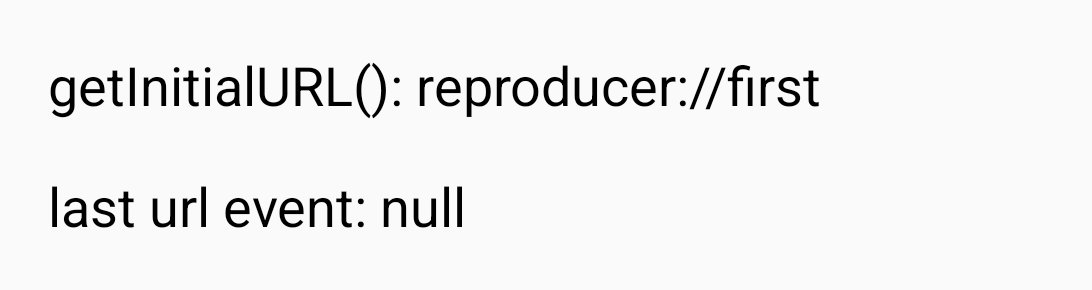 |
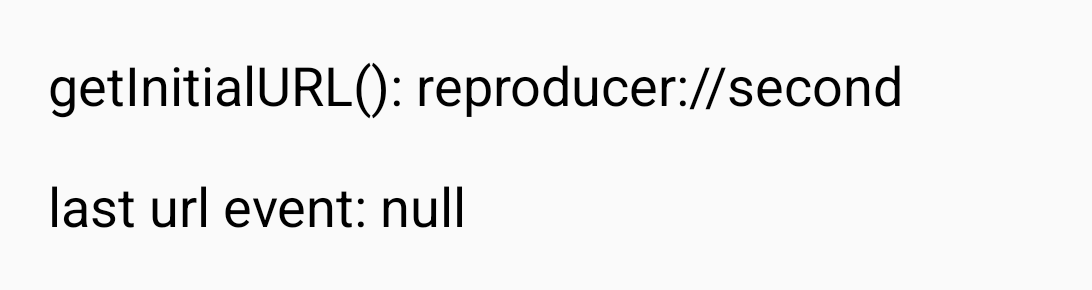 |
- 主要語言
- C++
- 星號
- 127k
- 分支
- 25.3k
- PR 合併指標
- 30 天內沒有已合併 PR
環境準備
- 沒有 Dockerfile 或 Docker Compose 檔案
- 有 Pull Request 範本
- 閱讀貢獻指南
從這裡開始
- 先讀完整個 Issue,再讀專案的貢獻指南。
- 在 Issue 下留言說明你要接手 —— 這能避免兩個人做同樣的事。
- Fork 儲存庫,在一個分支上完成修改。
- 送出 Pull Request,並在描述裡引用這個 Issue 編號。
react/react-native 的其他 Issue
-
Needs: Author Feedback Needs: Repro
難度 2/5 1-3 小時 新手友好度 76/100
react/react-native#58952 · 1 則留言 ·
維護者通常 1 天內回覆
-
Needs: Attention Needs: Repro
難度 2/5 1-3 小時 新手友好度 78/100
react/react-native#58904 · 2 則留言 ·
維護者通常 1 天內回覆
-
Needs: Author Feedback Needs: Repro
難度 2/5 1-3 小時 新手友好度 75/100
react/react-native#58659 · 2 則留言 ·
維護者通常 1 天內回覆
-
Needs: Author Feedback Needs: Repro
難度 1/5 1 小時以內 新手友好度 92/100
react/react-native#58621 · 1 則留言 ·
維護者通常 1 天內回覆
-
Add TypeScript declaration for the performance global可能已有人在做 @Cedric921 於 9 天前認領。 未關閉Needs: Attention Needs: Repro
難度 2/5 1-3 小時 新手友好度 85/100
react/react-native#58610 · 5 則留言 ·
維護者通常 1 天內回覆
查看 react/react-native 的全部 Issue
相似的 Issue
-
bug format I/O medium priority rt_lib
難度 2/5 1-3 小時 新手友好度 72/100
維護者通常 1 天內回覆
-
refactor
難度 2/5 1-3 小時 新手友好度 78/100
維護者通常 1 天內回覆
-
enhancement
難度 2/5 1-3 小時 新手友好度 75/100
raspberrypi/rpi-imager#1775 ·
維護者通常 1 天內回覆
-
bug
難度 2/5 1-3 小時 新手友好度 62/100
compiler-explorer/compiler-explorer#9272 ·
維護者通常 1 天內回覆
-
難度 2/5 1-3 小時 新手友好度 65/100