Linking.getInitialURL() returns the task's first link after a link relaunches a reclaimed Android app
メンテナーはふだん 1 日以内に返信
評価
- 難易度
- 2/5
- 見積もり時間
- 1〜3時間
- 初心者へのやさしさ
- 78/100
調査の方向性
まず ReactActivity.onNewIntent と IntentModule.getInitialURL() を読みます。issue では両方のエントリーポイントが示されており、MainActivity の修正を含む再現手順が記載されています。Android で再現手順を実行し、再起動されたアプリが getInitialURL() または url イベントを通じて reproducer://second を報告することを確認します。
索引モデルが issue の本文から書いたものです。
説明
Description
When Android ends a backgrounded app's process but keeps its task, a link to the app relaunches it into that task: Android recreates the activity from the task's first intent and passes the link to onNewIntent. The link never reaches JavaScript. Linking.getInitialURL() answers the task's first link, and no url event fires.
IntentModule.getInitialURL() reads currentActivity.intent, and getIntent() keeps returning the task's first intent until the activity calls setIntent() (Activity.onNewIntent). ReactActivity.onNewIntent hands the intent to its delegate without calling setIntent.
Calling setIntent(intent) first in ReactActivity.onNewIntent fixes it: with that line in the reproducer's MainActivity (its verify/set-intent branch), every round below answers reproducer://second. I'm happy to open a PR with it.
Steps to reproduce
- Build and install the reproducer's release APK:
cd ReproducerApp/android && ./gradlew assembleRelease && adb install -r app/build/outputs/apk/release/app-release.apk. - Open the first link:
adb shell am start -a android.intent.action.VIEW -d reproducer://first com.reproducerapp. The screen showsgetInitialURL(): reproducer://first. - Background the app and let Android end its process while the task stays in Recents:
adb shell input keyevent KEYCODE_HOME,adb shell am start -a android.settings.SETTINGS,adb shell input keyevent KEYCODE_HOME, thenadb shell am kill com.reproducerappuntiladb shell pidof com.reproducerappprints nothing. - Open the second link:
adb shell am start -a android.intent.action.VIEW -d reproducer://second com.reproducerapp.
Expected: getInitialURL(): reproducer://second, or a url event carrying it.
Actual: getInitialURL(): reproducer://first and last url event: null.
A cold start on the second link (adb shell am force-stop com.reproducerapp, then step 4) shows reproducer://second.
React Native Version
0.87.1
Affected Platforms
Runtime - Android
Output of npx @react-native-community/cli info
System:
  OS: Windows 11 10.0.26200
  CPU: "(32) x64 AMD Ryzen 9 9950X3D 16-Core Processor          "
  Memory: 170.35 GB / 255.67 GB
Binaries:
  Node:
    version: 26.5.0
    path: C:\Program Files\nodejs\node.EXE
  Yarn:
    version: 1.22.22
    path: C:\Users\<user>\AppData\Roaming\npm\yarn.CMD
  npm:
    version: 12.0.1
    path: C:\Program Files\nodejs\npm.CMD
  Watchman: Not Found
SDKs:
  Android SDK:
    API Levels:
      - "35"
      - "35"
      - "35"
      - "36"
      - "37"
    Build Tools:
      - 35.0.0
      - 36.0.0
      - 36.1.0
      - 37.0.0
    System Images:
      - android-36.1 | Google Play Intel x86_64 Atom
      - android-36.1 | Pre-Release 16 KB Page Size Google Play Intel x86_64 Atom
    Android NDK: Not Found
  Windows SDK: Not Found
IDEs:
  Android Studio: AI-252.27397.103.2522.14617522
  Visual Studio: Not Found
Languages:
  Java:
    version: 17.0.20.1
    path: C:\Program Files\Microsoft\jdk-17.0.20.101-hotspot\bin\javac.EXE
  Ruby: Not Found
npmPackages:
  "@react-native-community/cli":
    installed: 20.2.0
    wanted: 20.2.0
  react:
    installed: 19.2.3
    wanted: 19.2.3
  react-native:
    installed: 0.87.1
    wanted: 0.87.1
  react-native-windows: Not Found
npmGlobalPackages:
  "*react-native*": Not Found
Android:
  hermesEnabled: true
  newArchEnabled: true
iOS:
  hermesEnabled: Not found
  newArchEnabled: Not found
Stacktrace or Logs
Galaxy S23 (SM-S911B), Android 14 (API 34), release build, three rounds of steps 2–4:
round 1: cold [getInitialURL(): reproducer://first] · relaunched [getInitialURL(): reproducer://first] [last url event: null]
round 2: cold [getInitialURL(): reproducer://first] · relaunched [getInitialURL(): reproducer://first] [last url event: null]
round 3: cold [getInitialURL(): reproducer://first] · relaunched [getInitialURL(): reproducer://first] [last url event: null]
cold start on the second link: [getInitialURL(): reproducer://second]

With setIntent(intent) first in MainActivity.onNewIntent, same device and steps:
round 1: cold [getInitialURL(): reproducer://first] · relaunched [getInitialURL(): reproducer://second] [last url event: null]
round 2: cold [getInitialURL(): reproducer://first] · relaunched [getInitialURL(): reproducer://second] [last url event: null]
round 3: cold [getInitialURL(): reproducer://first] · relaunched [getInitialURL(): reproducer://second] [last url event: null]
MANDATORY Reproducer
https://github.com/YevheniiKotyrlo/rn-relaunch-link-repro
Screenshots and Videos
The screen after step 4, release build on an Android 16 (API 36) emulator:
| stock | with setIntent(intent) in MainActivity.onNewIntent |
|---|---|
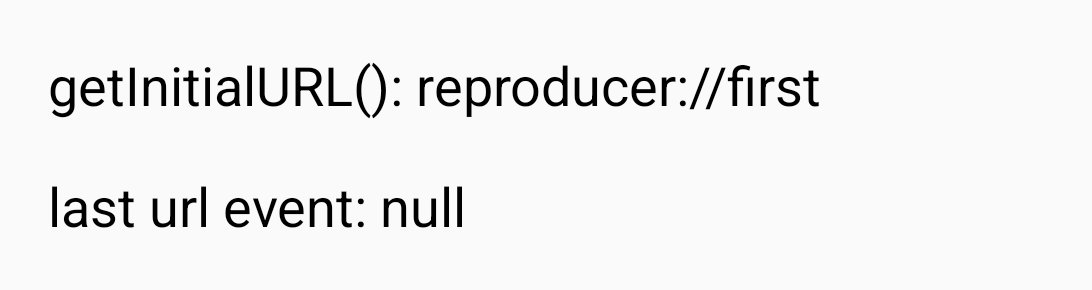 |
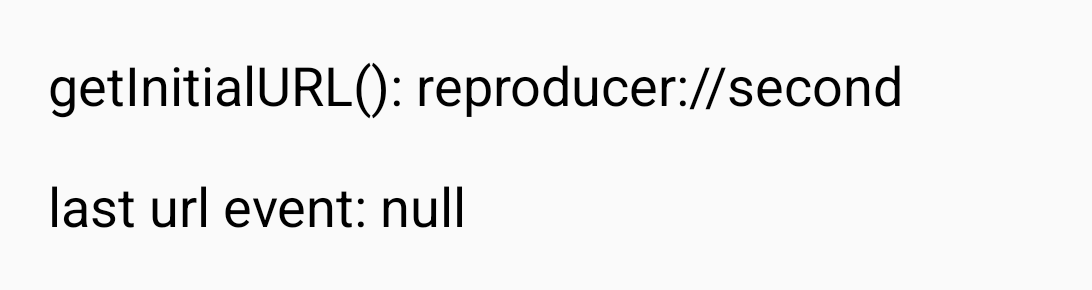 |
- 主要言語
- C++
- スター
- 127k
- フォーク
- 25.3k
- PR マージ指標
- 30日以内にマージされた PR はありません
環境構築
- Dockerfile・Docker Compose ファイルなし
- プルリクエストのテンプレートあり
- コントリビューションガイドを読む
はじめの一歩
- issue を最後まで読み、次にプロジェクトのコントリビューションガイドを読みます。
- 着手することを issue にコメントします — 二人が同じ作業をするのを防げます。
- リポジトリをフォークし、ブランチを切って変更します。
- issue 番号を参照したプルリクエストを送ります。
react/react-native のほかの issue
-
Fabric TextInput: prepareForRecycle leaves stale inputAccessoryViewButtonLabel (empty Done bar)オープンNeeds: Author Feedback Needs: Repro
難易度 2/5 1〜3時間 初心者へのやさしさ 76/100
react/react-native#58952 · コメント 1 件 ·
メンテナーはふだん 1 日以内に返信
-
Needs: Attention Needs: Repro
難易度 2/5 1〜3時間 初心者へのやさしさ 78/100
react/react-native#58904 · コメント 2 件 ·
メンテナーはふだん 1 日以内に返信
-
Needs: Author Feedback Needs: Repro
難易度 2/5 1〜3時間 初心者へのやさしさ 75/100
react/react-native#58659 · コメント 2 件 ·
メンテナーはふだん 1 日以内に返信
-
Needs: Author Feedback Needs: Repro
難易度 1/5 1時間未満 初心者へのやさしさ 92/100
react/react-native#58621 · コメント 1 件 ·
メンテナーはふだん 1 日以内に返信
-
Add TypeScript declaration for the performance global対応中かも @Cedric921 が 9 日前に担当しました。 オープンNeeds: Attention Needs: Repro
難易度 2/5 1〜3時間 初心者へのやさしさ 85/100
react/react-native#58610 · コメント 5 件 ·
メンテナーはふだん 1 日以内に返信
react/react-native の issue をすべて見る
似ている issue
-
難易度 2/5 1〜3時間 初心者へのやさしさ 62/100
メンテナーはふだん 4 日以内に返信
-
難易度 2/5 1〜3時間 初心者へのやさしさ 68/100
-
難易度 2/5 1〜3時間 初心者へのやさしさ 62/100
scanaislop/aislop#482 ·
メンテナーはふだん 1 日以内に返信
-
難易度 2/5 1〜3時間 初心者へのやさしさ 62/100
EchoTools/nevr-runtime#547 ·
メンテナーはふだん 1 日以内に返信
-
1 type: problem 2 scope: firmware 3 good first issue
難易度 2/5 1〜3時間 初心者へのやさしさ 65/100
SpaceTeam/STS1_COBC_SW#511 ·