Linking.getInitialURL() returns the task's first link after a link relaunches a reclaimed Android app
Los mantenedores suelen responder en 1 día
@YevheniiKotyrlo ya está trabajando en esto.
Desde el 14/10/2026.
- #59053 de @YevheniiKotyrlo — abierto
Evaluación
- Dificultad
- 2/5
- Tiempo estimado
- 1-3 horas
- Aptitud para principiantes
- 78/100
Línea de trabajo
Empieza leyendo ReactActivity.onNewIntent y IntentModule.getInitialURL(); el issue identifica ambos puntos de entrada e incluye un reproductor con una corrección para MainActivity. Sigue los pasos del reproductor en Android y confirma que la aplicación reiniciada informa de reproducer://second mediante getInitialURL() o un evento url.
Escrito por el modelo de indexación a partir del texto del issue.
Descripción
Description
When Android ends a backgrounded app's process but keeps its task, a link to the app relaunches it into that task: Android recreates the activity from the task's first intent and passes the link to onNewIntent. The link never reaches JavaScript. Linking.getInitialURL() answers the task's first link, and no url event fires.
IntentModule.getInitialURL() reads currentActivity.intent, and getIntent() keeps returning the task's first intent until the activity calls setIntent() (Activity.onNewIntent). ReactActivity.onNewIntent hands the intent to its delegate without calling setIntent.
Calling setIntent(intent) first in ReactActivity.onNewIntent fixes it: with that line in the reproducer's MainActivity (its verify/set-intent branch), every round below answers reproducer://second. I'm happy to open a PR with it.
Steps to reproduce
- Build and install the reproducer's release APK:
cd ReproducerApp/android && ./gradlew assembleRelease && adb install -r app/build/outputs/apk/release/app-release.apk. - Open the first link:
adb shell am start -a android.intent.action.VIEW -d reproducer://first com.reproducerapp. The screen showsgetInitialURL(): reproducer://first. - Background the app and let Android end its process while the task stays in Recents:
adb shell input keyevent KEYCODE_HOME,adb shell am start -a android.settings.SETTINGS,adb shell input keyevent KEYCODE_HOME, thenadb shell am kill com.reproducerappuntiladb shell pidof com.reproducerappprints nothing. - Open the second link:
adb shell am start -a android.intent.action.VIEW -d reproducer://second com.reproducerapp.
Expected: getInitialURL(): reproducer://second, or a url event carrying it.
Actual: getInitialURL(): reproducer://first and last url event: null.
A cold start on the second link (adb shell am force-stop com.reproducerapp, then step 4) shows reproducer://second.
React Native Version
0.87.1
Affected Platforms
Runtime - Android
Output of npx @react-native-community/cli info
System:
  OS: Windows 11 10.0.26200
  CPU: "(32) x64 AMD Ryzen 9 9950X3D 16-Core Processor          "
  Memory: 170.35 GB / 255.67 GB
Binaries:
  Node:
    version: 26.5.0
    path: C:\Program Files\nodejs\node.EXE
  Yarn:
    version: 1.22.22
    path: C:\Users\<user>\AppData\Roaming\npm\yarn.CMD
  npm:
    version: 12.0.1
    path: C:\Program Files\nodejs\npm.CMD
  Watchman: Not Found
SDKs:
  Android SDK:
    API Levels:
      - "35"
      - "35"
      - "35"
      - "36"
      - "37"
    Build Tools:
      - 35.0.0
      - 36.0.0
      - 36.1.0
      - 37.0.0
    System Images:
      - android-36.1 | Google Play Intel x86_64 Atom
      - android-36.1 | Pre-Release 16 KB Page Size Google Play Intel x86_64 Atom
    Android NDK: Not Found
  Windows SDK: Not Found
IDEs:
  Android Studio: AI-252.27397.103.2522.14617522
  Visual Studio: Not Found
Languages:
  Java:
    version: 17.0.20.1
    path: C:\Program Files\Microsoft\jdk-17.0.20.101-hotspot\bin\javac.EXE
  Ruby: Not Found
npmPackages:
  "@react-native-community/cli":
    installed: 20.2.0
    wanted: 20.2.0
  react:
    installed: 19.2.3
    wanted: 19.2.3
  react-native:
    installed: 0.87.1
    wanted: 0.87.1
  react-native-windows: Not Found
npmGlobalPackages:
  "*react-native*": Not Found
Android:
  hermesEnabled: true
  newArchEnabled: true
iOS:
  hermesEnabled: Not found
  newArchEnabled: Not found
Stacktrace or Logs
Galaxy S23 (SM-S911B), Android 14 (API 34), release build, three rounds of steps 2–4:
round 1: cold [getInitialURL(): reproducer://first] · relaunched [getInitialURL(): reproducer://first] [last url event: null]
round 2: cold [getInitialURL(): reproducer://first] · relaunched [getInitialURL(): reproducer://first] [last url event: null]
round 3: cold [getInitialURL(): reproducer://first] · relaunched [getInitialURL(): reproducer://first] [last url event: null]
cold start on the second link: [getInitialURL(): reproducer://second]

With setIntent(intent) first in MainActivity.onNewIntent, same device and steps:
round 1: cold [getInitialURL(): reproducer://first] · relaunched [getInitialURL(): reproducer://second] [last url event: null]
round 2: cold [getInitialURL(): reproducer://first] · relaunched [getInitialURL(): reproducer://second] [last url event: null]
round 3: cold [getInitialURL(): reproducer://first] · relaunched [getInitialURL(): reproducer://second] [last url event: null]
MANDATORY Reproducer
https://github.com/YevheniiKotyrlo/rn-relaunch-link-repro
Screenshots and Videos
The screen after step 4, release build on an Android 16 (API 36) emulator:
| stock | with setIntent(intent) in MainActivity.onNewIntent |
|---|---|
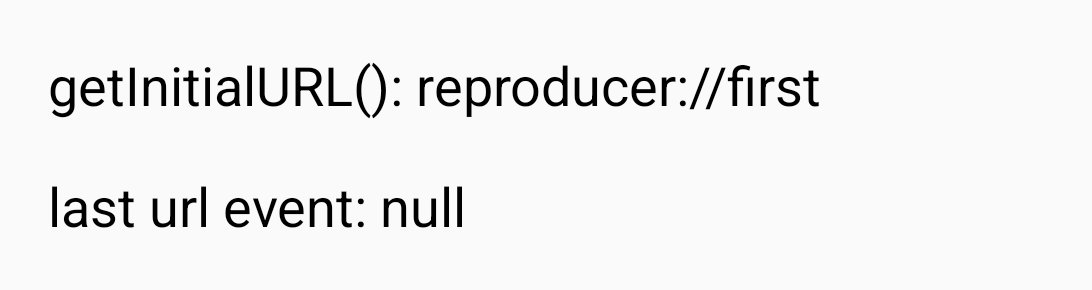 |
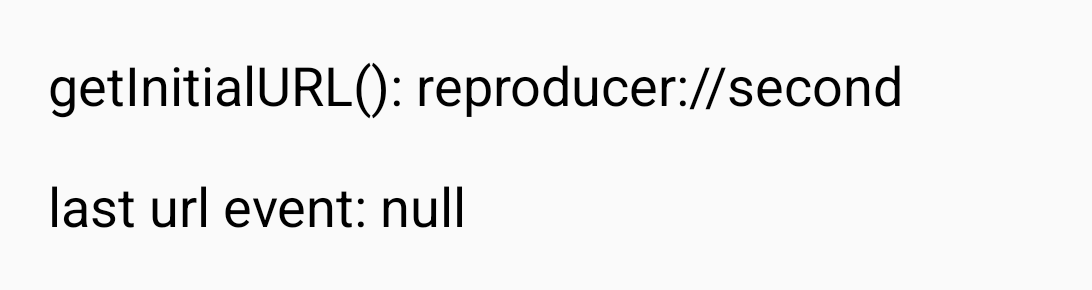 |
- Lenguaje dominante
- C++
- Estrellas
- 127k
- Forks
- 25.3k
- Métricas de merge de PR
- Sin PR fusionados en 30 d
Preparar el entorno
- Sin Dockerfile ni archivo de Docker Compose
- Tiene una plantilla de pull request
- Leer la guía de contribución
Primeros pasos
- Lee el issue completo y luego la guía de contribución del proyecto.
- Comenta en el issue que vas a ocuparte — evita que dos personas hagan lo mismo.
- Haz un fork del repositorio y trabaja en una rama.
- Abre un pull request que haga referencia al número del issue.
Más de react/react-native
-
Fabric TextInput: prepareForRecycle leaves stale inputAccessoryViewButtonLabel (empty Done bar)AbiertoNeeds: Author Feedback Needs: Repro
Dificultad 2/5 1-3 horas Aptitud para principiantes 76/100
react/react-native#58952 · 1 comentario ·
Los mantenedores suelen responder en 1 día
-
Needs: Attention Needs: Repro
Dificultad 2/5 1-3 horas Aptitud para principiantes 78/100
react/react-native#58904 · 2 comentarios ·
Los mantenedores suelen responder en 1 día
-
Needs: Author Feedback Needs: Repro
Dificultad 2/5 1-3 horas Aptitud para principiantes 75/100
react/react-native#58659 · 2 comentarios ·
Los mantenedores suelen responder en 1 día
-
Needs: Author Feedback Needs: Repro
Dificultad 1/5 Menos de una hora Aptitud para principiantes 92/100
react/react-native#58621 · 1 comentario ·
Los mantenedores suelen responder en 1 día
-
Add TypeScript declaration for the performance globalPosiblemente ocupada @Cedric921 la tomó hace 10 días. AbiertoNeeds: Attention Needs: Repro
Dificultad 2/5 1-3 horas Aptitud para principiantes 85/100
react/react-native#58610 · 5 comentarios ·
Los mantenedores suelen responder en 1 día
Todos los issues de react/react-native
Issues similares
-
ai_p1 comp-message-queues
Dificultad 2/5 1-3 horas Aptitud para principiantes 72/100
ClickHouse/ClickHouse#125890 ·
Los mantenedores suelen responder en 1 día
-
bug
Dificultad 2/5 1-3 horas Aptitud para principiantes 74/100
Los mantenedores suelen responder en 1 día
-
bug
Dificultad 1/5 Menos de una hora Aptitud para principiantes 78/100
yt-project/ewah_bool_utils#215 · 1 comentario ·
-
Dificultad 2/5 1-3 horas Aptitud para principiantes 72/100
redis/memtier_benchmark#642 ·
Los mantenedores suelen responder en 1 día
-
Feature Request
Dificultad 2/5 1-3 horas Aptitud para principiantes 70/100
sandboxie-plus/Sandboxie#5653 ·
Los mantenedores suelen responder en 1 día