Linking.getInitialURL() returns the task's first link after a link relaunches a reclaimed Android app
Les mainteneurs répondent en général sous 1 jour
Évaluation
- Difficulté
- 2/5
- Temps estimé
- 1-3 heures
- Accessibilité débutants
- 78/100
Piste de recherche
Commencez par lire ReactActivity.onNewIntent et IntentModule.getInitialURL() ; l’issue identifie les deux points d’entrée et inclut un reproducteur avec une correction pour MainActivity. Suivez les étapes du reproducteur sur Android et confirmez que l’application relancée signale reproducer://second via getInitialURL() ou un événement url.
Rédigé par le modèle d'indexation à partir du texte de l'issue.
Description
Description
When Android ends a backgrounded app's process but keeps its task, a link to the app relaunches it into that task: Android recreates the activity from the task's first intent and passes the link to onNewIntent. The link never reaches JavaScript. Linking.getInitialURL() answers the task's first link, and no url event fires.
IntentModule.getInitialURL() reads currentActivity.intent, and getIntent() keeps returning the task's first intent until the activity calls setIntent() (Activity.onNewIntent). ReactActivity.onNewIntent hands the intent to its delegate without calling setIntent.
Calling setIntent(intent) first in ReactActivity.onNewIntent fixes it: with that line in the reproducer's MainActivity (its verify/set-intent branch), every round below answers reproducer://second. I'm happy to open a PR with it.
Steps to reproduce
- Build and install the reproducer's release APK:
cd ReproducerApp/android && ./gradlew assembleRelease && adb install -r app/build/outputs/apk/release/app-release.apk. - Open the first link:
adb shell am start -a android.intent.action.VIEW -d reproducer://first com.reproducerapp. The screen showsgetInitialURL(): reproducer://first. - Background the app and let Android end its process while the task stays in Recents:
adb shell input keyevent KEYCODE_HOME,adb shell am start -a android.settings.SETTINGS,adb shell input keyevent KEYCODE_HOME, thenadb shell am kill com.reproducerappuntiladb shell pidof com.reproducerappprints nothing. - Open the second link:
adb shell am start -a android.intent.action.VIEW -d reproducer://second com.reproducerapp.
Expected: getInitialURL(): reproducer://second, or a url event carrying it.
Actual: getInitialURL(): reproducer://first and last url event: null.
A cold start on the second link (adb shell am force-stop com.reproducerapp, then step 4) shows reproducer://second.
React Native Version
0.87.1
Affected Platforms
Runtime - Android
Output of npx @react-native-community/cli info
System:
  OS: Windows 11 10.0.26200
  CPU: "(32) x64 AMD Ryzen 9 9950X3D 16-Core Processor          "
  Memory: 170.35 GB / 255.67 GB
Binaries:
  Node:
    version: 26.5.0
    path: C:\Program Files\nodejs\node.EXE
  Yarn:
    version: 1.22.22
    path: C:\Users\<user>\AppData\Roaming\npm\yarn.CMD
  npm:
    version: 12.0.1
    path: C:\Program Files\nodejs\npm.CMD
  Watchman: Not Found
SDKs:
  Android SDK:
    API Levels:
      - "35"
      - "35"
      - "35"
      - "36"
      - "37"
    Build Tools:
      - 35.0.0
      - 36.0.0
      - 36.1.0
      - 37.0.0
    System Images:
      - android-36.1 | Google Play Intel x86_64 Atom
      - android-36.1 | Pre-Release 16 KB Page Size Google Play Intel x86_64 Atom
    Android NDK: Not Found
  Windows SDK: Not Found
IDEs:
  Android Studio: AI-252.27397.103.2522.14617522
  Visual Studio: Not Found
Languages:
  Java:
    version: 17.0.20.1
    path: C:\Program Files\Microsoft\jdk-17.0.20.101-hotspot\bin\javac.EXE
  Ruby: Not Found
npmPackages:
  "@react-native-community/cli":
    installed: 20.2.0
    wanted: 20.2.0
  react:
    installed: 19.2.3
    wanted: 19.2.3
  react-native:
    installed: 0.87.1
    wanted: 0.87.1
  react-native-windows: Not Found
npmGlobalPackages:
  "*react-native*": Not Found
Android:
  hermesEnabled: true
  newArchEnabled: true
iOS:
  hermesEnabled: Not found
  newArchEnabled: Not found
Stacktrace or Logs
Galaxy S23 (SM-S911B), Android 14 (API 34), release build, three rounds of steps 2–4:
round 1: cold [getInitialURL(): reproducer://first] · relaunched [getInitialURL(): reproducer://first] [last url event: null]
round 2: cold [getInitialURL(): reproducer://first] · relaunched [getInitialURL(): reproducer://first] [last url event: null]
round 3: cold [getInitialURL(): reproducer://first] · relaunched [getInitialURL(): reproducer://first] [last url event: null]
cold start on the second link: [getInitialURL(): reproducer://second]

With setIntent(intent) first in MainActivity.onNewIntent, same device and steps:
round 1: cold [getInitialURL(): reproducer://first] · relaunched [getInitialURL(): reproducer://second] [last url event: null]
round 2: cold [getInitialURL(): reproducer://first] · relaunched [getInitialURL(): reproducer://second] [last url event: null]
round 3: cold [getInitialURL(): reproducer://first] · relaunched [getInitialURL(): reproducer://second] [last url event: null]
MANDATORY Reproducer
https://github.com/YevheniiKotyrlo/rn-relaunch-link-repro
Screenshots and Videos
The screen after step 4, release build on an Android 16 (API 36) emulator:
| stock | with setIntent(intent) in MainActivity.onNewIntent |
|---|---|
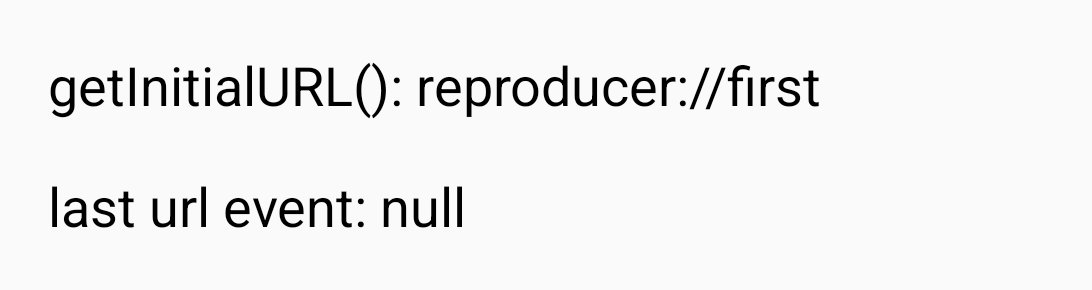 |
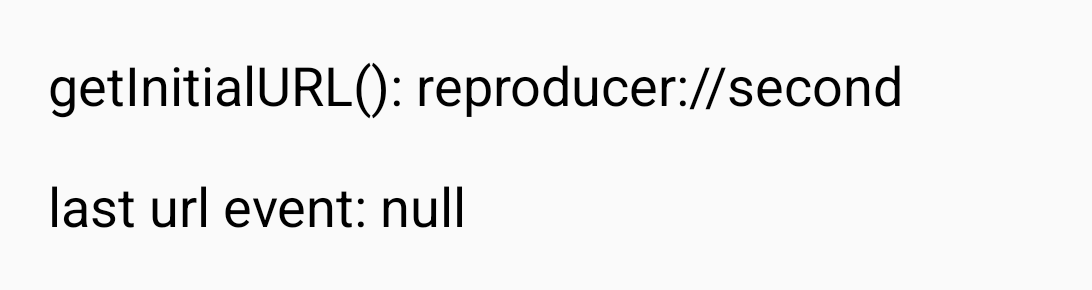 |
- Langage dominant
- C++
- Étoiles
- 127k
- Forks
- 25.3k
- Métriques de merge des PR
- Aucune PR mergée en 30 j
Préparer son environnement
- Aucun Dockerfile ni fichier Docker Compose
- Propose un modèle de pull request
- Lire le guide de contribution
Par où commencer
- Lisez l'issue en entier, puis le guide de contribution du projet.
- Signalez en commentaire que vous la prenez — cela évite que deux personnes fassent le même travail.
- Forkez le dépôt et travaillez sur une branche.
- Ouvrez une pull request qui référence le numéro de l'issue.
Autres issues de react/react-native
-
Fabric TextInput: prepareForRecycle leaves stale inputAccessoryViewButtonLabel (empty Done bar)Peut-être pris Une pull request liée à cette issue est ouverte ou déjà fusionnée. OuverteNeeds: Author Feedback Needs: Repro
Difficulté 2/5 1-3 heures Accessibilité débutants 76/100
react/react-native#58952 · 1 commentaire ·
Les mainteneurs répondent en général sous 1 jour
-
Needs: Attention Needs: Repro
Difficulté 2/5 1-3 heures Accessibilité débutants 78/100
react/react-native#58904 · 2 commentaires ·
Les mainteneurs répondent en général sous 1 jour
-
Needs: Author Feedback Needs: Repro
Difficulté 2/5 1-3 heures Accessibilité débutants 75/100
react/react-native#58659 · 2 commentaires ·
Les mainteneurs répondent en général sous 1 jour
-
Needs: Author Feedback Needs: Repro
Difficulté 1/5 Moins d'une heure Accessibilité débutants 92/100
react/react-native#58621 · 1 commentaire ·
Les mainteneurs répondent en général sous 1 jour
-
Add TypeScript declaration for the performance globalPeut-être pris @Cedric921 l’a pris il y a 10 jours. OuverteNeeds: Attention Needs: Repro
Difficulté 2/5 1-3 heures Accessibilité débutants 85/100
react/react-native#58610 · 5 commentaires ·
Les mainteneurs répondent en général sous 1 jour
Toutes les issues de react/react-native
Issues similaires
-
agent:WSL bug linux LOW
Difficulté 2/5 1-3 heures Accessibilité débutants 70/100
Les mainteneurs répondent en général sous 1 jour
-
Build failure: limoOuverte0.kind: build failure
Difficulté 2/5 1-3 heures Accessibilité débutants 72/100
Les mainteneurs répondent en général sous 1 jour
-
tech-debt
Difficulté 2/5 1-3 heures Accessibilité débutants 72/100
prestonbrown/helixscreen#1797 ·
Les mainteneurs répondent en général sous 2 jours
-
Difficulté 2/5 Moins d'une heure Accessibilité débutants 72/100
finalburnneo/FBNeo#2803 · 1 commentaire ·
Les mainteneurs répondent en général sous 1 jour
-
Difficulté 2/5 1-3 heures Accessibilité débutants 75/100
Les mainteneurs répondent en général sous 1 jour