[iOS][Fabric] TextInput drops a keystroke right after the first character typed into an empty field (_textOf:equals: compares attributes of a focused field)
維護者通常 1 天內回覆
還沒有人認領這個 Issue。
評估
- 難度
- 2/5
- 預估耗時
- 1-3 小時
- 新手友好度
- 78/100
- Issue 類型
- 缺陷
- 描述清晰度
- 描述清楚
- 活躍度
- 活躍
- 技術堆疊
- ios, objective-c, react-native
- 領域
- mobile
研究方向
閱讀 RCTTextInputComponentView.mm,特別是 _textOf:equals: 以及現有的聽寫、標記文字和安全輸入檢查。使用連結的重現程式重現快速輸入情境,然後比較建議的 first responder 相等性檢查加入前後的行為。完成標準是:焦點欄位中的相同字元不再觸發導致按鍵遺失的更新,且重現程式確認問題已修正。
由索引模型根據 Issue 內容生成。
描述
Description
On iOS with the New Architecture (Fabric), typing quickly into an empty TextInput sometimes loses the second key. For example, typing «28» into an empty numeric field leaves «2». It happens only for the first character typed into an empty field, and only in a fast burst. Fields that already contain text are not affected.
We traced it as follows:
- The first character typed into an empty field reaches the native view with UIKit's typing attributes.
- The state round trip brings the same character back as an attributed string with React Native's full attribute set.
-[RCTTextInputComponentView _textOf:equals:]compares the two strings including their attributes. It answers NO, although the characters are identical.- React Native then calls
setAttributedText:on the field while it is the first responder. That resets UIKit's keyboard / input pipeline, and the key in flight at that moment is dropped.
_textOf:equals: already has exceptions for dictation, Korean input, marked text and secure entry. One more exception fixes it in our app: while the backed text input view is the first responder, two strings with equal characters are treated as equal.
Suggested fix, in RCTTextInputComponentView.mm, _textOf:equals:: when _backedTextInputView is the first responder, compare only newText.string with oldText.string, next to the existing dictation / marked text / secure entry checks. Then a state round trip of the same characters never calls setAttributedText: on a focused field.
Workaround: we swizzle _textOf:equals: with that exception in a small native module, and will remove it once a release includes a fix.
Steps to reproduce
- Render an uncontrolled
TextInput(defaultValueonly,keyboardType="number-pad"). Leave it empty, and give it a style that setsfontSize,lineHeightandcolor. - Focus it and type two digits quickly as one burst, for example «2» then «8» within about 100 ms.
- Repeat, emptying the field between runs.
Expected: «28». Actual: «2» in some of the bursts.
Our measurements (iOS 27 simulator, Release build):
- without the exception, 5 of 13 two- and three-digit bursts lost a key;
- with the exception, 0 of 12 did.
React Native Version
0.86.3
Affected Platforms
Runtime - iOS
Areas
Fabric - The New Renderer
Output of npx @react-native-community/cli info
System:
  OS: macOS 27
  CPU: Apple Silicon
Binaries:
  Node: 25.9.0
  Bun: 1.3.11
IDEs:
  Xcode: 27.0 (27A266a)
npmPackages:
  react: 19.2
  react-native: 0.86.3
  expo: 57
iOS:
  hermesEnabled: true
  newArchEnabled: true
Stacktrace or Logs
No crash or log: a key is silently lost. In the debugger, `-[RCTTextInputComponentView _textOf:equals:]` returns NO for an
equal one-character string (UIKit typing attributes vs React Native's attribute set), and `setAttributedText:` runs on the
first responder right before the lost key.
MANDATORY Reproducer
https://github.com/vdzerkalo/rn-58904-textinput-lost-key
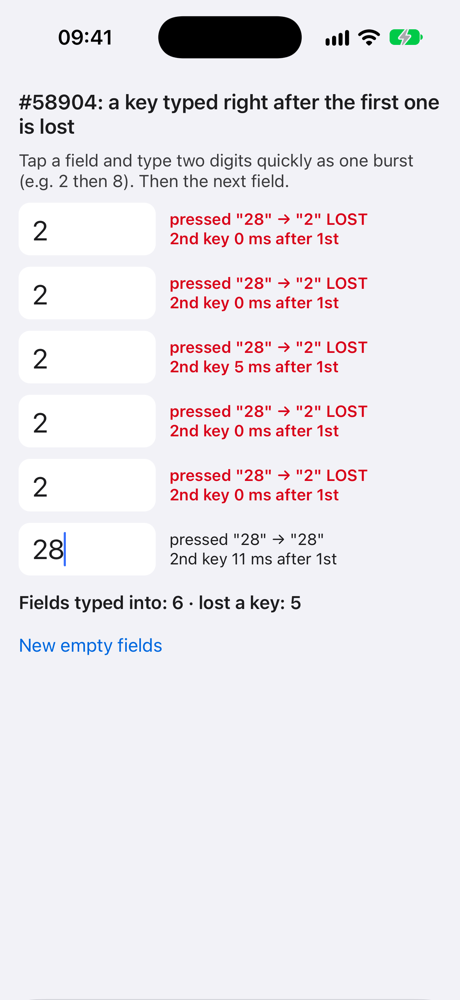
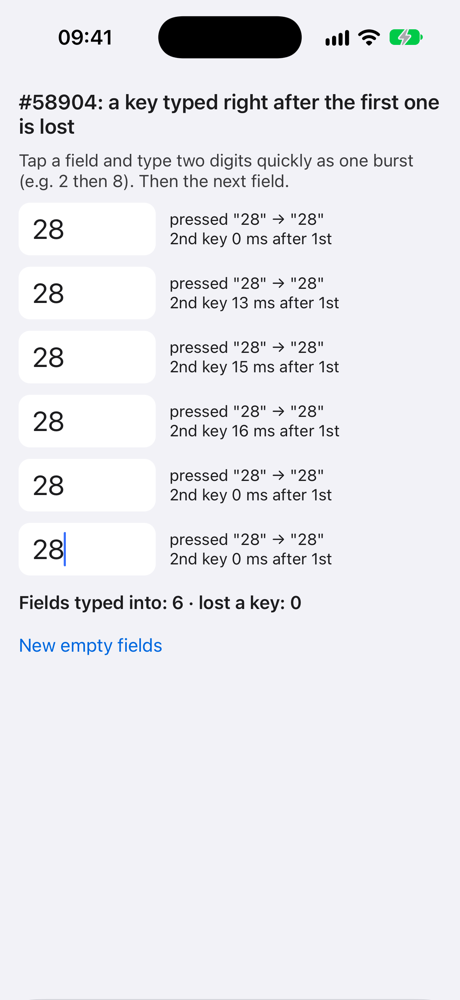
Made from the reproducer template: react-native 0.87.1 (latest), New Architecture, no extra dependencies. Six empty, uncontrolled fields; each row compares the keys onKeyPress reported with the characters that landed in the field. iOS 27 simulator, Release: 9 of 18 bursts of «28» lost the second key; with the suggested change applied at runtime (-ApplySuggestedFix YES, off by default), 0 of 18.
Screenshots and Videos
One Release round each from the reproducer (iOS 27 simulator, a fresh launch, six bursts of «28»). Left: React Native 0.87.1 as is, 5 of 6 bursts lost the second key. Right: with the suggested change (-ApplySuggestedFix YES), 0 of 6.
| As is | With the suggested change |
|---|---|
 |
 |
- 主要語言
- C++
- 星號
- 127k
- 分支
- 25.3k
- PR 合併指標
- 30 天內沒有已合併 PR
環境準備
- 沒有 Dockerfile 或 Docker Compose 檔案
- 有 Pull Request 範本
- 閱讀貢獻指南
從這裡開始
- 先讀完整個 Issue,再讀專案的貢獻指南。
- 在 Issue 下留言說明你要接手 —— 這能避免兩個人做同樣的事。
- Fork 儲存庫,在一個分支上完成修改。
- 送出 Pull Request,並在描述裡引用這個 Issue 編號。
react/react-native 的其他 Issue
-
Needs: Author Feedback Needs: Repro
難度 2/5 1-3 小時 新手友好度 75/100
react/react-native#58659 · 2 則留言 ·
維護者通常 1 天內回覆
-
Needs: Author Feedback Needs: Repro
難度 1/5 1 小時以內 新手友好度 92/100
react/react-native#58621 · 1 則留言 ·
維護者通常 1 天內回覆
-
Add TypeScript declaration for the performance global可能已有人在做 @Cedric921 於 4 天前認領。 未關閉Needs: Attention Needs: Repro
難度 2/5 1-3 小時 新手友好度 85/100
react/react-native#58610 · 4 則留言 ·
維護者通常 1 天內回覆
-
Needs: Triage :mag:
難度 2/5 1-3 小時 新手友好度 82/100
react/react-native#58565 · 2 則留言 · 2 個 reaction ·
維護者通常 1 天內回覆
-
[Android][Fabric] addViewAt hard-crashes on a placeholder ViewState synthesised by updateEventEmitter可能已有人在做 @wneel 於 23 天前認領。 未關閉Needs: Attention Needs: Repro
難度 2/5 1-3 小時 新手友好度 85/100
react/react-native#58526 · 2 則留言 ·
維護者通常 1 天內回覆
查看 react/react-native 的全部 Issue
相似的 Issue
-
難度 1/5 1 小時以內 新手友好度 78/100
維護者通常 1 天內回覆
-
難度 2/5 1-3 小時 新手友好度 74/100
EsotericSoftware/spine-runtimes#3186 ·
-
難度 2/5 1-3 小時 新手友好度 68/100
維護者通常 1 天內回覆
-
Round video messages start gray and blocky with libx264: encoder is configured for 1,000,000 fps未關閉
難度 2/5 1-3 小時 新手友好度 78/100
telegramdesktop/tdesktop#31422 ·
維護者通常 9 天內回覆
-
難度 2/5 1-3 小時 新手友好度 74/100
維護者通常 5 天內回覆