Linking.getInitialURL() returns the task's first link after a link relaunches a reclaimed Android app
Maintainer antworten meist innerhalb von 1 Tag
Bewertung
- Schwierigkeit
- 2/5
- Geschätzter Aufwand
- 1-3 Stunden
- Anfängerfreundlichkeit
- 78/100
Rechercherichtung
Lies zunächst ReactActivity.onNewIntent und IntentModule.getInitialURL(); das Issue nennt beide Einstiegspunkte und enthält einen Reproducer mit einer Korrektur für MainActivity. Führe die Schritte des Reproducers auf Android aus und bestätige, dass die neu gestartete App reproducer://second über getInitialURL() oder ein url-Ereignis meldet.
Vom Indexierungsmodell aus dem Issue-Text verfasst.
Beschreibung
Description
When Android ends a backgrounded app's process but keeps its task, a link to the app relaunches it into that task: Android recreates the activity from the task's first intent and passes the link to onNewIntent. The link never reaches JavaScript. Linking.getInitialURL() answers the task's first link, and no url event fires.
IntentModule.getInitialURL() reads currentActivity.intent, and getIntent() keeps returning the task's first intent until the activity calls setIntent() (Activity.onNewIntent). ReactActivity.onNewIntent hands the intent to its delegate without calling setIntent.
Calling setIntent(intent) first in ReactActivity.onNewIntent fixes it: with that line in the reproducer's MainActivity (its verify/set-intent branch), every round below answers reproducer://second. I'm happy to open a PR with it.
Steps to reproduce
- Build and install the reproducer's release APK:
cd ReproducerApp/android && ./gradlew assembleRelease && adb install -r app/build/outputs/apk/release/app-release.apk. - Open the first link:
adb shell am start -a android.intent.action.VIEW -d reproducer://first com.reproducerapp. The screen showsgetInitialURL(): reproducer://first. - Background the app and let Android end its process while the task stays in Recents:
adb shell input keyevent KEYCODE_HOME,adb shell am start -a android.settings.SETTINGS,adb shell input keyevent KEYCODE_HOME, thenadb shell am kill com.reproducerappuntiladb shell pidof com.reproducerappprints nothing. - Open the second link:
adb shell am start -a android.intent.action.VIEW -d reproducer://second com.reproducerapp.
Expected: getInitialURL(): reproducer://second, or a url event carrying it.
Actual: getInitialURL(): reproducer://first and last url event: null.
A cold start on the second link (adb shell am force-stop com.reproducerapp, then step 4) shows reproducer://second.
React Native Version
0.87.1
Affected Platforms
Runtime - Android
Output of npx @react-native-community/cli info
System:
  OS: Windows 11 10.0.26200
  CPU: "(32) x64 AMD Ryzen 9 9950X3D 16-Core Processor          "
  Memory: 170.35 GB / 255.67 GB
Binaries:
  Node:
    version: 26.5.0
    path: C:\Program Files\nodejs\node.EXE
  Yarn:
    version: 1.22.22
    path: C:\Users\<user>\AppData\Roaming\npm\yarn.CMD
  npm:
    version: 12.0.1
    path: C:\Program Files\nodejs\npm.CMD
  Watchman: Not Found
SDKs:
  Android SDK:
    API Levels:
      - "35"
      - "35"
      - "35"
      - "36"
      - "37"
    Build Tools:
      - 35.0.0
      - 36.0.0
      - 36.1.0
      - 37.0.0
    System Images:
      - android-36.1 | Google Play Intel x86_64 Atom
      - android-36.1 | Pre-Release 16 KB Page Size Google Play Intel x86_64 Atom
    Android NDK: Not Found
  Windows SDK: Not Found
IDEs:
  Android Studio: AI-252.27397.103.2522.14617522
  Visual Studio: Not Found
Languages:
  Java:
    version: 17.0.20.1
    path: C:\Program Files\Microsoft\jdk-17.0.20.101-hotspot\bin\javac.EXE
  Ruby: Not Found
npmPackages:
  "@react-native-community/cli":
    installed: 20.2.0
    wanted: 20.2.0
  react:
    installed: 19.2.3
    wanted: 19.2.3
  react-native:
    installed: 0.87.1
    wanted: 0.87.1
  react-native-windows: Not Found
npmGlobalPackages:
  "*react-native*": Not Found
Android:
  hermesEnabled: true
  newArchEnabled: true
iOS:
  hermesEnabled: Not found
  newArchEnabled: Not found
Stacktrace or Logs
Galaxy S23 (SM-S911B), Android 14 (API 34), release build, three rounds of steps 2–4:
round 1: cold [getInitialURL(): reproducer://first] · relaunched [getInitialURL(): reproducer://first] [last url event: null]
round 2: cold [getInitialURL(): reproducer://first] · relaunched [getInitialURL(): reproducer://first] [last url event: null]
round 3: cold [getInitialURL(): reproducer://first] · relaunched [getInitialURL(): reproducer://first] [last url event: null]
cold start on the second link: [getInitialURL(): reproducer://second]

With setIntent(intent) first in MainActivity.onNewIntent, same device and steps:
round 1: cold [getInitialURL(): reproducer://first] · relaunched [getInitialURL(): reproducer://second] [last url event: null]
round 2: cold [getInitialURL(): reproducer://first] · relaunched [getInitialURL(): reproducer://second] [last url event: null]
round 3: cold [getInitialURL(): reproducer://first] · relaunched [getInitialURL(): reproducer://second] [last url event: null]
MANDATORY Reproducer
https://github.com/YevheniiKotyrlo/rn-relaunch-link-repro
Screenshots and Videos
The screen after step 4, release build on an Android 16 (API 36) emulator:
| stock | with setIntent(intent) in MainActivity.onNewIntent |
|---|---|
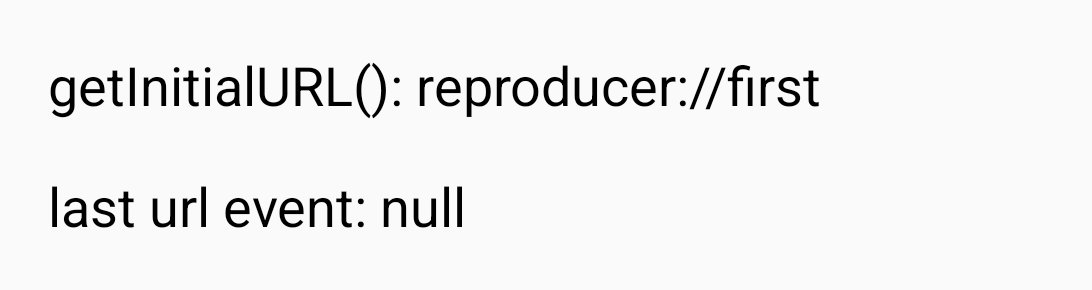 |
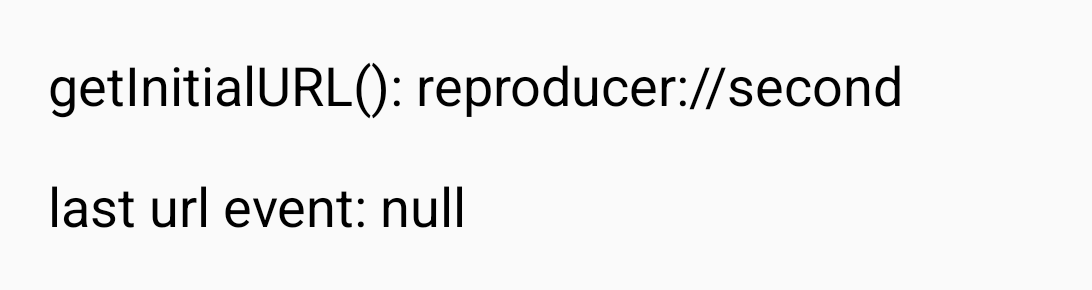 |
- Vorherrschende Sprache
- C++
- Sterne
- 127k
- Forks
- 25.3k
- PR-Merge-Kennzahlen
- Keine gemergten PRs in 30 T.
Entwicklungsumgebung
- Kein Dockerfile und keine Docker-Compose-Datei
- Hat eine Pull-Request-Vorlage
- Beitragsleitfaden lesen
Erste Schritte
- Lesen Sie das ganze Issue und danach den Beitragsleitfaden des Projekts.
- Schreiben Sie ins Issue, dass Sie es übernehmen — das erspart doppelte Arbeit.
- Forken Sie das Repository und arbeiten Sie in einem Branch.
- Öffnen Sie einen Pull Request, der die Issue-Nummer nennt.
Mehr aus react/react-native
-
Fabric TextInput: prepareForRecycle leaves stale inputAccessoryViewButtonLabel (empty Done bar)Evtl. vergeben Ein verknüpfter Pull Request ist offen oder bereits gemergt. OffenNeeds: Author Feedback Needs: Repro
Schwierigkeit 2/5 1-3 Stunden Anfängerfreundlichkeit 76/100
react/react-native#58952 · 1 Kommentar ·
Maintainer antworten meist innerhalb von 1 Tag
-
Needs: Attention Needs: Repro
Schwierigkeit 2/5 1-3 Stunden Anfängerfreundlichkeit 78/100
react/react-native#58904 · 2 Kommentare ·
Maintainer antworten meist innerhalb von 1 Tag
-
Needs: Author Feedback Needs: Repro
Schwierigkeit 2/5 1-3 Stunden Anfängerfreundlichkeit 75/100
react/react-native#58659 · 2 Kommentare ·
Maintainer antworten meist innerhalb von 1 Tag
-
Needs: Author Feedback Needs: Repro
Schwierigkeit 1/5 Unter einer Stunde Anfängerfreundlichkeit 92/100
react/react-native#58621 · 1 Kommentar ·
Maintainer antworten meist innerhalb von 1 Tag
-
Add TypeScript declaration for the performance globalEvtl. vergeben @Cedric921 hat das vor 11 Tagen übernommen. OffenNeeds: Attention Needs: Repro
Schwierigkeit 2/5 1-3 Stunden Anfängerfreundlichkeit 85/100
react/react-native#58610 · 5 Kommentare ·
Maintainer antworten meist innerhalb von 1 Tag
Alle Issues in react/react-native
Ähnliche Issues
-
Schwierigkeit 2/5 1-3 Stunden Anfängerfreundlichkeit 70/100
FriendsofECCE/ECCE#336 · 1 Kommentar ·
-
Schwierigkeit 2/5 1-3 Stunden Anfängerfreundlichkeit 66/100
bitcoin-core/gui-qml#1030 ·
Maintainer antworten meist innerhalb von 3 Tagen
-
Schwierigkeit 2/5 1-3 Stunden Anfängerfreundlichkeit 82/100
Maintainer antworten meist innerhalb von 1 Tag
-
Schwierigkeit 2/5 1-3 Stunden Anfängerfreundlichkeit 85/100
tesseract-robotics/tesseract#1384 ·
-
Schwierigkeit 2/5 1-3 Stunden Anfängerfreundlichkeit 62/100
NVIDIA/nccl-extensions#26 ·