[iOS][Fabric] TextInput drops a keystroke right after the first character typed into an empty field (_textOf:equals: compares attributes of a focused field)
Les mainteneurs répondent en général sous 1 jour
Personne n'a encore pris cette issue.
Évaluation
- Difficulté
- 2/5
- Temps estimé
- 1-3 heures
- Accessibilité débutants
- 78/100
- Type d'issue
- Bug
- Clarté
- Clairement spécifiée
- Activité
- Active
- Stack technique
- ios, objective-c, react-native
- Domaine
- mobile
Piste de recherche
Lisez RCTTextInputComponentView.mm, en particulier _textOf:equals: et les vérifications existantes concernant la dictée, le texte marqué et la saisie sécurisée. Reproduisez le cas de saisie rapide à l’aide du reproducteur lié, puis comparez son comportement avant et après la vérification d’égalité proposée pour le first responder. Le travail est terminé lorsque les mêmes caractères dans un champ actif ne déclenchent plus la mise à jour qui fait perdre une frappe, et que le reproducteur confirme que le problème est résolu.
Rédigé par le modèle d'indexation à partir du texte de l'issue.
Description
Description
On iOS with the New Architecture (Fabric), typing quickly into an empty TextInput sometimes loses the second key. For example, typing «28» into an empty numeric field leaves «2». It happens only for the first character typed into an empty field, and only in a fast burst. Fields that already contain text are not affected.
We traced it as follows:
- The first character typed into an empty field reaches the native view with UIKit's typing attributes.
- The state round trip brings the same character back as an attributed string with React Native's full attribute set.
-[RCTTextInputComponentView _textOf:equals:]compares the two strings including their attributes. It answers NO, although the characters are identical.- React Native then calls
setAttributedText:on the field while it is the first responder. That resets UIKit's keyboard / input pipeline, and the key in flight at that moment is dropped.
_textOf:equals: already has exceptions for dictation, Korean input, marked text and secure entry. One more exception fixes it in our app: while the backed text input view is the first responder, two strings with equal characters are treated as equal.
Suggested fix, in RCTTextInputComponentView.mm, _textOf:equals:: when _backedTextInputView is the first responder, compare only newText.string with oldText.string, next to the existing dictation / marked text / secure entry checks. Then a state round trip of the same characters never calls setAttributedText: on a focused field.
Workaround: we swizzle _textOf:equals: with that exception in a small native module, and will remove it once a release includes a fix.
Steps to reproduce
- Render an uncontrolled
TextInput(defaultValueonly,keyboardType="number-pad"). Leave it empty, and give it a style that setsfontSize,lineHeightandcolor. - Focus it and type two digits quickly as one burst, for example «2» then «8» within about 100 ms.
- Repeat, emptying the field between runs.
Expected: «28». Actual: «2» in some of the bursts.
Our measurements (iOS 27 simulator, Release build):
- without the exception, 5 of 13 two- and three-digit bursts lost a key;
- with the exception, 0 of 12 did.
React Native Version
0.86.3
Affected Platforms
Runtime - iOS
Areas
Fabric - The New Renderer
Output of npx @react-native-community/cli info
System:
  OS: macOS 27
  CPU: Apple Silicon
Binaries:
  Node: 25.9.0
  Bun: 1.3.11
IDEs:
  Xcode: 27.0 (27A266a)
npmPackages:
  react: 19.2
  react-native: 0.86.3
  expo: 57
iOS:
  hermesEnabled: true
  newArchEnabled: true
Stacktrace or Logs
No crash or log: a key is silently lost. In the debugger, `-[RCTTextInputComponentView _textOf:equals:]` returns NO for an
equal one-character string (UIKit typing attributes vs React Native's attribute set), and `setAttributedText:` runs on the
first responder right before the lost key.
MANDATORY Reproducer
https://github.com/vdzerkalo/rn-58904-textinput-lost-key
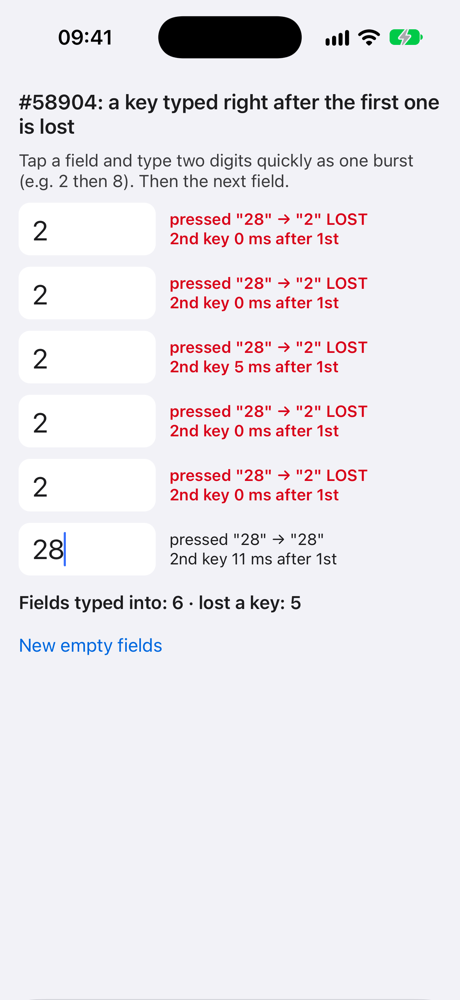
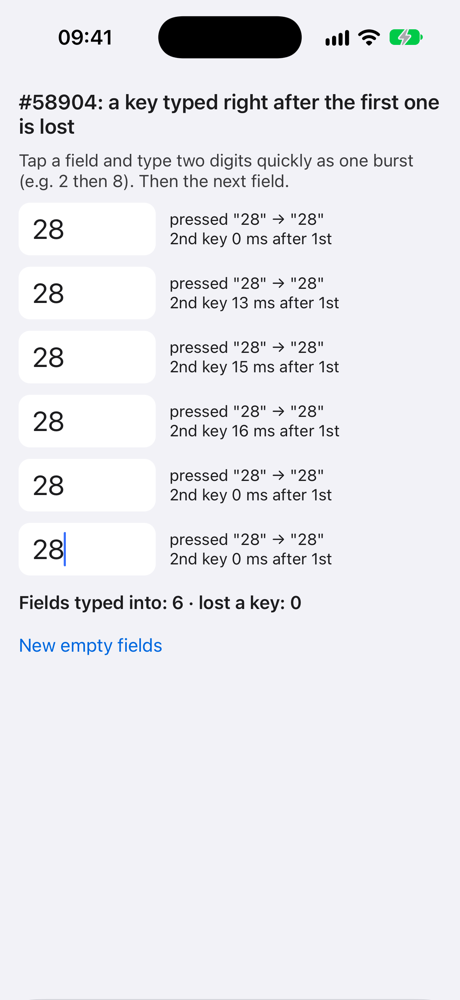
Made from the reproducer template: react-native 0.87.1 (latest), New Architecture, no extra dependencies. Six empty, uncontrolled fields; each row compares the keys onKeyPress reported with the characters that landed in the field. iOS 27 simulator, Release: 9 of 18 bursts of «28» lost the second key; with the suggested change applied at runtime (-ApplySuggestedFix YES, off by default), 0 of 18.
Screenshots and Videos
One Release round each from the reproducer (iOS 27 simulator, a fresh launch, six bursts of «28»). Left: React Native 0.87.1 as is, 5 of 6 bursts lost the second key. Right: with the suggested change (-ApplySuggestedFix YES), 0 of 6.
| As is | With the suggested change |
|---|---|
 |
 |
- Langage dominant
- C++
- Étoiles
- 127k
- Forks
- 25.3k
- Métriques de merge des PR
- Aucune PR mergée en 30 j
Préparer son environnement
- Aucun Dockerfile ni fichier Docker Compose
- Propose un modèle de pull request
- Lire le guide de contribution
Par où commencer
- Lisez l'issue en entier, puis le guide de contribution du projet.
- Signalez en commentaire que vous la prenez — cela évite que deux personnes fassent le même travail.
- Forkez le dépôt et travaillez sur une branche.
- Ouvrez une pull request qui référence le numéro de l'issue.
Autres issues de react/react-native
-
Linking.getInitialURL() returns the task's first link after a link relaunches a reclaimed Android appPeut-être pris Une pull request liée à cette issue est ouverte ou déjà fusionnée. Ouverte
Difficulté 2/5 1-3 heures Accessibilité débutants 78/100
react/react-native#59006 · 1 commentaire ·
Les mainteneurs répondent en général sous 1 jour
-
Fabric TextInput: prepareForRecycle leaves stale inputAccessoryViewButtonLabel (empty Done bar)OuverteNeeds: Author Feedback Needs: Repro
Difficulté 2/5 1-3 heures Accessibilité débutants 76/100
react/react-native#58952 · 1 commentaire ·
Les mainteneurs répondent en général sous 1 jour
-
Needs: Author Feedback Needs: Repro
Difficulté 2/5 1-3 heures Accessibilité débutants 75/100
react/react-native#58659 · 2 commentaires ·
Les mainteneurs répondent en général sous 1 jour
-
Needs: Author Feedback Needs: Repro
Difficulté 1/5 Moins d'une heure Accessibilité débutants 92/100
react/react-native#58621 · 1 commentaire ·
Les mainteneurs répondent en général sous 1 jour
-
Add TypeScript declaration for the performance globalPeut-être pris @Cedric921 l’a pris il y a 10 jours. OuverteNeeds: Attention Needs: Repro
Difficulté 2/5 1-3 heures Accessibilité débutants 85/100
react/react-native#58610 · 5 commentaires ·
Les mainteneurs répondent en général sous 1 jour
Toutes les issues de react/react-native
Issues similaires
-
bug
Difficulté 2/5 1-3 heures Accessibilité débutants 74/100
Les mainteneurs répondent en général sous 1 jour
-
Difficulté 2/5 1-3 heures Accessibilité débutants 74/100
Les mainteneurs répondent en général sous 1 jour
-
enhancement
Difficulté 2/5 1-3 heures Accessibilité débutants 72/100
Les mainteneurs répondent en général sous 1 jour
-
`IO.FS.realPath` reports every failure as `noFileOrDirectory` instead of classifying by `errno`Ouvertebug
Difficulté 2/5 1-3 heures Accessibilité débutants 66/100
leanprover/lean4#15683 ·
Les mainteneurs répondent en général sous 1 jour
-
Difficulté 2/5 1-3 heures Accessibilité débutants 66/100
touhouworldcup/thprac#414 ·