[iOS][Fabric] TextInput drops a keystroke right after the first character typed into an empty field (_textOf:equals: compares attributes of a focused field)
Los mantenedores suelen responder en 1 día
Nadie ha tomado este issue todavía.
Evaluación
- Dificultad
- 2/5
- Tiempo estimado
- 1-3 horas
- Aptitud para principiantes
- 78/100
- Tipo de issue
- Error
- Claridad
- Bien especificado
- Estado de actividad
- Activo
- Stack tecnológico
- ios, objective-c, react-native
- Área
- mobile
Línea de trabajo
Lee RCTTextInputComponentView.mm, especialmente _textOf:equals: y las comprobaciones existentes de dictado, texto marcado y entrada segura. Reproduce el caso de escritura rápida con el reproductor enlazado y compara su comportamiento antes y después de la comprobación de igualdad propuesta para el first responder. Se considera terminado cuando los mismos caracteres en un campo enfocado ya no activan la actualización que hace que se pierda una pulsación de tecla y el reproductor confirma que el problema está solucionado.
Escrito por el modelo de indexación a partir del texto del issue.
Descripción
Description
On iOS with the New Architecture (Fabric), typing quickly into an empty TextInput sometimes loses the second key. For example, typing «28» into an empty numeric field leaves «2». It happens only for the first character typed into an empty field, and only in a fast burst. Fields that already contain text are not affected.
We traced it as follows:
- The first character typed into an empty field reaches the native view with UIKit's typing attributes.
- The state round trip brings the same character back as an attributed string with React Native's full attribute set.
-[RCTTextInputComponentView _textOf:equals:]compares the two strings including their attributes. It answers NO, although the characters are identical.- React Native then calls
setAttributedText:on the field while it is the first responder. That resets UIKit's keyboard / input pipeline, and the key in flight at that moment is dropped.
_textOf:equals: already has exceptions for dictation, Korean input, marked text and secure entry. One more exception fixes it in our app: while the backed text input view is the first responder, two strings with equal characters are treated as equal.
Suggested fix, in RCTTextInputComponentView.mm, _textOf:equals:: when _backedTextInputView is the first responder, compare only newText.string with oldText.string, next to the existing dictation / marked text / secure entry checks. Then a state round trip of the same characters never calls setAttributedText: on a focused field.
Workaround: we swizzle _textOf:equals: with that exception in a small native module, and will remove it once a release includes a fix.
Steps to reproduce
- Render an uncontrolled
TextInput(defaultValueonly,keyboardType="number-pad"). Leave it empty, and give it a style that setsfontSize,lineHeightandcolor. - Focus it and type two digits quickly as one burst, for example «2» then «8» within about 100 ms.
- Repeat, emptying the field between runs.
Expected: «28». Actual: «2» in some of the bursts.
Our measurements (iOS 27 simulator, Release build):
- without the exception, 5 of 13 two- and three-digit bursts lost a key;
- with the exception, 0 of 12 did.
React Native Version
0.86.3
Affected Platforms
Runtime - iOS
Areas
Fabric - The New Renderer
Output of npx @react-native-community/cli info
System:
  OS: macOS 27
  CPU: Apple Silicon
Binaries:
  Node: 25.9.0
  Bun: 1.3.11
IDEs:
  Xcode: 27.0 (27A266a)
npmPackages:
  react: 19.2
  react-native: 0.86.3
  expo: 57
iOS:
  hermesEnabled: true
  newArchEnabled: true
Stacktrace or Logs
No crash or log: a key is silently lost. In the debugger, `-[RCTTextInputComponentView _textOf:equals:]` returns NO for an
equal one-character string (UIKit typing attributes vs React Native's attribute set), and `setAttributedText:` runs on the
first responder right before the lost key.
MANDATORY Reproducer
https://github.com/vdzerkalo/rn-58904-textinput-lost-key
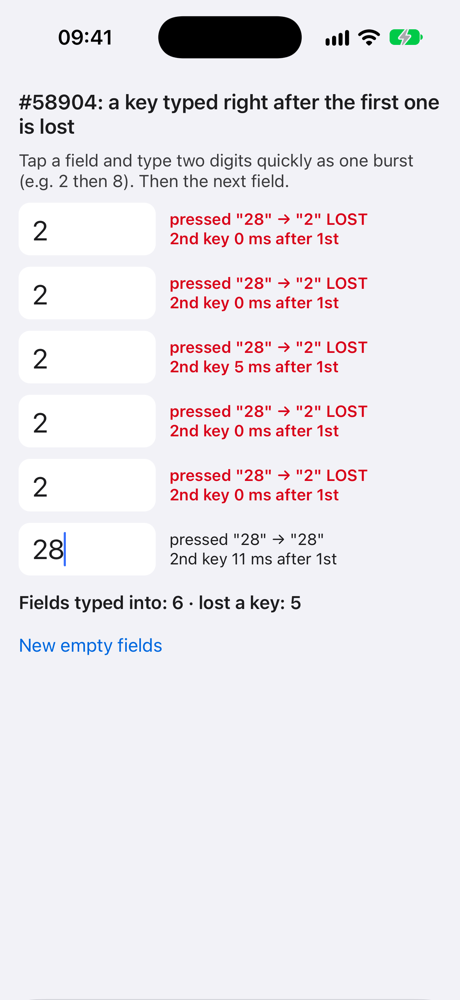
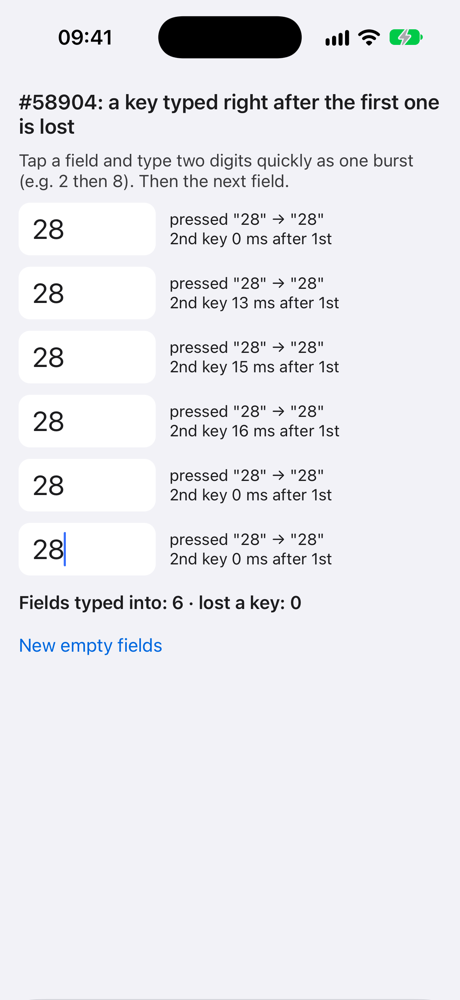
Made from the reproducer template: react-native 0.87.1 (latest), New Architecture, no extra dependencies. Six empty, uncontrolled fields; each row compares the keys onKeyPress reported with the characters that landed in the field. iOS 27 simulator, Release: 9 of 18 bursts of «28» lost the second key; with the suggested change applied at runtime (-ApplySuggestedFix YES, off by default), 0 of 18.
Screenshots and Videos
One Release round each from the reproducer (iOS 27 simulator, a fresh launch, six bursts of «28»). Left: React Native 0.87.1 as is, 5 of 6 bursts lost the second key. Right: with the suggested change (-ApplySuggestedFix YES), 0 of 6.
| As is | With the suggested change |
|---|---|
 |
 |
- Lenguaje dominante
- C++
- Estrellas
- 127k
- Forks
- 25.3k
- Métricas de merge de PR
- Sin PR fusionados en 30 d
Preparar el entorno
- Sin Dockerfile ni archivo de Docker Compose
- Tiene una plantilla de pull request
- Leer la guía de contribución
Primeros pasos
- Lee el issue completo y luego la guía de contribución del proyecto.
- Comenta en el issue que vas a ocuparte — evita que dos personas hagan lo mismo.
- Haz un fork del repositorio y trabaja en una rama.
- Abre un pull request que haga referencia al número del issue.
Más de react/react-native
-
Needs: Author Feedback Needs: Repro
Dificultad 2/5 1-3 horas Aptitud para principiantes 75/100
react/react-native#58659 · 2 comentarios ·
Los mantenedores suelen responder en 1 día
-
Needs: Author Feedback Needs: Repro
Dificultad 1/5 Menos de una hora Aptitud para principiantes 92/100
react/react-native#58621 · 1 comentario ·
Los mantenedores suelen responder en 1 día
-
Add TypeScript declaration for the performance globalPosiblemente ocupada Un pull request vinculado a esta issue está abierto o ya se fusionó. AbiertoNeeds: Attention Needs: Repro
Dificultad 2/5 1-3 horas Aptitud para principiantes 85/100
react/react-native#58610 · 4 comentarios ·
Los mantenedores suelen responder en 1 día
-
Needs: Triage :mag:
Dificultad 2/5 1-3 horas Aptitud para principiantes 82/100
react/react-native#58565 · 2 comentarios · 2 reacciones ·
Los mantenedores suelen responder en 1 día
-
[Android][Fabric] addViewAt hard-crashes on a placeholder ViewState synthesised by updateEventEmitterPosiblemente ocupada @wneel la tomó hace 23 días. AbiertoNeeds: Attention Needs: Repro
Dificultad 2/5 1-3 horas Aptitud para principiantes 85/100
react/react-native#58526 · 2 comentarios ·
Los mantenedores suelen responder en 1 día
Todos los issues de react/react-native
Issues similares
-
needs-triage
Dificultad 2/5 1-3 horas Aptitud para principiantes 70/100
flashinfer-ai/flashinfer#6212 ·
Los mantenedores suelen responder en 1 día
-
bug graphics
Dificultad 2/5 1-3 horas Aptitud para principiantes 76/100
FlaxEngine/FlaxEngine#4295 · 2 comentarios ·
Los mantenedores suelen responder en 2 días
-
bug
Dificultad 2/5 1-3 horas Aptitud para principiantes 66/100
Algorithmiq/monoprop#390 ·
Los mantenedores suelen responder en 1 día
-
docs
Dificultad 2/5 1-3 horas Aptitud para principiantes 68/100
Los mantenedores suelen responder en 1 día
-
8-membered-ring atrop stereo lost in 2026.09.1Posiblemente ocupada Un pull request vinculado a esta issue está abierto o ya se fusionó. Abiertobug
Dificultad 2/5 Medio día Aptitud para principiantes 86/100
Los mantenedores suelen responder en 2 días