[Bug]: Usage and Settings modals stop at 60rem tall, and zooming out shrinks them instead of showing more
Maintainer antworten meist innerhalb von 1 Tag
Bewertung
- Schwierigkeit
- 2/5
- Geschätzter Aufwand
- 1-3 Stunden
- Anfängerfreundlichkeit
- 35/100
- Issue-Typ
- Bug
- Klarheit
- Klar beschrieben
- Aktivitätsstatus
- Veraltet
- Tech-Stack
- typescript
- Bereich
- frontend
Rechercherichtung
Start with the sm:max-h-[60rem] cap in apps/web/src/components/AppRouteModal.tsx and inspect how the modal height responds to viewport size and zoom. Verify the Usage and Settings modals in a tall window; done means they can use the available height and reveal more content when zooming out.
Vom Indexierungsmodell aus dem Issue-Text verfasst.
Beschreibung
Before submitting
- I searched existing issues and did not find a duplicate.
- I included enough detail to reproduce or investigate the problem.
Area
apps/web
Steps to reproduce
- Open T3 Code in a window taller than about 1040px. Mine is a portrait monitor, with a window of about 1073×1669.
- Open Usage → Limits with enough providers and accounts that the list is longer than 960px. I have Codex, five Claude accounts, Cursor and Grok.
- Look at the space above and below the modal, then scroll the list.
- Zoom out with Ctrl+- and look again.
Expected behavior
The modal uses the height the window has, so the whole list is visible without scrolling. Zooming out shows more of the list.
Actual behavior
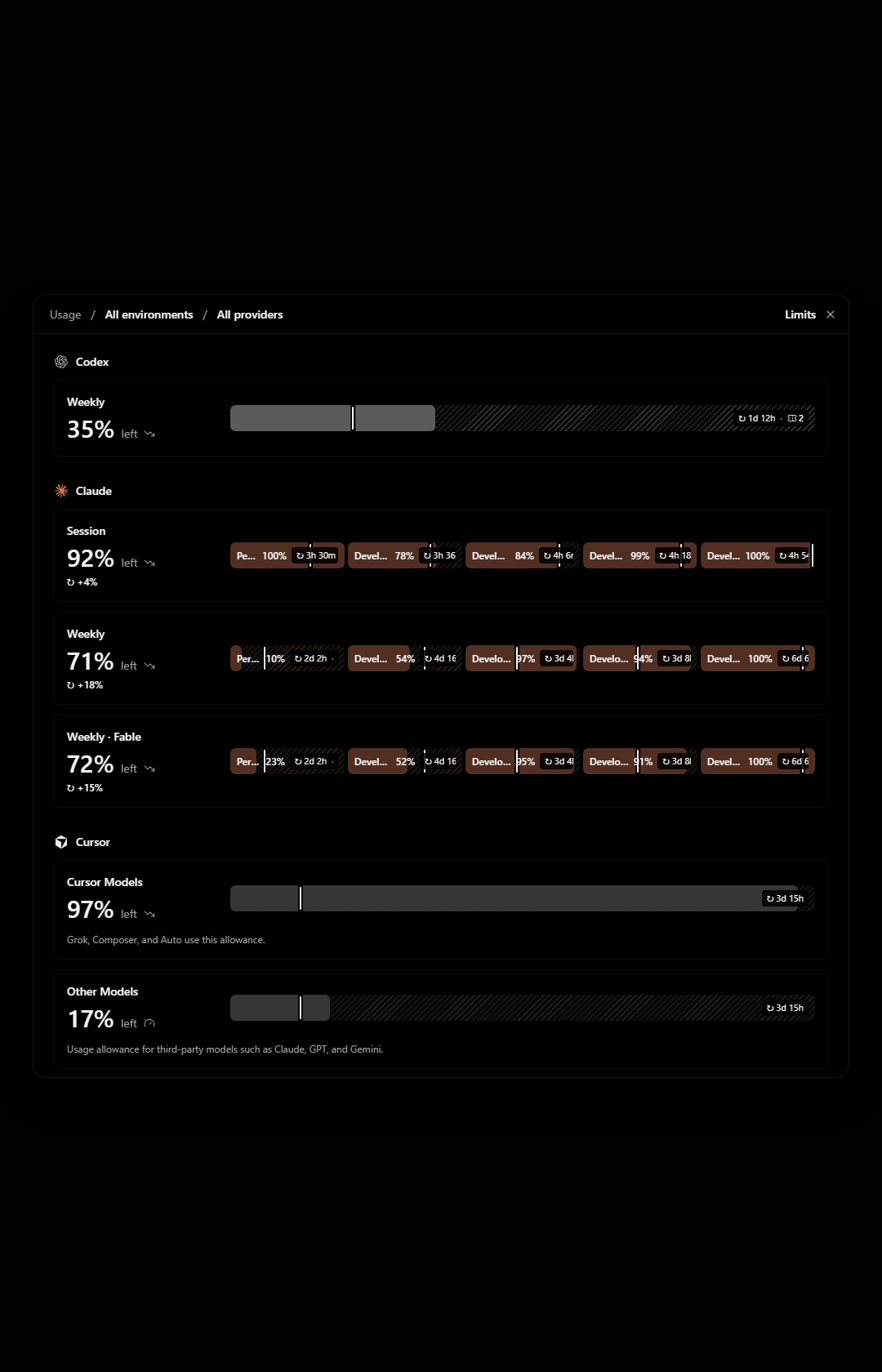
The modal stops at 960px tall. In a 1680px tall window that leaves about 360px of empty backdrop above and below it, while the last provider is cut off and I have to scroll inside the modal to reach it.
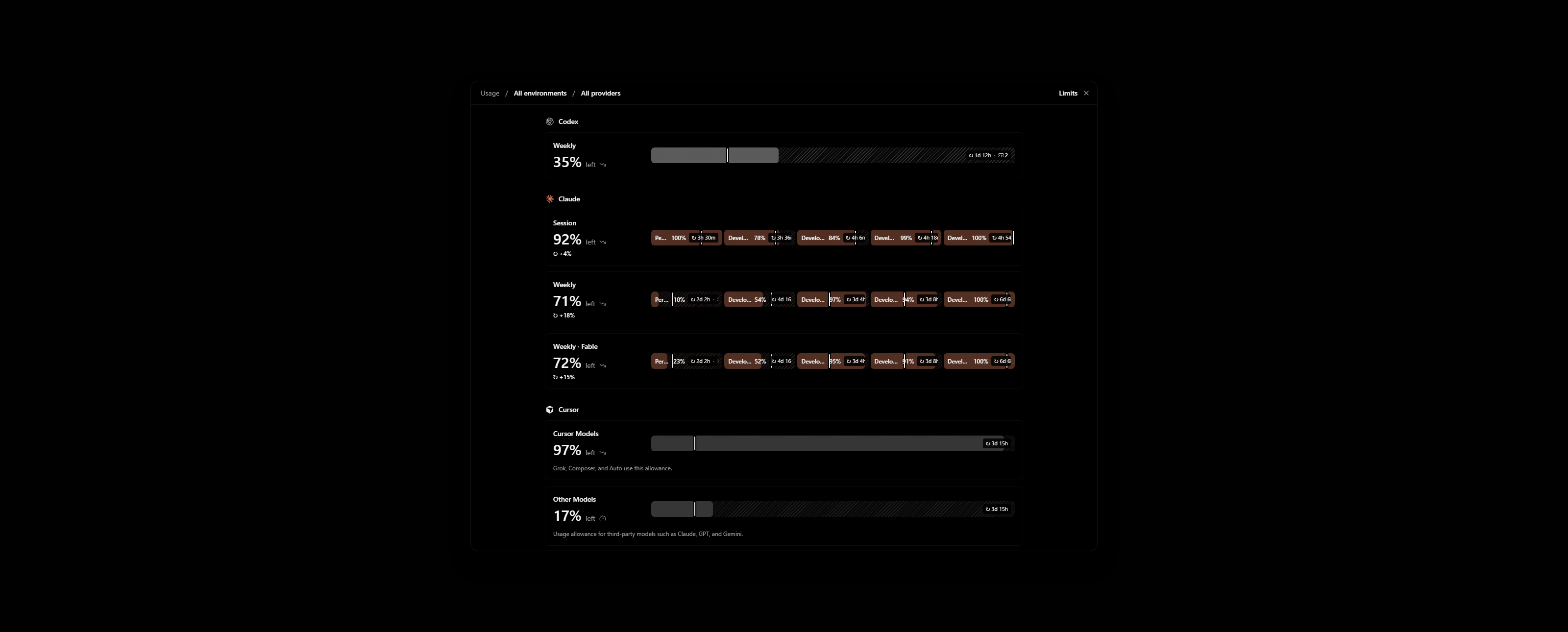
Zooming out does not help. The modal gets physically smaller and still shows the same rows, with more empty backdrop around it.
The cause is sm:max-h-[60rem] on the popup in apps/web/src/components/AppRouteModal.tsx. The cap is in rem, so it scales with zoom. Settings uses the same modal and behaves the same way.
Impact
Minor bug or occasional failure
Version or commit
0.1.10-nightly.20261113.4616. Also on main @ 7903b487.
Environment
Windows 11, T3 Code desktop. One ultrawide monitor in portrait and one in landscape.
Screenshots, recordings, or supporting files
These are renders of AppRouteModal with the Limits view on made-up accounts, not my own. My real Limits page shows account emails.
Portrait window, 1080×1680. Grok is below the fold while the backdrop above and below is empty:
Landscape window, 2560×1030, zoomed out to 80%. The modal is smaller and Grok is still cut off:
Workaround
None. To show an agent my usage across providers I take several screenshots while scrolling.
- Vorherrschende Sprache
- TypeScript
- Sterne
- 24.8k
- Forks
- 6.4k
- Ø Merge
- 59 Min.
- Gemergte PRs (30 T.)
- 418
Entwicklungsumgebung
Startet den Dev-Container des Projekts im Browser, mit Ihrem eigenen GitHub-Konto.
- Kein Dockerfile und keine Docker-Compose-Datei
- Hat eine Pull-Request-Vorlage
- Beitragsleitfaden lesen
Erste Schritte
- Lesen Sie das ganze Issue und danach den Beitragsleitfaden des Projekts.
- Schreiben Sie ins Issue, dass Sie es übernehmen — das erspart doppelte Arbeit.
- Forken Sie das Repository und arbeiten Sie in einem Branch.
- Öffnen Sie einen Pull Request, der die Issue-Nummer nennt.
Mehr aus pingdotgg/t3code
-
Schwierigkeit 2/5 1-3 Stunden Anfängerfreundlichkeit 66/100
Maintainer antworten meist innerhalb von 1 Tag
-
via-triage
Schwierigkeit 2/5 1-3 Stunden Anfängerfreundlichkeit 82/100
Maintainer antworten meist innerhalb von 1 Tag
-
Schwierigkeit 2/5 Ein halber Tag Anfängerfreundlichkeit 68/100
Maintainer antworten meist innerhalb von 1 Tag
-
Question card options show LaTeX as raw source, though the question text renders itEvtl. vergeben Ein verknüpfter Pull Request ist offen oder bereits gemergt. Offen
Schwierigkeit 2/5 1-3 Stunden Anfängerfreundlichkeit 76/100
Maintainer antworten meist innerhalb von 1 Tag
-
[Bug]: Settings inheritance popover shows raw slugs for branch naming, default permissions and response streamingEvtl. vergeben @juliusmarminge hat das vor 1 Tag übernommen. Offenvouch:denounced
Schwierigkeit 2/5 1-3 Stunden Anfängerfreundlichkeit 84/100
Maintainer antworten meist innerhalb von 1 Tag
Alle Issues in pingdotgg/t3code
Ähnliche Issues
-
skill fork: kickoff message "Run the X skill now" makes the child call the skill tool on itselfOffenarea: skills bug priority: medium
Schwierigkeit 1/5 Unter einer Stunde Anfängerfreundlichkeit 68/100
griffinwork40/agent-afk#4874 ·
Maintainer antworten meist innerhalb von 1 Tag
-
Schwierigkeit 2/5 1-3 Stunden Anfängerfreundlichkeit 82/100
paperclipai/paperclip#21503 ·
Maintainer antworten meist innerhalb von 1 Tag
-
[Bug] List: the reorder hint's Move up stays enabled on the first row, and Move down on the lastOffen
Schwierigkeit 2/5 1-3 Stunden Anfängerfreundlichkeit 83/100
-
blocklist addition
Schwierigkeit 2/5 1-3 Stunden Anfängerfreundlichkeit 72/100
MetaMask/eth-phishing-detect#312343 ·
Maintainer antworten meist innerhalb von 1 Tag
-
packages:player
Schwierigkeit 2/5 1-3 Stunden Anfängerfreundlichkeit 75/100
Maintainer antworten meist innerhalb von 1 Tag