[Bug]: Usage and Settings modals stop at 60rem tall, and zooming out shrinks them instead of showing more
Los mantenedores suelen responder en 1 día
Evaluación
- Dificultad
- 2/5
- Tiempo estimado
- 1-3 horas
- Aptitud para principiantes
- 35/100
- Tipo de issue
- Error
- Claridad
- Bien especificado
- Estado de actividad
- Estancado
- Stack tecnológico
- typescript
- Área
- frontend
Línea de trabajo
Start with the sm:max-h-[60rem] cap in apps/web/src/components/AppRouteModal.tsx and inspect how the modal height responds to viewport size and zoom. Verify the Usage and Settings modals in a tall window; done means they can use the available height and reveal more content when zooming out.
Escrito por el modelo de indexación a partir del texto del issue.
Descripción
Before submitting
- I searched existing issues and did not find a duplicate.
- I included enough detail to reproduce or investigate the problem.
Area
apps/web
Steps to reproduce
- Open T3 Code in a window taller than about 1040px. Mine is a portrait monitor, with a window of about 1073×1669.
- Open Usage → Limits with enough providers and accounts that the list is longer than 960px. I have Codex, five Claude accounts, Cursor and Grok.
- Look at the space above and below the modal, then scroll the list.
- Zoom out with Ctrl+- and look again.
Expected behavior
The modal uses the height the window has, so the whole list is visible without scrolling. Zooming out shows more of the list.
Actual behavior
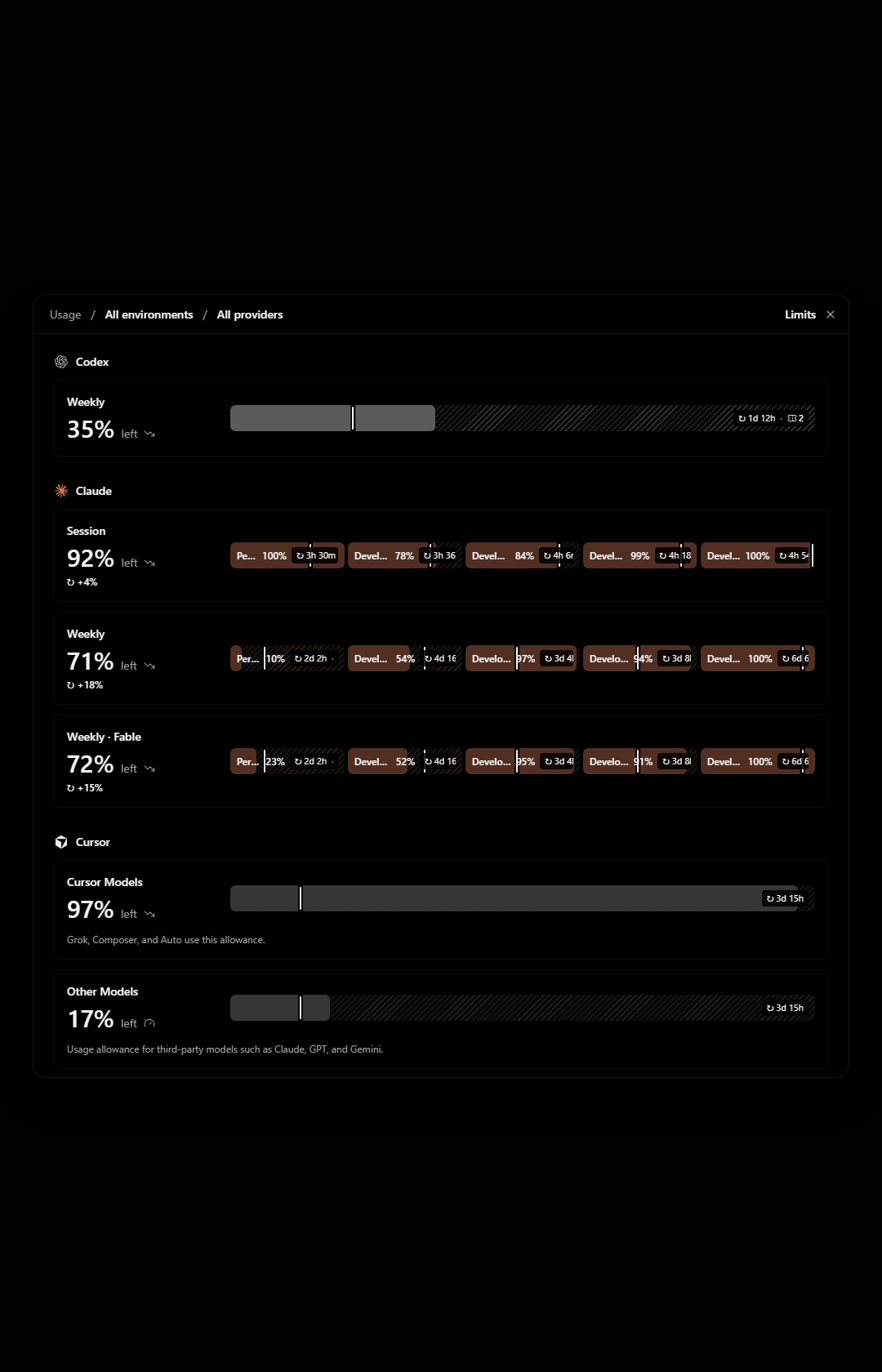
The modal stops at 960px tall. In a 1680px tall window that leaves about 360px of empty backdrop above and below it, while the last provider is cut off and I have to scroll inside the modal to reach it.
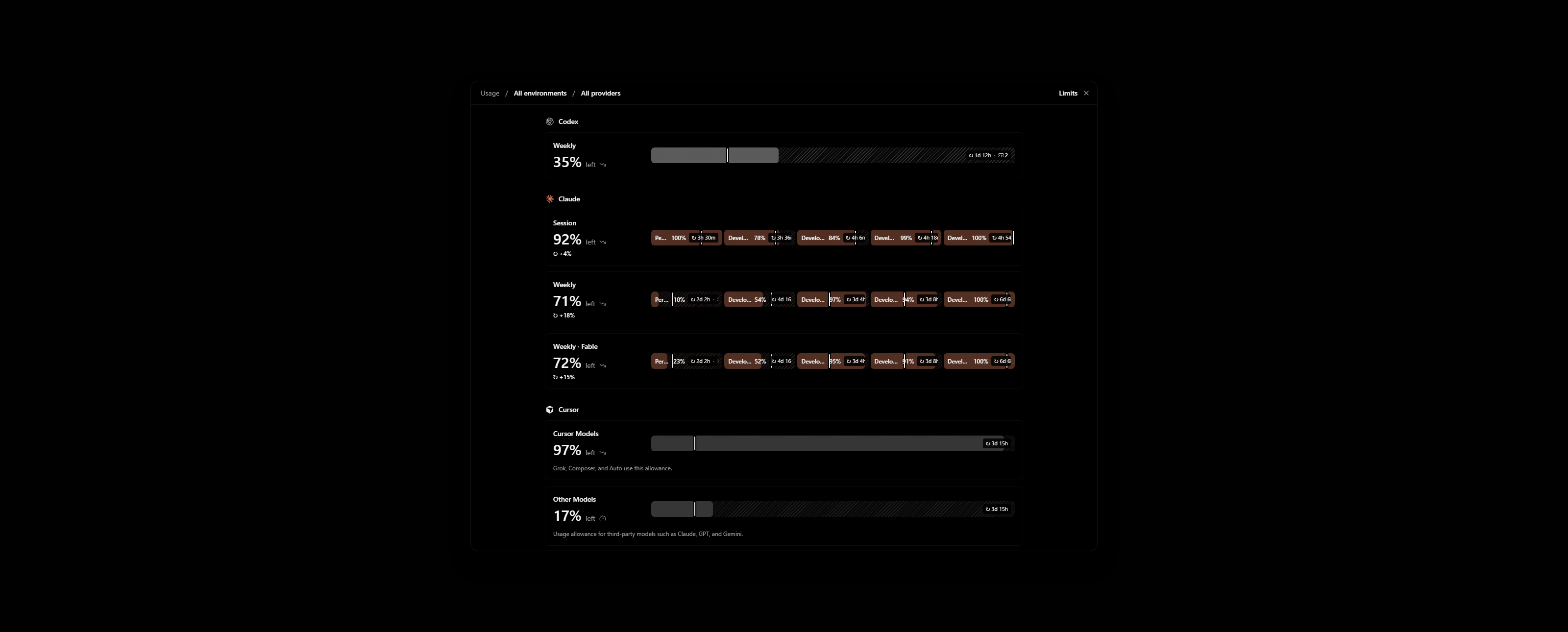
Zooming out does not help. The modal gets physically smaller and still shows the same rows, with more empty backdrop around it.
The cause is sm:max-h-[60rem] on the popup in apps/web/src/components/AppRouteModal.tsx. The cap is in rem, so it scales with zoom. Settings uses the same modal and behaves the same way.
Impact
Minor bug or occasional failure
Version or commit
0.1.10-nightly.20261113.4616. Also on main @ 7903b487.
Environment
Windows 11, T3 Code desktop. One ultrawide monitor in portrait and one in landscape.
Screenshots, recordings, or supporting files
These are renders of AppRouteModal with the Limits view on made-up accounts, not my own. My real Limits page shows account emails.
Portrait window, 1080×1680. Grok is below the fold while the backdrop above and below is empty:
Landscape window, 2560×1030, zoomed out to 80%. The modal is smaller and Grok is still cut off:
Workaround
None. To show an agent my usage across providers I take several screenshots while scrolling.
- Lenguaje dominante
- TypeScript
- Estrellas
- 24.8k
- Forks
- 6.4k
- Merge medio
- 59 min
- PR fusionados (30 d)
- 418
Preparar el entorno
Inicia el contenedor de desarrollo del proyecto en tu navegador, con tu propia cuenta de GitHub.
- Sin Dockerfile ni archivo de Docker Compose
- Tiene una plantilla de pull request
- Leer la guía de contribución
Primeros pasos
- Lee el issue completo y luego la guía de contribución del proyecto.
- Comenta en el issue que vas a ocuparte — evita que dos personas hagan lo mismo.
- Haz un fork del repositorio y trabaja en una rama.
- Abre un pull request que haga referencia al número del issue.
Más de pingdotgg/t3code
-
Dificultad 2/5 1-3 horas Aptitud para principiantes 66/100
Los mantenedores suelen responder en 1 día
-
via-triage
Dificultad 2/5 1-3 horas Aptitud para principiantes 82/100
Los mantenedores suelen responder en 1 día
-
[Bug]: MCP App inline frames never go below 80px, so compact apps get blank space under themAbierto
Dificultad 2/5 Medio día Aptitud para principiantes 68/100
Los mantenedores suelen responder en 1 día
-
Dificultad 2/5 1-3 horas Aptitud para principiantes 76/100
Los mantenedores suelen responder en 1 día
-
[Bug]: Settings inheritance popover shows raw slugs for branch naming, default permissions and response streamingPosiblemente ocupada @juliusmarminge la tomó hace 1 día. Abiertovouch:denounced
Dificultad 2/5 1-3 horas Aptitud para principiantes 84/100
Los mantenedores suelen responder en 1 día
Todos los issues de pingdotgg/t3code
Issues similares
-
Dificultad 2/5 1-3 horas Aptitud para principiantes 72/100
nikoheikkila/nikoheikkila.fi#1131 ·
Los mantenedores suelen responder en 1 día
-
Resources: Update work of urumqiPosiblemente ocupada Un pull request vinculado a esta issue está abierto o ya se fusionó. Abierto
Dificultad 2/5 1-3 horas Aptitud para principiantes 65/100
railmapgen/rmp-gallery#4176 ·
Los mantenedores suelen responder en 2 días
-
GraphQL custom headers duplicate differently cased default headersPosiblemente ocupada @yxr-2025 la tomó hoy. Abierto
Dificultad 2/5 1-3 horas Aptitud para principiantes 70/100
elie222/rakazo#4625 · 1 comentario ·
Los mantenedores suelen responder en 1 día
-
Dificultad 2/5 1-3 horas Aptitud para principiantes 76/100
Los mantenedores suelen responder en 1 día
-
[New Project]: PacaAbierto
Dificultad 2/5 1-3 horas Aptitud para principiantes 65/100
github/forgoodfirstissue#574 ·