[Bug]: Usage and Settings modals stop at 60rem tall, and zooming out shrinks them instead of showing more
Maintainer thường phản hồi trong vòng 1 ngày
Đánh giá
- Độ khó
- 2/5
- Thời gian dự kiến
- 1-3 giờ
- Mức phù hợp với người mới
- 35/100
- Loại issue
- Lỗi
- Độ rõ ràng
- Đặc tả rõ ràng
- Mức độ hoạt động
- Đình trệ
- Công nghệ
- typescript
- Lĩnh vực
- frontend
Hướng nghiên cứu
Start with the sm:max-h-[60rem] cap in apps/web/src/components/AppRouteModal.tsx and inspect how the modal height responds to viewport size and zoom. Verify the Usage and Settings modals in a tall window; done means they can use the available height and reveal more content when zooming out.
Do mô hình lập chỉ mục viết ra từ nội dung của issue.
Mô tả
Before submitting
- I searched existing issues and did not find a duplicate.
- I included enough detail to reproduce or investigate the problem.
Area
apps/web
Steps to reproduce
- Open T3 Code in a window taller than about 1040px. Mine is a portrait monitor, with a window of about 1073×1669.
- Open Usage → Limits with enough providers and accounts that the list is longer than 960px. I have Codex, five Claude accounts, Cursor and Grok.
- Look at the space above and below the modal, then scroll the list.
- Zoom out with Ctrl+- and look again.
Expected behavior
The modal uses the height the window has, so the whole list is visible without scrolling. Zooming out shows more of the list.
Actual behavior
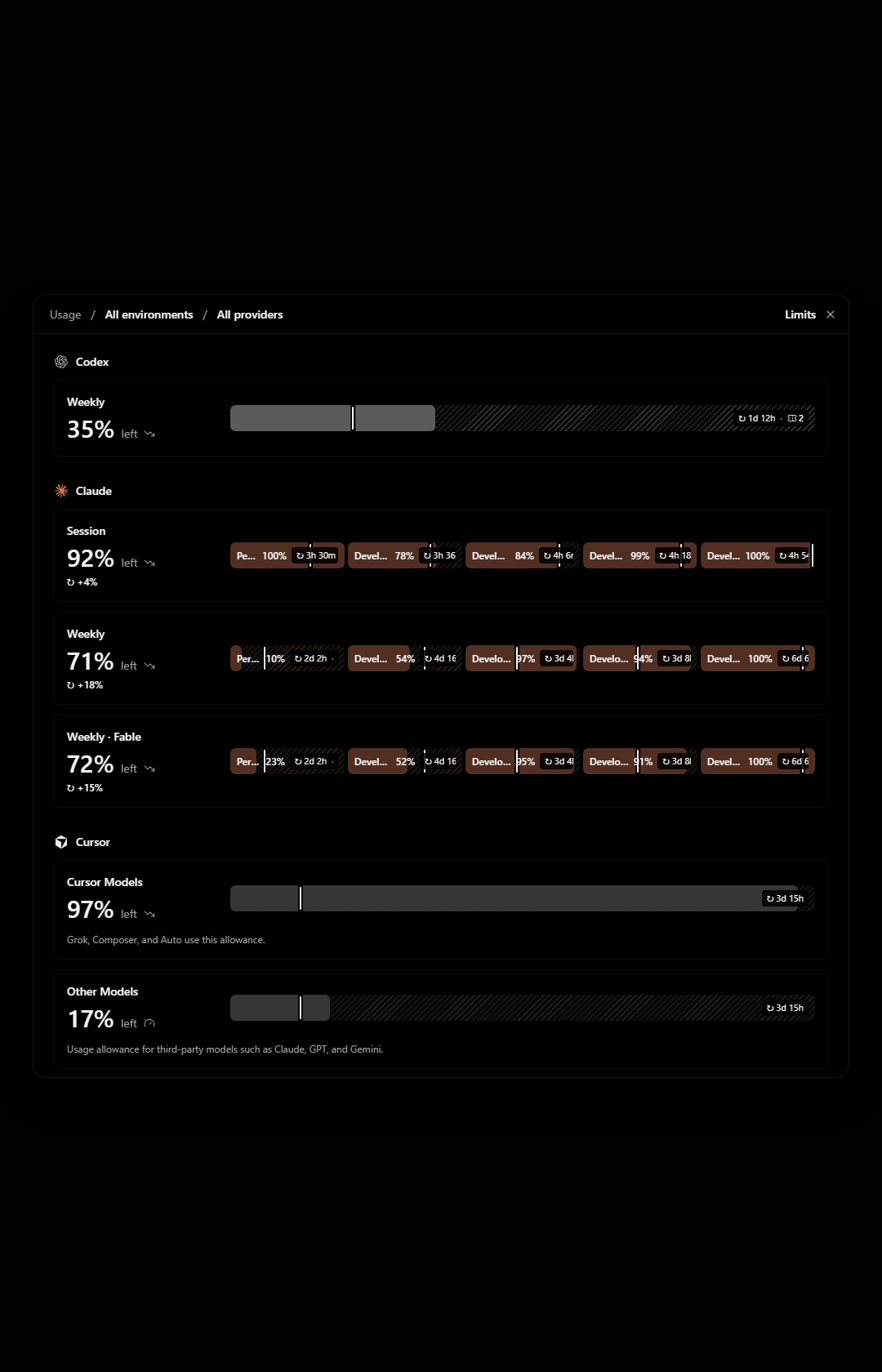
The modal stops at 960px tall. In a 1680px tall window that leaves about 360px of empty backdrop above and below it, while the last provider is cut off and I have to scroll inside the modal to reach it.
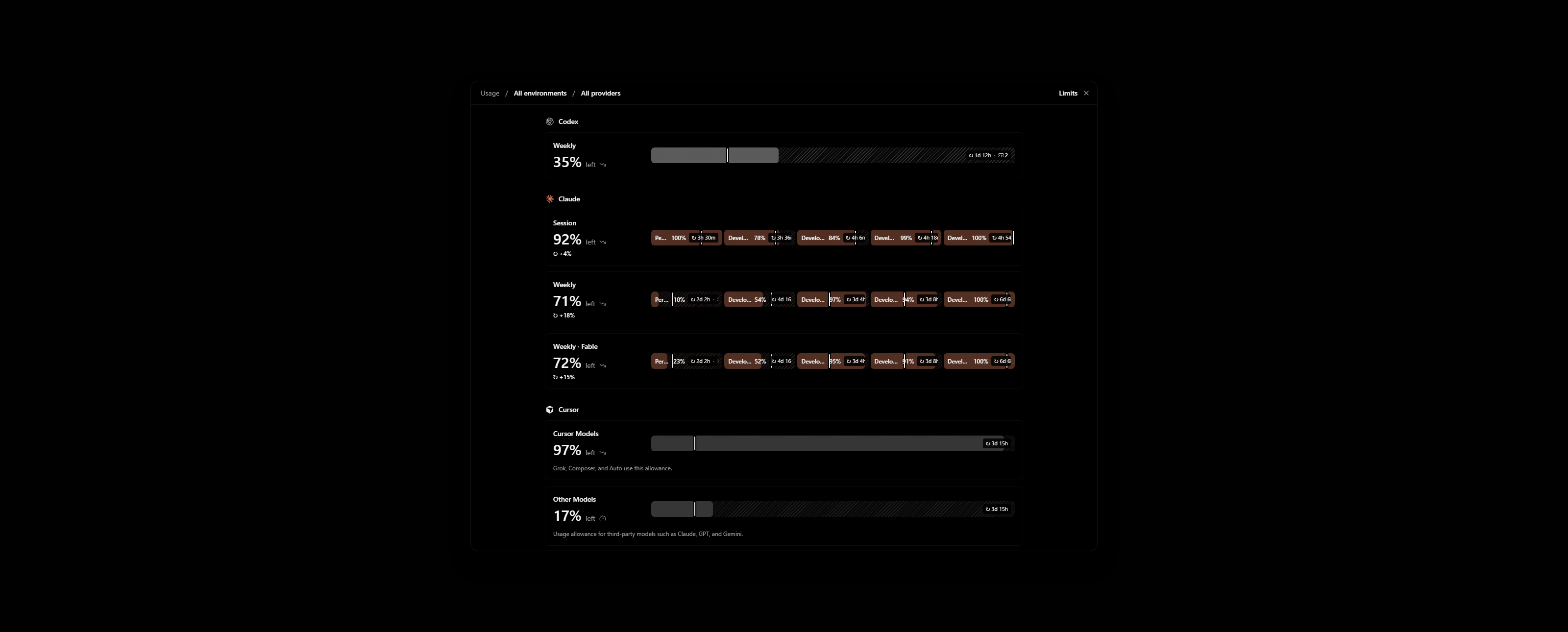
Zooming out does not help. The modal gets physically smaller and still shows the same rows, with more empty backdrop around it.
The cause is sm:max-h-[60rem] on the popup in apps/web/src/components/AppRouteModal.tsx. The cap is in rem, so it scales with zoom. Settings uses the same modal and behaves the same way.
Impact
Minor bug or occasional failure
Version or commit
0.1.10-nightly.20261113.4616. Also on main @ 7903b487.
Environment
Windows 11, T3 Code desktop. One ultrawide monitor in portrait and one in landscape.
Screenshots, recordings, or supporting files
These are renders of AppRouteModal with the Limits view on made-up accounts, not my own. My real Limits page shows account emails.
Portrait window, 1080×1680. Grok is below the fold while the backdrop above and below is empty:
Landscape window, 2560×1030, zoomed out to 80%. The modal is smaller and Grok is still cut off:
Workaround
None. To show an agent my usage across providers I take several screenshots while scrolling.
- Ngôn ngữ chính
- TypeScript
- Star
- 24.8k
- Fork
- 6.4k
- Merge trung bình
- 59 phút
- Pull request đã merge (30 ngày)
- 418
Chuẩn bị môi trường
Khởi chạy dev container của dự án ngay trên trình duyệt, bằng tài khoản GitHub của bạn.
- Không có Dockerfile hay tệp Docker Compose
- Có mẫu pull request
- Đọc hướng dẫn đóng góp
Bắt đầu từ đâu
- Đọc hết issue, rồi đọc hướng dẫn đóng góp của dự án.
- Bình luận trên issue rằng bạn sẽ nhận — tránh hai người làm cùng một việc.
- Fork repository và làm thay đổi trên một nhánh.
- Mở pull request có tham chiếu số hiệu của issue.
Issue khác của pingdotgg/t3code
-
Độ khó 2/5 1-3 giờ Mức phù hợp với người mới 66/100
Maintainer thường phản hồi trong vòng 1 ngày
-
via-triage
Độ khó 2/5 1-3 giờ Mức phù hợp với người mới 82/100
Maintainer thường phản hồi trong vòng 1 ngày
-
[Bug]: MCP App inline frames never go below 80px, so compact apps get blank space under themĐang mở
Độ khó 2/5 Nửa ngày Mức phù hợp với người mới 68/100
Maintainer thường phản hồi trong vòng 1 ngày
-
Question card options show LaTeX as raw source, though the question text renders itCó thể đã có người làm Có pull request liên kết đang mở hoặc đã được merge. Đang mở
Độ khó 2/5 1-3 giờ Mức phù hợp với người mới 76/100
Maintainer thường phản hồi trong vòng 1 ngày
-
[Bug]: Settings inheritance popover shows raw slugs for branch naming, default permissions and response streamingCó thể đã có người làm @juliusmarminge đã nhận 1 ngày trước. Đang mởvouch:denounced
Độ khó 2/5 1-3 giờ Mức phù hợp với người mới 84/100
Maintainer thường phản hồi trong vòng 1 ngày
Tất cả issue của pingdotgg/t3code
Issue tương tự
-
Độ khó 2/5 1-3 giờ Mức phù hợp với người mới 72/100
nikoheikkila/nikoheikkila.fi#1131 ·
Maintainer thường phản hồi trong vòng 1 ngày
-
Resources: Update work of urumqiCó thể đã có người làm Có pull request liên kết đang mở hoặc đã được merge. Đang mở
Độ khó 2/5 1-3 giờ Mức phù hợp với người mới 65/100
railmapgen/rmp-gallery#4176 ·
Maintainer thường phản hồi trong vòng 2 ngày
-
GraphQL custom headers duplicate differently cased default headersCó thể đã có người làm @yxr-2025 đã nhận hôm nay. Đang mở
Độ khó 2/5 1-3 giờ Mức phù hợp với người mới 70/100
elie222/rakazo#4625 · 1 bình luận ·
Maintainer thường phản hồi trong vòng 1 ngày
-
Độ khó 2/5 1-3 giờ Mức phù hợp với người mới 76/100
Maintainer thường phản hồi trong vòng 1 ngày
-
[New Project]: PacaĐang mở
Độ khó 2/5 1-3 giờ Mức phù hợp với người mới 65/100
github/forgoodfirstissue#574 ·