[Bug]: Usage and Settings modals stop at 60rem tall, and zooming out shrinks them instead of showing more
维护者通常 1 天内回复
评估
- 难度
- 2/5
- 预计耗时
- 1-3 小时
- 新手友好度
- 35/100
- Issue 类型
- 缺陷
- 描述清晰度
- 描述清楚
- 活跃度
- 停滞
- 技术栈
- typescript
- 领域
- frontend
调研方向
Start with the sm:max-h-[60rem] cap in apps/web/src/components/AppRouteModal.tsx and inspect how the modal height responds to viewport size and zoom. Verify the Usage and Settings modals in a tall window; done means they can use the available height and reveal more content when zooming out.
由索引模型根据 Issue 内容生成。
描述
Before submitting
- I searched existing issues and did not find a duplicate.
- I included enough detail to reproduce or investigate the problem.
Area
apps/web
Steps to reproduce
- Open T3 Code in a window taller than about 1040px. Mine is a portrait monitor, with a window of about 1073×1669.
- Open Usage → Limits with enough providers and accounts that the list is longer than 960px. I have Codex, five Claude accounts, Cursor and Grok.
- Look at the space above and below the modal, then scroll the list.
- Zoom out with Ctrl+- and look again.
Expected behavior
The modal uses the height the window has, so the whole list is visible without scrolling. Zooming out shows more of the list.
Actual behavior
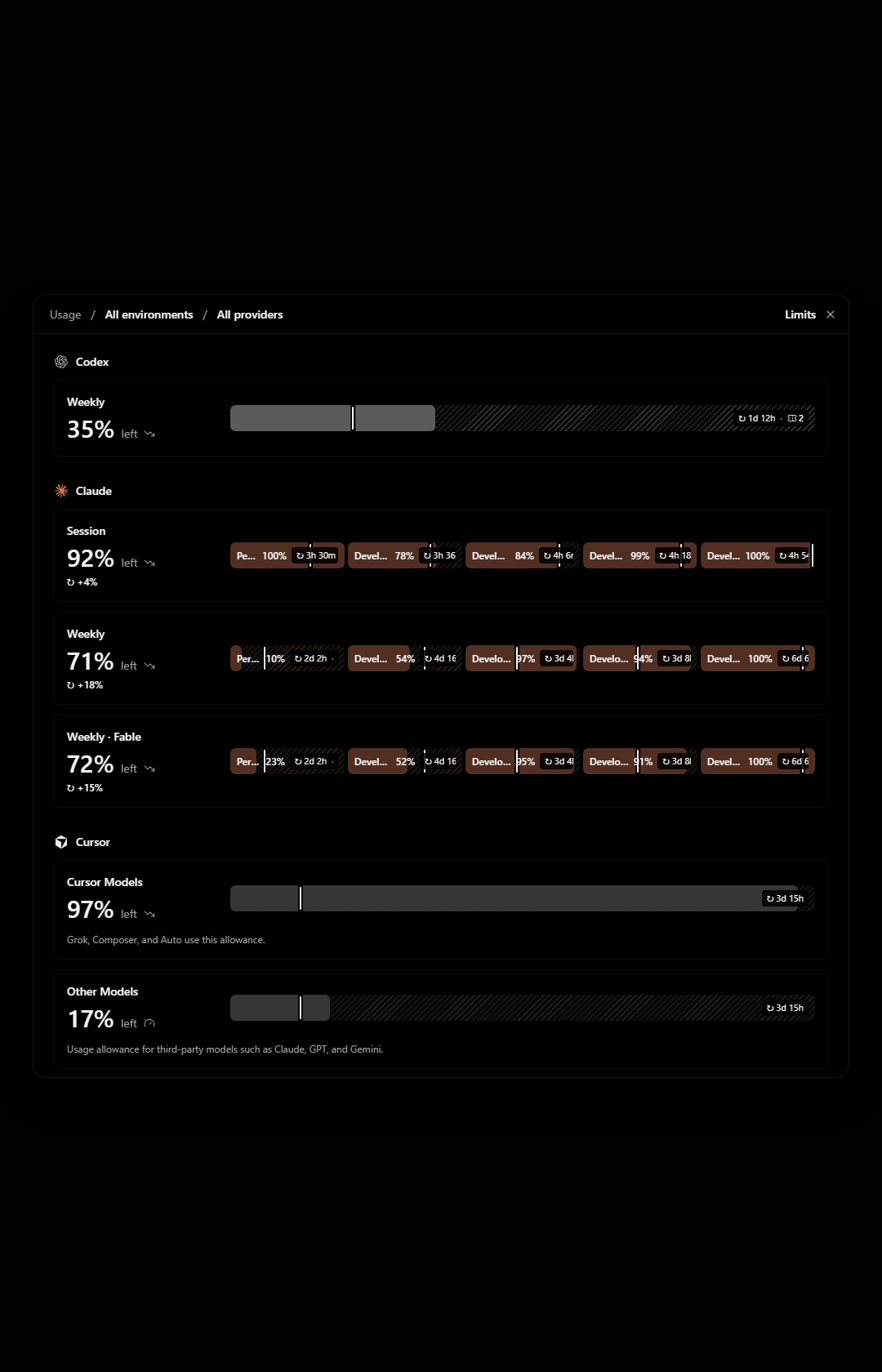
The modal stops at 960px tall. In a 1680px tall window that leaves about 360px of empty backdrop above and below it, while the last provider is cut off and I have to scroll inside the modal to reach it.
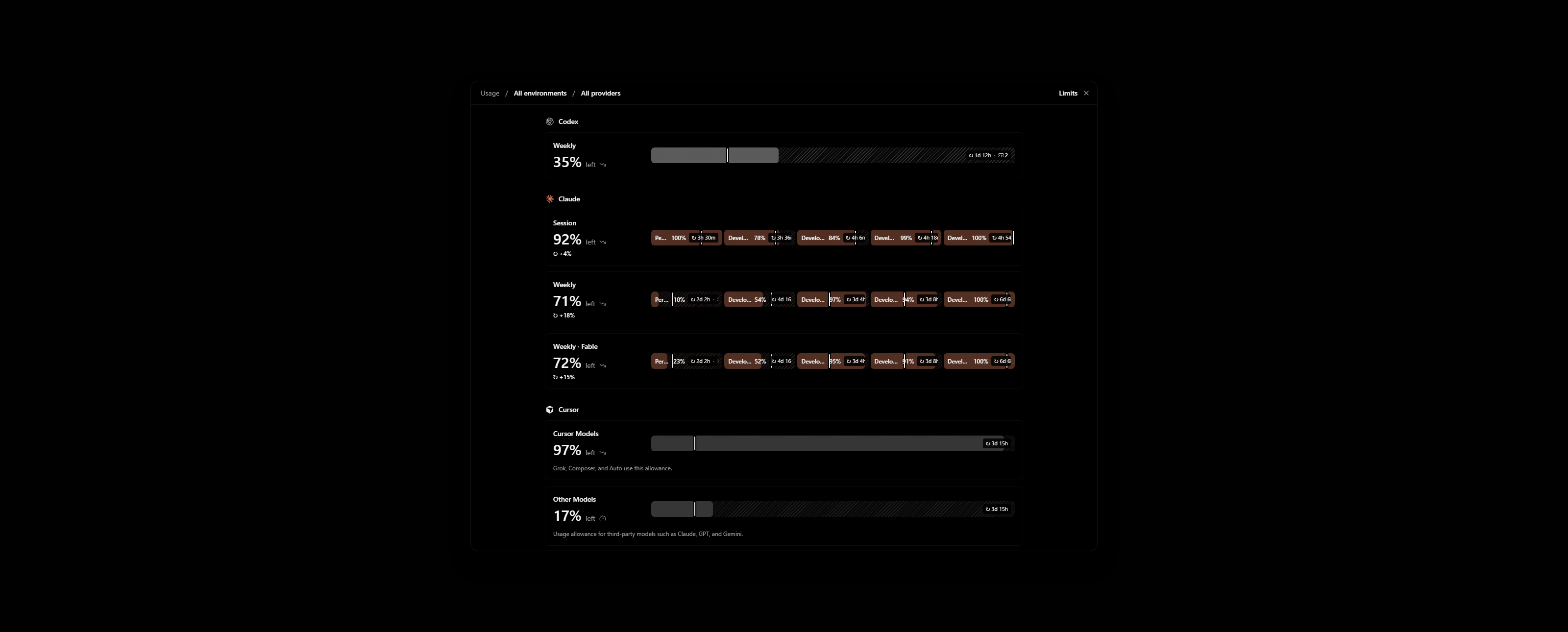
Zooming out does not help. The modal gets physically smaller and still shows the same rows, with more empty backdrop around it.
The cause is sm:max-h-[60rem] on the popup in apps/web/src/components/AppRouteModal.tsx. The cap is in rem, so it scales with zoom. Settings uses the same modal and behaves the same way.
Impact
Minor bug or occasional failure
Version or commit
0.1.10-nightly.20261113.4616. Also on main @ 7903b487.
Environment
Windows 11, T3 Code desktop. One ultrawide monitor in portrait and one in landscape.
Screenshots, recordings, or supporting files
These are renders of AppRouteModal with the Limits view on made-up accounts, not my own. My real Limits page shows account emails.
Portrait window, 1080×1680. Grok is below the fold while the backdrop above and below is empty:
Landscape window, 2560×1030, zoomed out to 80%. The modal is smaller and Grok is still cut off:
Workaround
None. To show an agent my usage across providers I take several screenshots while scrolling.
- 主要语言
- TypeScript
- 星标
- 24.8k
- 派生
- 6.4k
- 平均合并
- 59 分钟
- 30 天内合并 PR
- 418
环境准备
在浏览器里用你自己的 GitHub 账号启动这个项目的开发容器。
- 没有 Dockerfile 或 Docker Compose 文件
- 有 Pull Request 模板
- 阅读贡献指南
从这里开始
- 先读完整个 Issue,再读项目的贡献指南。
- 在 Issue 下留言说明你要接手 —— 这能避免两个人做同样的事。
- Fork 仓库,在一个分支上完成修改。
- 提交 Pull Request,并在描述里引用这个 Issue 编号。
pingdotgg/t3code 的其他 Issue
-
难度 2/5 1-3 小时 新手友好度 66/100
维护者通常 1 天内回复
-
via-triage
难度 2/5 1-3 小时 新手友好度 82/100
维护者通常 1 天内回复
-
难度 2/5 半天 新手友好度 68/100
维护者通常 1 天内回复
-
Question card options show LaTeX as raw source, though the question text renders it可能已有人在做 关联的 PR 仍在进行中或已合并。 未关闭
难度 2/5 1-3 小时 新手友好度 76/100
维护者通常 1 天内回复
-
[Bug]: Settings inheritance popover shows raw slugs for branch naming, default permissions and response streaming可能已有人在做 @juliusmarminge 于 1 天前认领。 未关闭vouch:denounced
难度 2/5 1-3 小时 新手友好度 84/100
维护者通常 1 天内回复
相似的 Issue
-
难度 2/5 1-3 小时 新手友好度 72/100
nikoheikkila/nikoheikkila.fi#1131 ·
维护者通常 1 天内回复
-
Resources: Update work of urumqi可能已有人在做 关联的 PR 仍在进行中或已合并。 未关闭
难度 2/5 1-3 小时 新手友好度 65/100
railmapgen/rmp-gallery#4176 ·
维护者通常 2 天内回复
-
GraphQL custom headers duplicate differently cased default headers可能已有人在做 @yxr-2025 今天认领。 未关闭
难度 2/5 1-3 小时 新手友好度 70/100
维护者通常 1 天内回复
-
难度 2/5 1-3 小时 新手友好度 76/100
维护者通常 1 天内回复
-
难度 2/5 1-3 小时 新手友好度 65/100
github/forgoodfirstissue#574 ·