[Bug]: Usage and Settings modals stop at 60rem tall, and zooming out shrinks them instead of showing more
I maintainer di solito rispondono entro 1 giorno
Valutazione
- Difficoltà
- 2/5
- Tempo stimato
- 1-3 ore
- Idoneità per principianti
- 35/100
- Tipo di issue
- Bug
- Chiarezza
- Specificata chiaramente
- Stato di attività
- Ferma
- Stack tecnologico
- typescript
- Ambito
- frontend
Direzione di ricerca
Start with the sm:max-h-[60rem] cap in apps/web/src/components/AppRouteModal.tsx and inspect how the modal height responds to viewport size and zoom. Verify the Usage and Settings modals in a tall window; done means they can use the available height and reveal more content when zooming out.
Scritto dal modello di indicizzazione a partire dal testo della issue.
Descrizione
Before submitting
- I searched existing issues and did not find a duplicate.
- I included enough detail to reproduce or investigate the problem.
Area
apps/web
Steps to reproduce
- Open T3 Code in a window taller than about 1040px. Mine is a portrait monitor, with a window of about 1073×1669.
- Open Usage → Limits with enough providers and accounts that the list is longer than 960px. I have Codex, five Claude accounts, Cursor and Grok.
- Look at the space above and below the modal, then scroll the list.
- Zoom out with Ctrl+- and look again.
Expected behavior
The modal uses the height the window has, so the whole list is visible without scrolling. Zooming out shows more of the list.
Actual behavior
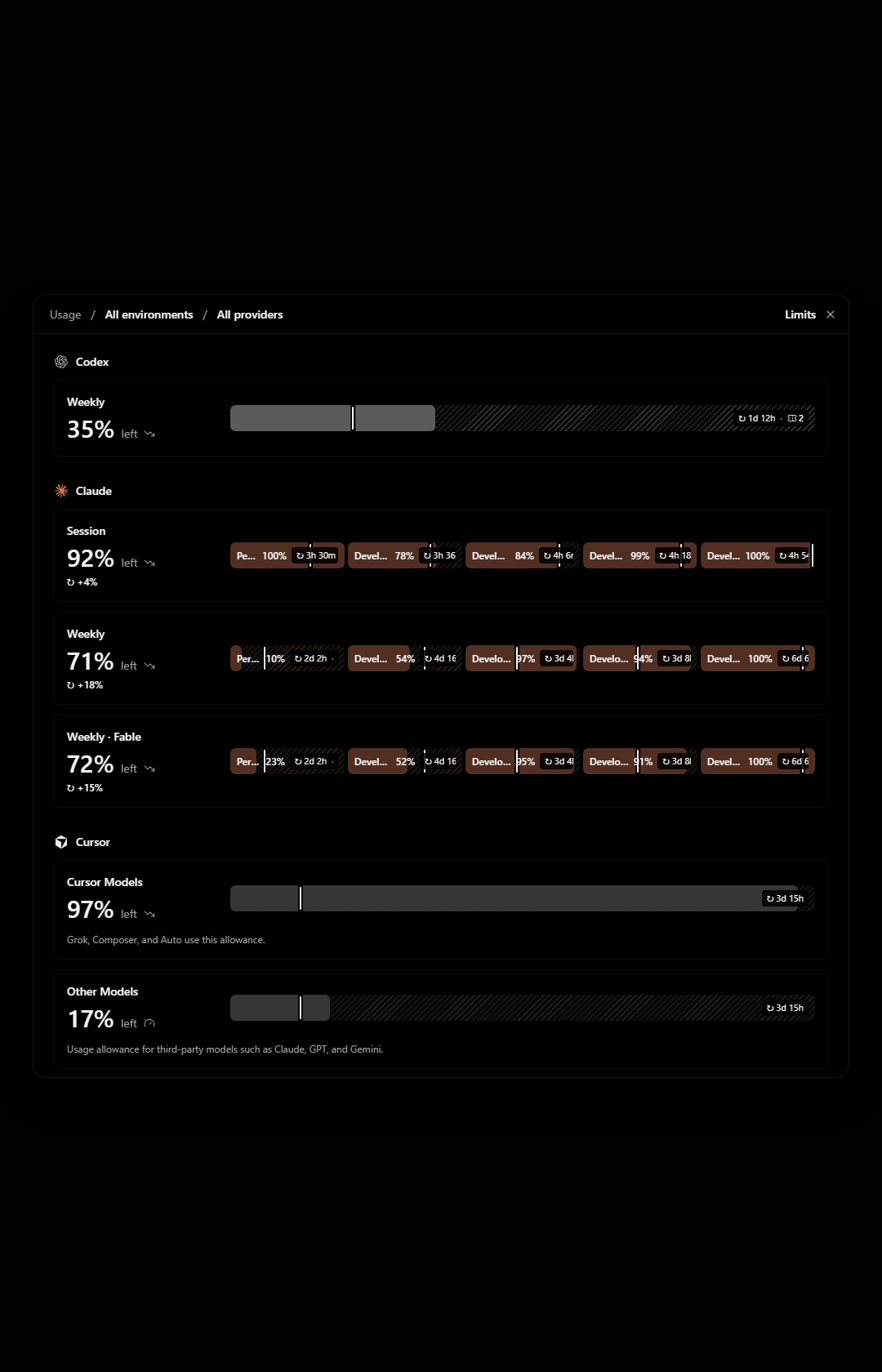
The modal stops at 960px tall. In a 1680px tall window that leaves about 360px of empty backdrop above and below it, while the last provider is cut off and I have to scroll inside the modal to reach it.
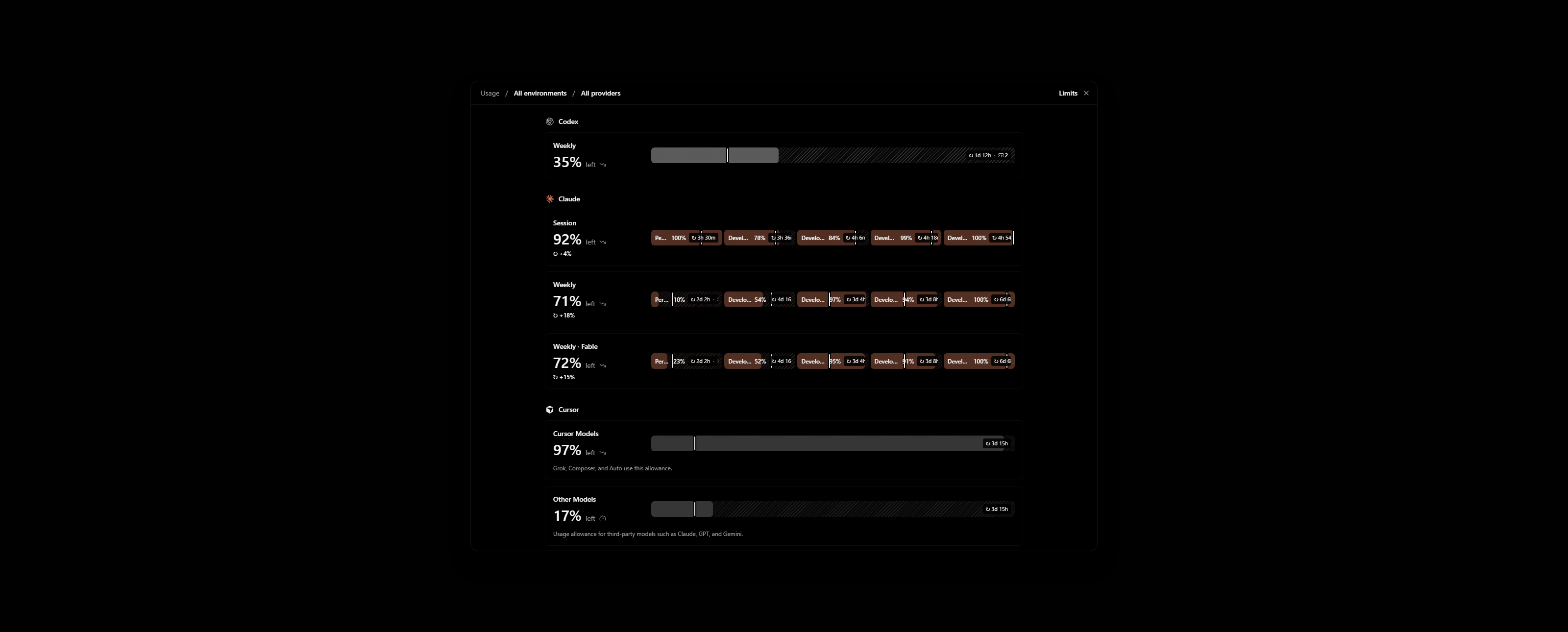
Zooming out does not help. The modal gets physically smaller and still shows the same rows, with more empty backdrop around it.
The cause is sm:max-h-[60rem] on the popup in apps/web/src/components/AppRouteModal.tsx. The cap is in rem, so it scales with zoom. Settings uses the same modal and behaves the same way.
Impact
Minor bug or occasional failure
Version or commit
0.1.10-nightly.20261113.4616. Also on main @ 7903b487.
Environment
Windows 11, T3 Code desktop. One ultrawide monitor in portrait and one in landscape.
Screenshots, recordings, or supporting files
These are renders of AppRouteModal with the Limits view on made-up accounts, not my own. My real Limits page shows account emails.
Portrait window, 1080×1680. Grok is below the fold while the backdrop above and below is empty:
Landscape window, 2560×1030, zoomed out to 80%. The modal is smaller and Grok is still cut off:
Workaround
None. To show an agent my usage across providers I take several screenshots while scrolling.
- Lingua principale
- TypeScript
- Stelle
- 24.8k
- Fork
- 6.4k
- Merge medio
- 59m
- PR unite (30g)
- 418
Preparare l'ambiente
Avvia il container di sviluppo del progetto nel browser, con il tuo account GitHub.
- Nessun Dockerfile né file Docker Compose
- Ha un modello di pull request
- Leggi la guida per i contributori
Come iniziare
- Leggi tutta la issue e poi la guida ai contributi del progetto.
- Commenta sulla issue per dire che te ne occupi tu — evita che due persone facciano lo stesso lavoro.
- Fai un fork del repository e lavora su un branch.
- Apri una pull request che faccia riferimento al numero della issue.
Altre issue di pingdotgg/t3code
-
Difficoltà 2/5 1-3 ore Idoneità per principianti 66/100
I maintainer di solito rispondono entro 1 giorno
-
via-triage
Difficoltà 2/5 1-3 ore Idoneità per principianti 82/100
I maintainer di solito rispondono entro 1 giorno
-
Difficoltà 2/5 Mezza giornata Idoneità per principianti 68/100
I maintainer di solito rispondono entro 1 giorno
-
Question card options show LaTeX as raw source, though the question text renders itForse già presa Una pull request collegata a questa issue è aperta o già unita. Aperta
Difficoltà 2/5 1-3 ore Idoneità per principianti 76/100
I maintainer di solito rispondono entro 1 giorno
-
[Bug]: Settings inheritance popover shows raw slugs for branch naming, default permissions and response streamingForse già presa @juliusmarminge l’ha presa 1 giorno fa. Apertavouch:denounced
Difficoltà 2/5 1-3 ore Idoneità per principianti 84/100
I maintainer di solito rispondono entro 1 giorno
Tutte le issue di pingdotgg/t3code
Issue simili
-
Difficoltà 2/5 1-3 ore Idoneità per principianti 72/100
nikoheikkila/nikoheikkila.fi#1131 ·
I maintainer di solito rispondono entro 1 giorno
-
Resources: Update work of urumqiForse già presa Una pull request collegata a questa issue è aperta o già unita. Aperta
Difficoltà 2/5 1-3 ore Idoneità per principianti 65/100
railmapgen/rmp-gallery#4176 ·
I maintainer di solito rispondono entro 2 giorni
-
GraphQL custom headers duplicate differently cased default headersForse già presa @yxr-2025 l’ha presa oggi. Aperta
Difficoltà 2/5 1-3 ore Idoneità per principianti 70/100
elie222/rakazo#4625 · 1 commento ·
I maintainer di solito rispondono entro 1 giorno
-
Difficoltà 2/5 1-3 ore Idoneità per principianti 76/100
I maintainer di solito rispondono entro 1 giorno
-
[New Project]: PacaAperta
Difficoltà 2/5 1-3 ore Idoneità per principianti 65/100
github/forgoodfirstissue#574 ·