Groups and stacked/dodged positions.
Los mantenedores suelen responder en 1 día
Nadie ha tomado este issue todavía.
Evaluación
- Dificultad
- 5/5
- Tiempo estimado
- Más de una semana
- Aptitud para principiantes
- 28/100
- Tipo de issue
- Nueva funcionalidad
- Claridad
- Bastante claro
- Estado de actividad
- Estancado
- Área
- data-visualization
Línea de trabajo
Comienza reproduciendo los ejemplos con geom_col, position='stack', position='dodge' y position_dodge2 usando los datos full_df proporcionados. Traza cómo estas posiciones gestionan las asignaciones explícitas group='replicate' y fill='species'; el resultado debería ser una forma documentada y probada de hacer dodge de los grupos replicate manteniendo species apilado, sin ajustes manuales de x o width.
Escrito por el modelo de indexación a partir del texto del issue.
Descripción
I'm dealing with a figure where I would like to be able to dodge columns based on the group aesthetic while having the columns stay stacked on the fill aesthetic.
My intuition was that for geometries that use the group aesthetic, color/fill is assumed to be used as the group when it is not explicitly mapped to a variable. This seems to be the case with geom_line, for instance.
However, when using position_dodge and an explicitly mapped group, the bars appear to still be dodged by the group + fill variable.
To show some examples with a toy dataset:
df = pd.DataFrame(dict(
    day=np.repeat(range(1, 5), 3),
    species=np.tile(['A', 'B', 'C'], 4),
    counts=np.random.randint(0, 200, 12),
    replicate=1
))

df_replicates = df.query('day==2').assign(replicate=2).assign(counts=np.random.randint(0, 200, 3))

full_df = pd.concat([df, df_replicates])
| day | species | counts | replicate |
|---|---|---|---|
| 1 | A | 49 | 1 |
| 1 | B | 92 | 1 |
| 1 | C | 195 | 1 |
| 2 | A | 110 | 1 |
| 2 | B | 150 | 1 |
| 2 | C | 32 | 1 |
| 3 | A | 9 | 1 |
| 3 | B | 146 | 1 |
| 3 | C | 195 | 1 |
| 4 | A | 161 | 1 |
| 4 | B | 190 | 1 |
| 4 | C | 100 | 1 |
| 2 | A | 88 | 2 |
| 2 | B | 87 | 2 |
| 2 | C | 32 | 2 |
In this case, we have two different samples/replicates in day 2.
Default Behaviour
(p9.ggplot(full_df)
 + p9.aes('day', 'counts', fill='species', group='replicate')
 + p9.geom_col()
)
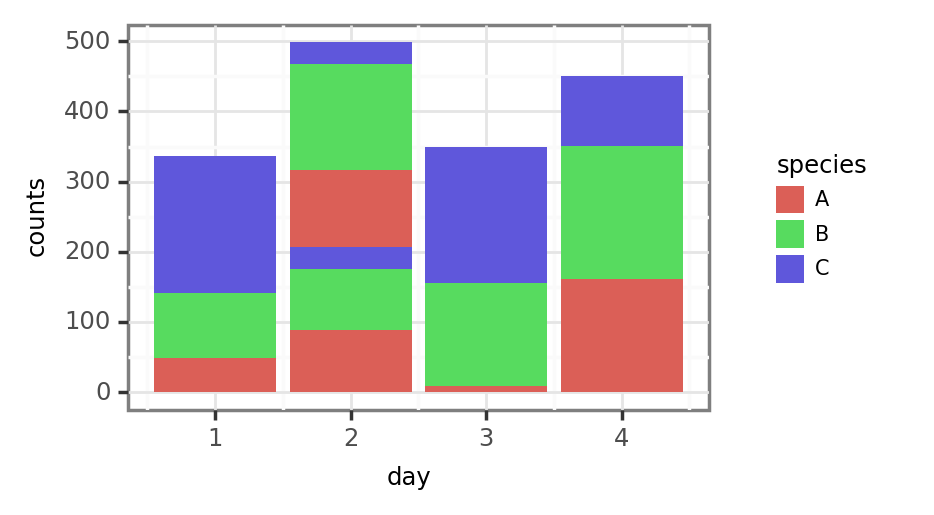
Since the default position is stack, specifying the group as the replicate stacks the bars for each of the replicates of day 2 following the order of species-replicate: A-1, B-1, C-1, A-2, B-2, C-2. Fair enough, this is probably the expected and desired behaviour.
Dodged Behaviour
The issue arises when we attempt to dodge the groups, so that the height of the bars still represents the total counts in a single sample:
position_dodge
(p9.ggplot(full_df)
 + p9.aes('day', 'counts', fill='species', group='replicate')
 + p9.geom_col(position='dodge')
)
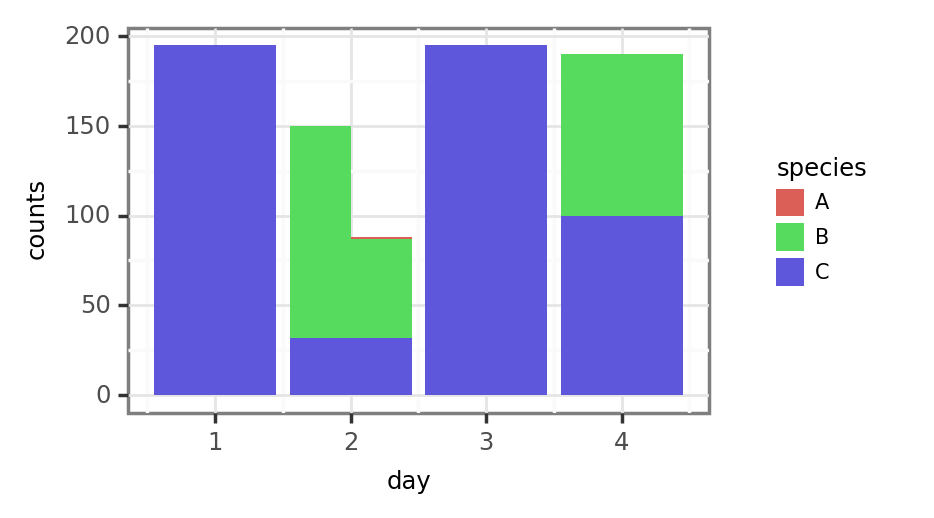
The group (replicates) have now been properly dodged/unstacked in day 2, but the previously stacked species all start now in the same x-y coords of the day-group instead of being stacked. Lowering the alpha a tad helps to see it better:

position_dodge2
The results with position_dodge2 are also problematic, since the width of the bars doesn't seem to be properly calculated (day 1 values become half as wide, while values for day 2 stay the same and overlap with values from the other days).
In any case, this completely unstacks the species/fill aesthetic, which is something we don't want even if bars' width was properly calculated.
The hacky solution
I thought that manually changing the x values (works in this case but would be a bit harder if the x variable was a Categorical, for instance) and generating a width variable to pass as an aesthetic manually setting the width of the day 2 values to .25 should allow me to make this work:
(full_df
 .assign(day=lambda dd: np.where(dd.replicate == 2, dd.day + .22, dd.day))
 .assign(day=lambda dd: np.where(dd.day==2, dd.day - .22, dd.day))
 .assign(width=lambda dd: np.where(dd.day.round() == 2, .4, .8))
 .pipe(lambda dd: p9.ggplot(dd)
 + p9.aes('day', 'counts', fill='species', group='replicate')
 + p9.geom_col(position='stack', mapping=p9.aes(width='width'))
)

I actually managed to solve this while writing the issue with this hacky solution, but still, it feels like there might be some way to include this behaviour in some position variety? I don't know if this situation is common enough to justify generating a specific position_dodgestack or something like that, but what do you think?
- Lenguaje dominante
- Python
- Estrellas
- 4.8k
- Forks
- 260
- Merge medio
- 2 d 12 h
- PR fusionados (30 d)
- 4
Preparar el entorno
Este proyecto no incluye contenedor de desarrollo, Dockerfile ni guía de contribución, así que la configuración corre por tu cuenta: empieza por su README y consulta nuestra guía para la primera contribución para los pasos generales.
Primeros pasos
- Lee el issue completo y luego la guía de contribución del proyecto.
- Comenta en el issue que vas a ocuparte — evita que dos personas hagan lo mismo.
- Haz un fork del repositorio y trabaja en una rama.
- Abre un pull request que haga referencia al número del issue.
Más de has2k1/plotnine
-
Dificultad 2/5 1-3 horas Aptitud para principiantes 66/100
Los mantenedores suelen responder en 1 día
-
Enhancement
Dificultad 3/5 Medio día Aptitud para principiantes 55/100
has2k1/plotnine#1141 · 2 comentarios ·
Los mantenedores suelen responder en 1 día
-
Enhancement
Dificultad 4/5 3-5 días Aptitud para principiantes 52/100
has2k1/plotnine#1081 · 3 comentarios ·
Los mantenedores suelen responder en 1 día
-
Discussion
Dificultad 5/5 Más de una semana Aptitud para principiantes 30/100
has2k1/plotnine#1047 · 15 comentarios · 3 reacciones ·
Los mantenedores suelen responder en 1 día
-
Documentation Plot Composition Question
Dificultad 3/5 1-2 días Aptitud para principiantes 45/100
has2k1/plotnine#1036 · 1 comentario ·
Los mantenedores suelen responder en 1 día
Todos los issues de has2k1/plotnine
Issues similares
-
Dificultad 2/5 1-3 horas Aptitud para principiantes 76/100
volcengine/OpenViking#7347 ·
Los mantenedores suelen responder en 1 día
-
Dificultad 2/5 1-3 horas Aptitud para principiantes 72/100
duolicious/duolicious#1943 ·
Los mantenedores suelen responder en 1 día
-
Dificultad 2/5 1-3 horas Aptitud para principiantes 76/100
fedora-infra/anitya#2166 ·
Los mantenedores suelen responder en 1 día
-
Dificultad 2/5 1-3 horas Aptitud para principiantes 78/100
NVIDIA/auto-ontology#486 ·
Los mantenedores suelen responder en 1 día
-
Dificultad 2/5 1-3 horas Aptitud para principiantes 69/100
NVIDIA/SkillEvaluator#446 ·
Los mantenedores suelen responder en 2 días