Groups and stacked/dodged positions.
维护者通常 1 天内回复
还没有人认领这个 Issue。
评估
- 难度
- 5/5
- 预计耗时
- 一周以上
- 新手友好度
- 28/100
- Issue 类型
- 功能
- 描述清晰度
- 基本清楚
- 活跃度
- 停滞
调研方向
首先使用提供的 full_df 数据复现 geom_col、position='stack'、position='dodge' 和 position_dodge2 的示例。跟踪这些 position 如何处理显式的 group='replicate' 和 fill='species' 映射;完成后应提供一种有文档记录且经过测试的方法,在保持 species 堆叠的同时对 replicate 组进行 dodge,而无需手动调整 x 或 width。
由索引模型根据 Issue 内容生成。
描述
I'm dealing with a figure where I would like to be able to dodge columns based on the group aesthetic while having the columns stay stacked on the fill aesthetic.
My intuition was that for geometries that use the group aesthetic, color/fill is assumed to be used as the group when it is not explicitly mapped to a variable. This seems to be the case with geom_line, for instance.
However, when using position_dodge and an explicitly mapped group, the bars appear to still be dodged by the group + fill variable.
To show some examples with a toy dataset:
df = pd.DataFrame(dict(
    day=np.repeat(range(1, 5), 3),
    species=np.tile(['A', 'B', 'C'], 4),
    counts=np.random.randint(0, 200, 12),
    replicate=1
))

df_replicates = df.query('day==2').assign(replicate=2).assign(counts=np.random.randint(0, 200, 3))

full_df = pd.concat([df, df_replicates])
| day | species | counts | replicate |
|---|---|---|---|
| 1 | A | 49 | 1 |
| 1 | B | 92 | 1 |
| 1 | C | 195 | 1 |
| 2 | A | 110 | 1 |
| 2 | B | 150 | 1 |
| 2 | C | 32 | 1 |
| 3 | A | 9 | 1 |
| 3 | B | 146 | 1 |
| 3 | C | 195 | 1 |
| 4 | A | 161 | 1 |
| 4 | B | 190 | 1 |
| 4 | C | 100 | 1 |
| 2 | A | 88 | 2 |
| 2 | B | 87 | 2 |
| 2 | C | 32 | 2 |
In this case, we have two different samples/replicates in day 2.
Default Behaviour
(p9.ggplot(full_df)
 + p9.aes('day', 'counts', fill='species', group='replicate')
 + p9.geom_col()
)
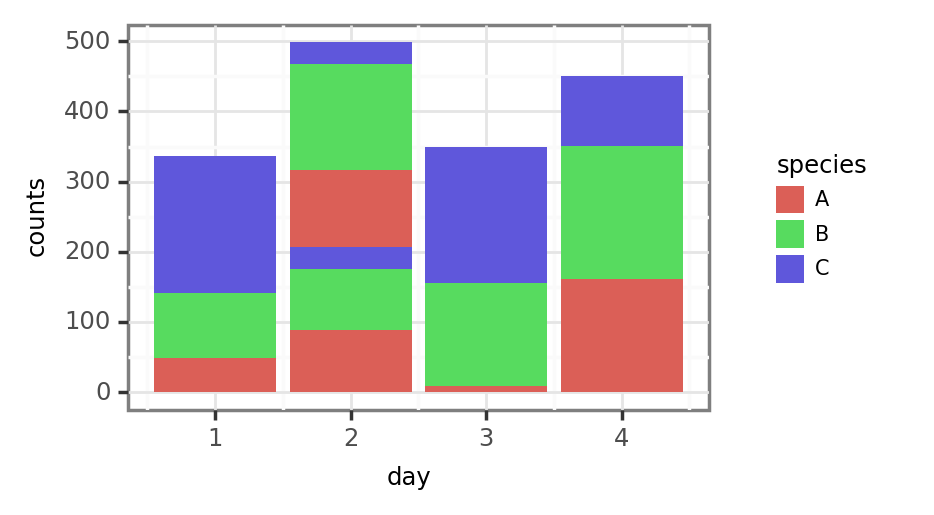
Since the default position is stack, specifying the group as the replicate stacks the bars for each of the replicates of day 2 following the order of species-replicate: A-1, B-1, C-1, A-2, B-2, C-2. Fair enough, this is probably the expected and desired behaviour.
Dodged Behaviour
The issue arises when we attempt to dodge the groups, so that the height of the bars still represents the total counts in a single sample:
position_dodge
(p9.ggplot(full_df)
 + p9.aes('day', 'counts', fill='species', group='replicate')
 + p9.geom_col(position='dodge')
)
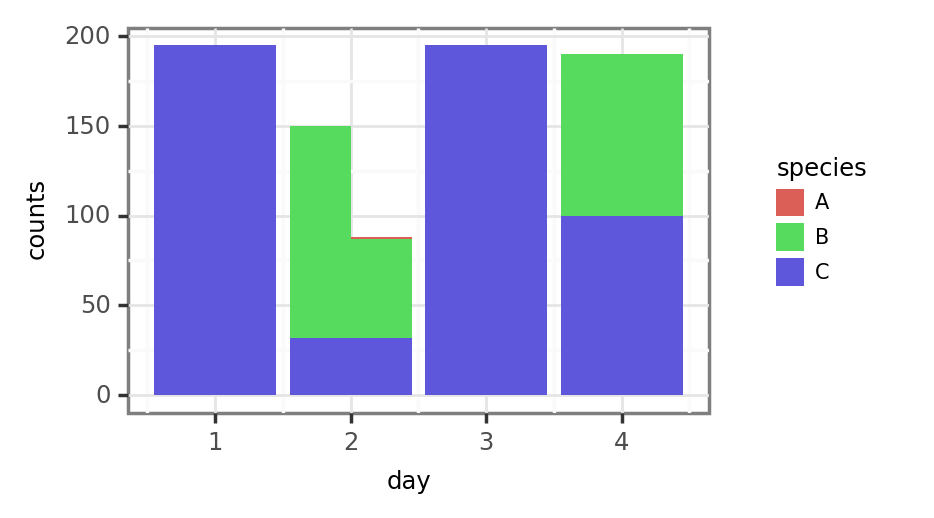
The group (replicates) have now been properly dodged/unstacked in day 2, but the previously stacked species all start now in the same x-y coords of the day-group instead of being stacked. Lowering the alpha a tad helps to see it better:

position_dodge2
The results with position_dodge2 are also problematic, since the width of the bars doesn't seem to be properly calculated (day 1 values become half as wide, while values for day 2 stay the same and overlap with values from the other days).
In any case, this completely unstacks the species/fill aesthetic, which is something we don't want even if bars' width was properly calculated.
The hacky solution
I thought that manually changing the x values (works in this case but would be a bit harder if the x variable was a Categorical, for instance) and generating a width variable to pass as an aesthetic manually setting the width of the day 2 values to .25 should allow me to make this work:
(full_df
 .assign(day=lambda dd: np.where(dd.replicate == 2, dd.day + .22, dd.day))
 .assign(day=lambda dd: np.where(dd.day==2, dd.day - .22, dd.day))
 .assign(width=lambda dd: np.where(dd.day.round() == 2, .4, .8))
 .pipe(lambda dd: p9.ggplot(dd)
 + p9.aes('day', 'counts', fill='species', group='replicate')
 + p9.geom_col(position='stack', mapping=p9.aes(width='width'))
)

I actually managed to solve this while writing the issue with this hacky solution, but still, it feels like there might be some way to include this behaviour in some position variety? I don't know if this situation is common enough to justify generating a specific position_dodgestack or something like that, but what do you think?
- 主要语言
- Python
- 星标
- 4.8k
- 派生
- 260
- 平均合并
- 2 天 12 小时
- 30 天内合并 PR
- 4
环境准备
这个项目没有提供开发容器、Dockerfile 或贡献指南,环境需要你自己搭建:先看它的 README,通用步骤见我们的新手贡献指南。
从这里开始
- 先读完整个 Issue,再读项目的贡献指南。
- 在 Issue 下留言说明你要接手 —— 这能避免两个人做同样的事。
- Fork 仓库,在一个分支上完成修改。
- 提交 Pull Request,并在描述里引用这个 Issue 编号。
has2k1/plotnine 的其他 Issue
-
难度 2/5 1-3 小时 新手友好度 66/100
维护者通常 1 天内回复
-
Enhancement
难度 3/5 半天 新手友好度 55/100
has2k1/plotnine#1141 · 2 条评论 ·
维护者通常 1 天内回复
-
Enhancement
难度 4/5 3-5 天 新手友好度 52/100
has2k1/plotnine#1081 · 3 条评论 ·
维护者通常 1 天内回复
-
Discussion
难度 5/5 一周以上 新手友好度 30/100
has2k1/plotnine#1047 · 15 条评论 · 3 个 reaction ·
维护者通常 1 天内回复
-
Documentation Plot Composition Question
难度 3/5 1-2 天 新手友好度 45/100
has2k1/plotnine#1036 · 1 条评论 ·
维护者通常 1 天内回复
相似的 Issue
-
area: providers/aws priority: p2 size: S type: bug type: testing
难度 2/5 1-3 小时 新手友好度 78/100
finos/open-resource-broker#851 ·
维护者通常 1 天内回复
-
难度 1/5 1-3 小时 新手友好度 88/100
sandialabs/atlas-ui-3#1196 ·
维护者通常 1 天内回复
-
enhancement triage
难度 2/5 1-3 小时 新手友好度 82/100
ShaftHQ/SHAFT_ENGINE#7902 ·
维护者通常 1 天内回复
-
[Bug]: GraphML export writes invalid XML when a value contains a control character (e.g. form feed)未关闭
难度 2/5 1-3 小时 新手友好度 78/100
topoteretes/cognee#6646 · 1 条评论 ·
维护者通常 1 天内回复
-
难度 1/5 1 小时以内 新手友好度 75/100
DOI-USGS/pywatershed#428 ·