Export screen text overflows its controls and statistics
Maintainers usually reply within 1 day
Assessment
- Difficulty
- 2/5
- Estimated time
- 1-3 hours
- Newbie friendliness
- 1/100
Research direction
Start in the export screen UI and its GPUI layout test mentioned in the issue; reproduce with a Studio recording at 1080p and 30 FPS, with Advanced and Export cursor only enabled. Check the MOV warning, Shareable Link destination, and statistics output value for text that stays within its control or card. A linked pull request, #4275, is already open.
Written by the indexing model from the issue text.
Description
Description
The export screen has several text layout problems:
- With Export cursor only enabled, the transparent MOV warning runs past the right edge of its card.
- The output value can cross into the next column in the export statistics, for example
1660×1080 · 30 fpsin a 520 px-wide statistics card. - The Shareable Link destination is truncated in the English interface.
The text should remain readable within its own control or card.
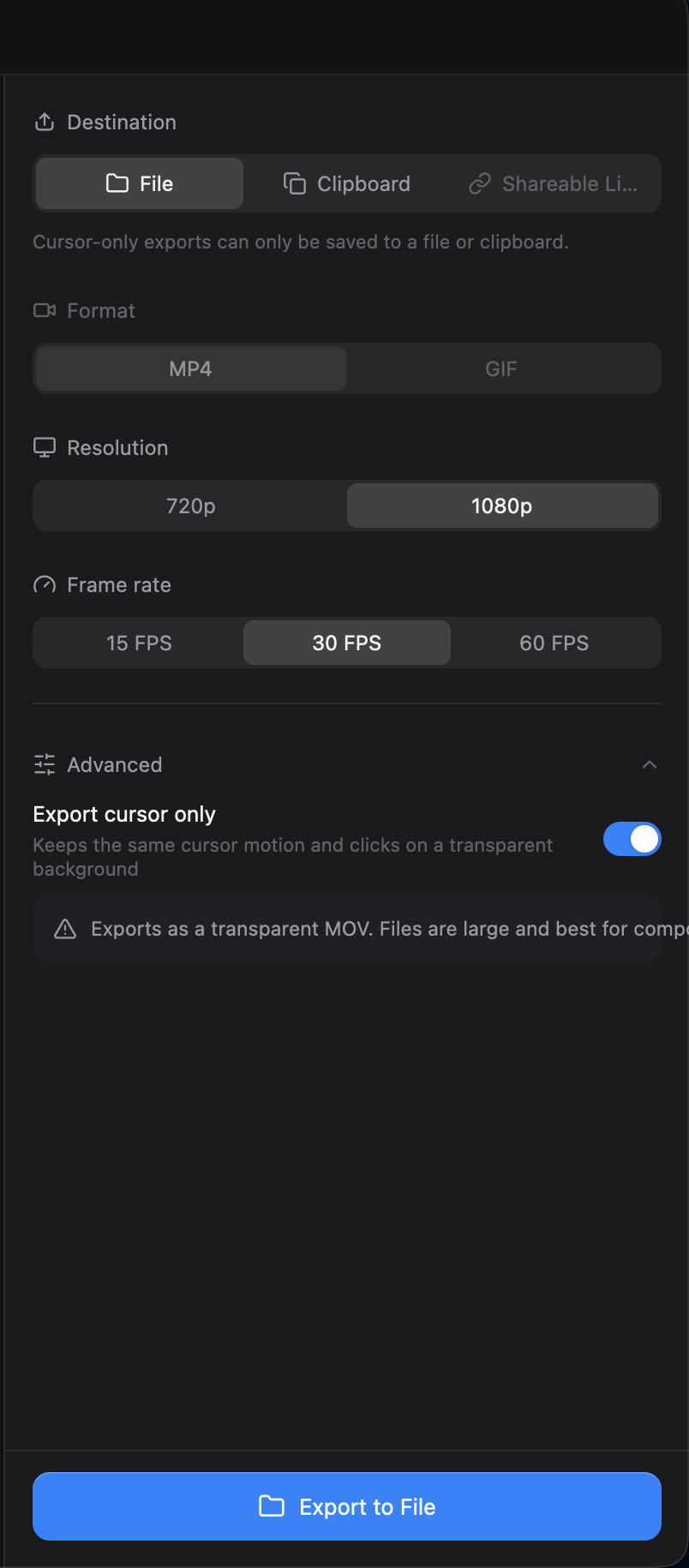

Reproduction
- Open a Studio recording in the editor and open Export.
- Select 1080p and 30 FPS, expand Advanced, and enable Export cursor only.
- Check the warning, the destination controls, and the output value in the statistics card.
Additional Context
- Operating system: macOS
- The statistics overlap was also reproduced with a GPUI layout test against commit
e5fb548.
- Dominant language
- Rust
- Stars
- 25k
- Forks
- 2.4k
- Avg merge
- 1d 8h
- Merged PRs (30d)
- 676
Getting set up
- Ships a Dockerfile or Docker Compose file
- No pull request template
- Read the contributing guide
First steps
- Read the whole issue, then the project's contributing guide.
- Comment on the issue to say you are picking it up — it saves two people doing the same work.
- Fork the repository and make your change on a branch.
- Open a pull request that references the issue number.
More from CapSoftware/Cap
-
Captions panel does not offer to show an existing transcriptPossibly taken @thedavidweng claimed this today. Open
Difficulty 2/5 1-3 hours Newbie friendliness 72/100
CapSoftware/Cap#4276 · 1 comment ·
Maintainers usually reply within 1 day
-
Download, FAQ, privacy and terms pages have no meta descriptionPossibly taken @patrickballard claimed this 13 days ago. Open
Difficulty 2/5 1-3 hours Newbie friendliness 82/100
CapSoftware/Cap#3675 · 1 comment ·
Maintainers usually reply within 1 day
-
self hosting
Difficulty 2/5 1-3 hours Newbie friendliness 68/100
CapSoftware/Cap#2384 · 3 comments ·
Maintainers usually reply within 1 day
-
Dashboard pagination causes full page reloads on self-hosted CapPossibly taken @DipanshuAmbilkar03 claimed this 11 days ago. Open
Difficulty 2/5 1-3 hours Newbie friendliness 88/100
CapSoftware/Cap#2305 · 2 comments ·
Maintainers usually reply within 1 day
-
Difficulty 2/5 1-3 hours Newbie friendliness 68/100
CapSoftware/Cap#1714 · 3 comments ·
Maintainers usually reply within 1 day
Similar issues
-
benchmark-review
Difficulty 2/5 1-3 hours Newbie friendliness 63/100
Maintainers usually reply within 1 day
-
area:filesystem bug need-triage
Difficulty 2/5 1-3 hours Newbie friendliness 85/100
Maintainers usually reply within 1 day
-
Difficulty 2/5 1-3 hours Newbie friendliness 78/100
Maintainers usually reply within 1 day
-
Difficulty 2/5 1-3 hours Newbie friendliness 76/100
libracoder/kiri#364 ·
Maintainers usually reply within 1 day
-
Difficulty 2/5 1-3 hours Newbie friendliness 78/100
matrix-org/matrix-rust-sdk#7495 ·
Maintainers usually reply within 1 day