Export screen text overflows its controls and statistics
メンテナーはふだん 1 日以内に返信
評価
- 難易度
- 2/5
- 見積もり時間
- 1〜3時間
- 初心者へのやさしさ
- 1/100
調査の方向性
Start in the export screen UI and its GPUI layout test mentioned in the issue; reproduce with a Studio recording at 1080p and 30 FPS, with Advanced and Export cursor only enabled. Check the MOV warning, Shareable Link destination, and statistics output value for text that stays within its control or card. A linked pull request, #4275, is already open.
索引モデルが issue の本文から書いたものです。
説明
Description
The export screen has several text layout problems:
- With Export cursor only enabled, the transparent MOV warning runs past the right edge of its card.
- The output value can cross into the next column in the export statistics, for example
1660×1080 · 30 fpsin a 520 px-wide statistics card. - The Shareable Link destination is truncated in the English interface.
The text should remain readable within its own control or card.
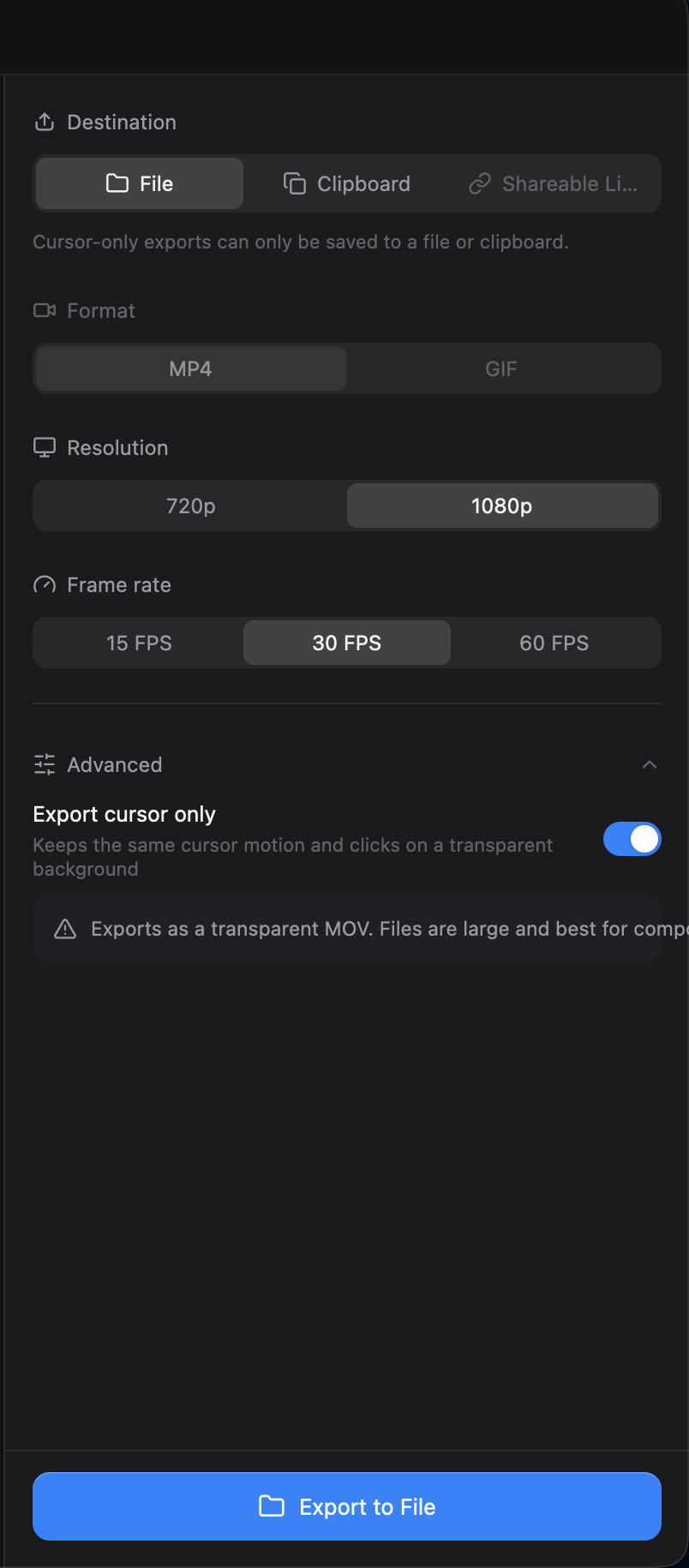

Reproduction
- Open a Studio recording in the editor and open Export.
- Select 1080p and 30 FPS, expand Advanced, and enable Export cursor only.
- Check the warning, the destination controls, and the output value in the statistics card.
Additional Context
- Operating system: macOS
- The statistics overlap was also reproduced with a GPUI layout test against commit
e5fb548.
- 主要言語
- Rust
- スター
- 25k
- フォーク
- 2.4k
- 平均マージ
- 1日 8時間
- マージ済み PR(30日)
- 676
環境構築
- Dockerfile または Docker Compose ファイルあり
- プルリクエストのテンプレートなし
- コントリビューションガイドを読む
はじめの一歩
- issue を最後まで読み、次にプロジェクトのコントリビューションガイドを読みます。
- 着手することを issue にコメントします — 二人が同じ作業をするのを防げます。
- リポジトリをフォークし、ブランチを切って変更します。
- issue 番号を参照したプルリクエストを送ります。
CapSoftware/Cap のほかの issue
-
Captions panel does not offer to show an existing transcript対応中かも @thedavidweng が今日担当しました。 オープン
難易度 2/5 1〜3時間 初心者へのやさしさ 72/100
CapSoftware/Cap#4276 · コメント 1 件 ·
メンテナーはふだん 1 日以内に返信
-
Download, FAQ, privacy and terms pages have no meta description対応中かも @patrickballard が 13 日前に担当しました。 オープン
難易度 2/5 1〜3時間 初心者へのやさしさ 82/100
CapSoftware/Cap#3675 · コメント 1 件 ·
メンテナーはふだん 1 日以内に返信
-
self hosting
難易度 2/5 1〜3時間 初心者へのやさしさ 68/100
CapSoftware/Cap#2384 · コメント 3 件 ·
メンテナーはふだん 1 日以内に返信
-
Dashboard pagination causes full page reloads on self-hosted Cap対応中かも @DipanshuAmbilkar03 が 11 日前に担当しました。 オープン
難易度 2/5 1〜3時間 初心者へのやさしさ 88/100
CapSoftware/Cap#2305 · コメント 2 件 ·
メンテナーはふだん 1 日以内に返信
-
難易度 2/5 1〜3時間 初心者へのやさしさ 68/100
CapSoftware/Cap#1714 · コメント 3 件 ·
メンテナーはふだん 1 日以内に返信
CapSoftware/Cap の issue をすべて見る
似ている issue
-
benchmark-review
難易度 2/5 1〜3時間 初心者へのやさしさ 63/100
メンテナーはふだん 1 日以内に返信
-
area:filesystem bug need-triage
難易度 2/5 1〜3時間 初心者へのやさしさ 85/100
メンテナーはふだん 1 日以内に返信
-
難易度 2/5 1〜3時間 初心者へのやさしさ 78/100
メンテナーはふだん 1 日以内に返信
-
難易度 2/5 1〜3時間 初心者へのやさしさ 76/100
libracoder/kiri#364 ·
メンテナーはふだん 1 日以内に返信
-
難易度 2/5 1〜3時間 初心者へのやさしさ 78/100
matrix-org/matrix-rust-sdk#7495 ·
メンテナーはふだん 1 日以内に返信