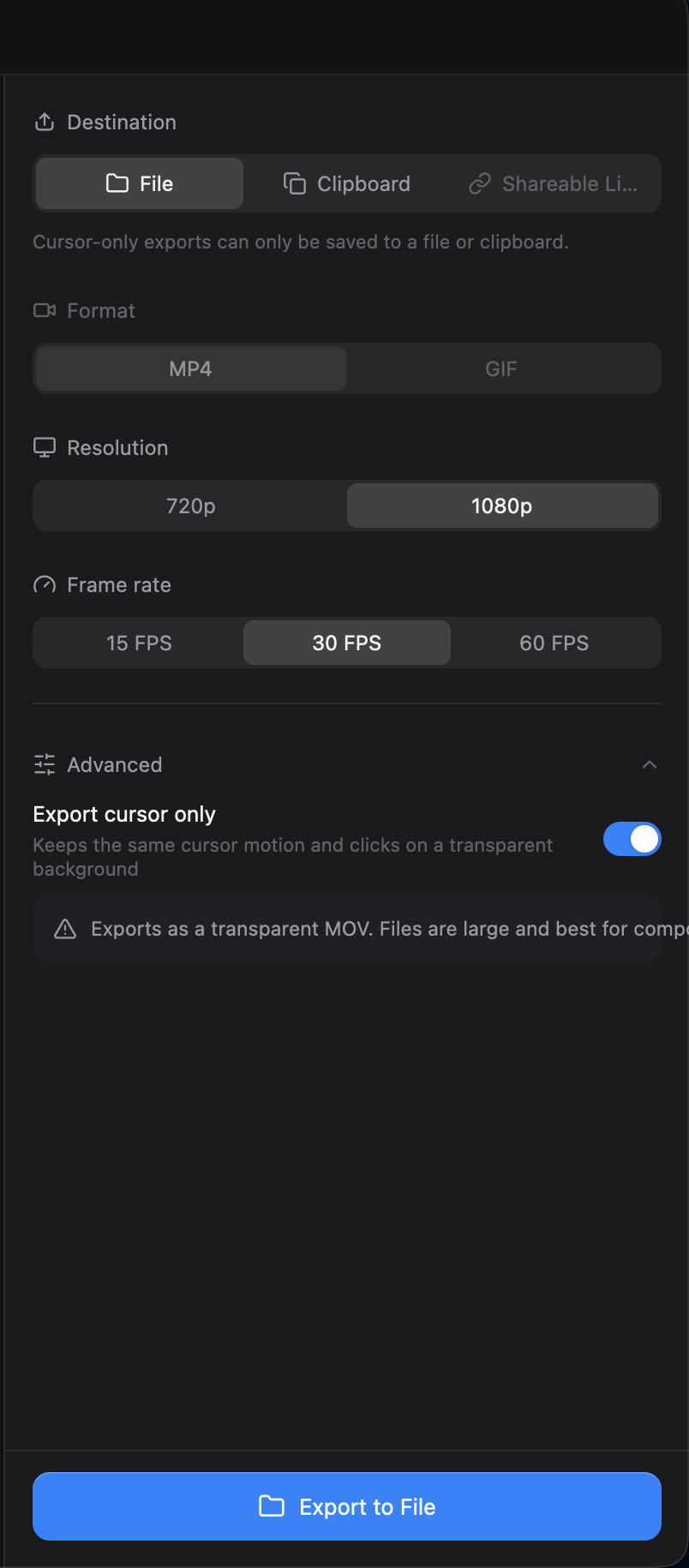
Export screen text overflows its controls and statistics
I maintainer di solito rispondono entro 1 giorno
Valutazione
- Difficoltà
- 2/5
- Tempo stimato
- 1-3 ore
- Idoneità per principianti
- 1/100
Direzione di ricerca
Start in the export screen UI and its GPUI layout test mentioned in the issue; reproduce with a Studio recording at 1080p and 30 FPS, with Advanced and Export cursor only enabled. Check the MOV warning, Shareable Link destination, and statistics output value for text that stays within its control or card. A linked pull request, #4275, is already open.
Scritto dal modello di indicizzazione a partire dal testo della issue.
Descrizione
Description
The export screen has several text layout problems:
- With Export cursor only enabled, the transparent MOV warning runs past the right edge of its card.
- The output value can cross into the next column in the export statistics, for example
1660×1080 · 30 fpsin a 520 px-wide statistics card. - The Shareable Link destination is truncated in the English interface.
The text should remain readable within its own control or card.

Reproduction
- Open a Studio recording in the editor and open Export.
- Select 1080p and 30 FPS, expand Advanced, and enable Export cursor only.
- Check the warning, the destination controls, and the output value in the statistics card.
Additional Context
- Operating system: macOS
- The statistics overlap was also reproduced with a GPUI layout test against commit
e5fb548.
- Lingua principale
- Rust
- Stelle
- 25k
- Fork
- 2.4k
- Merge medio
- 1g 8h
- PR unite (30g)
- 676
Preparare l'ambiente
- Include un Dockerfile o un file Docker Compose
- Nessun modello di pull request
- Leggi la guida per i contributori
Come iniziare
- Leggi tutta la issue e poi la guida ai contributi del progetto.
- Commenta sulla issue per dire che te ne occupi tu — evita che due persone facciano lo stesso lavoro.
- Fai un fork del repository e lavora su un branch.
- Apri una pull request che faccia riferimento al numero della issue.
Altre issue di CapSoftware/Cap
-
Captions panel does not offer to show an existing transcriptForse già presa @thedavidweng l’ha presa oggi. Aperta
Difficoltà 2/5 1-3 ore Idoneità per principianti 72/100
CapSoftware/Cap#4276 · 1 commento ·
I maintainer di solito rispondono entro 1 giorno
-
Download, FAQ, privacy and terms pages have no meta descriptionForse già presa @patrickballard l’ha presa 13 giorni fa. Aperta
Difficoltà 2/5 1-3 ore Idoneità per principianti 82/100
CapSoftware/Cap#3675 · 1 commento ·
I maintainer di solito rispondono entro 1 giorno
-
self hosting
Difficoltà 2/5 1-3 ore Idoneità per principianti 68/100
CapSoftware/Cap#2384 · 3 commenti ·
I maintainer di solito rispondono entro 1 giorno
-
Dashboard pagination causes full page reloads on self-hosted CapForse già presa @DipanshuAmbilkar03 l’ha presa 11 giorni fa. Aperta
Difficoltà 2/5 1-3 ore Idoneità per principianti 88/100
CapSoftware/Cap#2305 · 2 commenti ·
I maintainer di solito rispondono entro 1 giorno
-
Difficoltà 2/5 1-3 ore Idoneità per principianti 68/100
CapSoftware/Cap#1714 · 3 commenti ·
I maintainer di solito rispondono entro 1 giorno
Tutte le issue di CapSoftware/Cap
Issue simili
-
benchmark-review
Difficoltà 2/5 1-3 ore Idoneità per principianti 63/100
I maintainer di solito rispondono entro 1 giorno
-
area:filesystem bug need-triage
Difficoltà 2/5 1-3 ore Idoneità per principianti 85/100
I maintainer di solito rispondono entro 1 giorno
-
Difficoltà 2/5 1-3 ore Idoneità per principianti 78/100
I maintainer di solito rispondono entro 1 giorno
-
Difficoltà 2/5 1-3 ore Idoneità per principianti 76/100
libracoder/kiri#364 ·
I maintainer di solito rispondono entro 1 giorno
-
Difficoltà 2/5 1-3 ore Idoneità per principianti 78/100
matrix-org/matrix-rust-sdk#7495 ·
I maintainer di solito rispondono entro 1 giorno