Export screen text overflows its controls and statistics
Les mainteneurs répondent en général sous 1 jour
Évaluation
- Difficulté
- 2/5
- Temps estimé
- 1-3 heures
- Accessibilité débutants
- 1/100
Piste de recherche
Start in the export screen UI and its GPUI layout test mentioned in the issue; reproduce with a Studio recording at 1080p and 30 FPS, with Advanced and Export cursor only enabled. Check the MOV warning, Shareable Link destination, and statistics output value for text that stays within its control or card. A linked pull request, #4275, is already open.
Rédigé par le modèle d'indexation à partir du texte de l'issue.
Description
Description
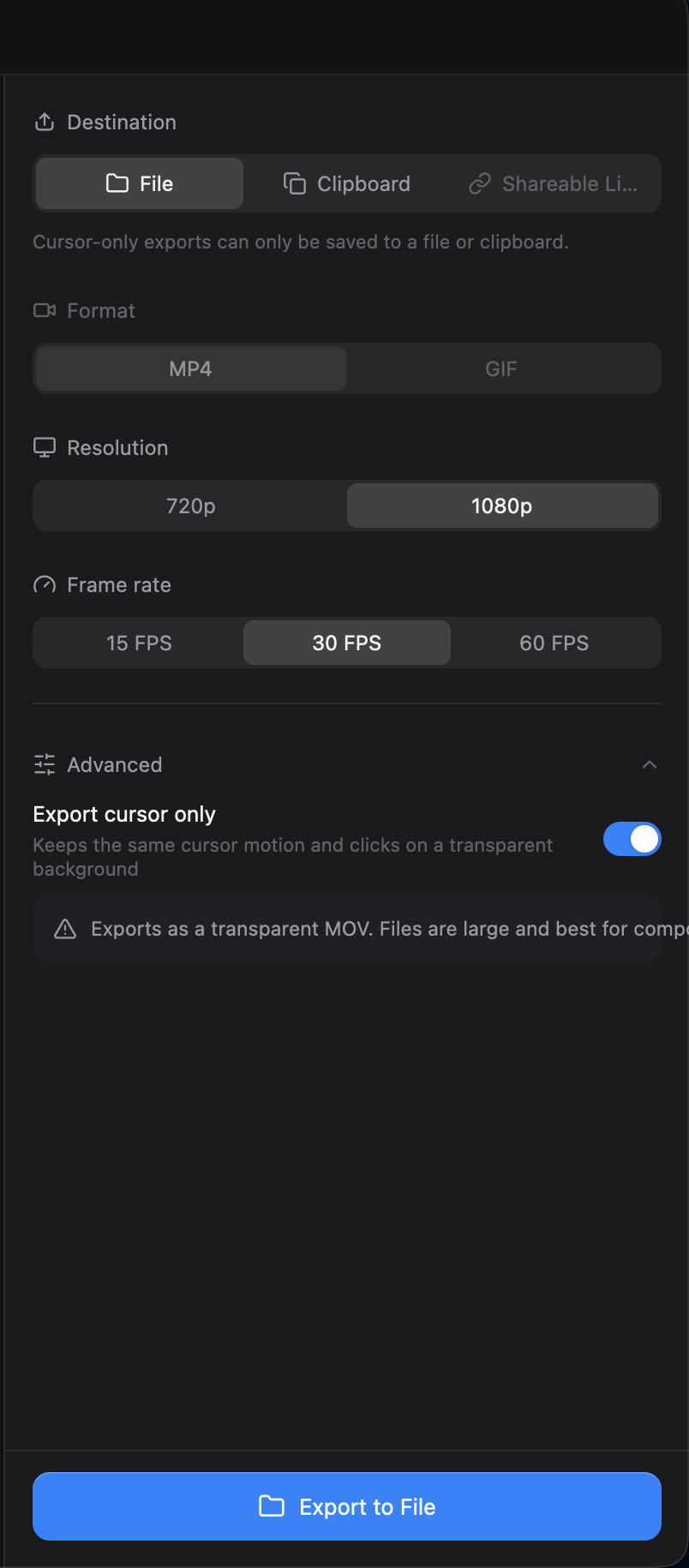
The export screen has several text layout problems:
- With Export cursor only enabled, the transparent MOV warning runs past the right edge of its card.
- The output value can cross into the next column in the export statistics, for example
1660×1080 · 30 fpsin a 520 px-wide statistics card. - The Shareable Link destination is truncated in the English interface.
The text should remain readable within its own control or card.

Reproduction
- Open a Studio recording in the editor and open Export.
- Select 1080p and 30 FPS, expand Advanced, and enable Export cursor only.
- Check the warning, the destination controls, and the output value in the statistics card.
Additional Context
- Operating system: macOS
- The statistics overlap was also reproduced with a GPUI layout test against commit
e5fb548.
- Langage dominant
- Rust
- Étoiles
- 25k
- Forks
- 2.4k
- Merge moyen
- 1 j 8 h
- PR mergées (30 j)
- 676
Préparer son environnement
- Fournit un Dockerfile ou un fichier Docker Compose
- Aucun modèle de pull request
- Lire le guide de contribution
Par où commencer
- Lisez l'issue en entier, puis le guide de contribution du projet.
- Signalez en commentaire que vous la prenez — cela évite que deux personnes fassent le même travail.
- Forkez le dépôt et travaillez sur une branche.
- Ouvrez une pull request qui référence le numéro de l'issue.
Autres issues de CapSoftware/Cap
-
Captions panel does not offer to show an existing transcriptPeut-être pris @thedavidweng l’a pris aujourd’hui. Ouverte
Difficulté 2/5 1-3 heures Accessibilité débutants 72/100
CapSoftware/Cap#4276 · 1 commentaire ·
Les mainteneurs répondent en général sous 1 jour
-
Download, FAQ, privacy and terms pages have no meta descriptionPeut-être pris @patrickballard l’a pris il y a 13 jours. Ouverte
Difficulté 2/5 1-3 heures Accessibilité débutants 82/100
CapSoftware/Cap#3675 · 1 commentaire ·
Les mainteneurs répondent en général sous 1 jour
-
self hosting
Difficulté 2/5 1-3 heures Accessibilité débutants 68/100
CapSoftware/Cap#2384 · 3 commentaires ·
Les mainteneurs répondent en général sous 1 jour
-
Dashboard pagination causes full page reloads on self-hosted CapPeut-être pris @DipanshuAmbilkar03 l’a pris il y a 11 jours. Ouverte
Difficulté 2/5 1-3 heures Accessibilité débutants 88/100
CapSoftware/Cap#2305 · 2 commentaires ·
Les mainteneurs répondent en général sous 1 jour
-
Difficulté 2/5 1-3 heures Accessibilité débutants 68/100
CapSoftware/Cap#1714 · 3 commentaires ·
Les mainteneurs répondent en général sous 1 jour
Toutes les issues de CapSoftware/Cap
Issues similaires
-
benchmark-review
Difficulté 2/5 1-3 heures Accessibilité débutants 63/100
Les mainteneurs répondent en général sous 1 jour
-
area:filesystem bug need-triage
Difficulté 2/5 1-3 heures Accessibilité débutants 85/100
Les mainteneurs répondent en général sous 1 jour
-
Difficulté 2/5 1-3 heures Accessibilité débutants 78/100
Les mainteneurs répondent en général sous 1 jour
-
Difficulté 2/5 1-3 heures Accessibilité débutants 76/100
libracoder/kiri#364 ·
Les mainteneurs répondent en général sous 1 jour
-
Difficulté 2/5 1-3 heures Accessibilité débutants 78/100
matrix-org/matrix-rust-sdk#7495 ·
Les mainteneurs répondent en général sous 1 jour