Export screen text overflows its controls and statistics
維護者通常 1 天內回覆
評估
研究方向
Start in the export screen UI and its GPUI layout test mentioned in the issue; reproduce with a Studio recording at 1080p and 30 FPS, with Advanced and Export cursor only enabled. Check the MOV warning, Shareable Link destination, and statistics output value for text that stays within its control or card. A linked pull request, #4275, is already open.
由索引模型根據 Issue 內容生成。
描述
Description
The export screen has several text layout problems:
- With Export cursor only enabled, the transparent MOV warning runs past the right edge of its card.
- The output value can cross into the next column in the export statistics, for example
1660×1080 · 30 fpsin a 520 px-wide statistics card. - The Shareable Link destination is truncated in the English interface.
The text should remain readable within its own control or card.
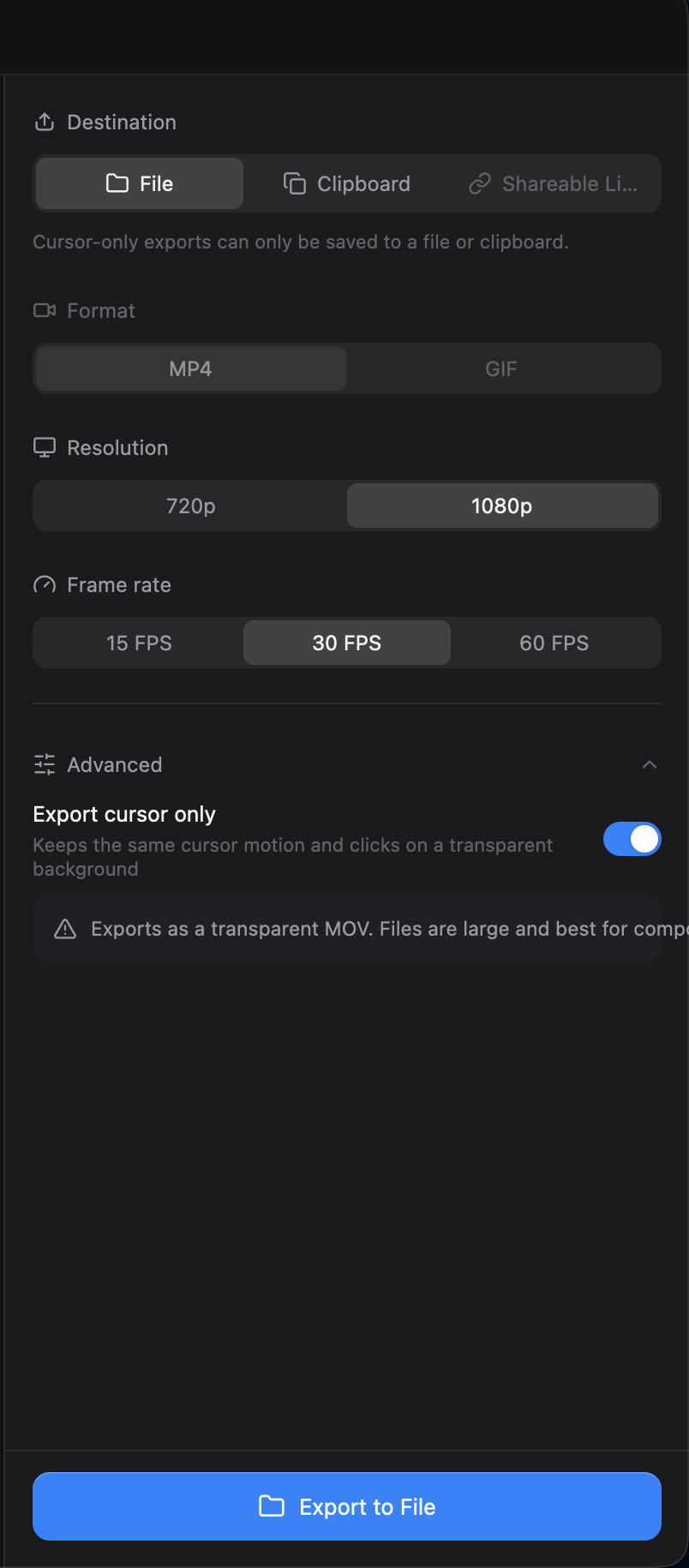

Reproduction
- Open a Studio recording in the editor and open Export.
- Select 1080p and 30 FPS, expand Advanced, and enable Export cursor only.
- Check the warning, the destination controls, and the output value in the statistics card.
Additional Context
- Operating system: macOS
- The statistics overlap was also reproduced with a GPUI layout test against commit
e5fb548.
- 主要語言
- Rust
- 星號
- 25k
- 分支
- 2.4k
- 平均合併
- 1 天 8 小時
- 30 天內合併 PR
- 676
環境準備
- 提供 Dockerfile 或 Docker Compose 檔案
- 沒有 Pull Request 範本
- 閱讀貢獻指南
從這裡開始
- 先讀完整個 Issue,再讀專案的貢獻指南。
- 在 Issue 下留言說明你要接手 —— 這能避免兩個人做同樣的事。
- Fork 儲存庫,在一個分支上完成修改。
- 送出 Pull Request,並在描述裡引用這個 Issue 編號。
CapSoftware/Cap 的其他 Issue
-
Captions panel does not offer to show an existing transcript可能已有人在做 @thedavidweng 今天認領。 未關閉
難度 2/5 1-3 小時 新手友好度 72/100
CapSoftware/Cap#4276 · 1 則留言 ·
維護者通常 1 天內回覆
-
Download, FAQ, privacy and terms pages have no meta description可能已有人在做 @patrickballard 於 13 天前認領。 未關閉
難度 2/5 1-3 小時 新手友好度 82/100
CapSoftware/Cap#3675 · 1 則留言 ·
維護者通常 1 天內回覆
-
self hosting
難度 2/5 1-3 小時 新手友好度 68/100
CapSoftware/Cap#2384 · 3 則留言 ·
維護者通常 1 天內回覆
-
Dashboard pagination causes full page reloads on self-hosted Cap可能已有人在做 @DipanshuAmbilkar03 於 11 天前認領。 未關閉
難度 2/5 1-3 小時 新手友好度 88/100
CapSoftware/Cap#2305 · 2 則留言 ·
維護者通常 1 天內回覆
-
難度 2/5 1-3 小時 新手友好度 68/100
CapSoftware/Cap#1714 · 3 則留言 ·
維護者通常 1 天內回覆
相似的 Issue
-
benchmark-review
難度 2/5 1-3 小時 新手友好度 63/100
維護者通常 1 天內回覆
-
area:filesystem bug need-triage
難度 2/5 1-3 小時 新手友好度 85/100
維護者通常 1 天內回覆
-
難度 2/5 1-3 小時 新手友好度 78/100
維護者通常 1 天內回覆
-
難度 2/5 1-3 小時 新手友好度 76/100
libracoder/kiri#364 ·
維護者通常 1 天內回覆
-
難度 2/5 1-3 小時 新手友好度 78/100
matrix-org/matrix-rust-sdk#7495 ·
維護者通常 1 天內回覆