[JavaScript] Tokenization breaks when new line starts with less-than operator
还没有人认领这个 Issue。
评估
- 难度
- 4/5
- 预计耗时
- 3-5 天
- 新手友好度
- 35/100
- Issue 类型
- 缺陷
- 描述清晰度
- 基本清楚
- 活跃度
- 停滞
- 技术栈
- javascript, typescript
- 领域
- tooling
调研方向
首先,在禁用扩展的 VS Code 中重现 JavaScript 示例,然后检查仓库的 TypeScript 语法文件。当行首的 less-than 运算符被高亮为运算符而不是开启 JSX,并且高亮不会持续到闭合标签时,修复就完成了。
由索引模型根据 Issue 内容生成。
描述
Does this issue occur when all extensions are disabled?: Yes
VS Code version: Code 1.66.0 (e18005f0f1b33c29e81d732535d8c0e47cafb0b5, 2022-03-30T05:50:41.156Z)
OS version: Linux x64 4.15.0-175-generic
Restricted Mode: No
System Info
| Item | Value |
|---|---|
| CPUs | Intel(R) Core(TM) i7-7820HQ CPU @ 2.90GHz (8 x 3541) |
| GPU Status | 2d_canvas: enabled canvas_oop_rasterization: disabled_off direct_rendering_display_compositor: disabled_off_ok gpu_compositing: enabled multiple_raster_threads: enabled_on oop_rasterization: disabled_off opengl: enabled_on rasterization: disabled_software raw_draw: disabled_off_ok skia_renderer: enabled_on video_decode: disabled_software video_encode: disabled_software vulkan: disabled_off webgl: enabled webgl2: enabled |
| Load (avg) | 0, 0, 1 |
| Memory (System) | 31.26GB (23.84GB free) |
| Process Argv | --unity-launch --crash-reporter-id c990702e-9bfc-48d9-b2b9-78bab7fdb823 |
| Screen Reader | no |
| VM | 0% |
| DESKTOP_SESSION | ubuntu |
| XDG_CURRENT_DESKTOP | Unity |
| XDG_SESSION_DESKTOP | ubuntu |
|XDG_SESSION_TYPE|x11|
Simple example
- In a new editor, set the language mode to plain
JavaScript - Type the following
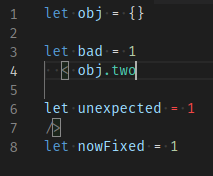
let obj = {} let bad = 1 < obj.two let unexpected = 1 /> let nowFixed = 1 - The
<on line 4 is treated as a JSX tag opener (even when the self-closing tag on line 7 is removed)
Note how GitHub's highlighting in 2. and this screenshot disagree
- Declaring
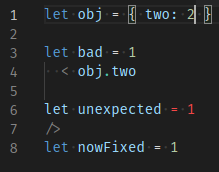
twoslightly changes highlighting, but notice the.inobj.twois still green. Using "Developer: Inspect Editor Token and Scopes" shows it's still considered a JSX tag.
Extended example
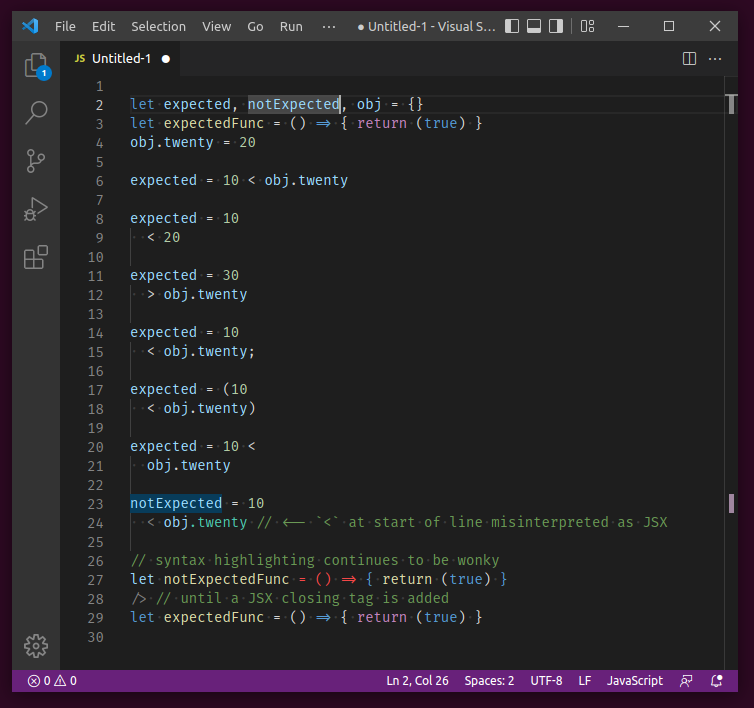
To show all the specific conditions required to trigger this issue
Show code snippet for copy-paste
let expected, notExpected, obj = {}
let expectedFunc = () => { return (true) }
obj.twenty = 20

expected = 10 < obj.twenty

expected = 10
  < 20

expected = 30
  > obj.twenty

expected = 10
  < obj.twenty;

expected = (10
  < obj.twenty)

expected = 10 <
  obj.twenty

notExpected = 10
  < obj.twenty // <-- `<` at start of line misinterpreted as JSX

// syntax highlighting continues to be wonky
let notExpectedFunc = () => { return (true) }
/> // until a JSX closing tag is added
let expectedFunc = () => { return (true) }
Real-world example
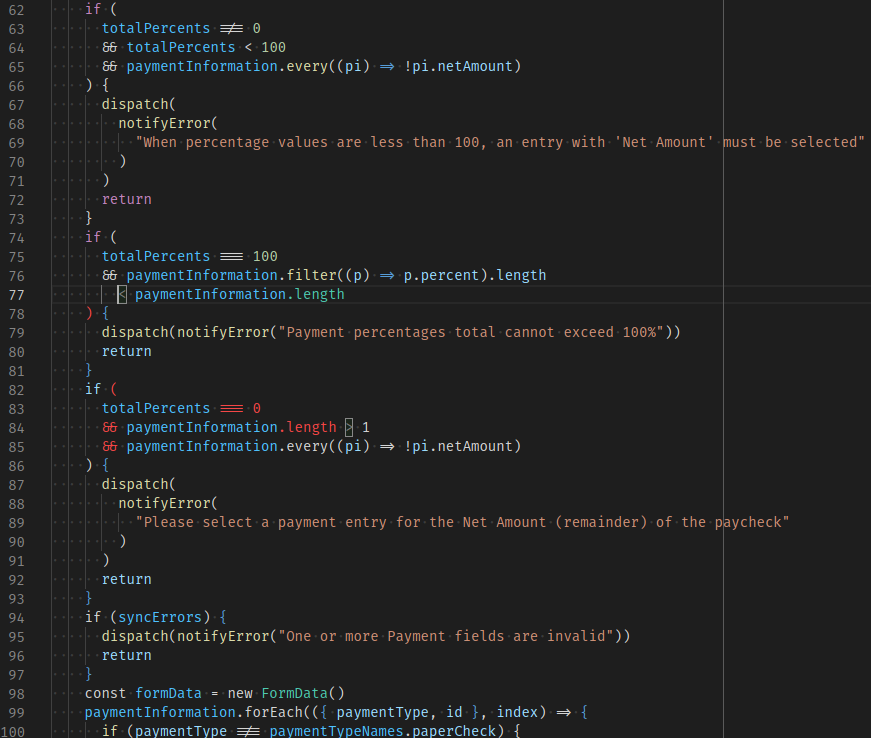
In my repo, using prettier for formatting (specifically, a prettier fork that places operators at start of line instead of end) yields the following output, with the problem starting at line 77. Note how placing the cursor on the less-than op highlights the greater-than op on line 84, as if lines 77-84 are just one giant JSX opening tag declaration. Also note that this is a .js file with no mention nor import of React, and the prior examples also had language type explicitly set to JavaScript.
My preemptive apologies if this issue is a duplicate (I searched but found none) or if it belongs in a more specific repo.
- 主要语言
- TypeScript
- 星标
- 471
- 派生
- 149
- PR 合并指标
- 30 天内没有已合并 PR
贡献指南
这个仓库没有索引到贡献指南
从这里开始
- 先读完整个 Issue,再读项目的贡献指南。
- 在 Issue 下留言说明你要接手 —— 这能避免两个人做同样的事。
- Fork 仓库,在一个分支上完成修改。
- 提交 Pull Request,并在描述里引用这个 Issue 编号。
microsoft/TypeScript-TmLanguage 的其他 Issue
-
难度 2/5 1-3 小时 新手友好度 72/100
microsoft/TypeScript-TmLanguage#1071 ·
-
triste 未关闭
难度 5/5 一周以上 新手友好度 5/100
microsoft/TypeScript-TmLanguage#1078 ·
-
难度 3/5 1-2 天 新手友好度 68/100
microsoft/TypeScript-TmLanguage#1076 · 6 条评论 ·
-
难度 2/5 1-3 小时 新手友好度 55/100
microsoft/TypeScript-TmLanguage#1074 · 2 条评论 ·
-
难度 1/5 1-3 小时 新手友好度 58/100
microsoft/TypeScript-TmLanguage#1066 · 1 条评论 ·
查看 microsoft/TypeScript-TmLanguage 的全部 Issue
相似的 Issue
-
难度 2/5 1-3 小时 新手友好度 74/100
-
security
难度 2/5 1-3 小时 新手友好度 72/100
IBM/node-sdk-core#373 ·
-
e2e-failure ready-to-code
难度 2/5 1-3 小时 新手友好度 86/100
-
bug
难度 2/5 1-3 小时 新手友好度 74/100
-
chore
难度 2/5 1-3 小时 新手友好度 88/100