[JavaScript] Tokenization breaks when new line starts with less-than operator
まだ誰も着手していません。
評価
- 難易度
- 4/5
- 見積もり時間
- 3〜5日
- 初心者へのやさしさ
- 35/100
- issue の種類
- バグ
- 明瞭さ
- おおむね明確
- 活発さ
- 停滞
- 技術スタック
- javascript, typescript
- 領域
- tooling
調査の方向性
まず、拡張機能を無効にした状態で VS Code で JavaScript の例を再現し、その後、リポジトリの TypeScript 文法ファイルを調べます。行頭の less-than 演算子が JSX の開始ではなく演算子としてハイライトされ、ハイライトが閉じタグまで続かなくなれば、修正は完了です。
索引モデルが issue の本文から書いたものです。
説明
Does this issue occur when all extensions are disabled?: Yes
VS Code version: Code 1.66.0 (e18005f0f1b33c29e81d732535d8c0e47cafb0b5, 2022-03-30T05:50:41.156Z)
OS version: Linux x64 4.15.0-175-generic
Restricted Mode: No
System Info
| Item | Value |
|---|---|
| CPUs | Intel(R) Core(TM) i7-7820HQ CPU @ 2.90GHz (8 x 3541) |
| GPU Status | 2d_canvas: enabled canvas_oop_rasterization: disabled_off direct_rendering_display_compositor: disabled_off_ok gpu_compositing: enabled multiple_raster_threads: enabled_on oop_rasterization: disabled_off opengl: enabled_on rasterization: disabled_software raw_draw: disabled_off_ok skia_renderer: enabled_on video_decode: disabled_software video_encode: disabled_software vulkan: disabled_off webgl: enabled webgl2: enabled |
| Load (avg) | 0, 0, 1 |
| Memory (System) | 31.26GB (23.84GB free) |
| Process Argv | --unity-launch --crash-reporter-id c990702e-9bfc-48d9-b2b9-78bab7fdb823 |
| Screen Reader | no |
| VM | 0% |
| DESKTOP_SESSION | ubuntu |
| XDG_CURRENT_DESKTOP | Unity |
| XDG_SESSION_DESKTOP | ubuntu |
|XDG_SESSION_TYPE|x11|
Simple example
- In a new editor, set the language mode to plain
JavaScript - Type the following
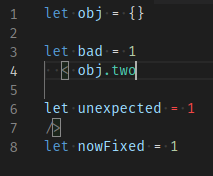
let obj = {} let bad = 1 < obj.two let unexpected = 1 /> let nowFixed = 1 - The
<on line 4 is treated as a JSX tag opener (even when the self-closing tag on line 7 is removed)
Note how GitHub's highlighting in 2. and this screenshot disagree
- Declaring
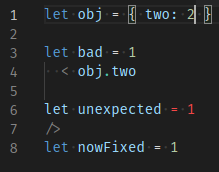
twoslightly changes highlighting, but notice the.inobj.twois still green. Using "Developer: Inspect Editor Token and Scopes" shows it's still considered a JSX tag.
Extended example
To show all the specific conditions required to trigger this issue
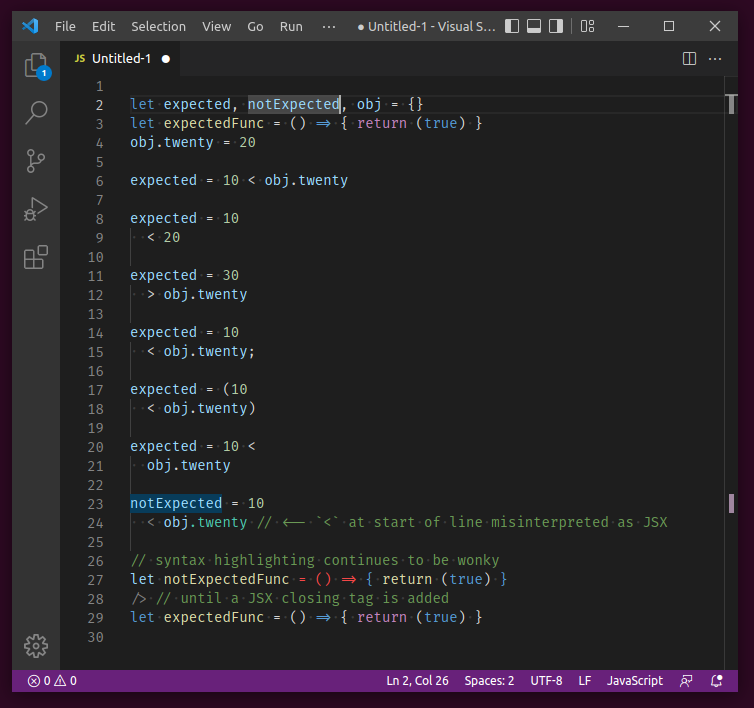
Show code snippet for copy-paste
let expected, notExpected, obj = {}
let expectedFunc = () => { return (true) }
obj.twenty = 20

expected = 10 < obj.twenty

expected = 10
  < 20

expected = 30
  > obj.twenty

expected = 10
  < obj.twenty;

expected = (10
  < obj.twenty)

expected = 10 <
  obj.twenty

notExpected = 10
  < obj.twenty // <-- `<` at start of line misinterpreted as JSX

// syntax highlighting continues to be wonky
let notExpectedFunc = () => { return (true) }
/> // until a JSX closing tag is added
let expectedFunc = () => { return (true) }
Real-world example
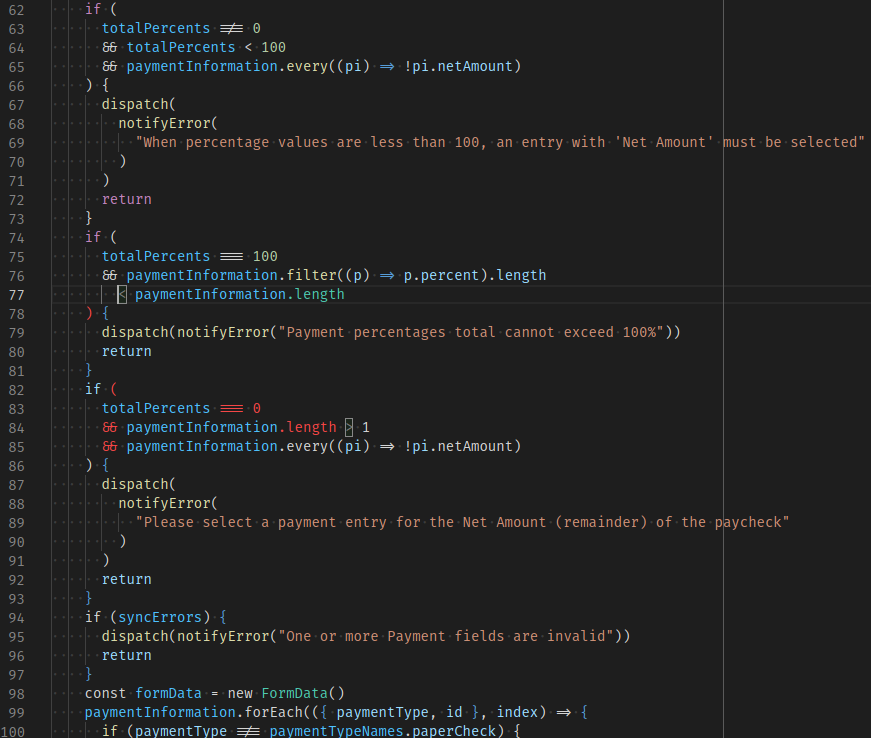
In my repo, using prettier for formatting (specifically, a prettier fork that places operators at start of line instead of end) yields the following output, with the problem starting at line 77. Note how placing the cursor on the less-than op highlights the greater-than op on line 84, as if lines 77-84 are just one giant JSX opening tag declaration. Also note that this is a .js file with no mention nor import of React, and the prior examples also had language type explicitly set to JavaScript.
My preemptive apologies if this issue is a duplicate (I searched but found none) or if it belongs in a more specific repo.
- 主要言語
- TypeScript
- スター
- 471
- フォーク
- 149
- PR マージ指標
- 30日以内にマージされた PR はありません
コントリビューションガイド
このリポジトリのコントリビューションガイドは索引されていません
はじめの一歩
- issue を最後まで読み、次にプロジェクトのコントリビューションガイドを読みます。
- 着手することを issue にコメントします — 二人が同じ作業をするのを防げます。
- リポジトリをフォークし、ブランチを切って変更します。
- issue 番号を参照したプルリクエストを送ります。
microsoft/TypeScript-TmLanguage のほかの issue
-
難易度 2/5 1〜3時間 初心者へのやさしさ 72/100
microsoft/TypeScript-TmLanguage#1071 ·
-
triste オープン
難易度 5/5 1週間以上 初心者へのやさしさ 5/100
microsoft/TypeScript-TmLanguage#1078 ·
-
難易度 3/5 1〜2日 初心者へのやさしさ 68/100
microsoft/TypeScript-TmLanguage#1076 · コメント 6 件 ·
-
難易度 2/5 1〜3時間 初心者へのやさしさ 55/100
microsoft/TypeScript-TmLanguage#1074 · コメント 2 件 ·
-
難易度 1/5 1〜3時間 初心者へのやさしさ 58/100
microsoft/TypeScript-TmLanguage#1066 · コメント 1 件 ·
microsoft/TypeScript-TmLanguage の issue をすべて見る
似ている issue
-
難易度 2/5 1〜3時間 初心者へのやさしさ 84/100
bcgov/bc-wallet-mobile#4761 · コメント 1 件 ·
-
external-issue to-triage
難易度 2/5 1〜3時間 初心者へのやさしさ 88/100
-
area-deployment area-integrations triage:bot-seen
難易度 2/5 半日 初心者へのやさしさ 86/100
-
難易度 2/5 1〜3時間 初心者へのやさしさ 82/100
-
refactor
難易度 2/5 1〜3時間 初心者へのやさしさ 84/100