[JavaScript] Tokenization breaks when new line starts with less-than operator
Ninguém assumiu esta issue ainda.
Avaliação
- Dificuldade
- 4/5
- Tempo estimado
- 3-5 dias
- Facilidade para iniciantes
- 35/100
- Tipo de issue
- Bug
- Clareza
- Razoavelmente clara
- Status de atividade
- Estagnada
- Stack de tecnologia
- javascript, typescript
- Domínio
- tooling
Direção de pesquisa
Comece reproduzindo o exemplo de JavaScript no VS Code com as extensões desabilitadas e, em seguida, inspecione os arquivos de gramática TypeScript do repositório. A correção estará concluída quando um operador less-than no início de uma linha for destacado como operador em vez de abrir JSX, e o destaque não continuar até uma tag de fechamento.
Escrita pelo modelo de indexação a partir do texto da issue.
Descrição
Does this issue occur when all extensions are disabled?: Yes
VS Code version: Code 1.66.0 (e18005f0f1b33c29e81d732535d8c0e47cafb0b5, 2022-03-30T05:50:41.156Z)
OS version: Linux x64 4.15.0-175-generic
Restricted Mode: No
System Info
| Item | Value |
|---|---|
| CPUs | Intel(R) Core(TM) i7-7820HQ CPU @ 2.90GHz (8 x 3541) |
| GPU Status | 2d_canvas: enabled canvas_oop_rasterization: disabled_off direct_rendering_display_compositor: disabled_off_ok gpu_compositing: enabled multiple_raster_threads: enabled_on oop_rasterization: disabled_off opengl: enabled_on rasterization: disabled_software raw_draw: disabled_off_ok skia_renderer: enabled_on video_decode: disabled_software video_encode: disabled_software vulkan: disabled_off webgl: enabled webgl2: enabled |
| Load (avg) | 0, 0, 1 |
| Memory (System) | 31.26GB (23.84GB free) |
| Process Argv | --unity-launch --crash-reporter-id c990702e-9bfc-48d9-b2b9-78bab7fdb823 |
| Screen Reader | no |
| VM | 0% |
| DESKTOP_SESSION | ubuntu |
| XDG_CURRENT_DESKTOP | Unity |
| XDG_SESSION_DESKTOP | ubuntu |
|XDG_SESSION_TYPE|x11|
Simple example
- In a new editor, set the language mode to plain
JavaScript - Type the following
let obj = {} let bad = 1 < obj.two let unexpected = 1 /> let nowFixed = 1 - The
<on line 4 is treated as a JSX tag opener (even when the self-closing tag on line 7 is removed)
Note how GitHub's highlighting in 2. and this screenshot disagree
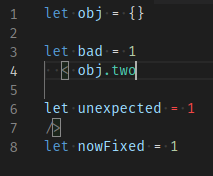
- Declaring
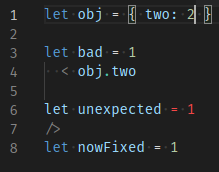
twoslightly changes highlighting, but notice the.inobj.twois still green. Using "Developer: Inspect Editor Token and Scopes" shows it's still considered a JSX tag.
Extended example
To show all the specific conditions required to trigger this issue
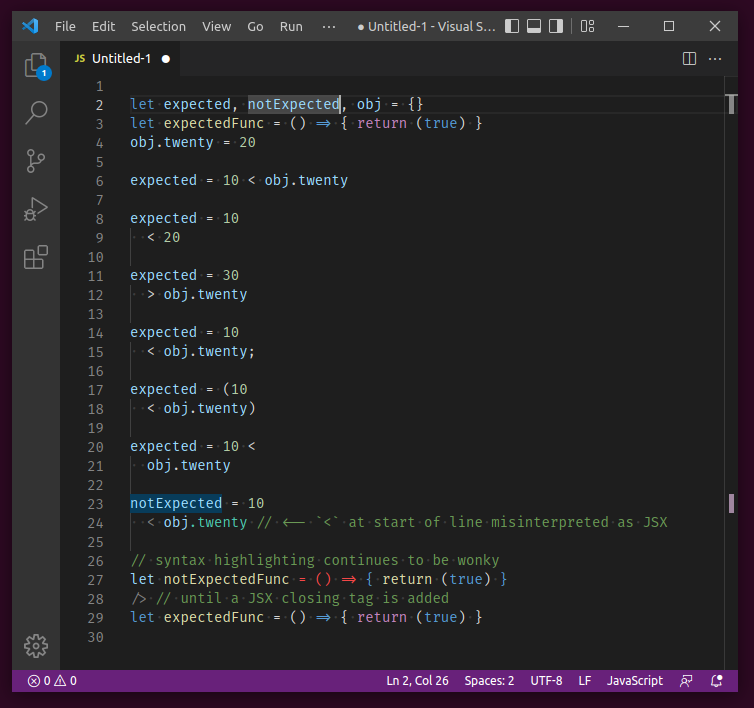
Show code snippet for copy-paste
let expected, notExpected, obj = {}
let expectedFunc = () => { return (true) }
obj.twenty = 20

expected = 10 < obj.twenty

expected = 10
  < 20

expected = 30
  > obj.twenty

expected = 10
  < obj.twenty;

expected = (10
  < obj.twenty)

expected = 10 <
  obj.twenty

notExpected = 10
  < obj.twenty // <-- `<` at start of line misinterpreted as JSX

// syntax highlighting continues to be wonky
let notExpectedFunc = () => { return (true) }
/> // until a JSX closing tag is added
let expectedFunc = () => { return (true) }
Real-world example
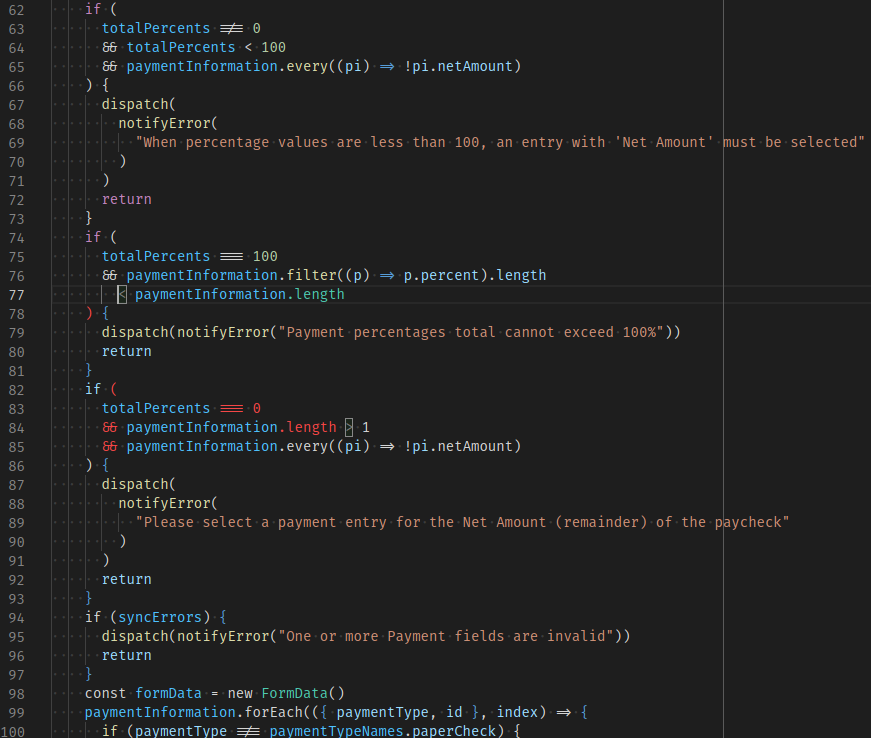
In my repo, using prettier for formatting (specifically, a prettier fork that places operators at start of line instead of end) yields the following output, with the problem starting at line 77. Note how placing the cursor on the less-than op highlights the greater-than op on line 84, as if lines 77-84 are just one giant JSX opening tag declaration. Also note that this is a .js file with no mention nor import of React, and the prior examples also had language type explicitly set to JavaScript.
My preemptive apologies if this issue is a duplicate (I searched but found none) or if it belongs in a more specific repo.
- Linguagem predominante
- TypeScript
- Estrelas
- 471
- Forks
- 149
- Métricas de merge de PRs
- Nenhum PR com merge em 30d
Guia de contribuição
Nenhum guia de contribuição indexado para este repositório
Primeiros passos
- Leia a issue inteira e depois o guia de contribuição do projeto.
- Comente na issue dizendo que vai assumir — evita que duas pessoas façam o mesmo trabalho.
- Faça um fork do repositório e trabalhe em uma branch.
- Abra um pull request que referencie o número da issue.
Mais de microsoft/TypeScript-TmLanguage
-
Dificuldade 2/5 1-3 horas Facilidade para iniciantes 72/100
microsoft/TypeScript-TmLanguage#1071 ·
-
triste Aberta
Dificuldade 5/5 Mais de uma semana Facilidade para iniciantes 5/100
microsoft/TypeScript-TmLanguage#1078 ·
-
Dificuldade 3/5 1-2 dias Facilidade para iniciantes 68/100
microsoft/TypeScript-TmLanguage#1076 · 6 comentários ·
-
Dificuldade 2/5 1-3 horas Facilidade para iniciantes 55/100
microsoft/TypeScript-TmLanguage#1074 · 2 comentários ·
-
typescript-basics: fix highlighting for triple-slash reference directives with preserve="true" Aberta
Dificuldade 1/5 1-3 horas Facilidade para iniciantes 58/100
microsoft/TypeScript-TmLanguage#1066 · 1 comentário ·
Todas as issues de microsoft/TypeScript-TmLanguage
Issues semelhantes
-
Dificuldade 2/5 1-3 horas Facilidade para iniciantes 74/100
-
security
Dificuldade 2/5 1-3 horas Facilidade para iniciantes 72/100
IBM/node-sdk-core#373 ·
-
e2e-failure ready-to-code
Dificuldade 2/5 1-3 horas Facilidade para iniciantes 86/100
-
bug
Dificuldade 2/5 1-3 horas Facilidade para iniciantes 74/100
-
chore
Dificuldade 2/5 1-3 horas Facilidade para iniciantes 88/100