[JavaScript] Tokenization breaks when new line starts with less-than operator
Chưa có ai nhận issue này.
Đánh giá
- Độ khó
- 4/5
- Thời gian dự kiến
- 3-5 ngày
- Mức phù hợp với người mới
- 35/100
- Loại issue
- Lỗi
- Độ rõ ràng
- Khá rõ ràng
- Mức độ hoạt động
- Đình trệ
- Công nghệ
- javascript, typescript
- Lĩnh vực
- tooling
Hướng nghiên cứu
Bắt đầu bằng cách tái hiện ví dụ JavaScript trong VS Code với các extension đã bị tắt, sau đó kiểm tra các tệp grammar TypeScript của repository. Bản sửa được hoàn tất khi một toán tử less-than ở đầu dòng được tô sáng dưới dạng toán tử thay vì mở JSX, và việc tô sáng không tiếp tục cho đến thẻ đóng.
Do mô hình lập chỉ mục viết ra từ nội dung của issue.
Mô tả
Does this issue occur when all extensions are disabled?: Yes
VS Code version: Code 1.66.0 (e18005f0f1b33c29e81d732535d8c0e47cafb0b5, 2022-03-30T05:50:41.156Z)
OS version: Linux x64 4.15.0-175-generic
Restricted Mode: No
System Info
| Item | Value |
|---|---|
| CPUs | Intel(R) Core(TM) i7-7820HQ CPU @ 2.90GHz (8 x 3541) |
| GPU Status | 2d_canvas: enabled canvas_oop_rasterization: disabled_off direct_rendering_display_compositor: disabled_off_ok gpu_compositing: enabled multiple_raster_threads: enabled_on oop_rasterization: disabled_off opengl: enabled_on rasterization: disabled_software raw_draw: disabled_off_ok skia_renderer: enabled_on video_decode: disabled_software video_encode: disabled_software vulkan: disabled_off webgl: enabled webgl2: enabled |
| Load (avg) | 0, 0, 1 |
| Memory (System) | 31.26GB (23.84GB free) |
| Process Argv | --unity-launch --crash-reporter-id c990702e-9bfc-48d9-b2b9-78bab7fdb823 |
| Screen Reader | no |
| VM | 0% |
| DESKTOP_SESSION | ubuntu |
| XDG_CURRENT_DESKTOP | Unity |
| XDG_SESSION_DESKTOP | ubuntu |
|XDG_SESSION_TYPE|x11|
Simple example
- In a new editor, set the language mode to plain
JavaScript - Type the following
let obj = {} let bad = 1 < obj.two let unexpected = 1 /> let nowFixed = 1 - The
<on line 4 is treated as a JSX tag opener (even when the self-closing tag on line 7 is removed)
Note how GitHub's highlighting in 2. and this screenshot disagree
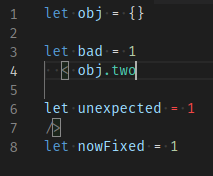
- Declaring
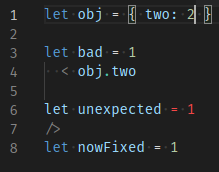
twoslightly changes highlighting, but notice the.inobj.twois still green. Using "Developer: Inspect Editor Token and Scopes" shows it's still considered a JSX tag.
Extended example
To show all the specific conditions required to trigger this issue
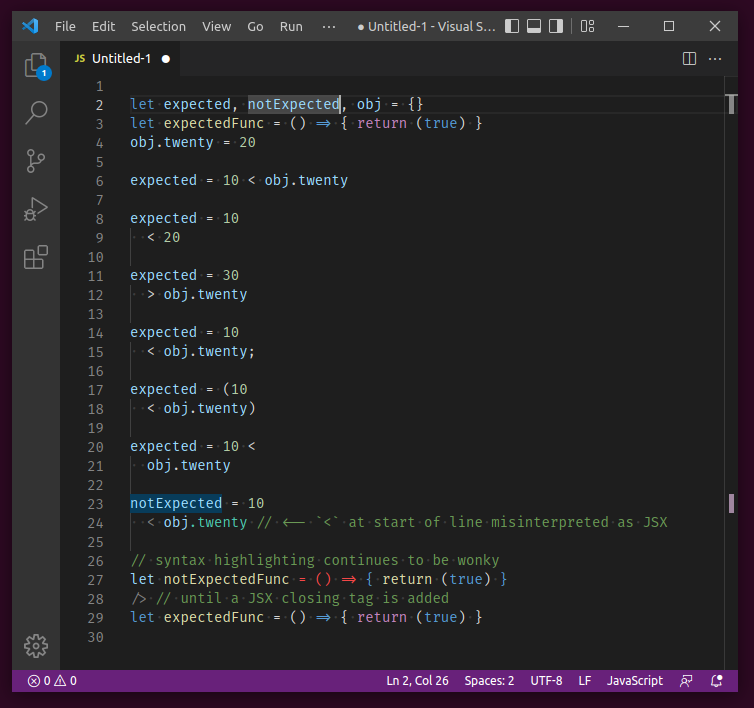
Show code snippet for copy-paste
let expected, notExpected, obj = {}
let expectedFunc = () => { return (true) }
obj.twenty = 20

expected = 10 < obj.twenty

expected = 10
  < 20

expected = 30
  > obj.twenty

expected = 10
  < obj.twenty;

expected = (10
  < obj.twenty)

expected = 10 <
  obj.twenty

notExpected = 10
  < obj.twenty // <-- `<` at start of line misinterpreted as JSX

// syntax highlighting continues to be wonky
let notExpectedFunc = () => { return (true) }
/> // until a JSX closing tag is added
let expectedFunc = () => { return (true) }
Real-world example
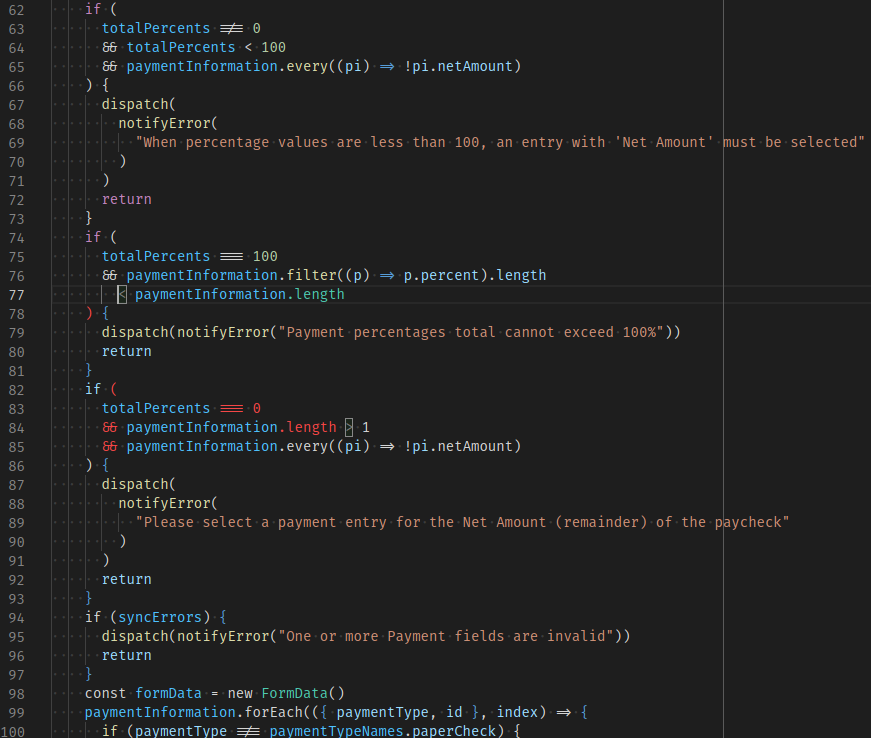
In my repo, using prettier for formatting (specifically, a prettier fork that places operators at start of line instead of end) yields the following output, with the problem starting at line 77. Note how placing the cursor on the less-than op highlights the greater-than op on line 84, as if lines 77-84 are just one giant JSX opening tag declaration. Also note that this is a .js file with no mention nor import of React, and the prior examples also had language type explicitly set to JavaScript.
My preemptive apologies if this issue is a duplicate (I searched but found none) or if it belongs in a more specific repo.
- Ngôn ngữ chính
- TypeScript
- Star
- 471
- Fork
- 150
- Chỉ số merge pull request
- Không có pull request nào được merge trong 30 ngày
Chuẩn bị môi trường
Dự án này không cung cấp dev container, Dockerfile hay hướng dẫn đóng góp, nên bạn cần tự thiết lập môi trường: hãy bắt đầu từ README và xem hướng dẫn đóng góp lần đầu của chúng tôi để biết các bước chung.
Bắt đầu từ đâu
- Đọc hết issue, rồi đọc hướng dẫn đóng góp của dự án.
- Bình luận trên issue rằng bạn sẽ nhận — tránh hai người làm cùng một việc.
- Fork repository và làm thay đổi trên một nhánh.
- Mở pull request có tham chiếu số hiệu của issue.
Issue khác của microsoft/TypeScript-TmLanguage
-
Độ khó 2/5 1-3 giờ Mức phù hợp với người mới 72/100
microsoft/TypeScript-TmLanguage#1071 ·
-
Độ khó 4/5 3-5 ngày Mức phù hợp với người mới 68/100
microsoft/TypeScript-TmLanguage#1079 ·
-
tristeĐang mở
Độ khó 5/5 Hơn một tuần Mức phù hợp với người mới 5/100
microsoft/TypeScript-TmLanguage#1078 ·
-
Độ khó 3/5 1-2 ngày Mức phù hợp với người mới 68/100
microsoft/TypeScript-TmLanguage#1076 · 6 bình luận ·
-
Độ khó 2/5 1-3 giờ Mức phù hợp với người mới 55/100
microsoft/TypeScript-TmLanguage#1074 · 2 bình luận ·
Tất cả issue của microsoft/TypeScript-TmLanguage
Issue tương tự
-
Độ khó 2/5 1-3 giờ Mức phù hợp với người mới 78/100
melgarafael/DeskcommCRM#1812 ·
Maintainer thường phản hồi trong vòng 1 ngày
-
Độ khó 2/5 1-3 giờ Mức phù hợp với người mới 84/100
prisma/prisma-cli#309 ·
Maintainer thường phản hồi trong vòng 1 ngày
-
Độ khó 2/5 1-3 giờ Mức phù hợp với người mới 78/100
gregwebs/pi-quota-dispatcher#26 ·
Maintainer thường phản hồi trong vòng 1 ngày
-
Độ khó 2/5 1-3 giờ Mức phù hợp với người mới 74/100
openwatersio/slackwater.xyz#124 ·
Maintainer thường phản hồi trong vòng 1 ngày
-
agent-reported area/browser area/docs documentation good first issue hacktoberfest help wanted P2
Độ khó 1/5 Dưới một giờ Mức phù hợp với người mới 90/100
Maintainer thường phản hồi trong vòng 2 ngày