Notifications tab freezes on the iPhone Duo's outer screen at accessibility text sizes
Maintainers usually reply within 1 day
Assessment
- Difficulty
- 2/5
- Estimated time
- 1-3 hours
- Newbie friendliness
- 78/100
- Issue type
- Bug
- Clarity
- Clearly specified
- Activity status
- Active
- Tech stack
- ios, swift
- Domain
- accessibility, mobile
Research direction
Read NotificationsViewController.swift around lines 2200 and 306, then inspect AppFeedbackPromptView.swift around line 47. Reproduce on an iPhone Duo simulator at AX1 text size by opening Notifications, switching tabs, and returning; the issue reports that disabling safe-area insets on the button stack stopped the freeze in a debugger. Done means the repeated layout settles and the tab remains responsive.
Written by the indexing model from the issue text.
Description
From Claude:
On the iPhone Duo's outer screen at accessibility text sizes, the Notifications tab freezes the app. One CPU core stays at 100% and taps do nothing.
What happens
The Notifications screen keeps a push-permission prompt in its table header. The prompt is hidden until it's needed, but it's set up from the second visit to the tab on. At accessibility text sizes its "Allow notifications / Not now" button row reaches into the 84 pt strip on the right of the Duo's outer screen, where the status bar and tab bar sit.
The button row takes its margins from the safe area. As it moves, its safe-area inset keeps changing (62 → 68.3 → 49 pt), so it never settles. Every layout pass also re-measures the table header. The main thread never leaves layout.
Who is affected
iPhone Duo users on the outer screen with an accessibility text size, who haven't decided on push notifications yet. It also happens on trunk.
What they see
The Notifications list appears, but avatars never load, and tapping another tab does nothing. The app has to be force quit.
Each pair: the Notifications tab on its second visit, then the screen 8–12 seconds after tapping My Site in the strip on the right.
| Notifications | After tapping My Site | |
|---|---|---|
| AX1 (98% CPU) | 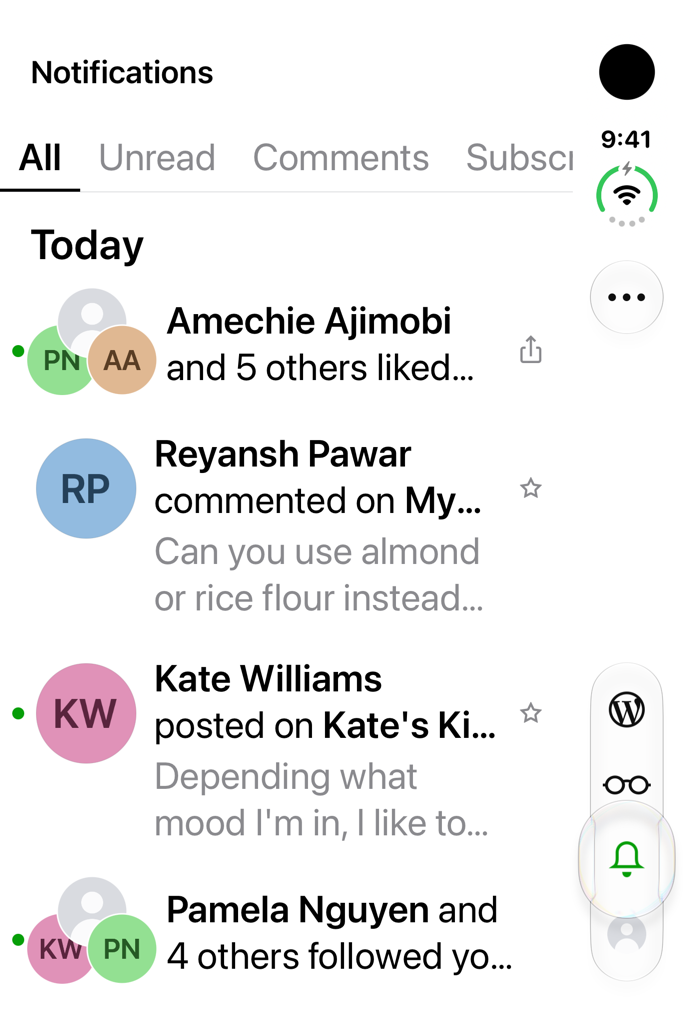 |
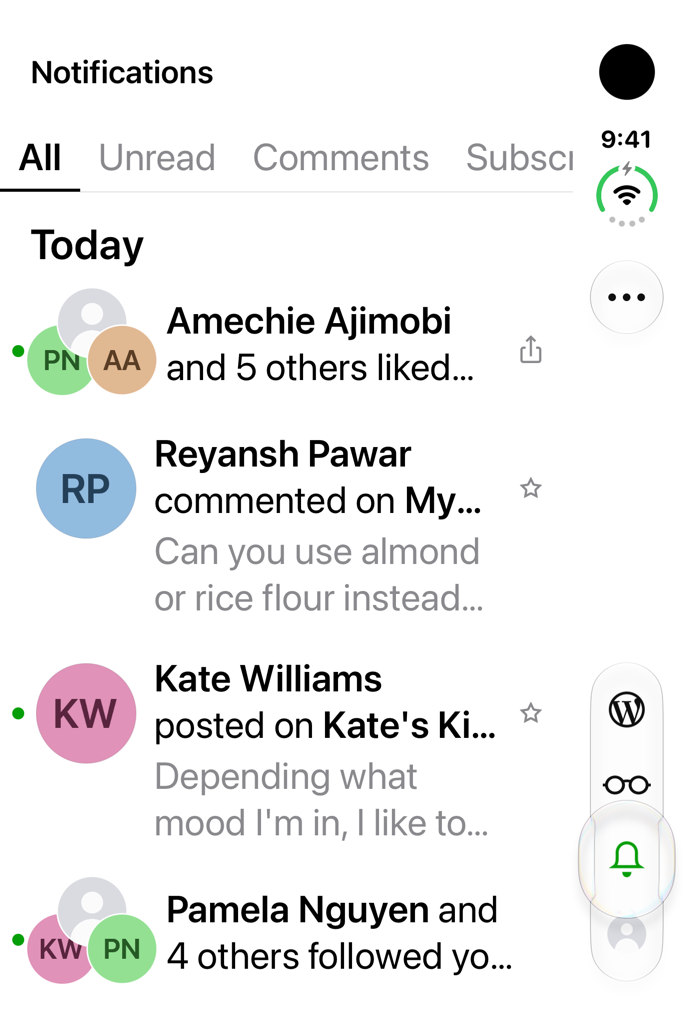 |
| Default text size (1% CPU) |  |
 |
The screenshots use the UI-test fixtures from #26339 (fake account, names and avatars), on trunk e2cbefd0d2 with only the fixture code added. At AX1, the push-permission sheet that normally slides up a moment after the list appears never shows.
Steps to reproduce
- On a new iPhone Duo simulator (iOS 27.1), set the text size to AX1:
xcrun simctl ui <udid> content_size accessibility-medium. - Install Jetpack built with Xcode 27.1, then sign in with WordPress.com.
- On the "Enable Notifications" screen after sign-in, tap Not Now.
- Open the Notifications tab. It doesn't freeze yet: on the first visit after that screen, the app skips setting up the prompt (
NotificationsViewController.swift:2200). - Switch to another tab, then open Notifications again. It freezes.
How this was checked
Trunk e2cbefd0d2, Jetpack Debug built with Xcode 27.1, new iPhone Duo simulator (iOS 27.1, 24A94425). Same simulator, app relaunched for each run, Notifications tab opened each time:
| Text size | App CPU on Notifications | Tap My Site afterwards |
|---|---|---|
| AX1 (step 5 above) | 100% | Ignored |
| Default | 2% | Blocked by the permission sheet; no freeze |
| AX1 | 100% | Ignored, still 100% |
| AX1 | 100% | Ignored, still 100% |
| Default | 1% | Works; inline prompt visible |
- A 3-second
sampleduring the freeze found every main-thread sample (1394 of 1394) in a Core Animation layout pass. The time is spent inNotificationsViewController.viewDidLayoutSubviews()→UITableView.layoutHeaderView()(NotificationsViewController.swift:306). - The same freeze also happens with the UI-test fixtures account (97–98% CPU), which is where the screenshots above come from.
- Not checked: a physical Duo, the inner screen, and the WordPress app.
Suggested fix
Stop the prompt's button row (AppFeedbackPromptView.swift:47) from taking its margins from the safe area, for example buttonStack.insetsLayoutMarginsFromSafeArea = false. Making that change in the debugger on a frozen app (an earlier investigation, not a build) dropped CPU from 100% to 1%. Also consider calling layoutHeaderView() only when the header's size changes.
- Dominant language
- Swift
- Stars
- 3.9k
- Forks
- 1.2k
- Avg merge
- 1d 19h
- Merged PRs (30d)
- 105
Getting set up
- No Dockerfile or Docker Compose file
- Has a pull request template
- Read the contributing guide
First steps
- Read the whole issue, then the project's contributing guide.
- Comment on the issue to say you are picking it up — it saves two people doing the same work.
- Fork the repository and make your change on a branch.
- Open a pull request that references the issue number.
More from wordpress-mobile/WordPress-iOS
-
[Pri] Low [Status] Ready for Dev [Type] Bug /Me
Difficulty 2/5 1-3 hours Newbie friendliness 78/100
wordpress-mobile/WordPress-iOS#26279 · 1 comment ·
Maintainers usually reply within 1 day
-
[Pri] Low [Status] Ready for Dev [Type] Bug Share Extension
Difficulty 2/5 1-3 hours Newbie friendliness 88/100
wordpress-mobile/WordPress-iOS#26276 · 1 comment ·
Maintainers usually reply within 1 day
-
[Pri] Low [Status] Ready for Dev [Type] Bug Blogging Prompts Notifications
Difficulty 2/5 1-3 hours Newbie friendliness 79/100
wordpress-mobile/WordPress-iOS#26256 · 1 comment ·
Maintainers usually reply within 1 day
-
[Status] Ready for Dev [Type] Bug Reader
Difficulty 2/5 1-3 hours Newbie friendliness 83/100
wordpress-mobile/WordPress-iOS#26254 · 2 comments ·
Maintainers usually reply within 1 day
-
[Type] Bug Posts + Pages UI
Difficulty 2/5 1-3 hours Newbie friendliness 75/100
wordpress-mobile/WordPress-iOS#26232 · 1 comment ·
Maintainers usually reply within 1 day
All issues in wordpress-mobile/WordPress-iOS
Similar issues
-
Tests fail when the Mac isn't set to EnglishPossibly taken @zolferfigueiredo claimed this today. Open
Difficulty 2/5 1-3 hours Newbie friendliness 72/100
Maintainers usually reply within 3 days
-
area:shell order:3 status:ready type:bug
Difficulty 2/5 1-3 hours Newbie friendliness 78/100
krystianslowik/arkt#618 ·
Maintainers usually reply within 1 day
-
needs-triage
Difficulty 2/5 1-3 hours Newbie friendliness 67/100
nightscout/Trio#1741 ·
Maintainers usually reply within 1 day
-
Difficulty 2/5 1-3 hours Newbie friendliness 82/100
deepsealabs/libdc-swift#107 ·
Maintainers usually reply within 1 day
-
bug
Difficulty 2/5 1-3 hours Newbie friendliness 82/100
alexandrereol/ethmensa#30 ·