Change Password: the error popup closes by itself and can’t be dismissed
Maintainers usually reply within 1 day
Nobody has claimed this yet.
Assessment
- Difficulty
- 2/5
- Estimated time
- 1-3 hours
- Newbie friendliness
- 78/100
Research direction
Start with AccountSettingsViewController.swift and trace the Change Password failure handler that currently calls SVProgressHUD.showError(withStatus:). Replace that transient error with an alert from the Change Password screen, preserving the server reason or generic fallback and leaving the success path unchanged. Build the WordPress iOS app and verify the rejection, dismissal, retained password, success message, and VoiceOver behavior listed in the test plan.
Written by the indexing model from the issue text.
Description
Split out of #10854, which stays open for inline password validation as you type.
What happens
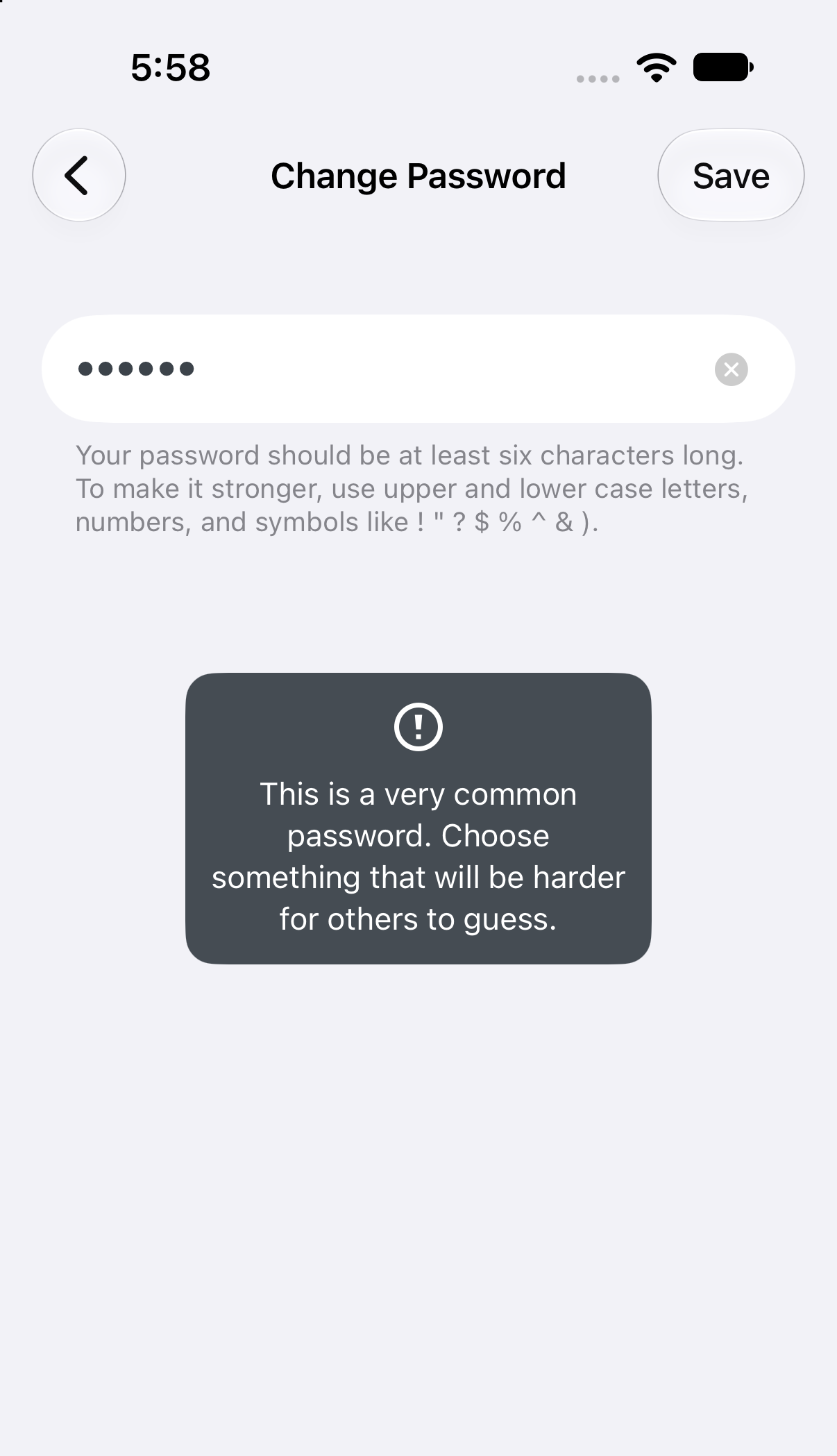
When the server rejects a new password on Me → Account Settings → Change Password, the reason appears in a popup that closes by itself after about 6 seconds. Tapping it does nothing. If you look away, or read slowly, the reason is gone, and the screen gives no other sign that the password wasn't changed.
| Popup after tapping Save | Recording (11 s): tapped twice, closes on its own |
|---|---|
 |
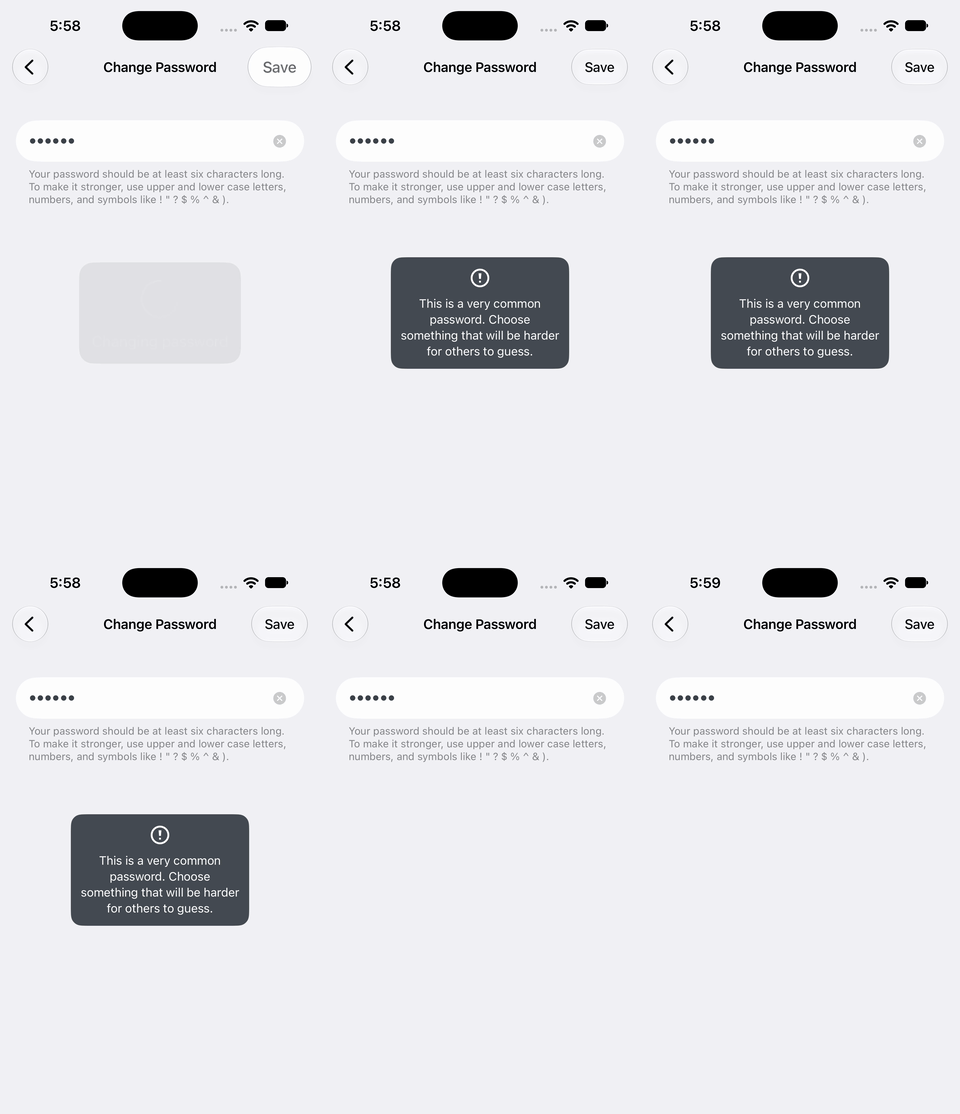 |
How this was checked: Jetpack Debug built from trunk (5f78984fbd) on an iOS 27.0 simulator. To avoid changing a real account's password, a temporary, uncommitted patch made AccountSettingsService.updatePassword fail after 1 second instead of calling the server. The error text in the patch is what POST /me/settings/password/validate returns for a common password. Two taps on the popup didn't dismiss it; it disappeared on its own.
Root cause
In AccountSettingsViewController.swift, the changePassword failure handler calls SVProgressHUD.showError(withStatus:). That popup is built to time out and ignores taps, so it doesn't suit a message the user needs to read and act on.
Fix
On failure, dismiss the progress popup and show an alert from the Change Password screen. The user stays on the screen with the password still typed, reads the reason, and taps OK.
- Keep a
weakreference to theChangePasswordViewControllerthe closure creates, and present the alert from it. - Add a title string: "Couldn’t change your password". The message is the server's reason, or the existing generic error.
- The success path (
showSuccess) is unchanged.
The patch below builds (Jetpack Debug, Xcode 27). We did not get to see the new alert on a simulator: the machine was overloaded and the simulator stopped drawing the keyboard.
Test plan
- With a password the server rejects (for example
abcdef), tap Save. An alert titled "Couldn’t change your password" shows the server's reason and stays until OK is tapped. - After OK, you're still on Change Password and the typed password is still there.
- A successful change still shows "Password changed successfully".
- VoiceOver reads the alert's title and message.
To test without changing a real password, use a throwaway WordPress.com account, or the same temporary failure patch.
Related: #10854 (inline validation). Calypso checks passwords as you type with POST /me/settings/password/validate, which returns per-rule results and doesn't change the password.
Fix
@@ -225,7 +225,8 @@ private class AccountSettingsController: SettingsController {
         service: AccountSettingsService
     ) -> (ImmuTableRow) -> SettingsTextViewController {
         { [weak self] _ in
-            ChangePasswordViewController(username: settings?.username ?? "") { value in
+            weak var changePasswordController: ChangePasswordViewController?
+            let controller = ChangePasswordViewController(username: settings?.username ?? "") { value in
                 DispatchQueue.main.async {
                     SVProgressHUD.show(withStatus: Constants.changingPassword)
                     service.updatePassword(
@@ -238,12 +239,21 @@ private class AccountSettingsController: SettingsController {
                                     }
                             } else {
                                 let errorMessage = error?.localizedDescription ?? Constants.changePasswordGenericError
-                                SVProgressHUD.showError(withStatus: errorMessage)
+                                SVProgressHUD.dismiss()
+                                let alert = UIAlertController(
+                                    title: Constants.changePasswordErrorTitle,
+                                    message: errorMessage,
+                                    preferredStyle: .alert
+                                )
+                                alert.addAction(UIAlertAction(title: SharedStrings.Button.ok, style: .default))
+                                changePasswordController?.present(alert, animated: true)
                             }
                         }
                     )
                 }
             }
+            changePasswordController = controller
+            return controller
         }
     }

@@ -513,6 +523,11 @@ private class AccountSettingsController: SettingsController {
             "Password changed successfully",
             comment: "Loader title displayed by the loading view while the password is changed successfully"
         )
+        static let changePasswordErrorTitle = NSLocalizedString(
+            "accountSettings.changePassword.error.title",
+            value: "Couldn’t change your password",
+            comment: "Title of the alert shown when changing the account password fails. The message below it is the reason from the server."
+        )
         static let changePasswordGenericError = NSLocalizedString(
             "There was an error changing the password",
             comment: "Text displayed when there is a failure loading the history."
- Dominant language
- Swift
- Stars
- 3.9k
- Forks
- 1.2k
- Avg merge
- 2d 3h
- Merged PRs (30d)
- 97
Getting set up
- No Dockerfile or Docker Compose file
- Has a pull request template
- Read the contributing guide
First steps
- Read the whole issue, then the project's contributing guide.
- Comment on the issue to say you are picking it up — it saves two people doing the same work.
- Fork the repository and make your change on a branch.
- Open a pull request that references the issue number.
More from wordpress-mobile/WordPress-iOS
-
[Pri] Low [Status] Ready for Dev [Type] Bug Share Extension
Difficulty 2/5 1-3 hours Newbie friendliness 88/100
wordpress-mobile/WordPress-iOS#26276 · 1 comment ·
Maintainers usually reply within 1 day
-
[Pri] Low [Status] Ready for Dev [Type] Bug Blogging Prompts Notifications
Difficulty 2/5 1-3 hours Newbie friendliness 79/100
wordpress-mobile/WordPress-iOS#26256 · 1 comment ·
Maintainers usually reply within 1 day
-
[Status] Ready for Dev [Type] Bug Reader
Difficulty 2/5 1-3 hours Newbie friendliness 83/100
wordpress-mobile/WordPress-iOS#26254 · 2 comments ·
Maintainers usually reply within 1 day
-
[Type] Bug Posts + Pages UI
Difficulty 2/5 1-3 hours Newbie friendliness 75/100
wordpress-mobile/WordPress-iOS#26232 · 1 comment ·
Maintainers usually reply within 1 day
-
[Type] Tech Debt Site Creation
Difficulty 2/5 1-3 hours Newbie friendliness 78/100
wordpress-mobile/WordPress-iOS#26113 · 3 comments ·
Maintainers usually reply within 1 day
All issues in wordpress-mobile/WordPress-iOS
Similar issues
-
Seed a JRNYAx price before the last close so asset-detail S1.3 doesn't fail from 08:00Z to the openOpenbug tests
Difficulty 2/5 1-3 hours Newbie friendliness 83/100
lognorman20/monaco#7231 ·
-
Difficulty 2/5 1-3 hours Newbie friendliness 78/100
Maintainers usually reply within 5 days
-
Difficulty 2/5 1-3 hours Newbie friendliness 72/100
Provenance-Emu/SkinKit#42 ·
Maintainers usually reply within 1 day
-
bug
Difficulty 2/5 1-3 hours Newbie friendliness 62/100
lwouis/alt-tab-macos#6154 ·
-
bug mac アプリ: コード アプリ: チャット 優先: 中 要トリアージ
Difficulty 2/5 1-3 hours Newbie friendliness 74/100
yksr-melt/Meltype#1346 · 2 comments ·
Maintainers usually reply within 1 day