Notifications tab freezes on the iPhone Duo's outer screen at accessibility text sizes
Los mantenedores suelen responder en 1 día
Evaluación
- Dificultad
- 2/5
- Tiempo estimado
- 1-3 horas
- Aptitud para principiantes
- 78/100
- Tipo de issue
- Error
- Claridad
- Bien especificado
- Estado de actividad
- Activo
- Stack tecnológico
- ios, swift
- Área
- accessibility, mobile
Línea de trabajo
Lee NotificationsViewController.swift cerca de las líneas 2200 y 306 y luego inspecciona AppFeedbackPromptView.swift cerca de la línea 47. Reproduce el problema en un simulador de iPhone Duo con el tamaño de texto AX1: abre Notifications, cambia de pestaña y vuelve; el informe indica que desactivar los insets del área segura en el stack de botones detuvo el bloqueo en un depurador. El trabajo estará terminado cuando el diseño repetido se estabilice y la pestaña siga respondiendo.
Escrito por el modelo de indexación a partir del texto del issue.
Descripción
From Claude:
On the iPhone Duo's outer screen at accessibility text sizes, the Notifications tab freezes the app. One CPU core stays at 100% and taps do nothing.
What happens
The Notifications screen keeps a push-permission prompt in its table header. The prompt is hidden until it's needed, but it's set up from the second visit to the tab on. At accessibility text sizes its "Allow notifications / Not now" button row reaches into the 84 pt strip on the right of the Duo's outer screen, where the status bar and tab bar sit.
The button row takes its margins from the safe area. As it moves, its safe-area inset keeps changing (62 → 68.3 → 49 pt), so it never settles. Every layout pass also re-measures the table header. The main thread never leaves layout.
Who is affected
iPhone Duo users on the outer screen with an accessibility text size, who haven't decided on push notifications yet. It also happens on trunk.
What they see
The Notifications list appears, but avatars never load, and tapping another tab does nothing. The app has to be force quit.
Each pair: the Notifications tab on its second visit, then the screen 8–12 seconds after tapping My Site in the strip on the right.
| Notifications | After tapping My Site | |
|---|---|---|
| AX1 (98% CPU) | 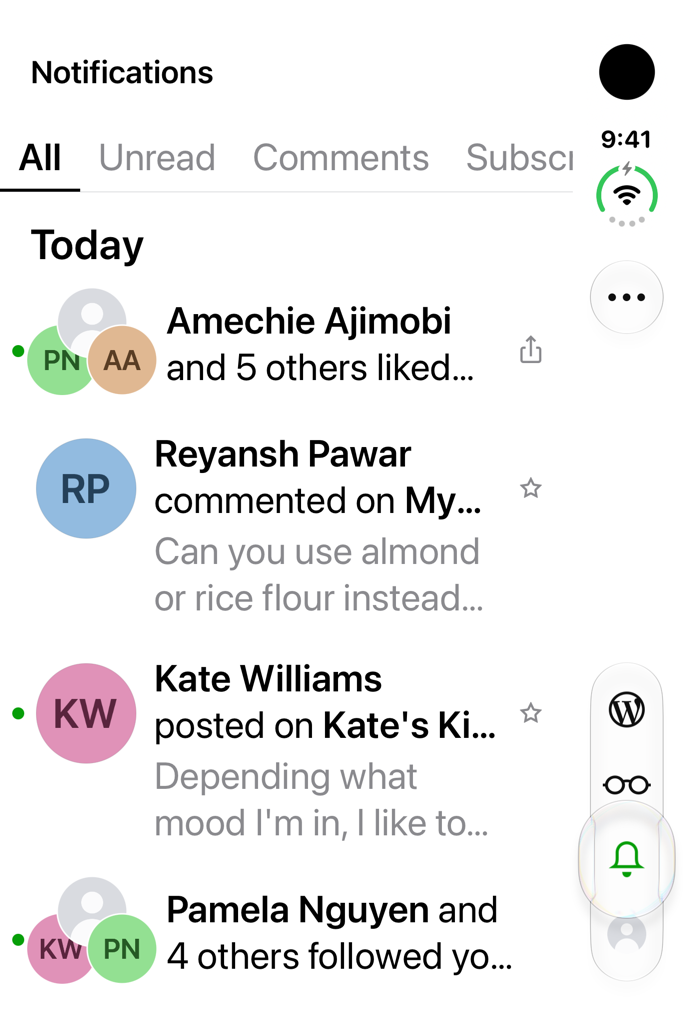 |
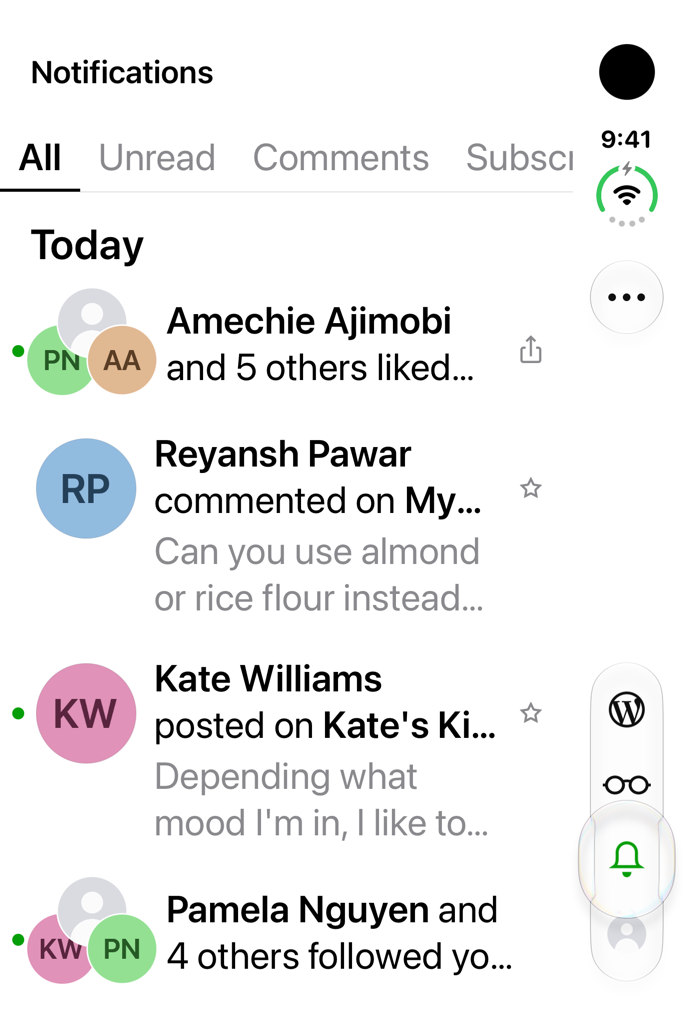 |
| Default text size (1% CPU) |  |
 |
The screenshots use the UI-test fixtures from #26339 (fake account, names and avatars), on trunk e2cbefd0d2 with only the fixture code added. At AX1, the push-permission sheet that normally slides up a moment after the list appears never shows.
Steps to reproduce
- On a new iPhone Duo simulator (iOS 27.1), set the text size to AX1:
xcrun simctl ui <udid> content_size accessibility-medium. - Install Jetpack built with Xcode 27.1, then sign in with WordPress.com.
- On the "Enable Notifications" screen after sign-in, tap Not Now.
- Open the Notifications tab. It doesn't freeze yet: on the first visit after that screen, the app skips setting up the prompt (
NotificationsViewController.swift:2200). - Switch to another tab, then open Notifications again. It freezes.
How this was checked
Trunk e2cbefd0d2, Jetpack Debug built with Xcode 27.1, new iPhone Duo simulator (iOS 27.1, 24A94425). Same simulator, app relaunched for each run, Notifications tab opened each time:
| Text size | App CPU on Notifications | Tap My Site afterwards |
|---|---|---|
| AX1 (step 5 above) | 100% | Ignored |
| Default | 2% | Blocked by the permission sheet; no freeze |
| AX1 | 100% | Ignored, still 100% |
| AX1 | 100% | Ignored, still 100% |
| Default | 1% | Works; inline prompt visible |
- A 3-second
sampleduring the freeze found every main-thread sample (1394 of 1394) in a Core Animation layout pass. The time is spent inNotificationsViewController.viewDidLayoutSubviews()→UITableView.layoutHeaderView()(NotificationsViewController.swift:306). - The same freeze also happens with the UI-test fixtures account (97–98% CPU), which is where the screenshots above come from.
- Not checked: a physical Duo, the inner screen, and the WordPress app.
Suggested fix
Stop the prompt's button row (AppFeedbackPromptView.swift:47) from taking its margins from the safe area, for example buttonStack.insetsLayoutMarginsFromSafeArea = false. Making that change in the debugger on a frozen app (an earlier investigation, not a build) dropped CPU from 100% to 1%. Also consider calling layoutHeaderView() only when the header's size changes.
- Lenguaje dominante
- Swift
- Estrellas
- 3.9k
- Forks
- 1.2k
- Merge medio
- 1 d 19 h
- PR fusionados (30 d)
- 105
Preparar el entorno
- Sin Dockerfile ni archivo de Docker Compose
- Tiene una plantilla de pull request
- Leer la guía de contribución
Primeros pasos
- Lee el issue completo y luego la guía de contribución del proyecto.
- Comenta en el issue que vas a ocuparte — evita que dos personas hagan lo mismo.
- Haz un fork del repositorio y trabaja en una rama.
- Abre un pull request que haga referencia al número del issue.
Más de wordpress-mobile/WordPress-iOS
-
[Pri] Low [Status] Ready for Dev [Type] Bug /Me
Dificultad 2/5 1-3 horas Aptitud para principiantes 78/100
wordpress-mobile/WordPress-iOS#26279 · 1 comentario ·
Los mantenedores suelen responder en 1 día
-
[Pri] Low [Status] Ready for Dev [Type] Bug Share Extension
Dificultad 2/5 1-3 horas Aptitud para principiantes 88/100
wordpress-mobile/WordPress-iOS#26276 · 1 comentario ·
Los mantenedores suelen responder en 1 día
-
[Pri] Low [Status] Ready for Dev [Type] Bug Blogging Prompts Notifications
Dificultad 2/5 1-3 horas Aptitud para principiantes 79/100
wordpress-mobile/WordPress-iOS#26256 · 1 comentario ·
Los mantenedores suelen responder en 1 día
-
[Status] Ready for Dev [Type] Bug Reader
Dificultad 2/5 1-3 horas Aptitud para principiantes 83/100
wordpress-mobile/WordPress-iOS#26254 · 2 comentarios ·
Los mantenedores suelen responder en 1 día
-
[Type] Bug Posts + Pages UI
Dificultad 2/5 1-3 horas Aptitud para principiantes 75/100
wordpress-mobile/WordPress-iOS#26232 · 1 comentario ·
Los mantenedores suelen responder en 1 día
Todos los issues de wordpress-mobile/WordPress-iOS
Issues similares
-
feat: 앱 정보에 개인정보처리방침과 고객지원 연결Posiblemente ocupada @xrpjwk8 la tomó hoy. Abierto
Dificultad 2/5 1-3 horas Aptitud para principiantes 62/100
DeveloperAcademy-POSTECH/2026-C6-A13-Hear-I-am#120 ·
Los mantenedores suelen responder en 1 día
-
[投稿] SSE 接收的三层检查:字节、事件与响应终态Abierto
Dificultad 2/5 1-3 horas Aptitud para principiantes 65/100
jaywcjlove/quick-rss#448 ·
-
Edit Space… → Save overwrites an imported space's SF Symbol icon with 🌱 and stacks both glyphsAbierto
Dificultad 2/5 1-3 horas Aptitud para principiantes 76/100
VictorKildahl/cra#205 · 1 comentario ·
Los mantenedores suelen responder en 1 día
-
[Bug]: Intermittent failure in PathUtilsTests.testNewDirectoryIsExcludedAndExistingChoiceIsKeptAbierto
Dificultad 2/5 1-3 horas Aptitud para principiantes 65/100
apple/container#2474 · 2 comentarios ·
Los mantenedores suelen responder en 1 día
-
Mac proof: carets blink and the inspector's thread lands in different places from run to runAbierto
Dificultad 2/5 1-3 horas Aptitud para principiantes 72/100
AttilaTheFun/visor#244 ·
Los mantenedores suelen responder en 1 día