[iOS][Fabric] TextInput drops a keystroke right after the first character typed into an empty field (_textOf:equals: compares attributes of a focused field)
Maintainers usually reply within 1 day
Nobody has claimed this yet.
Assessment
- Difficulty
- 2/5
- Estimated time
- 1-3 hours
- Newbie friendliness
- 78/100
- Issue type
- Bug
- Clarity
- Clearly specified
- Activity status
- Active
- Tech stack
- ios, objective-c, react-native
- Domain
- mobile
Research direction
Read RCTTextInputComponentView.mm, especially _textOf:equals: and the existing dictation, marked-text, and secure-entry checks. Reproduce the fast-typing case using the linked reproducer, then compare its behavior before and after the proposed first-responder equality check. Done means the same characters in a focused field no longer trigger the update that drops a keystroke, and the reproducer confirms the issue is fixed.
Written by the indexing model from the issue text.
Description
Description
On iOS with the New Architecture (Fabric), typing quickly into an empty TextInput sometimes loses the second key. For example, typing «28» into an empty numeric field leaves «2». It happens only for the first character typed into an empty field, and only in a fast burst. Fields that already contain text are not affected.
We traced it as follows:
- The first character typed into an empty field reaches the native view with UIKit's typing attributes.
- The state round trip brings the same character back as an attributed string with React Native's full attribute set.
-[RCTTextInputComponentView _textOf:equals:]compares the two strings including their attributes. It answers NO, although the characters are identical.- React Native then calls
setAttributedText:on the field while it is the first responder. That resets UIKit's keyboard / input pipeline, and the key in flight at that moment is dropped.
_textOf:equals: already has exceptions for dictation, Korean input, marked text and secure entry. One more exception fixes it in our app: while the backed text input view is the first responder, two strings with equal characters are treated as equal.
Suggested fix, in RCTTextInputComponentView.mm, _textOf:equals:: when _backedTextInputView is the first responder, compare only newText.string with oldText.string, next to the existing dictation / marked text / secure entry checks. Then a state round trip of the same characters never calls setAttributedText: on a focused field.
Workaround: we swizzle _textOf:equals: with that exception in a small native module, and will remove it once a release includes a fix.
Steps to reproduce
- Render an uncontrolled
TextInput(defaultValueonly,keyboardType="number-pad"). Leave it empty, and give it a style that setsfontSize,lineHeightandcolor. - Focus it and type two digits quickly as one burst, for example «2» then «8» within about 100 ms.
- Repeat, emptying the field between runs.
Expected: «28». Actual: «2» in some of the bursts.
Our measurements (iOS 27 simulator, Release build):
- without the exception, 5 of 13 two- and three-digit bursts lost a key;
- with the exception, 0 of 12 did.
React Native Version
0.86.3
Affected Platforms
Runtime - iOS
Areas
Fabric - The New Renderer
Output of npx @react-native-community/cli info
System:
  OS: macOS 27
  CPU: Apple Silicon
Binaries:
  Node: 25.9.0
  Bun: 1.3.11
IDEs:
  Xcode: 27.0 (27A266a)
npmPackages:
  react: 19.2
  react-native: 0.86.3
  expo: 57
iOS:
  hermesEnabled: true
  newArchEnabled: true
Stacktrace or Logs
No crash or log: a key is silently lost. In the debugger, `-[RCTTextInputComponentView _textOf:equals:]` returns NO for an
equal one-character string (UIKit typing attributes vs React Native's attribute set), and `setAttributedText:` runs on the
first responder right before the lost key.
MANDATORY Reproducer
https://github.com/vdzerkalo/rn-58904-textinput-lost-key
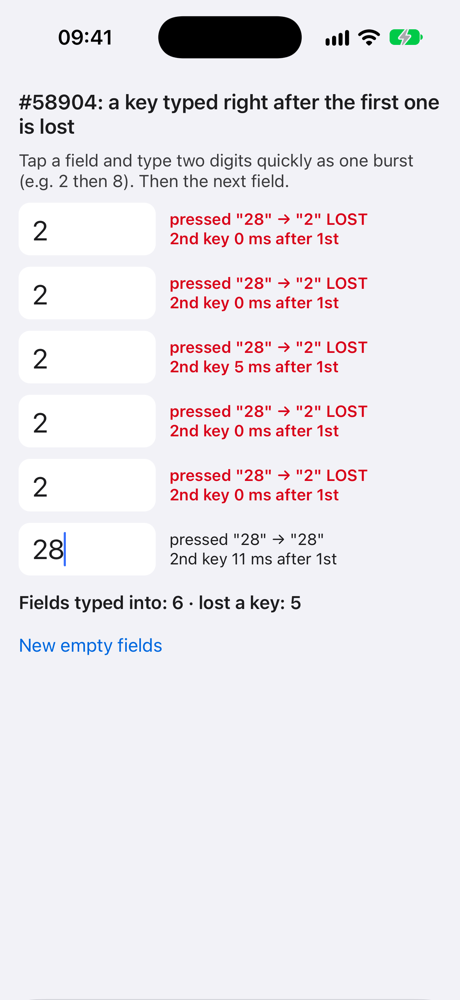
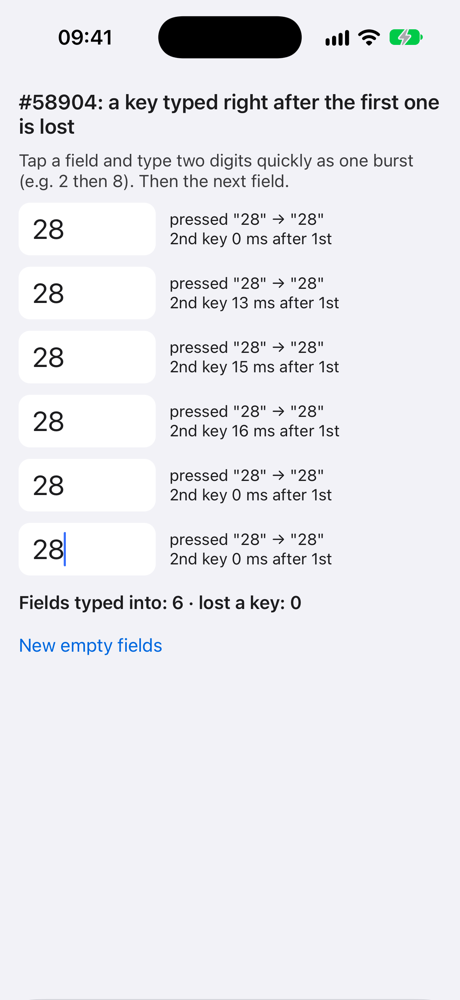
Made from the reproducer template: react-native 0.87.1 (latest), New Architecture, no extra dependencies. Six empty, uncontrolled fields; each row compares the keys onKeyPress reported with the characters that landed in the field. iOS 27 simulator, Release: 9 of 18 bursts of «28» lost the second key; with the suggested change applied at runtime (-ApplySuggestedFix YES, off by default), 0 of 18.
Screenshots and Videos
One Release round each from the reproducer (iOS 27 simulator, a fresh launch, six bursts of «28»). Left: React Native 0.87.1 as is, 5 of 6 bursts lost the second key. Right: with the suggested change (-ApplySuggestedFix YES), 0 of 6.
| As is | With the suggested change |
|---|---|
 |
 |
- Dominant language
- C++
- Stars
- 127k
- Forks
- 25.3k
- PR merge metrics
- No merged PRs in 30d
Getting set up
- No Dockerfile or Docker Compose file
- Has a pull request template
- Read the contributing guide
First steps
- Read the whole issue, then the project's contributing guide.
- Comment on the issue to say you are picking it up — it saves two people doing the same work.
- Fork the repository and make your change on a branch.
- Open a pull request that references the issue number.
More from react/react-native
-
Needs: Author Feedback Needs: Repro
Difficulty 2/5 1-3 hours Newbie friendliness 75/100
react/react-native#58659 · 2 comments ·
Maintainers usually reply within 1 day
-
Needs: Author Feedback Needs: Repro
Difficulty 1/5 Under an hour Newbie friendliness 92/100
react/react-native#58621 · 1 comment ·
Maintainers usually reply within 1 day
-
Add TypeScript declaration for the performance globalPossibly taken @Cedric921 claimed this 4 days ago. OpenNeeds: Attention Needs: Repro
Difficulty 2/5 1-3 hours Newbie friendliness 85/100
react/react-native#58610 · 4 comments ·
Maintainers usually reply within 1 day
-
Needs: Triage :mag:
Difficulty 2/5 1-3 hours Newbie friendliness 82/100
react/react-native#58565 · 2 comments · 2 reactions ·
Maintainers usually reply within 1 day
-
[Android][Fabric] addViewAt hard-crashes on a placeholder ViewState synthesised by updateEventEmitterPossibly taken @wneel claimed this 23 days ago. OpenNeeds: Attention Needs: Repro
Difficulty 2/5 1-3 hours Newbie friendliness 85/100
react/react-native#58526 · 2 comments ·
Maintainers usually reply within 1 day
All issues in react/react-native
Similar issues
-
Difficulty 2/5 1-3 hours Newbie friendliness 76/100
Maintainers usually reply within 1 day
-
hipRTC lit tests compile against /opt/rocm's LLVM instead of the ROCm under test (ci/ hardcodes LLVM_PATH)Possibly taken @bernardogv claimed this today. Open
Difficulty 2/5 1-3 hours Newbie friendliness 82/100
-
請增加教學:數字後的句號Open
Difficulty 1/5 Under an hour Newbie friendliness 70/100
Maintainers usually reply within 1 day
-
Difficulty 2/5 1-3 hours Newbie friendliness 75/100
-
Difficulty 2/5 1-3 hours Newbie friendliness 79/100
Maintainers usually reply within 1 day