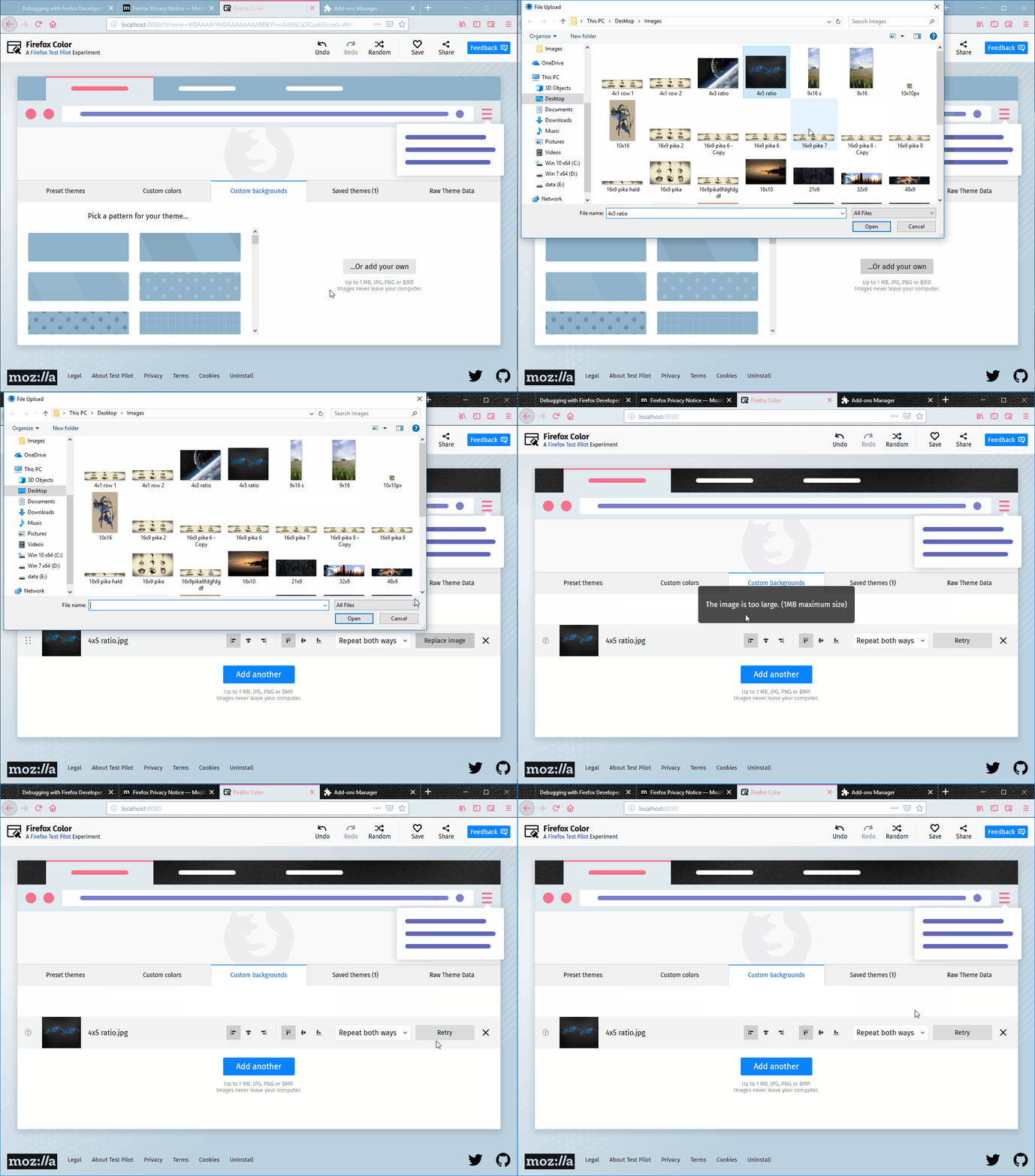
The error message displayed after replacing an image with an invalid one is not explicit enough
@johngruen arbeitet bereits daran.
Seit 10.10.2018.
Bewertung
Dieses Issue wurde noch nicht bewertet.
Beschreibung
[Notes]:
- A more explicit error message can help the user understand why some changes occur after the image was unsuccessfully replaced.
[Affected versions]:
- Firefox 62.0.3 and up
[Affected Platforms]:
- All Windows
- All Mac
- All Linux
[Prerequisites]:
- Have a Firefox profile with the latest version of the "Firefox Color" add-on (2.0.0) custom built on 10/09/2018 installed.
- Have a .txt file saved tp
[Steps to reproduce]:
- Open the Firefox browser with the profile from the prerequisites and click the Firefox Color icon from the toolbar.
- Click the "Custom backgrounds" button.
- Upload a valid image to the "Custom backgrounds" section.
- Click the "Replace image" and select an invalid type file.
- Observe the message displayed on the page and the page itself.
[Expected result]:
- An error is displayed explaining the user the action could not be completed because of the invalid size/type of the file.
[Actual results]:
- "The file is not accepted image type." message is displayed.
- The "Replace image" button is changed into a "Replay" button, but the image does not change and no other changes occur to the theme.
[Additional Notes]:
- Attached a screen recording with the issue:
- Vorherrschende Sprache
- JavaScript
- Sterne
- 506
- Forks
- 100
- PR-Merge-Kennzahlen
- Keine gemergten PRs in 30 T.
Entwicklungsumgebung
Erste Schritte
- Lesen Sie das ganze Issue und danach den Beitragsleitfaden des Projekts.
- Schreiben Sie ins Issue, dass Sie es übernehmen — das erspart doppelte Arbeit.
- Forken Sie das Repository und arbeiten Sie in einem Branch.
- Öffnen Sie einen Pull Request, der die Issue-Nummer nennt.
Mehr aus mozilla/FirefoxColor
-
Schwierigkeit 2/5 1-3 Stunden Anfängerfreundlichkeit 68/100
mozilla/FirefoxColor#1081 · 1 Kommentar ·
-
does not see browserOffen
Schwierigkeit 3/5 1-2 Tage Anfängerfreundlichkeit 35/100
mozilla/FirefoxColor#1087 · 1 Kommentar ·
-
Schwierigkeit 5/5 Über eine Woche Anfängerfreundlichkeit 35/100
mozilla/FirefoxColor#1085 · 1 Kommentar ·
-
Schwierigkeit 3/5 1-2 Tage Anfängerfreundlichkeit 68/100
mozilla/FirefoxColor#1084 · 1 Kommentar ·
-
Schwierigkeit 5/5 Über eine Woche Anfängerfreundlichkeit 35/100
mozilla/FirefoxColor#1083 · 1 Reaktion ·
Alle Issues in mozilla/FirefoxColor
Ähnliche Issues
-
Schwierigkeit 2/5 1-3 Stunden Anfängerfreundlichkeit 78/100
Maintainer antworten meist innerhalb von 1 Tag
-
Schwierigkeit 1/5 Unter einer Stunde Anfängerfreundlichkeit 92/100
parse-community/parse-server#10699 · 1 Kommentar ·
Maintainer antworten meist innerhalb von 1 Tag
-
area: dashboard bug perceived difficulty: 3
Schwierigkeit 2/5 1-3 Stunden Anfängerfreundlichkeit 88/100
Nitjsefnie-Harness-Commons/daedalus#1179 ·
Maintainer antworten meist innerhalb von 1 Tag
-
Aframe enhancement javascript
Schwierigkeit 1/5 Unter einer Stunde Anfängerfreundlichkeit 92/100
webarkit/Aframe-nft#17 ·
-
spec-feedback
Schwierigkeit 2/5 1-3 Stunden Anfängerfreundlichkeit 75/100