The error message displayed after replacing an image with an invalid one is not explicit enough
@johngruen já está trabalhando nisso.
Desde 10/10/2018.
Avaliação
Esta issue ainda não foi avaliada.
Descrição
[Notes]:
- A more explicit error message can help the user understand why some changes occur after the image was unsuccessfully replaced.
[Affected versions]:
- Firefox 62.0.3 and up
[Affected Platforms]:
- All Windows
- All Mac
- All Linux
[Prerequisites]:
- Have a Firefox profile with the latest version of the "Firefox Color" add-on (2.0.0) custom built on 10/09/2018 installed.
- Have a .txt file saved tp
[Steps to reproduce]:
- Open the Firefox browser with the profile from the prerequisites and click the Firefox Color icon from the toolbar.
- Click the "Custom backgrounds" button.
- Upload a valid image to the "Custom backgrounds" section.
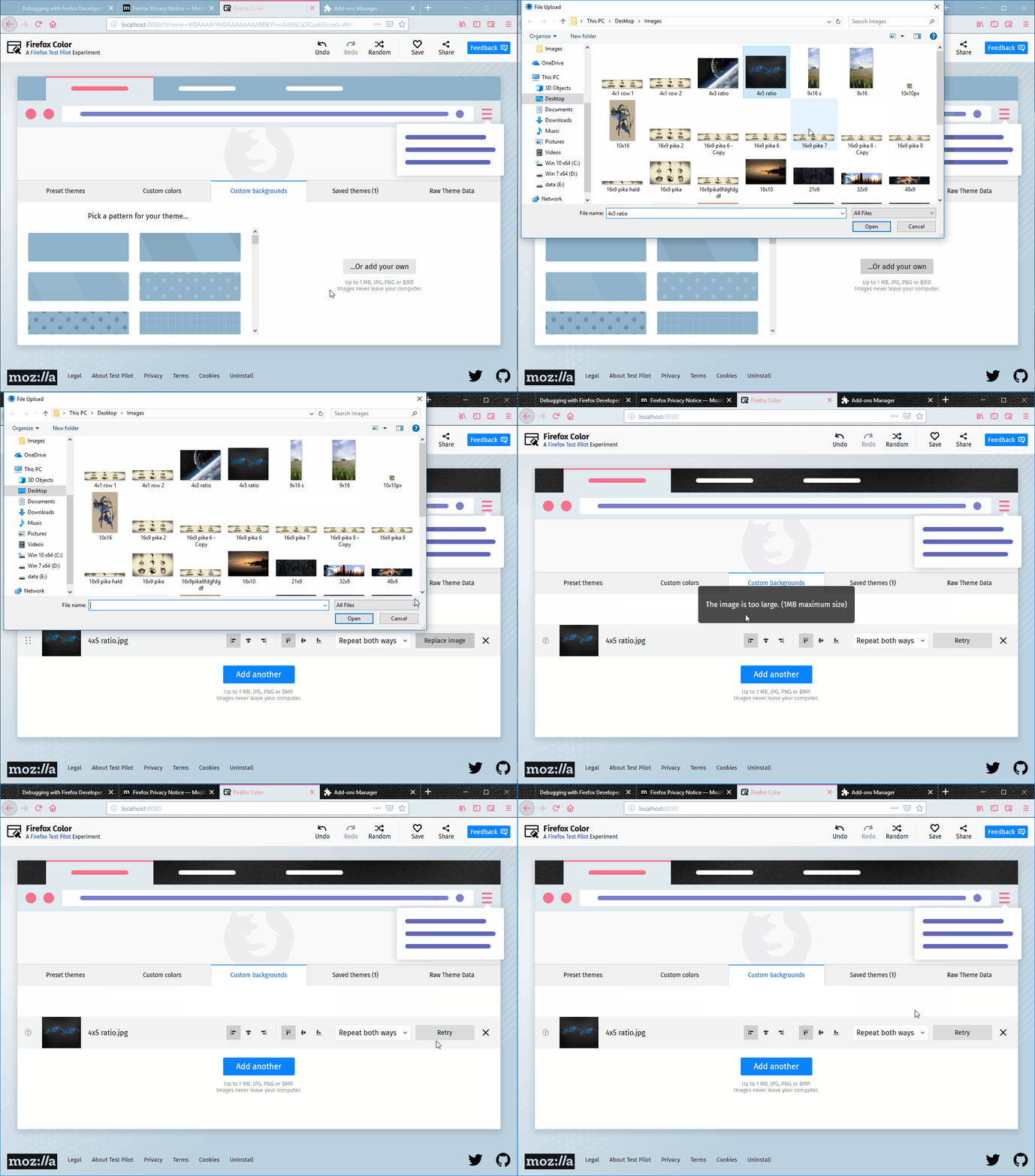
- Click the "Replace image" and select an invalid type file.
- Observe the message displayed on the page and the page itself.
[Expected result]:
- An error is displayed explaining the user the action could not be completed because of the invalid size/type of the file.
[Actual results]:
- "The file is not accepted image type." message is displayed.
- The "Replace image" button is changed into a "Replay" button, but the image does not change and no other changes occur to the theme.
[Additional Notes]:
- Attached a screen recording with the issue:
- Linguagem predominante
- JavaScript
- Estrelas
- 512
- Forks
- 101
- Métricas de merge de PRs
- Nenhum PR com merge em 30d
Preparar o ambiente
- Sem Dockerfile nem arquivo Docker Compose
- Sem modelo de pull request
- Ler o guia de contribuição
Primeiros passos
- Leia a issue inteira e depois o guia de contribuição do projeto.
- Comente na issue dizendo que vai assumir — evita que duas pessoas façam o mesmo trabalho.
- Faça um fork do repositório e trabalhe em uma branch.
- Abra um pull request que referencie o número da issue.
Mais de mozilla/FirefoxColor
-
Dificuldade 2/5 1-3 horas Facilidade para iniciantes 68/100
mozilla/FirefoxColor#1081 · 1 comentário ·
-
Dificuldade 4/5 3-5 dias Facilidade para iniciantes 35/100
mozilla/FirefoxColor#1088 ·
-
does not see browserAberta
Dificuldade 3/5 1-2 dias Facilidade para iniciantes 35/100
mozilla/FirefoxColor#1087 · 1 comentário ·
-
Dificuldade 5/5 Mais de uma semana Facilidade para iniciantes 35/100
mozilla/FirefoxColor#1085 · 1 comentário ·
-
Dificuldade 3/5 1-2 dias Facilidade para iniciantes 68/100
mozilla/FirefoxColor#1084 · 1 comentário ·
Todas as issues de mozilla/FirefoxColor
Issues semelhantes
-
Dificuldade 1/5 Menos de uma hora Facilidade para iniciantes 85/100
Mantenedores costumam responder em até 1 dia
-
Dificuldade 2/5 1-3 horas Facilidade para iniciantes 72/100
vercel-labs/agent-skills#348 ·
-
Dificuldade 2/5 1-3 horas Facilidade para iniciantes 65/100
NanmiCoder/dsh-agent-teams#289 ·
Mantenedores costumam responder em até 1 dia
-
Dificuldade 1/5 Menos de uma hora Facilidade para iniciantes 70/100
Mantenedores costumam responder em até 1 dia
-
Dificuldade 2/5 1-3 horas Facilidade para iniciantes 83/100
c1overzz/dsh-bili-scroll#124 ·
Mantenedores costumam responder em até 1 dia