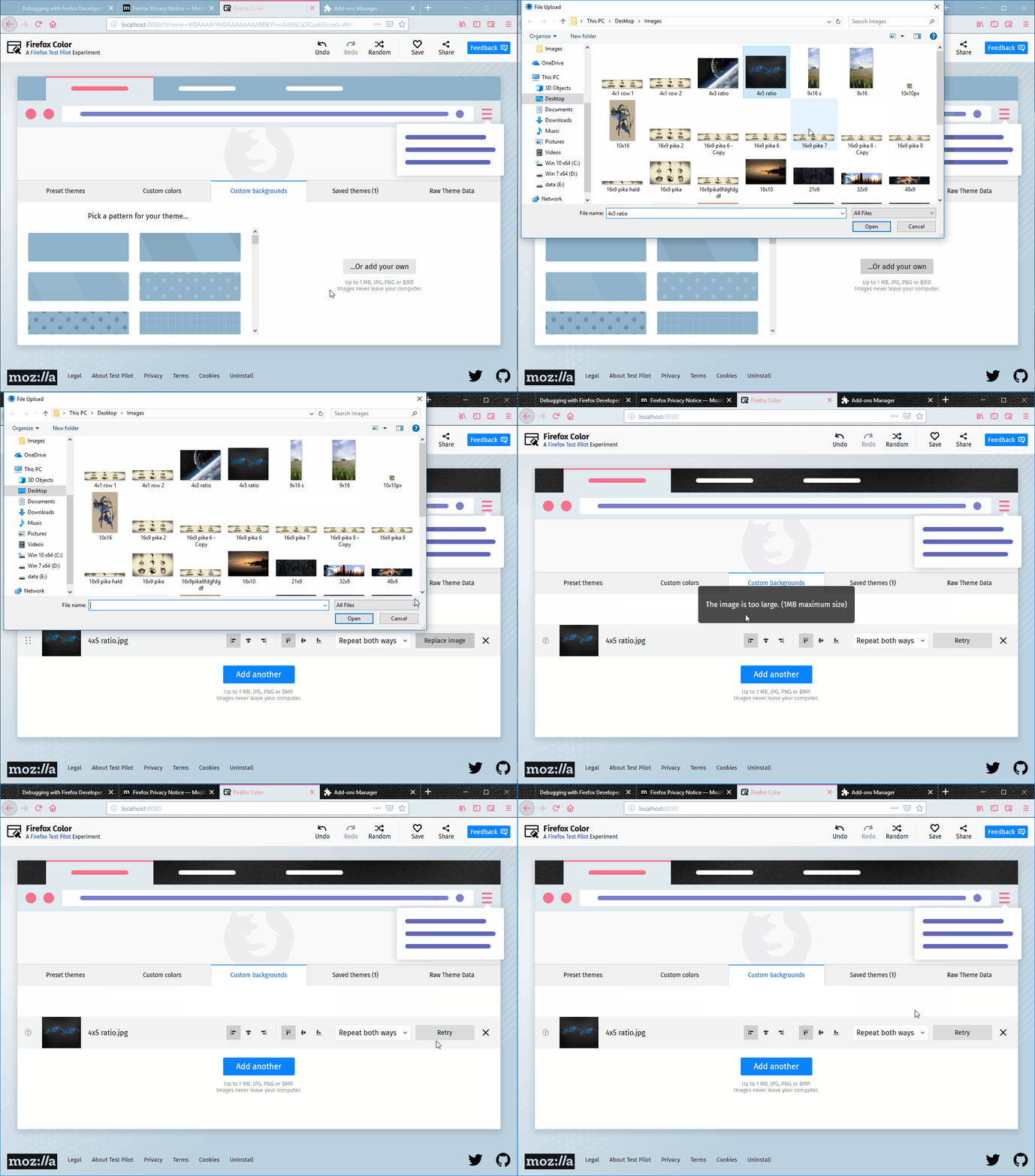
The error message displayed after replacing an image with an invalid one is not explicit enough
@johngruen ya está trabajando en esto.
Desde el 10/10/2018.
Evaluación
Este issue todavía no se ha evaluado.
Descripción
[Notes]:
- A more explicit error message can help the user understand why some changes occur after the image was unsuccessfully replaced.
[Affected versions]:
- Firefox 62.0.3 and up
[Affected Platforms]:
- All Windows
- All Mac
- All Linux
[Prerequisites]:
- Have a Firefox profile with the latest version of the "Firefox Color" add-on (2.0.0) custom built on 10/09/2018 installed.
- Have a .txt file saved tp
[Steps to reproduce]:
- Open the Firefox browser with the profile from the prerequisites and click the Firefox Color icon from the toolbar.
- Click the "Custom backgrounds" button.
- Upload a valid image to the "Custom backgrounds" section.
- Click the "Replace image" and select an invalid type file.
- Observe the message displayed on the page and the page itself.
[Expected result]:
- An error is displayed explaining the user the action could not be completed because of the invalid size/type of the file.
[Actual results]:
- "The file is not accepted image type." message is displayed.
- The "Replace image" button is changed into a "Replay" button, but the image does not change and no other changes occur to the theme.
[Additional Notes]:
- Attached a screen recording with the issue:
- Lenguaje dominante
- JavaScript
- Estrellas
- 506
- Forks
- 100
- Métricas de merge de PR
- Sin PR fusionados en 30 d
Preparar el entorno
Primeros pasos
- Lee el issue completo y luego la guía de contribución del proyecto.
- Comenta en el issue que vas a ocuparte — evita que dos personas hagan lo mismo.
- Haz un fork del repositorio y trabaja en una rama.
- Abre un pull request que haga referencia al número del issue.
Más de mozilla/FirefoxColor
-
Dificultad 2/5 1-3 horas Aptitud para principiantes 68/100
mozilla/FirefoxColor#1081 · 1 comentario ·
-
does not see browserAbierto
Dificultad 3/5 1-2 días Aptitud para principiantes 35/100
mozilla/FirefoxColor#1087 · 1 comentario ·
-
Dificultad 5/5 Más de una semana Aptitud para principiantes 35/100
mozilla/FirefoxColor#1085 · 1 comentario ·
-
Dificultad 3/5 1-2 días Aptitud para principiantes 68/100
mozilla/FirefoxColor#1084 · 1 comentario ·
-
Dificultad 5/5 Más de una semana Aptitud para principiantes 35/100
mozilla/FirefoxColor#1083 · 1 reacción ·
Todos los issues de mozilla/FirefoxColor
Issues similares
-
factory-active factory-automatic task-bug-reproduction-success task-identify-harness-labels-done task-identify-issue-type-done
Dificultad 2/5 1-3 horas Aptitud para principiantes 90/100
vercel/ai#21528 · 3 comentarios ·
Los mantenedores suelen responder en 1 día
-
Dificultad 2/5 1-3 horas Aptitud para principiantes 88/100
Los mantenedores suelen responder en 1 día
-
status: waiting triage
Dificultad 2/5 1-3 horas Aptitud para principiantes 84/100
freeCodeCamp/freeCodeCamp#70412 ·
Los mantenedores suelen responder en 1 día
-
Dificultad 2/5 1-3 horas Aptitud para principiantes 88/100
rohitg00/ai-engineering-from-scratch#490 ·
Los mantenedores suelen responder en 1 día
-
Dificultad 2/5 1-3 horas Aptitud para principiantes 88/100
Los mantenedores suelen responder en 6 días