Check pathnames for illegal characters (e.g. outputPath for build files)
Dieses Issue hat noch niemand übernommen.
Bewertung
- Schwierigkeit
- 3/5
- Geschätzter Aufwand
- 1-2 Tage
- Anfängerfreundlichkeit
- 35/100
- Issue-Typ
- Bug
- Klarheit
- Klar beschrieben
- Aktivitätsstatus
- Veraltet
- Tech-Stack
- angular, typescript
- Bereich
- build-system, cli
Rechercherichtung
Beginne damit, den Befehl ng build mit auf .../dist gesetztem outputPath in einer Windows-Sandbox zu reproduzieren, wobei du die im Issue beschriebene angular.json-Konfiguration verwendest. Verfolge, wie der Build diesen Pfad verarbeitet, und überprüfe, dass ein ungültiger Pfadname eine Warnung oder einen Fehler erzeugt, bevor Dateien oder Verzeichnisse erstellt werden.
Vom Indexierungsmodell aus dem Issue-Text verfasst.
Beschreibung
🐞 Bug report
Command (mark with an x)
- new
- build
- serve
- test
- e2e
- generate
- add
- update
- lint
- extract-i18n
- run
- config
- help
- version
- doc
Description
The Angular CLI should warn the user if a specified path is invalid for the current system.
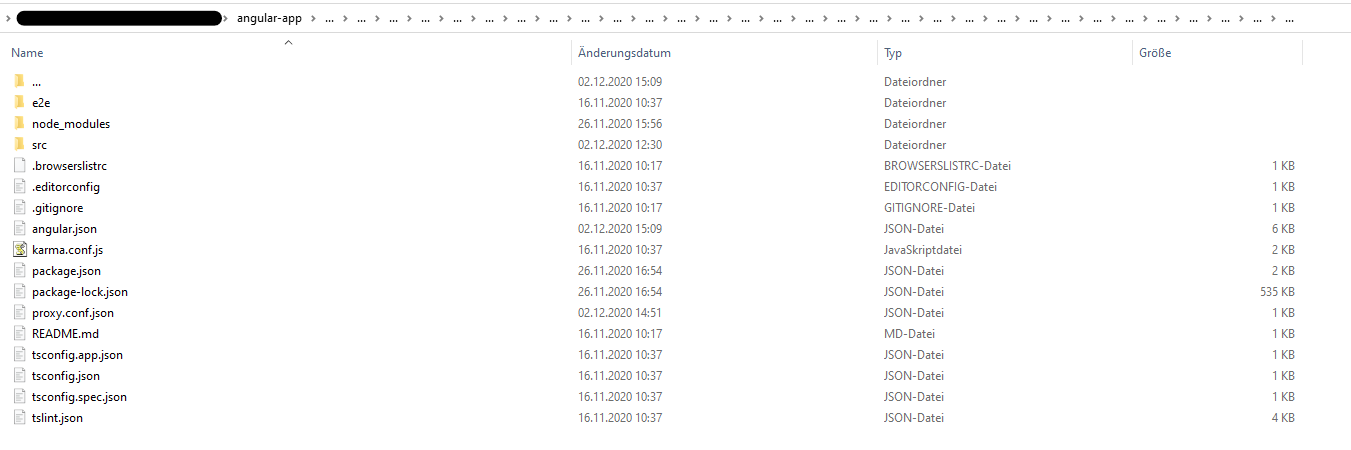
I accidently set ".../dist" (three dots) as outputPath in angular.json. Correct is "../dist" (two dots). Running ng build created a huge mess. In the app root a folder has been created with ... as name (ending a folder name in Windows with a dot is illegal). Inside of this three dot folder all of my project files were listed (including node_modules folder). There was also a folder named ..., which again contained my whole project files. This recursively went to whatever level (I clicked throuhg the folder approximately 30 levels down, there was still a ... folder). Deleting the first ... folder lastet more than 15 minutes, then telling me the files which should be deleted aren't there anymore. Also my project files in the root directory were deleted in this process (luckily most of it in Git). That was the strangest thing, it felt like the content inside of ... mirrored my root project somehow (like in https://superuser.com/questions/528502/cant-remove-three-dots-folder-on-my-hdd). I also tried reverting my files using Git which did not work at all. I managed to delete the whole repository locally with rm -rf 'folder' using the GitBash. After cloning the project again, my IDE (Webstorm) listed the ... folder once again, which luckily could be deleted this time. The project looks fine right now, and with the correct outputPath the app builds correctly.
It would be nice if the CLI checks pathnames for illegal characters. I did not try any other illegal characters inside of the path name.
🔬 Minimal Reproduction
Caution: Try in a sandbox environment with unimported files only to prevent loss of data!
- Change the
"outputPath"inangular.jsonto".../dist"(three dots) - Run
ng build
🌍 Your Environment
Angular CLI: 11.0.1
Node: 14.15.0
OS: win32 x64

Angular: 11.0.0
... animations, common, compiler, compiler-cli, core, forms
... platform-browser, platform-browser-dynamic, router
Ivy Workspace: Yes

Package                         Version
---------------------------------------------------------
@angular-devkit/architect       0.1100.1
@angular-devkit/build-angular   0.1100.1
@angular-devkit/core            11.0.1
@angular-devkit/schematics      11.0.1
@angular/cdk                    11.0.1
@angular/cli                    11.0.1
@angular/material               11.0.1
@schematics/angular             11.0.1
@schematics/update              0.1100.1
rxjs                            6.6.3
typescript                      4.0.5
Anything else relevant?
- Vorherrschende Sprache
- TypeScript
- Sterne
- 27k
- Forks
- 11.8k
- Ø Merge
- 17 Std. 25 Min.
- Gemergte PRs (30 T.)
- 183
Beitragsleitfaden
Erste Schritte
- Lesen Sie das ganze Issue und danach den Beitragsleitfaden des Projekts.
- Schreiben Sie ins Issue, dass Sie es übernehmen — das erspart doppelte Arbeit.
- Forken Sie das Repository und arbeiten Sie in einem Branch.
- Öffnen Sie einen Pull Request, der die Issue-Nummer nennt.
Mehr aus angular/angular-cli
-
area: @angular/build gemini-triaged
Schwierigkeit 2/5 1-3 Stunden Anfängerfreundlichkeit 74/100
angular/angular-cli#33955 ·
-
area: @angular/cli gemini-triaged
Schwierigkeit 2/5 1-3 Stunden Anfängerfreundlichkeit 72/100
angular/angular-cli#33055 · 1 Kommentar · 3 Reaktionen ·
-
angular/build:library area: @angular/build gemini-triaged
angular/angular-cli#34131 · 1 zugewiesene Person ·
-
angular/build:library area: @angular/build gemini-triaged
angular/angular-cli#34130 · 1 zugewiesene Person ·
-
angular/build:library area: @angular/build gemini-triaged
angular/angular-cli#34128 · 1 zugewiesene Person ·
Alle Issues in angular/angular-cli
Ähnliche Issues
-
[Bug]: Discord Activity titles with emoji are rejected as over 80 characters when they are not Offenclawsweeper:linked-pr-open clawsweeper:no-new-fix-pr clawsweeper:source-repro impact:message-loss issue-rating: 🦞 diamond lobster maturity:stable P2
Schwierigkeit 2/5 1-3 Stunden Anfängerfreundlichkeit 88/100
-
Schwierigkeit 2/5 1-3 Stunden Anfängerfreundlichkeit 84/100
Eynzof/Hermes-CN-Desktop#616 ·
-
ZCode 3.14.3 に対応する Offen
Schwierigkeit 2/5 1-3 Stunden Anfängerfreundlichkeit 68/100
supermomonga/zcode-acp#24 ·
-
Schwierigkeit 2/5 1-3 Stunden Anfängerfreundlichkeit 76/100
growthbook/growthbook#7100 ·
-
triage
Schwierigkeit 1/5 1-3 Stunden Anfängerfreundlichkeit 88/100