Check pathnames for illegal characters (e.g. outputPath for build files)
Chưa có ai nhận issue này.
Đánh giá
- Độ khó
- 3/5
- Thời gian dự kiến
- 1-2 ngày
- Mức phù hợp với người mới
- 35/100
- Loại issue
- Lỗi
- Độ rõ ràng
- Đặc tả rõ ràng
- Mức độ hoạt động
- Đình trệ
- Công nghệ
- angular, typescript
- Lĩnh vực
- build-system, cli
Hướng nghiên cứu
Bắt đầu bằng cách tái hiện lệnh ng build với outputPath được đặt thành .../dist trong sandbox Windows, sử dụng cấu hình angular.json được mô tả trong issue. Theo dõi cách build xử lý đường dẫn đó và xác minh rằng một tên đường dẫn không hợp lệ sẽ tạo ra cảnh báo hoặc lỗi trước khi tạo các tệp hoặc thư mục.
Do mô hình lập chỉ mục viết ra từ nội dung của issue.
Mô tả
🐞 Bug report
Command (mark with an x)
- new
- build
- serve
- test
- e2e
- generate
- add
- update
- lint
- extract-i18n
- run
- config
- help
- version
- doc
Description
The Angular CLI should warn the user if a specified path is invalid for the current system.
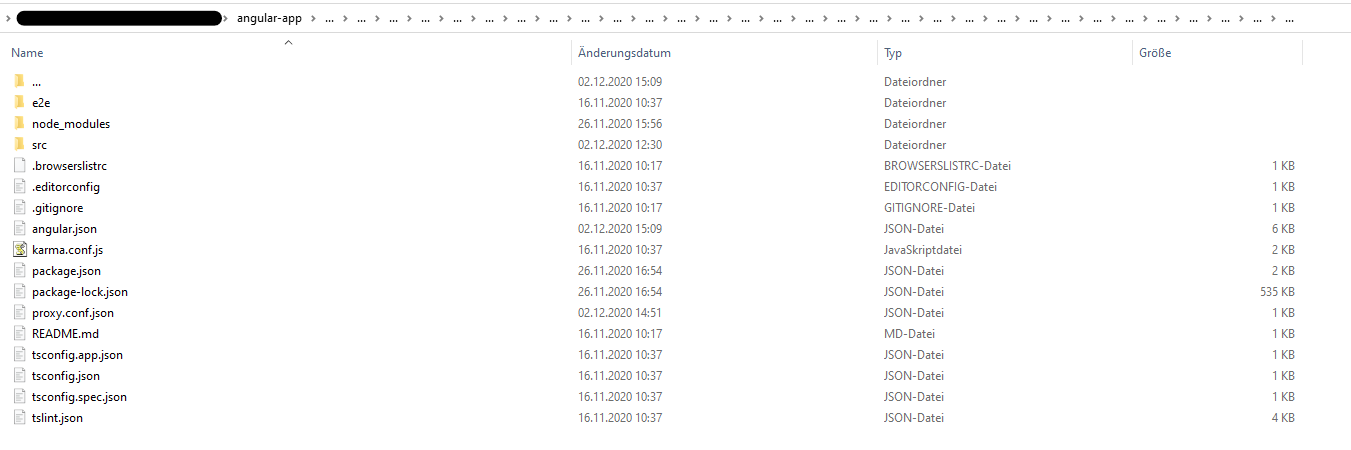
I accidently set ".../dist" (three dots) as outputPath in angular.json. Correct is "../dist" (two dots). Running ng build created a huge mess. In the app root a folder has been created with ... as name (ending a folder name in Windows with a dot is illegal). Inside of this three dot folder all of my project files were listed (including node_modules folder). There was also a folder named ..., which again contained my whole project files. This recursively went to whatever level (I clicked throuhg the folder approximately 30 levels down, there was still a ... folder). Deleting the first ... folder lastet more than 15 minutes, then telling me the files which should be deleted aren't there anymore. Also my project files in the root directory were deleted in this process (luckily most of it in Git). That was the strangest thing, it felt like the content inside of ... mirrored my root project somehow (like in https://superuser.com/questions/528502/cant-remove-three-dots-folder-on-my-hdd). I also tried reverting my files using Git which did not work at all. I managed to delete the whole repository locally with rm -rf 'folder' using the GitBash. After cloning the project again, my IDE (Webstorm) listed the ... folder once again, which luckily could be deleted this time. The project looks fine right now, and with the correct outputPath the app builds correctly.
It would be nice if the CLI checks pathnames for illegal characters. I did not try any other illegal characters inside of the path name.
🔬 Minimal Reproduction
Caution: Try in a sandbox environment with unimported files only to prevent loss of data!
- Change the
"outputPath"inangular.jsonto".../dist"(three dots) - Run
ng build
🌍 Your Environment
Angular CLI: 11.0.1
Node: 14.15.0
OS: win32 x64

Angular: 11.0.0
... animations, common, compiler, compiler-cli, core, forms
... platform-browser, platform-browser-dynamic, router
Ivy Workspace: Yes

Package                         Version
---------------------------------------------------------
@angular-devkit/architect       0.1100.1
@angular-devkit/build-angular   0.1100.1
@angular-devkit/core            11.0.1
@angular-devkit/schematics      11.0.1
@angular/cdk                    11.0.1
@angular/cli                    11.0.1
@angular/material               11.0.1
@schematics/angular             11.0.1
@schematics/update              0.1100.1
rxjs                            6.6.3
typescript                      4.0.5
Anything else relevant?
- Ngôn ngữ chính
- TypeScript
- Star
- 27k
- Fork
- 11.8k
- Merge trung bình
- 17 giờ 25 phút
- Pull request đã merge (30 ngày)
- 183
Hướng dẫn đóng góp
Bắt đầu từ đâu
- Đọc hết issue, rồi đọc hướng dẫn đóng góp của dự án.
- Bình luận trên issue rằng bạn sẽ nhận — tránh hai người làm cùng một việc.
- Fork repository và làm thay đổi trên một nhánh.
- Mở pull request có tham chiếu số hiệu của issue.
Issue khác của angular/angular-cli
-
Can't use an array of hostnames in --allowedHosts cli parameter in @angular/build:dev-server Đang mởarea: @angular/build gemini-triaged
Độ khó 2/5 1-3 giờ Mức phù hợp với người mới 74/100
angular/angular-cli#33955 ·
-
area: @angular/cli gemini-triaged
Độ khó 2/5 1-3 giờ Mức phù hợp với người mới 72/100
angular/angular-cli#33055 · 1 bình luận · 3 reaction ·
-
angular/build:library area: @angular/build gemini-triaged
angular/angular-cli#34131 · 1 người được giao ·
-
angular/build:library area: @angular/build gemini-triaged
angular/angular-cli#34130 · 1 người được giao ·
-
angular/build:library area: @angular/build gemini-triaged
angular/angular-cli#34128 · 1 người được giao ·
Tất cả issue của angular/angular-cli
Issue tương tự
-
Độ khó 2/5 1-3 giờ Mức phù hợp với người mới 75/100
safetrustcr/dApp-SafeTrust#426 ·
-
area:workflow bug ready-for-agent
Độ khó 2/5 1-3 giờ Mức phù hợp với người mới 75/100
fil-donadoni/tolaria#4409 ·
-
Độ khó 2/5 1-3 giờ Mức phù hợp với người mới 70/100
Fission-AI/OpenSpec#1960 ·
-
Add dependabot Đang mở
Độ khó 2/5 1-3 giờ Mức phù hợp với người mới 70/100
-
Độ khó 2/5 1-3 giờ Mức phù hợp với người mới 75/100
corsairdev/corsair#1764 ·