Void with 512 megs of RAM (VM) - xbps sync causes OOMkill
Chưa có ai nhận issue này.
Đánh giá
- Độ khó
- 4/5
- Thời gian dự kiến
- 3-5 ngày
- Mức phù hợp với người mới
- 35/100
- Loại issue
- Lỗi
- Độ rõ ràng
- Khá rõ ràng
- Mức độ hoạt động
- Đình trệ
- Lĩnh vực
- performance, tooling
Hướng nghiên cứu
Start by reproducing the xbps-install calls in http/basic-void.cfg with the 512 MB and 648 MB VM limits, using void-autoinstall.pkr.hcl as the build context. Compare the 2024 ISO with the 20250202 ISO and inspect the OOM-killer output to identify what changed. Done means the installation completes reliably within 512 MB or the regression is clearly isolated.
Do mô hình lập chỉ mục viết ra từ nội dung của issue.
Mô tả
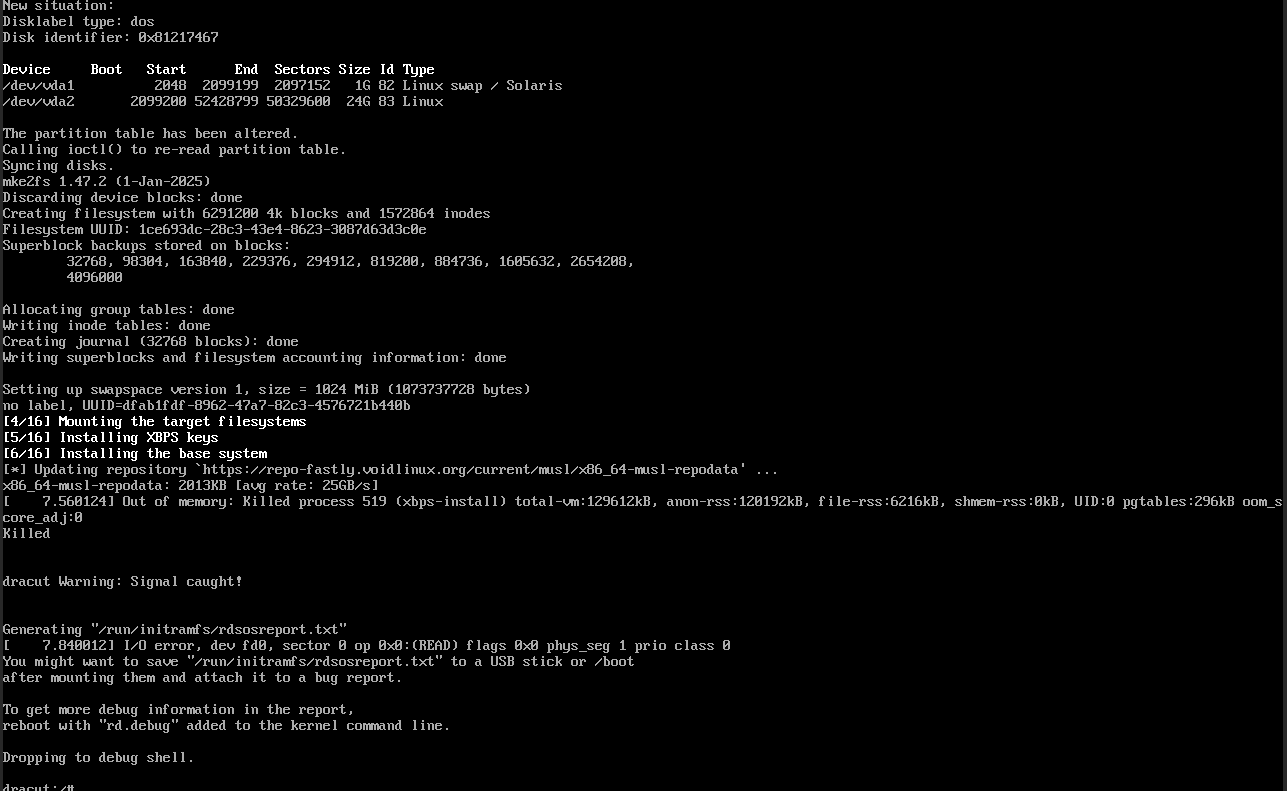
In the 2024 ISO, this wasn't a problem. Now I have a packer build as follows:
└» cat void-autoinstall.pkr.hcl
source "qemu" "void-musl" {
  iso_url          = "https://repo-fastly.voidlinux.org/live/current/void-live-x86_64-musl-20250202-base.iso"
  iso_checksum     = "sha256:0c46bf13a7a019c1fec0b2969201aecf09ff9a7646ef749e04ea63ead0c86404"
  output_directory = "output-void-musl"
  shutdown_command = "echo 'voidlinux' | sudo -S shutdown -P now"
  disk_size        = "25G"
  format           = "qcow2"
  accelerator      = "kvm"
  headless         = true
  http_directory   = "http"

  ssh_username = "admin"
  ssh_password = "voidlinux"
  ssh_timeout  = "90m" # How long we give the system to get installed

  boot_wait = "2s"
  boot_command = [
    "<tab><wait>",
    "auto autourl=http://{{.HTTPIP}}:{{.HTTPPort}}/basic-void.cfg",
    "<enter>"
  ]
}

build {
  source "source.qemu.void-musl" {
    vm_name = "void-nova"
  }
}
and the config I load:
└» cat http/basic-void.cfg
#!/bin/sh

export username=admin
export password=voidlinux

export XBPS_ARCH=x86_64-musl
export xbpsrepository="https://repo-fastly.voidlinux.org/current/musl"

export timezone="America/New_York"

export pkgs="docker git neovim temporal-cli nomad uv"

export end_action=func
end_function() {
        printf "Linking default services\n"
        ln -s /etc/sv/docker "${target}/etc/runit/runsvdir/default/docker"
        ln -s /etc/sv/dhcpcd "${target}/etc/runit/runsvdir/default/dhcpcd"
        ln -s /etc/sv/sshd "${target}/etc/runit/runsvdir/default/sshd"
        ln -s /etc/sv/agetty-ttyS0 "${target}/etc/runit/runsvdir/default/agetty-ttyS0"
        echo "***"


        echo "***"
        printf "Let's continue with our life.\n"
        sync
        reboot -f
}

# Skip boot partition
VAI_partition_disk() {
        sfdisk "${disk}" <<EOF
,${swapsize},S
;
EOF
}
VAI_format_disk() {
        mkfs.ext4 -F "${disk}2"
        mkswap -f "${disk}1"
}
export swapsize="1G"

VAI_mount_target() {
        mkdir -p "${target}"
        mount "${disk}2" "${target}"
}

VAI_configure_fstab() {
        uuid_root="$(blkid -s UUID -o value "${disk}2")"
        uuid_swap="$(blkid -s UUID -o value "${disk}1")"
        echo "UUID=$uuid_root / ext4 defaults,errors=remount-ro,noatime 0 1" >> "${target}/etc/fstab"
        echo "UUID=$uuid_swap swap swap defaults 0 0" >> "${target}/etc/fstab"
}

# Removable when this is closed
VAI_install_base_system() {
    # Install a base system
    XBPS_ARCH="${XBPS_ARCH}" xbps-install -Sy -R "${xbpsrepository}" -r /mnt base-system grub

    # Install additional packages
    if [  -n "${pkgs}" ] ; then
        # shellcheck disable=SC2086
        XBPS_ARCH="${XBPS_ARCH}" xbps-install -Sy -R "${xbpsrepository}" -r /mnt ${pkgs}
    fi
}
(yes most of this can be removed in the newest mklive but the newest mklive is newer than the ISO)
The point is this image ends up in trouble because xbps-install triggers an OOMkill reliably. I believe xbps is allocating a lot of memory where it didn't always, and the system has a 512 meg limit. If I increase the system RAM from the default (512) to 648 megs, the install works flawlessly.
- Ngôn ngữ chính
- C
- Star
- 1.2k
- Fork
- 152
- Chỉ số merge pull request
- Không có pull request nào được merge trong 30 ngày
Chuẩn bị môi trường
- Không có Dockerfile hay tệp Docker Compose
- Không có mẫu pull request
- Đọc hướng dẫn đóng góp
Bắt đầu từ đâu
- Đọc hết issue, rồi đọc hướng dẫn đóng góp của dự án.
- Bình luận trên issue rằng bạn sẽ nhận — tránh hai người làm cùng một việc.
- Fork repository và làm thay đổi trên một nhánh.
- Mở pull request có tham chiếu số hiệu của issue.
Issue khác của void-linux/xbps
-
Độ khó 1/5 Dưới một giờ Mức phù hợp với người mới 68/100
void-linux/xbps#475 ·
-
Độ khó 4/5 3-5 ngày Mức phù hợp với người mới 45/100
void-linux/xbps#701 ·
-
Độ khó 4/5 3-5 ngày Mức phù hợp với người mới 55/100
void-linux/xbps#700 ·
-
xbps-query -RX repository overridesCó thể đã có người làm @outofsyncrs đã nhận 33 ngày trước. Đang mởbug
Độ khó 3/5 1-2 ngày Mức phù hợp với người mới 45/100
void-linux/xbps#696 ·
-
Độ khó 3/5 1-2 ngày Mức phù hợp với người mới 52/100
void-linux/xbps#695 · 7 bình luận ·
Tất cả issue của void-linux/xbps
Issue tương tự
-
Độ khó 1/5 1-3 giờ Mức phù hợp với người mới 76/100
SteamGridDB/SGDBoop#147 ·
-
Doc: insert executor and incremental consolidation leave sorted runs, not globally sorted headsĐang mở
Độ khó 1/5 Dưới một giờ Mức phù hợp với người mới 83/100
semantic-reasoning/wirelog#2133 ·
Maintainer thường phản hồi trong vòng 1 ngày
-
backlog
Độ khó 1/5 Dưới một giờ Mức phù hợp với người mới 82/100
EchoTools/nevr-runtime#454 ·
Maintainer thường phản hồi trong vòng 1 ngày
-
initramfs: -type f (#18686) skips the libcurl.so.4 symlink, libcurl no longer copied into initramfsĐang mở
Độ khó 2/5 1-3 giờ Mức phù hợp với người mới 72/100
Maintainer thường phản hồi trong vòng 2 ngày
-
Độ khó 1/5 Dưới một giờ Mức phù hợp với người mới 76/100
Maintainer thường phản hồi trong vòng 1 ngày