Void with 512 megs of RAM (VM) - xbps sync causes OOMkill
Personne n'a encore pris cette issue.
Évaluation
- Difficulté
- 4/5
- Temps estimé
- 3-5 jours
- Accessibilité débutants
- 35/100
- Type d'issue
- Bug
- Clarté
- Plutôt claire
- Activité
- À l'abandon
- Domaine
- performance, tooling
Piste de recherche
Start by reproducing the xbps-install calls in http/basic-void.cfg with the 512 MB and 648 MB VM limits, using void-autoinstall.pkr.hcl as the build context. Compare the 2024 ISO with the 20250202 ISO and inspect the OOM-killer output to identify what changed. Done means the installation completes reliably within 512 MB or the regression is clearly isolated.
Rédigé par le modèle d'indexation à partir du texte de l'issue.
Description
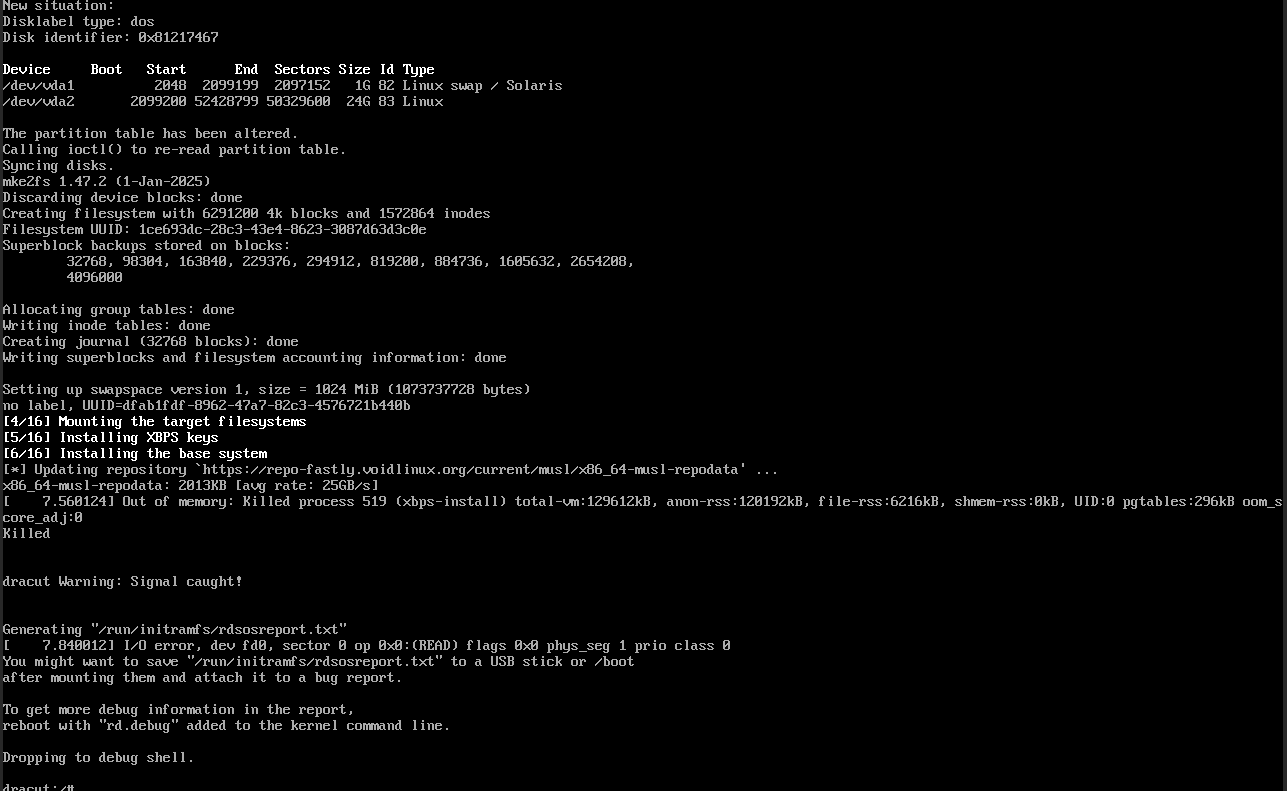
In the 2024 ISO, this wasn't a problem. Now I have a packer build as follows:
└» cat void-autoinstall.pkr.hcl
source "qemu" "void-musl" {
  iso_url          = "https://repo-fastly.voidlinux.org/live/current/void-live-x86_64-musl-20250202-base.iso"
  iso_checksum     = "sha256:0c46bf13a7a019c1fec0b2969201aecf09ff9a7646ef749e04ea63ead0c86404"
  output_directory = "output-void-musl"
  shutdown_command = "echo 'voidlinux' | sudo -S shutdown -P now"
  disk_size        = "25G"
  format           = "qcow2"
  accelerator      = "kvm"
  headless         = true
  http_directory   = "http"

  ssh_username = "admin"
  ssh_password = "voidlinux"
  ssh_timeout  = "90m" # How long we give the system to get installed

  boot_wait = "2s"
  boot_command = [
    "<tab><wait>",
    "auto autourl=http://{{.HTTPIP}}:{{.HTTPPort}}/basic-void.cfg",
    "<enter>"
  ]
}

build {
  source "source.qemu.void-musl" {
    vm_name = "void-nova"
  }
}
and the config I load:
└» cat http/basic-void.cfg
#!/bin/sh

export username=admin
export password=voidlinux

export XBPS_ARCH=x86_64-musl
export xbpsrepository="https://repo-fastly.voidlinux.org/current/musl"

export timezone="America/New_York"

export pkgs="docker git neovim temporal-cli nomad uv"

export end_action=func
end_function() {
        printf "Linking default services\n"
        ln -s /etc/sv/docker "${target}/etc/runit/runsvdir/default/docker"
        ln -s /etc/sv/dhcpcd "${target}/etc/runit/runsvdir/default/dhcpcd"
        ln -s /etc/sv/sshd "${target}/etc/runit/runsvdir/default/sshd"
        ln -s /etc/sv/agetty-ttyS0 "${target}/etc/runit/runsvdir/default/agetty-ttyS0"
        echo "***"


        echo "***"
        printf "Let's continue with our life.\n"
        sync
        reboot -f
}

# Skip boot partition
VAI_partition_disk() {
        sfdisk "${disk}" <<EOF
,${swapsize},S
;
EOF
}
VAI_format_disk() {
        mkfs.ext4 -F "${disk}2"
        mkswap -f "${disk}1"
}
export swapsize="1G"

VAI_mount_target() {
        mkdir -p "${target}"
        mount "${disk}2" "${target}"
}

VAI_configure_fstab() {
        uuid_root="$(blkid -s UUID -o value "${disk}2")"
        uuid_swap="$(blkid -s UUID -o value "${disk}1")"
        echo "UUID=$uuid_root / ext4 defaults,errors=remount-ro,noatime 0 1" >> "${target}/etc/fstab"
        echo "UUID=$uuid_swap swap swap defaults 0 0" >> "${target}/etc/fstab"
}

# Removable when this is closed
VAI_install_base_system() {
    # Install a base system
    XBPS_ARCH="${XBPS_ARCH}" xbps-install -Sy -R "${xbpsrepository}" -r /mnt base-system grub

    # Install additional packages
    if [  -n "${pkgs}" ] ; then
        # shellcheck disable=SC2086
        XBPS_ARCH="${XBPS_ARCH}" xbps-install -Sy -R "${xbpsrepository}" -r /mnt ${pkgs}
    fi
}
(yes most of this can be removed in the newest mklive but the newest mklive is newer than the ISO)
The point is this image ends up in trouble because xbps-install triggers an OOMkill reliably. I believe xbps is allocating a lot of memory where it didn't always, and the system has a 512 meg limit. If I increase the system RAM from the default (512) to 648 megs, the install works flawlessly.
- Langage dominant
- C
- Étoiles
- 1.2k
- Forks
- 155
- Merge moyen
- 1 h 39 min
- PR mergées (30 j)
- 1
Préparer son environnement
- Aucun Dockerfile ni fichier Docker Compose
- Aucun modèle de pull request
- Lire le guide de contribution
Par où commencer
- Lisez l'issue en entier, puis le guide de contribution du projet.
- Signalez en commentaire que vous la prenez — cela évite que deux personnes fassent le même travail.
- Forkez le dépôt et travaillez sur une branche.
- Ouvrez une pull request qui référence le numéro de l'issue.
Autres issues de void-linux/xbps
-
Difficulté 1/5 Moins d'une heure Accessibilité débutants 68/100
void-linux/xbps#475 ·
-
Difficulté 4/5 3-5 jours Accessibilité débutants 45/100
void-linux/xbps#701 ·
-
Difficulté 4/5 3-5 jours Accessibilité débutants 55/100
void-linux/xbps#700 ·
-
xbps-query -RX repository overridesPeut-être pris @naevui l’a pris il y a 50 jours. Ouvertebug
Difficulté 3/5 1-2 jours Accessibilité débutants 45/100
void-linux/xbps#696 ·
-
Difficulté 3/5 1-2 jours Accessibilité débutants 52/100
void-linux/xbps#695 · 7 commentaires ·
Toutes les issues de void-linux/xbps
Issues similaires
-
bug intrinsic medium priority rt_lib
Difficulté 2/5 1-3 heures Accessibilité débutants 75/100
Les mainteneurs répondent en général sous 1 jour
-
[CLI] Clarify distinction between 'capture camera' and 'capture screen' in help text and outputOuverte
Difficulté 2/5 1-3 heures Accessibilité débutants 68/100
espressif/esp-vision#18 ·
-
Difficulté 2/5 1-3 heures Accessibilité débutants 68/100
sumatrapdfreader/sumatrapdf#6417 · 3 commentaires ·
-
[BUG] Cython cache evicts most recent instead of oldest entry on cleanupPeut-être pris @scoder l’a pris aujourd’hui. OuverteBuild System defect
Difficulté 2/5 1-3 heures Accessibilité débutants 75/100
Les mainteneurs répondent en général sous 2 jours
-
Difficulté 2/5 1-3 heures Accessibilité débutants 61/100
HexaCluster/credcheck#94 ·