Android: setting a view's background drawable alpha anywhere from 1 to 254 makes its border fully transparent
Maintainers usually reply within 2 days
Nobody has claimed this yet.
- #59965 by @lazerg — closed without merging
Assessment
- Difficulty
- 2/5
- Estimated time
- 1-3 hours
- Newbie friendliness
- 25/100
Research direction
Start with BorderDrawable.kt, especially multiplyColorAlpha and the paint and opacity call sites named in the issue; the report links the related earlier change in issue #56154. Check existing Android drawable tests and add coverage for alpha values between 1 and 254, including edge-colored borders. Done means border alpha scales as expected while alpha 0 and 255 retain their current behavior; pull request #59965 is already open.
Written by the indexing model from the issue text.
Description
Description
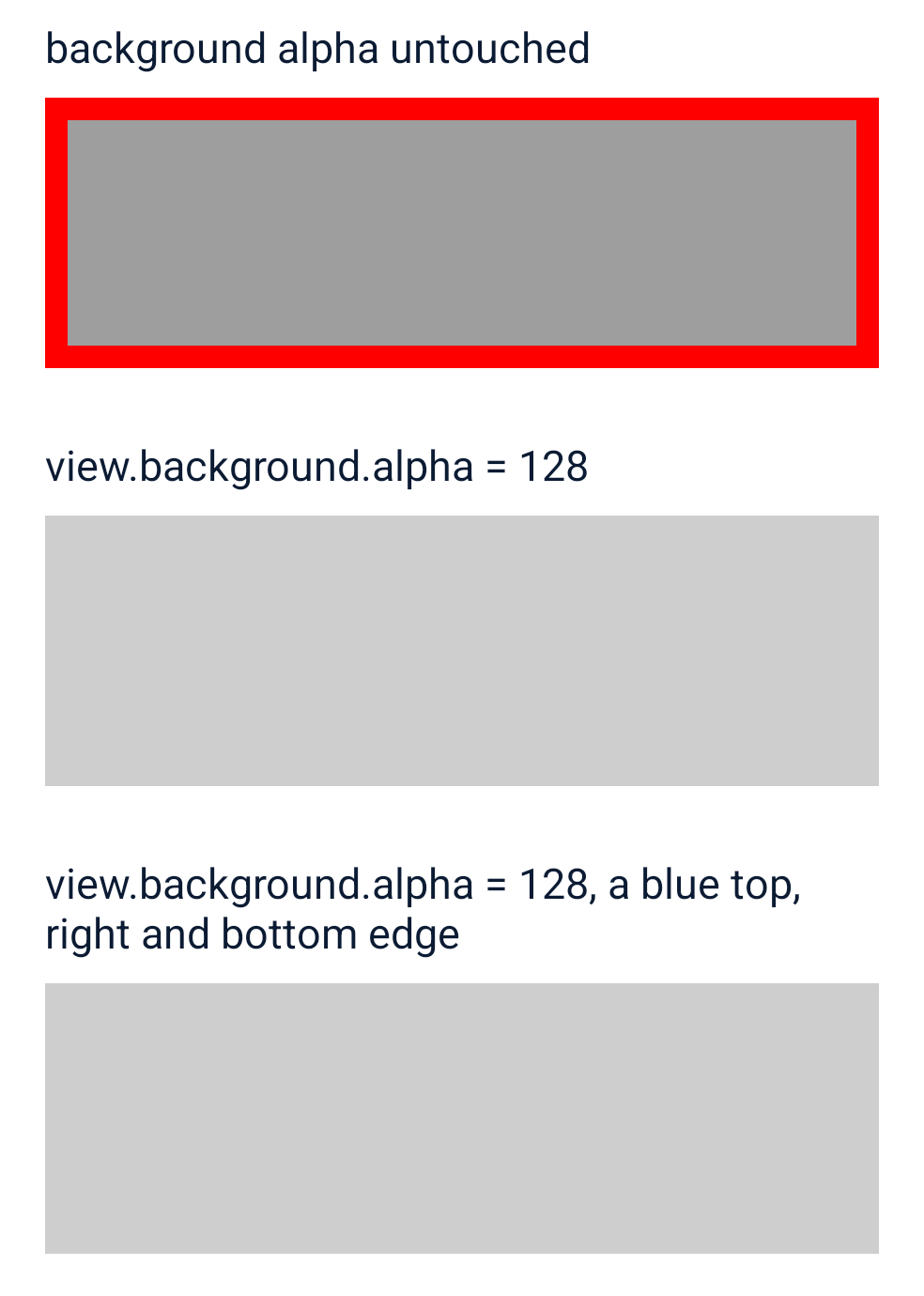
On Android, setting a view's background drawable alpha to any value from 1 to 254, as view.background.alpha = 128 from native code, makes its border fully transparent, where it should draw the border at that alpha; the background color takes the alpha as asked, and 0 and 255 behave. The view's CompositeBackgroundDrawable is a LayerDrawable, whose setAlpha hands the alpha to each layer, BorderDrawable among them.
BorderDrawable.multiplyColorAlpha (L1084-L1095) computes colorAlpha * (alpha shr 7) shr 8, with alpha the drawable's alpha mapped to 0..256. alpha shr 7 is 0 below 128 and 1 from 128 up, so the result is 0 for every color alpha. Every border paint goes through it (L262, L392, L539), and so does getOpacity (L139-L165).
#56154 changed this expression among other border changes and was closed without merging.
Steps to reproduce
The reproducer renders three views with an 8 dp red border on a gray background. MainActivity finds the second and the third by their nativeID through ReactFindViewUtil and sets view.background.alpha = 128 on each; the third has blue top, right and bottom edges, so its border is drawn edge by edge.
- Clone the reproducer and, with one Android device attached, run
./reproduce.sh. It builds and installs the release APK, waits forMainActivityto log the alpha it set, takes a screenshot and reads the middle of each view's left border edge. - Or by hand:
cd ReproducerApp/android && ./gradlew assembleRelease && adb install -r app/build/outputs/apk/release/app-release.apk, and open the app.
Expected: the second and the third view draw their border at half its alpha, as they draw their background; alpha 0 and 255 draw the border as they do now.
Seen: neither draws any border.
React Native Version
0.90.0-nightly-20261112-897cca827
Affected Platforms
Runtime - Android
Output of npx @react-native-community/cli info
System:
  OS: Windows 11 10.0.26300
  CPU: "(32) x64 AMD Ryzen 9 9950X3D 16-Core Processor          "
  Memory: 120.39 GB / 255.67 GB
Binaries:
  Node:
    version: 26.12.1
    path: C:\Program Files\nodejs\node.EXE
  Yarn:
    version: 1.22.22
    path: C:\Users\<user>\AppData\Roaming\npm\yarn.CMD
  npm:
    version: 12.2.1
    path: C:\Program Files\nodejs\npm.CMD
  Watchman: Not Found
SDKs:
  Android SDK: Not Found
  Windows SDK:
    AllowDevelopmentWithoutDevLicense: Enabled
    Versions:
      - 10.0.19041.0
      - 10.0.26100.0
IDEs:
  Android Studio: AI-262.9437.185.2621.16467767
  Visual Studio: Not Found
Languages:
  Java:
    version: 17.0.20.1
    path: C:\Program Files\Microsoft\jdk-17.0.20.101-hotspot\bin\javac.EXE
  Ruby: Not Found
npmPackages:
  "@react-native-community/cli":
    installed: 21.0.0-alpha.1
    wanted: 21.0.0-alpha.1
  react:
    installed: 19.3.0
    wanted: 19.3.0
  react-native:
    installed: 0.90.0-nightly-20261112-897cca827
    wanted: 0.90.0-nightly-20261112-897cca827
  react-native-windows: Not Found
npmGlobalPackages:
  "*react-native*": Not Found
Android:
  hermesEnabled: true
  newArchEnabled: true
iOS:
  hermesEnabled: Not found
  newArchEnabled: Not found
Stacktrace or Logs
No error is logged. ./reproduce.sh at the reproducer's 465c5d4, on a Galaxy S23:
device: SM-S911B, Android 14 (API 34), arm64-v8a, 1080x2340 at 480 dpi
react-native 0.90.0-nightly-20261112-897cca827
== ./gradlew :app:assembleRelease -PreactNativeArchitectures=arm64-v8a
BorderAlphaReproducer: uniform-border: CompositeBackgroundDrawable.alpha = 128
BorderAlphaReproducer: edge-colors: CompositeBackgroundDrawable.alpha = 128
screenshot: screenshots/background-alpha-128.png
red border, background alpha untouched: left border edge rgb(255, 0, 0)
red border, background alpha 128: left border edge rgb(206, 206, 206), red border alpha 0, where 128 is half
red left edge, background alpha 128: left border edge rgb(206, 206, 206), red border alpha 0, where 128 is half
SUMMARY: with view.background.alpha = 128, the red border and the red left edge are gone, where each should show at half its alpha
MANDATORY Reproducer
https://github.com/YevheniiKotyrlo/rn-background-alpha-erases-border
Screenshots and Videos
The reproducer on the Galaxy S23:
- Dominant language
- C++
- Stars
- 127k
- Forks
- 25.5k
- Avg merge
- 3d 22h
- Merged PRs (30d)
- 235
Getting set up
- No Dockerfile or Docker Compose file
- Has a pull request template
- Read the contributing guide
First steps
- Read the whole issue, then the project's contributing guide.
- Comment on the issue to say you are picking it up — it saves two people doing the same work.
- Fork the repository and make your change on a branch.
- Open a pull request that references the issue number.
More from react/react-native
-
Needs: Author Feedback Needs: Repro
Difficulty 2/5 1-3 hours Newbie friendliness 82/100
react/react-native#60059 · 1 comment ·
Maintainers usually reply within 2 days
-
Needs: Triage :mag:
Difficulty 2/5 1-3 hours Newbie friendliness 70/100
react/react-native#60000 ·
Maintainers usually reply within 2 days
-
`yarn test-ios` exits before building RNTester: `objc-test.sh` launches the WebSocket server script #59433 deletedPossibly taken @lazerg claimed this 4 days ago. Open
Difficulty 2/5 1-3 hours Newbie friendliness 76/100
react/react-native#59939 ·
Maintainers usually reply within 2 days
-
iOS Fabric pointer-handler reset leaves the next lone touch non-primaryPossibly taken @alleneubank claimed this 6 days ago. Open
Difficulty 2/5 1-3 hours Newbie friendliness 68/100
react/react-native#59919 ·
Maintainers usually reply within 2 days
-
Difficulty 2/5 1-3 hours Newbie friendliness 70/100
react/react-native#59722 ·
Maintainers usually reply within 2 days
All issues in react/react-native
Similar issues
-
bug
Difficulty 2/5 1-3 hours Newbie friendliness 76/100
petercorke/robotics-toolbox-python#943 · 1 comment ·
Maintainers usually reply within 1 day
-
area:build bug
Difficulty 1/5 Under an hour Newbie friendliness 90/100
NatronGitHub/openfx-arena#71 ·
Maintainers usually reply within 1 day
-
upstream-blocked
Difficulty 2/5 1-3 hours Newbie friendliness 65/100
Maintainers usually reply within 1 day
-
Difficulty 2/5 1-3 hours Newbie friendliness 72/100
ROCm/FastFlowLM#1057 ·
Maintainers usually reply within 1 day
-
bug
Difficulty 2/5 1-3 hours Newbie friendliness 76/100
NatronGitHub/openfx-gmic#45 ·
Maintainers usually reply within 1 day