[Bug]: Android pending-answers card's Submit button is hidden behind the 3-button navigation bar (Samsung One UI)
Mantenedores costumam responder em até 1 dia
Ninguém assumiu esta issue ainda.
Avaliação
- Dificuldade
- 3/5
- Tempo estimado
- 1-2 dias
- Facilidade para iniciantes
- 68/100
- Tipo de issue
- Bug
- Clareza
- Razoavelmente clara
- Status de atividade
- Ativa
- Stack de tecnologia
- android, react-native, typescript
Direção de pesquisa
Start in the apps/mobile thread screen and trace how the pending-answers card is laid out alongside Android system insets. Reproduce on Android with 3-button navigation, then compare the card and composer behavior. Done when the Submit button remains visible and tappable above the navigation bar; check the related thread-screen issue #19345 for context.
Escrita pelo modelo de indexação a partir do texto da issue.
Descrição
Before submitting
- I searched existing issues and did not find a duplicate.
- I included enough detail to reproduce or investigate the problem.
Area
apps/mobile
Steps to reproduce
- On a Samsung Galaxy S21 Ultra (One UI 7.x, 3-button navigation), open the T3 Code Android app (Google Play build).
- Open a thread where the agent asks a question, so the "USER INPUT NEEDED · Fill in the pending answers" card is shown.
- Scroll to the bottom of the card, past the options and the "Or type a custom answer" field.
Expected behavior
The card's Submit button sits above the Android navigation bar and can be seen and tapped.
Actual behavior
The pending-answers card runs past the bottom of the visible area. Its Submit button ends up in the system navigation-bar area, level with or under the 3-button navigation, so it is hidden behind the system buttons and cut off in screenshots. The bottom inset does not seem to be applied below this card.
The composer's send button may be affected the same way (it was first reported as sitting in line with the system buttons), but the question card's Submit button is the clear case.
Possibly related: #19345 (thread screen pushed below the nav bar after starting a new chat), closed as fixed. This is a different screen state, so it may be a separate path or a regression.
Impact
Minor bug or occasional failure
Version or commit
2.3.0 (Google Play)
Environment
Samsung Galaxy S21 Ultra, One UI 7.x (exact version unknown), 3-button navigation, T3 Code 2.3.0 (Google Play).
Logs or stack traces
No response
Screenshots, recordings, or supporting files
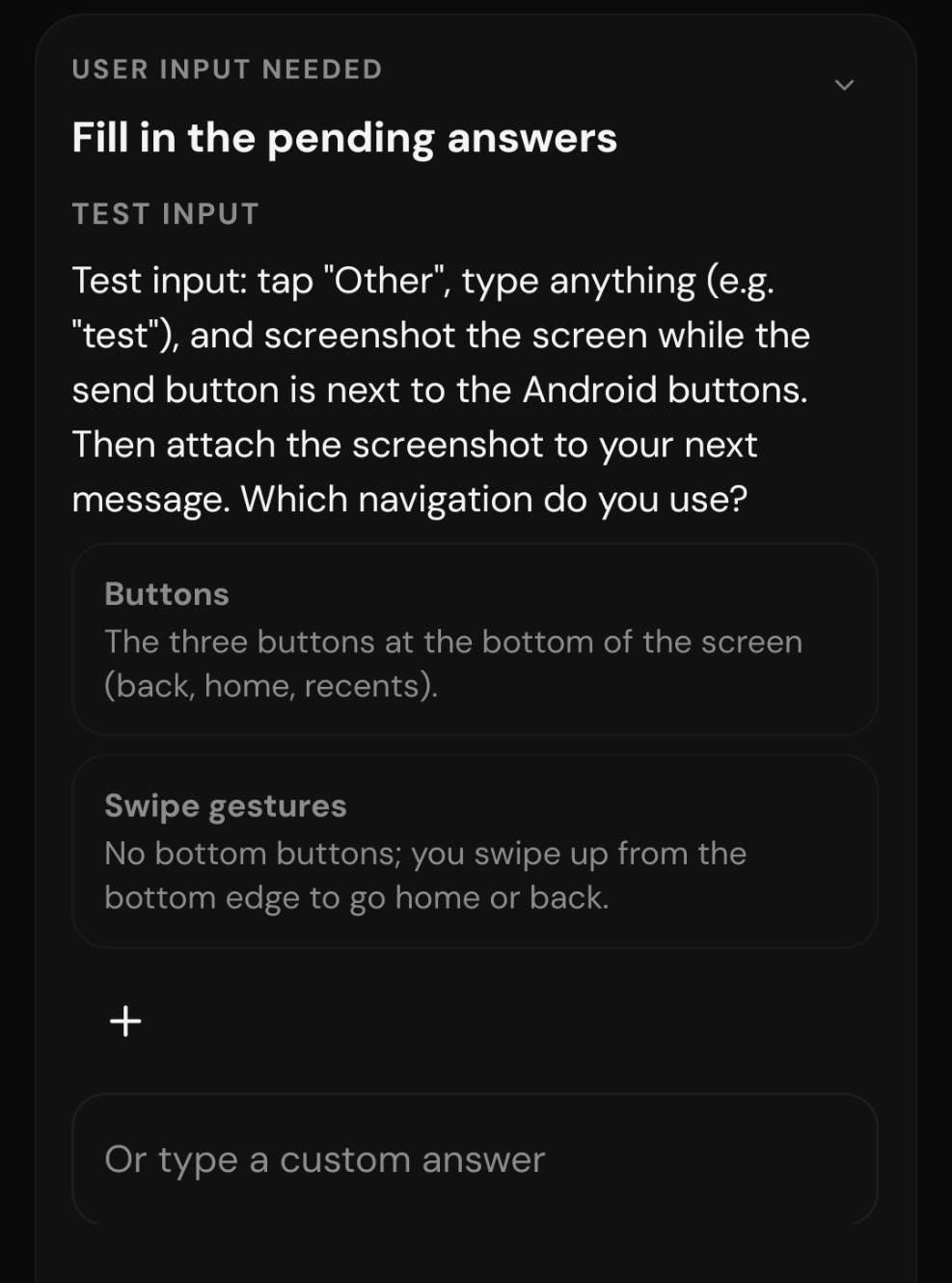
Cropped to the card. The screenshot ends at the "Or type a custom answer" field: the card continues past the bottom edge, and the Submit button below it is hidden in the navigation-bar area, so it does not appear in the capture.
Workaround
No response
- Linguagem predominante
- TypeScript
- Estrelas
- 24.8k
- Forks
- 6.4k
- Merge médio
- 4h 29min
- PRs com merge (30d)
- 488
Preparar o ambiente
Inicia o contêiner de desenvolvimento do projeto no navegador, com a sua própria conta do GitHub.
- Sem Dockerfile nem arquivo Docker Compose
- Tem um modelo de pull request
- Ler o guia de contribuição
Primeiros passos
- Leia a issue inteira e depois o guia de contribuição do projeto.
- Comente na issue dizendo que vai assumir — evita que duas pessoas façam o mesmo trabalho.
- Faça um fork do repositório e trabalhe em uma branch.
- Abra um pull request que referencie o número da issue.
Mais de pingdotgg/t3code
-
Dificuldade 2/5 1-3 horas Facilidade para iniciantes 75/100
Mantenedores costumam responder em até 1 dia
-
needs more info
Dificuldade 2/5 1-3 horas Facilidade para iniciantes 72/100
pingdotgg/t3code#39400 · 1 comentário ·
Mantenedores costumam responder em até 1 dia
-
[Bug]: Wrapped PR titles lose bottom padding in the thread details panelTalvez já em andamento @iamdatvt94 assumiu há 1 dia. Abertabug needs-triage
Dificuldade 2/5 1-3 horas Facilidade para iniciantes 72/100
Mantenedores costumam responder em até 1 dia
-
bug needs-triage
Dificuldade 2/5 1-3 horas Facilidade para iniciantes 66/100
Mantenedores costumam responder em até 1 dia
-
Dificuldade 2/5 1-3 horas Facilidade para iniciantes 73/100
Mantenedores costumam responder em até 1 dia
Todas as issues de pingdotgg/t3code
Issues semelhantes
-
area:plugins kind:bug priority:p2 ready
Dificuldade 2/5 1-3 horas Facilidade para iniciantes 90/100
Mantenedores costumam responder em até 1 dia
-
Escaped `*` followed by `*` (`\**`) never matchesTalvez já em andamento @bardrop assumiu hoje. Aberta
Dificuldade 2/5 1-3 horas Facilidade para iniciantes 71/100
editorconfig/editorconfig-core-js#172 ·
Mantenedores costumam responder em até 1 dia
-
Dificuldade 2/5 1-3 horas Facilidade para iniciantes 82/100
vega/vega-webgpu#40 ·
-
Adjust break point sizingAbertatype: bug 🐛
Dificuldade 2/5 1-3 horas Facilidade para iniciantes 63/100
puckeditor/puck#1929 ·
Mantenedores costumam responder em até 1 dia
-
compression() compresses every response at Brotli quality 11Talvez já em andamento @staylor assumiu hoje. Aberta
Dificuldade 2/5 1-3 horas Facilidade para iniciantes 72/100
Mantenedores costumam responder em até 1 dia