[Bug]: Android pending-answers card's Submit button is hidden behind the 3-button navigation bar (Samsung One UI)
Les mainteneurs répondent en général sous 1 jour
Personne n'a encore pris cette issue.
Évaluation
- Difficulté
- 3/5
- Temps estimé
- 1-2 jours
- Accessibilité débutants
- 68/100
- Type d'issue
- Bug
- Clarté
- Plutôt claire
- Activité
- Active
- Stack technique
- android, react-native, typescript
Piste de recherche
Start in the apps/mobile thread screen and trace how the pending-answers card is laid out alongside Android system insets. Reproduce on Android with 3-button navigation, then compare the card and composer behavior. Done when the Submit button remains visible and tappable above the navigation bar; check the related thread-screen issue #19345 for context.
Rédigé par le modèle d'indexation à partir du texte de l'issue.
Description
Before submitting
- I searched existing issues and did not find a duplicate.
- I included enough detail to reproduce or investigate the problem.
Area
apps/mobile
Steps to reproduce
- On a Samsung Galaxy S21 Ultra (One UI 7.x, 3-button navigation), open the T3 Code Android app (Google Play build).
- Open a thread where the agent asks a question, so the "USER INPUT NEEDED · Fill in the pending answers" card is shown.
- Scroll to the bottom of the card, past the options and the "Or type a custom answer" field.
Expected behavior
The card's Submit button sits above the Android navigation bar and can be seen and tapped.
Actual behavior
The pending-answers card runs past the bottom of the visible area. Its Submit button ends up in the system navigation-bar area, level with or under the 3-button navigation, so it is hidden behind the system buttons and cut off in screenshots. The bottom inset does not seem to be applied below this card.
The composer's send button may be affected the same way (it was first reported as sitting in line with the system buttons), but the question card's Submit button is the clear case.
Possibly related: #19345 (thread screen pushed below the nav bar after starting a new chat), closed as fixed. This is a different screen state, so it may be a separate path or a regression.
Impact
Minor bug or occasional failure
Version or commit
2.3.0 (Google Play)
Environment
Samsung Galaxy S21 Ultra, One UI 7.x (exact version unknown), 3-button navigation, T3 Code 2.3.0 (Google Play).
Logs or stack traces
No response
Screenshots, recordings, or supporting files
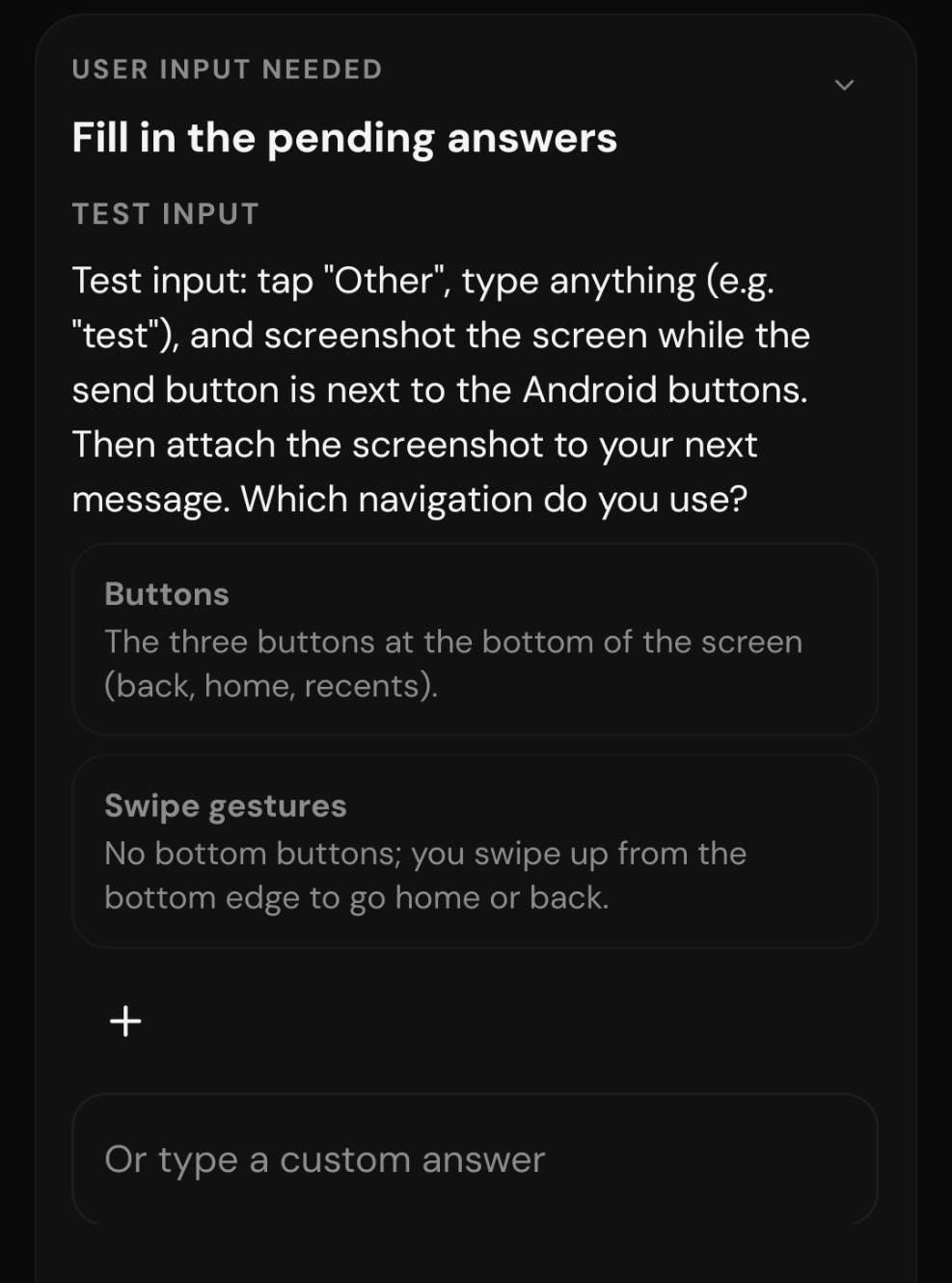
Cropped to the card. The screenshot ends at the "Or type a custom answer" field: the card continues past the bottom edge, and the Submit button below it is hidden in the navigation-bar area, so it does not appear in the capture.
Workaround
No response
- Langage dominant
- TypeScript
- Étoiles
- 24.8k
- Forks
- 6.4k
- Merge moyen
- 4 h 29 min
- PR mergées (30 j)
- 488
Préparer son environnement
Lance le conteneur de développement du projet dans votre navigateur, avec votre propre compte GitHub.
- Aucun Dockerfile ni fichier Docker Compose
- Propose un modèle de pull request
- Lire le guide de contribution
Par où commencer
- Lisez l'issue en entier, puis le guide de contribution du projet.
- Signalez en commentaire que vous la prenez — cela évite que deux personnes fassent le même travail.
- Forkez le dépôt et travaillez sur une branche.
- Ouvrez une pull request qui référence le numéro de l'issue.
Autres issues de pingdotgg/t3code
-
Difficulté 2/5 1-3 heures Accessibilité débutants 75/100
Les mainteneurs répondent en général sous 1 jour
-
needs more info
Difficulté 2/5 1-3 heures Accessibilité débutants 72/100
pingdotgg/t3code#39400 · 1 commentaire ·
Les mainteneurs répondent en général sous 1 jour
-
[Bug]: Wrapped PR titles lose bottom padding in the thread details panelPeut-être pris @iamdatvt94 l’a pris il y a 1 jour. Ouvertebug needs-triage
Difficulté 2/5 1-3 heures Accessibilité débutants 72/100
Les mainteneurs répondent en général sous 1 jour
-
bug needs-triage
Difficulté 2/5 1-3 heures Accessibilité débutants 66/100
Les mainteneurs répondent en général sous 1 jour
-
Difficulté 2/5 1-3 heures Accessibilité débutants 73/100
Les mainteneurs répondent en général sous 1 jour
Toutes les issues de pingdotgg/t3code
Issues similaires
-
area:plugins kind:bug priority:p2 ready
Difficulté 2/5 1-3 heures Accessibilité débutants 90/100
Les mainteneurs répondent en général sous 1 jour
-
Escaped `*` followed by `*` (`\**`) never matchesPeut-être pris @bardrop l’a pris aujourd’hui. Ouverte
Difficulté 2/5 1-3 heures Accessibilité débutants 71/100
editorconfig/editorconfig-core-js#172 ·
Les mainteneurs répondent en général sous 1 jour
-
Difficulté 2/5 1-3 heures Accessibilité débutants 82/100
vega/vega-webgpu#40 ·
-
Adjust break point sizingOuvertetype: bug 🐛
Difficulté 2/5 1-3 heures Accessibilité débutants 63/100
puckeditor/puck#1929 ·
Les mainteneurs répondent en général sous 1 jour
-
compression() compresses every response at Brotli quality 11Peut-être pris @staylor l’a pris aujourd’hui. Ouverte
Difficulté 2/5 1-3 heures Accessibilité débutants 72/100
Les mainteneurs répondent en général sous 1 jour