[Bug]: Android pending-answers card's Submit button is hidden behind the 3-button navigation bar (Samsung One UI)
I maintainer di solito rispondono entro 1 giorno
Nessuno ha ancora preso questa issue.
Valutazione
- Difficoltà
- 3/5
- Tempo stimato
- 1-2 giorni
- Idoneità per principianti
- 68/100
- Tipo di issue
- Bug
- Chiarezza
- Abbastanza chiara
- Stato di attività
- Attiva
- Stack tecnologico
- android, react-native, typescript
Direzione di ricerca
Start in the apps/mobile thread screen and trace how the pending-answers card is laid out alongside Android system insets. Reproduce on Android with 3-button navigation, then compare the card and composer behavior. Done when the Submit button remains visible and tappable above the navigation bar; check the related thread-screen issue #19345 for context.
Scritto dal modello di indicizzazione a partire dal testo della issue.
Descrizione
Before submitting
- I searched existing issues and did not find a duplicate.
- I included enough detail to reproduce or investigate the problem.
Area
apps/mobile
Steps to reproduce
- On a Samsung Galaxy S21 Ultra (One UI 7.x, 3-button navigation), open the T3 Code Android app (Google Play build).
- Open a thread where the agent asks a question, so the "USER INPUT NEEDED · Fill in the pending answers" card is shown.
- Scroll to the bottom of the card, past the options and the "Or type a custom answer" field.
Expected behavior
The card's Submit button sits above the Android navigation bar and can be seen and tapped.
Actual behavior
The pending-answers card runs past the bottom of the visible area. Its Submit button ends up in the system navigation-bar area, level with or under the 3-button navigation, so it is hidden behind the system buttons and cut off in screenshots. The bottom inset does not seem to be applied below this card.
The composer's send button may be affected the same way (it was first reported as sitting in line with the system buttons), but the question card's Submit button is the clear case.
Possibly related: #19345 (thread screen pushed below the nav bar after starting a new chat), closed as fixed. This is a different screen state, so it may be a separate path or a regression.
Impact
Minor bug or occasional failure
Version or commit
2.3.0 (Google Play)
Environment
Samsung Galaxy S21 Ultra, One UI 7.x (exact version unknown), 3-button navigation, T3 Code 2.3.0 (Google Play).
Logs or stack traces
No response
Screenshots, recordings, or supporting files
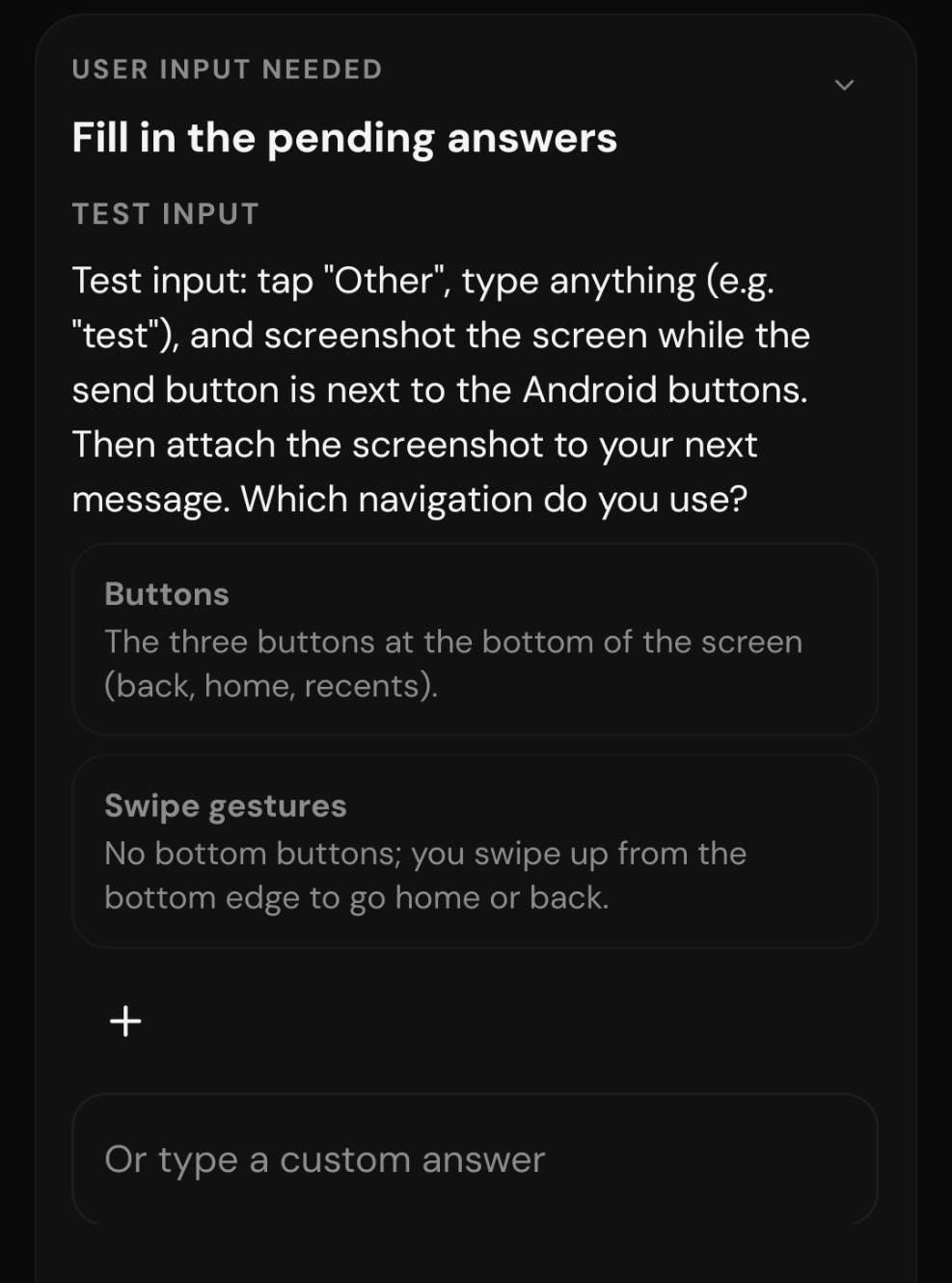
Cropped to the card. The screenshot ends at the "Or type a custom answer" field: the card continues past the bottom edge, and the Submit button below it is hidden in the navigation-bar area, so it does not appear in the capture.
Workaround
No response
- Lingua principale
- TypeScript
- Stelle
- 24.8k
- Fork
- 6.4k
- Merge medio
- 4h 29m
- PR unite (30g)
- 488
Preparare l'ambiente
Avvia il container di sviluppo del progetto nel browser, con il tuo account GitHub.
- Nessun Dockerfile né file Docker Compose
- Ha un modello di pull request
- Leggi la guida per i contributori
Come iniziare
- Leggi tutta la issue e poi la guida ai contributi del progetto.
- Commenta sulla issue per dire che te ne occupi tu — evita che due persone facciano lo stesso lavoro.
- Fai un fork del repository e lavora su un branch.
- Apri una pull request che faccia riferimento al numero della issue.
Altre issue di pingdotgg/t3code
-
Difficoltà 2/5 1-3 ore Idoneità per principianti 75/100
I maintainer di solito rispondono entro 1 giorno
-
needs more info
Difficoltà 2/5 1-3 ore Idoneità per principianti 72/100
pingdotgg/t3code#39400 · 1 commento ·
I maintainer di solito rispondono entro 1 giorno
-
[Bug]: Wrapped PR titles lose bottom padding in the thread details panelForse già presa @iamdatvt94 l’ha presa 1 giorno fa. Apertabug needs-triage
Difficoltà 2/5 1-3 ore Idoneità per principianti 72/100
I maintainer di solito rispondono entro 1 giorno
-
bug needs-triage
Difficoltà 2/5 1-3 ore Idoneità per principianti 66/100
I maintainer di solito rispondono entro 1 giorno
-
Difficoltà 2/5 1-3 ore Idoneità per principianti 73/100
I maintainer di solito rispondono entro 1 giorno
Tutte le issue di pingdotgg/t3code
Issue simili
-
area:plugins kind:bug priority:p2 ready
Difficoltà 2/5 1-3 ore Idoneità per principianti 90/100
I maintainer di solito rispondono entro 1 giorno
-
Escaped `*` followed by `*` (`\**`) never matchesForse già presa @bardrop l’ha presa oggi. Aperta
Difficoltà 2/5 1-3 ore Idoneità per principianti 71/100
editorconfig/editorconfig-core-js#172 ·
I maintainer di solito rispondono entro 1 giorno
-
Difficoltà 2/5 1-3 ore Idoneità per principianti 82/100
vega/vega-webgpu#40 ·
-
Adjust break point sizingApertatype: bug 🐛
Difficoltà 2/5 1-3 ore Idoneità per principianti 63/100
puckeditor/puck#1929 ·
I maintainer di solito rispondono entro 1 giorno
-
compression() compresses every response at Brotli quality 11Forse già presa @staylor l’ha presa oggi. Aperta
Difficoltà 2/5 1-3 ore Idoneità per principianti 72/100
I maintainer di solito rispondono entro 1 giorno