MipMapBlur ugly rendering on mac with transparent background
Nobody has claimed this yet.
Assessment
- Difficulty
- 4/5
- Estimated time
- 3-5 days
- Newbie friendliness
- 38/100
- Issue type
- Bug
- Clarity
- Mostly clear
- Activity status
- Quiet
- Tech stack
- javascript, three.js
- Domain
- computer-graphics
Research direction
Start with the linked CodeSandbox, especially src/App.js, and reproduce BloomEffect or SelectiveBloom with mipmapBlur enabled and a transparent WebGLRenderer. Compare the MacOS output with the Windows or iOS result while checking the reported alpha, mipmap-level, precision, and texture-filtering conditions. Done means removing the banding and restoring the expected roll-off without breaking the opaque-background behavior.
Written by the indexing model from the issue text.
Description
Description of the bug
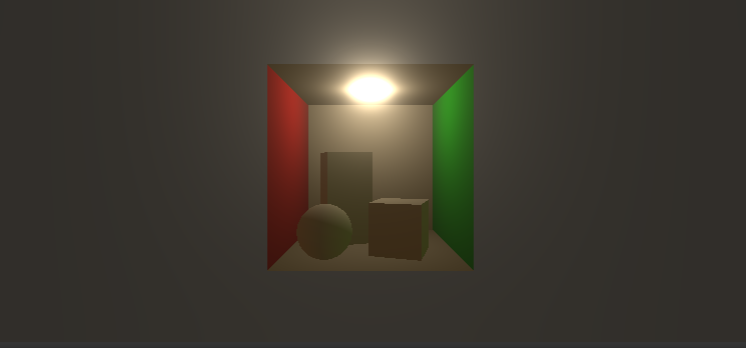
When using the BloomEffect/SelectiveBloom effect with mipmapBlur: true on windows with a transparent background the effect has a
nice roll-off, especially with higher radius and low smoothing values.
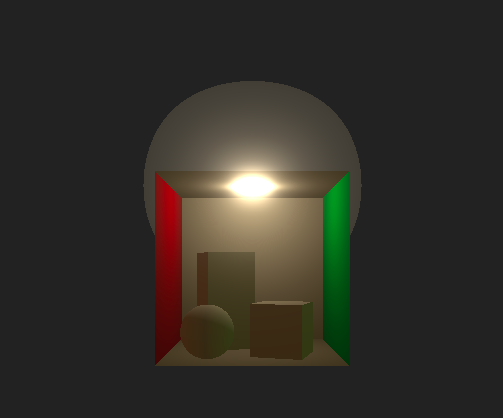
The exact same setup on MacOS renders with ugly banding and what seems like significantly lower mipMap levels, to the point that there is no roll-off.
To Reproduce
I have replicated the exact settings used by <model-viewer> in this sandbox.
https://codesandbox.io/s/bloom-transparent-zpn7iw?file=/src/App.js
Screenshots
Windows, IOS render like this:
MacOS renders like this:
Library versions used
- Three: [e.g. 1.151.3]
- Post Processing: [e.g. 6.30.2]
Desktop
- OS: MacOS
- Browser [Chrome, Firefox]
- Graphics hardware: [M1, Intel HD Graphics]
Additional comments:
I have checked all WebGL compatibility issues I could have thought of, with https://webglreport.com/?v=2.
Both desktops that created the screenshots support OES_texture_float_linear, 'highp' precision. The max samples is different (16 vs 8), but that is not enough to explain the difference since the default mimapblur uses 8 levels and I have not altered it. I can also confirm this does not happen with alpha: false on the WebGLRenderer.
- Dominant language
- JavaScript
- Stars
- 3k
- Forks
- 266
- Avg merge
- 6m
- Merged PRs (30d)
- 1
Getting set up
- No Dockerfile or Docker Compose file
- Has a pull request template
- Read the contributing guide
First steps
- Read the whole issue, then the project's contributing guide.
- Comment on the issue to say you are picking it up — it saves two people doing the same work.
- Fork the repository and make your change on a branch.
- Open a pull request that references the issue number.
More from pmndrs/postprocessing
-
Difficulty 5/5 Over a week Newbie friendliness 30/100
pmndrs/postprocessing#727 ·
-
Difficulty 4/5 3-5 days Newbie friendliness 38/100
pmndrs/postprocessing#726 · 1 reaction ·
-
Implement SMAA T2xOpen
Difficulty 5/5 Over a week Newbie friendliness 35/100
pmndrs/postprocessing#716 · 1 reaction ·
-
Research: XR SupportOpenvr
Difficulty 5/5 Over a week Newbie friendliness 25/100
pmndrs/postprocessing#677 · 5 comments · 8 reactions ·
-
Difficulty 4/5 3-5 days Newbie friendliness 35/100
pmndrs/postprocessing#665 · 1 comment ·
All issues in pmndrs/postprocessing
Similar issues
-
Difficulty 2/5 1-3 hours Newbie friendliness 86/100
Maintainers usually reply within 5 days
-
[v11] MeshTransmissionMaterial deep-imports `three/src`, bundling a second copy of the node treeOpen
Difficulty 1/5 Under an hour Newbie friendliness 88/100
-
Update Doc linksOpen
Difficulty 1/5 Under an hour Newbie friendliness 65/100
fboucher/n8n-nodes-bdp#69 ·
Maintainers usually reply within 1 day
-
Difficulty 2/5 1-3 hours Newbie friendliness 78/100
sidebandstudio/clawtrate#727 ·
Maintainers usually reply within 1 day
-
documentation good first issue
Difficulty 2/5 1-3 hours Newbie friendliness 88/100
Tfoucher5/fuzzy-toolkit#44 ·
Maintainers usually reply within 1 day