MipMapBlur ugly rendering on mac with transparent background
まだ誰も着手していません。
評価
- 難易度
- 4/5
- 見積もり時間
- 3〜5日
- 初心者へのやさしさ
- 38/100
- issue の種類
- バグ
- 明瞭さ
- おおむね明確
- 活発さ
- 静か
- 技術スタック
- javascript, three.js
調査の方向性
リンクされたCodeSandbox、特にsrc/App.jsから始め、mipmapBlurを有効にした透明なWebGLRendererでBloomEffectまたはSelectiveBloomを再現します。報告されているalpha、mipmapレベル、precision、テクスチャフィルタリングの条件を確認しながら、MacOSの出力をWindowsまたはiOSの結果と比較します。bandingを除去し、opaqueな背景での動作を壊すことなく期待されるroll-offを復元できれば完了です。
索引モデルが issue の本文から書いたものです。
説明
Description of the bug
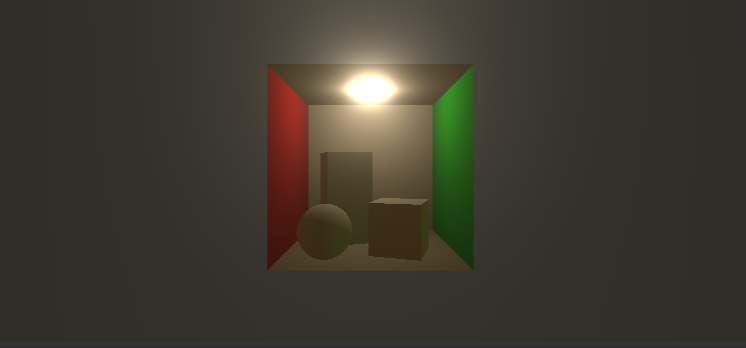
When using the BloomEffect/SelectiveBloom effect with mipmapBlur: true on windows with a transparent background the effect has a
nice roll-off, especially with higher radius and low smoothing values.
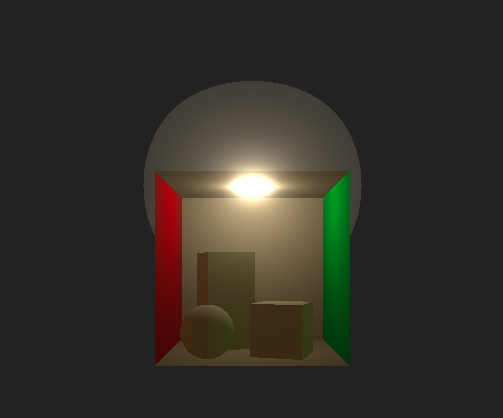
The exact same setup on MacOS renders with ugly banding and what seems like significantly lower mipMap levels, to the point that there is no roll-off.
To Reproduce
I have replicated the exact settings used by <model-viewer> in this sandbox.
https://codesandbox.io/s/bloom-transparent-zpn7iw?file=/src/App.js
Screenshots
Windows, IOS render like this:
MacOS renders like this:
Library versions used
- Three: [e.g. 1.151.3]
- Post Processing: [e.g. 6.30.2]
Desktop
- OS: MacOS
- Browser [Chrome, Firefox]
- Graphics hardware: [M1, Intel HD Graphics]
Additional comments:
I have checked all WebGL compatibility issues I could have thought of, with https://webglreport.com/?v=2.
Both desktops that created the screenshots support OES_texture_float_linear, 'highp' precision. The max samples is different (16 vs 8), but that is not enough to explain the difference since the default mimapblur uses 8 levels and I have not altered it. I can also confirm this does not happen with alpha: false on the WebGLRenderer.
- 主要言語
- JavaScript
- スター
- 2.9k
- フォーク
- 251
- 平均マージ
- 17分
- マージ済み PR(30日)
- 1
コントリビューションガイド
はじめの一歩
- issue を最後まで読み、次にプロジェクトのコントリビューションガイドを読みます。
- 着手することを issue にコメントします — 二人が同じ作業をするのを防げます。
- リポジトリをフォークし、ブランチを切って変更します。
- issue 番号を参照したプルリクエストを送ります。
pmndrs/postprocessing のほかの issue
-
難易度 5/5 1週間以上 初心者へのやさしさ 30/100
pmndrs/postprocessing#727 ·
-
難易度 4/5 3〜5日 初心者へのやさしさ 38/100
pmndrs/postprocessing#726 · リアクション 1 件 ·
-
Implement SMAA T2x オープン
難易度 5/5 1週間以上 初心者へのやさしさ 35/100
pmndrs/postprocessing#716 · リアクション 1 件 ·
-
Research: XR Support オープンvr
難易度 5/5 1週間以上 初心者へのやさしさ 25/100
pmndrs/postprocessing#677 · コメント 5 件 · リアクション 8 件 ·
-
難易度 4/5 3〜5日 初心者へのやさしさ 35/100
pmndrs/postprocessing#665 · コメント 1 件 ·
pmndrs/postprocessing の issue をすべて見る
似ている issue
-
難易度 2/5 1〜3時間 初心者へのやさしさ 82/100
-
area-deployment area-integrations triage:bot-seen
難易度 2/5 半日 初心者へのやさしさ 86/100
-
Issue-Bug
難易度 2/5 1〜3時間 初心者へのやさしさ 68/100
sugarlabs/musicblocks#8924 ·
-
難易度 1/5 1時間未満 初心者へのやさしさ 90/100
ArduPilot/ardupilot_wiki#8088 ·
-
[BUG] createTool tools cannot be registered with Mastra when exactOptionalPropertyTypes is enabled オープンcustomer-eng status: needs triage
難易度 2/5 1〜3時間 初心者へのやさしさ 84/100