figures that start in background tabs are cut off at bottom
まだ誰も着手していません。
評価
- 難易度
- 3/5
- 見積もり時間
- 1〜2日
- 初心者へのやさしさ
- 45/100
- issue の種類
- バグ
- 明瞭さ
- おおむね明確
- 活発さ
- 停滞
- 技術スタック
- jupyter, jupyter-notebook, python
調査の方向性
まず、2つの ipywidgets タブと matplotlib の Figure を使った最小限の notebook 例を実行し、最初は非表示になっている2つ目の Figure のサイズを1つ目と比較します。2つ目のタブが表示されたときに、Figure の寸法がどのように決定されるかを追跡します。すべてのタブの Figure で、プロット領域全体が切り取られずに表示されれば完了です。
索引モデルが issue の本文から書いたものです。
説明
I'm having some trouble with figures getting cut off at the bottom when they're included in tabs other than the first tab. Here's a minimal example. Note that I put the figures in boxes because I have the same problem as #126 if I don't.
%matplotlib widget
import matplotlib.pyplot as plt
plt.ioff()
import ipywidgets as widgets
import numpy as np
fig1,ax1 = plt.subplots()
ax1.scatter(np.arange(10),np.random.random(10))
ax1.set_xlabel('x axis')
ax1.set_ylabel('y axis')
fig2,ax2 = plt.subplots()
ax2.plot(np.arange(10),np.random.random(10))
ax2.set_xlabel('x axis')
ax2.set_ylabel('y axis')
tabs = widgets.Tab(children=[widgets.Box([fig1.canvas]),widgets.Box([fig2.canvas])])
tabs.set_title(0, 'fig1')
tabs.set_title(1, 'fig2')
tabs
The first tab looks like (I clicked on the figure to show the boundaries)

and the second tab looks like:
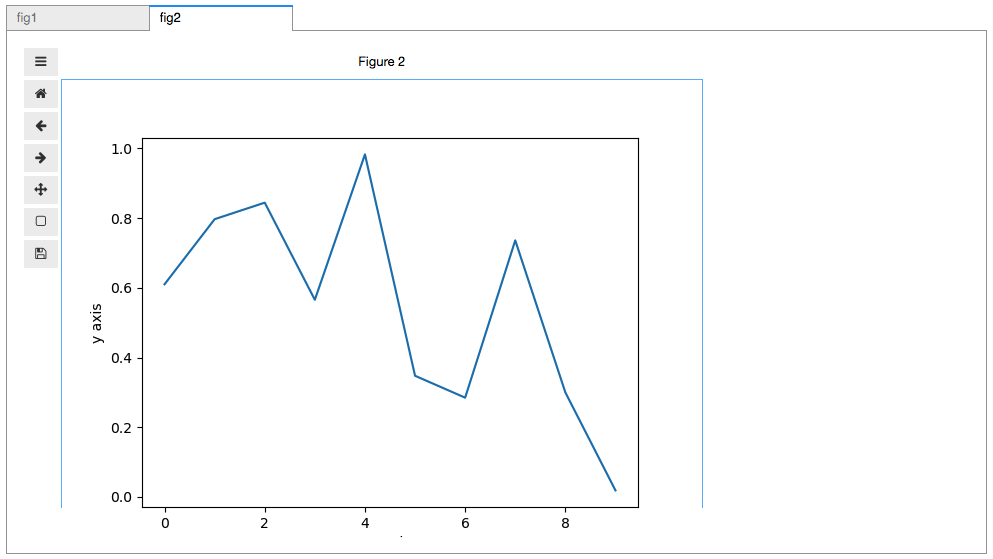
I just cannot figure out why the bottom of that second figure is getting cut off.
- 主要言語
- Jupyter Notebook
- スター
- 1.7k
- フォーク
- 234
- PR マージ指標
- 30日以内にマージされた PR はありません
コントリビューションガイド
はじめの一歩
- issue を最後まで読み、次にプロジェクトのコントリビューションガイドを読みます。
- 着手することを issue にコメントします — 二人が同じ作業をするのを防げます。
- リポジトリをフォークし、ブランチを切って変更します。
- issue 番号を参照したプルリクエストを送ります。
matplotlib/ipympl のほかの issue
-
難易度 4/5 3〜5日 初心者へのやさしさ 35/100
matplotlib/ipympl#623 · コメント 1 件 ·
-
難易度 4/5 3〜5日 初心者へのやさしさ 35/100
matplotlib/ipympl#622 · コメント 13 件 ·
-
難易度 4/5 3〜5日 初心者へのやさしさ 42/100
matplotlib/ipympl#612 ·
-
難易度 3/5 1〜2日 初心者へのやさしさ 45/100
matplotlib/ipympl#611 · コメント 4 件 ·
-
難易度 4/5 3〜5日 初心者へのやさしさ 42/100
matplotlib/ipympl#609 · コメント 7 件 ·
matplotlib/ipympl の issue をすべて見る
似ている issue
-
難易度 2/5 1〜3時間 初心者へのやさしさ 65/100
-
duplicate invalid
難易度 2/5 1〜3時間 初心者へのやさしさ 75/100
anthropics/claude-code#96312 ·
-
難易度 2/5 1〜3時間 初心者へのやさしさ 75/100
palladius/ricc.rocks#7 ·
-
難易度 2/5 1〜3時間 初心者へのやさしさ 75/100
pydata/pydata-sphinx-theme#2503 ·
-
難易度 2/5 1〜3時間 初心者へのやさしさ 75/100
unitaryfoundation/metriq-gym#828 ·