Bug: Tabbed and stacked groups that contain a split show windows on top of each other
Assessment
- Difficulty
- 4/5
- Estimated time
- 3-5 days
- Newbie friendliness
- 20/100
- Issue type
- Bug
- Clarity
- Mostly clear
- Activity status
- Stale
- Tech stack
- javascript
- Domain
- desktop
Research direction
Run sandbox/run-suite.sh 16 17 to reproduce the failures in scenarios/17_stack_tab_switching.py and scenarios/16_tabbed_edge_resize.py. Read those scenarios to learn the expected tabbed/stacked behaviour. Note linked PR #571 already implements a fix, so the work is under way.
Written by the indexing model from the issue text.
Description
Problem. A tabbed or stacked group can hold a container, e.g. after Super+Z/Super+V (split) inside a tab, or when a split is toggled to tabbed/stacked. Such a member is handled as if it weren't there:
- It has no tab or row. A tab group shows tabs only for its windows, and there is no tab to click to reach the split.
- Stacks fall back to the cascade. A stack holding a split has no title list (P15 adds one only when every member is a window), so it cascades: the split is drawn over the other windows, with only their title bars peeking out above it.
- Only one window of the split is raised. When a window in the split gets focus, only that window is raised. The group's other member stays on top of the split's other windows and shows through where they should be.
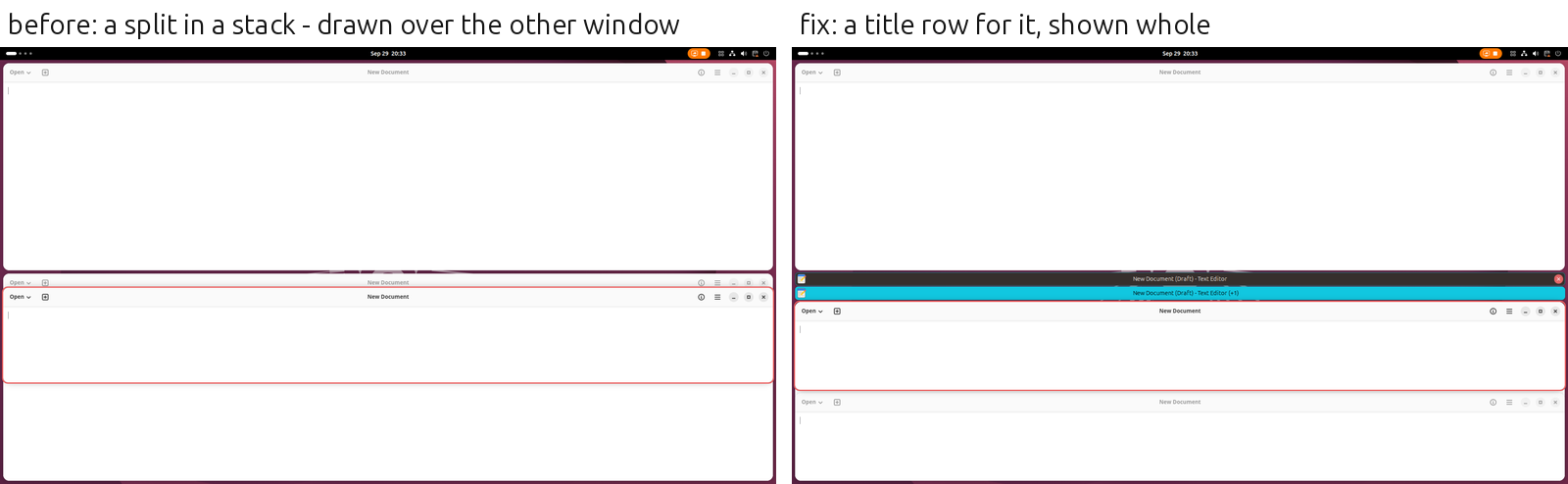
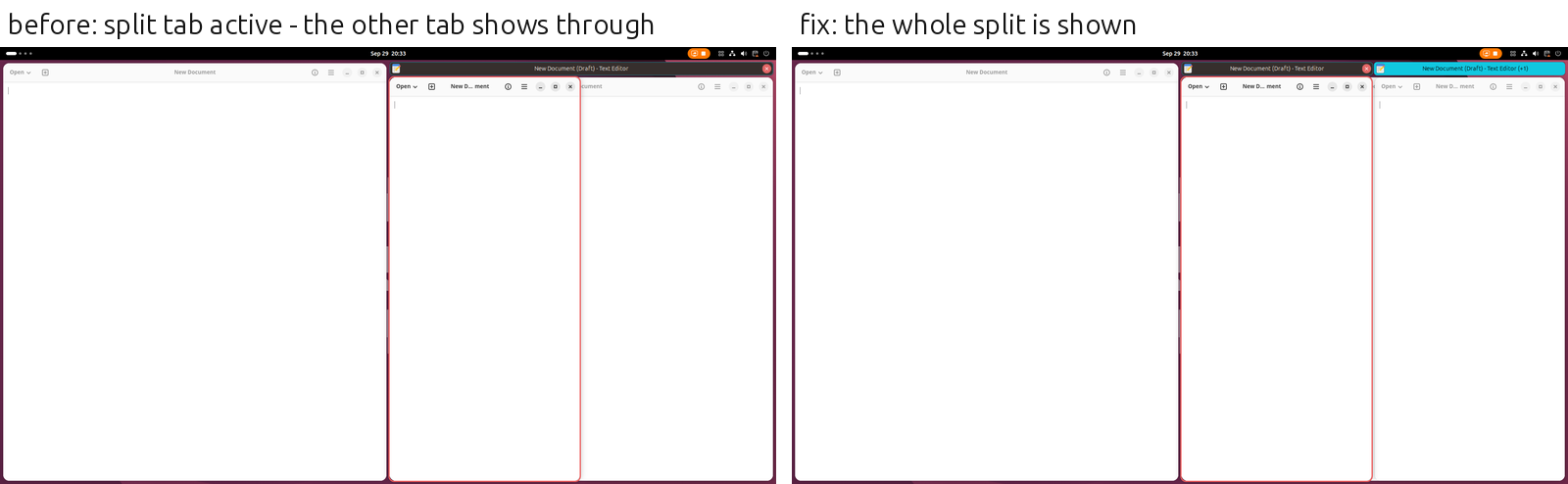
Desired outcome. A container in a tabbed or stacked group is a member like a window. It has a tab (or a row in the stack's title list) showing the title of the window last used in it, and how many more windows it holds. Clicking the tab goes to that window. While it is the member shown, all of its windows are in front of the group's other members. The member shown is always shown whole, and the others are fully hidden.
Acceptance criteria.
TABBED[W1, HSPLIT[W2, W3]]: two tabs. Clicking the split's tab focuses W2 or W3, and both show, with W1 fully hidden behind them. Clicking W1's tab hides the split behind W1.STACKED[W1, HSPLIT[W2, W3]]: a title list with two rows (no cascade), the same behaviour.- Focus moving into the split by keyboard (
Super+H/J/K/L) or by clicking one of its windows shows the whole split at once, with no other tab showing through in between. - The active tab is highlighted for the split too.
- With title bars turned off (
showtab-decoration-enabled), stacks keep the cascade as before.
Reproduction: scenarios/17_stack_tab_switching.py (17.11, 17.12) and scenarios/16_tabbed_edge_resize.py under the watcher (sandbox/run-suite.sh 16 17).
- Dominant language
- JavaScript
- Stars
- 1.3k
- Forks
- 112
- PR merge metrics
- No merged PRs in 30d
Getting set up
This project ships no dev container, Dockerfile or contributing guide, so setting up is up to you: start from its README, and see our first-contribution guide for the general steps.
First steps
- Read the whole issue, then the project's contributing guide.
- Comment on the issue to say you are picking it up — it saves two people doing the same work.
- Fork the repository and make your change on a branch.
- Open a pull request that references the issue number.
More from forge-ext/forge
-
bug
Difficulty 2/5 1-3 hours Newbie friendliness 75/100
-
Difficulty 2/5 1-3 hours Newbie friendliness 76/100
-
Bug: Changing a setting while Forge is disabled (e.g. screen locked) throws errors; old handlers keep runningPossibly taken @mattchristenson claimed this 41 days ago. Open
Difficulty 3/5 1-2 days Newbie friendliness 35/100
-
Bug: Windows overlap while resizing, until slower apps catch upPossibly taken @mattchristenson claimed this 41 days ago. Open
Difficulty 4/5 3-5 days Newbie friendliness 30/100
-
Bug: Windows in a stacked group are hidden without a tracePossibly taken @mattchristenson claimed this 41 days ago. Open
Difficulty 4/5 3-5 days Newbie friendliness 35/100
Similar issues
-
ai core enhancement good first issue testing
Difficulty 2/5 1-3 hours Newbie friendliness 88/100
Maintainers usually reply within 1 day
-
bug
Difficulty 2/5 1-3 hours Newbie friendliness 68/100
-
good first issue help wanted
Difficulty 2/5 1-3 hours Newbie friendliness 88/100
-
cli: `studio --request <missing file>` answers with a raw ENOENT/EISDIR instead of a clear errorPossibly taken A pull request linked to this issue is open or already merged. Openbug good first issue help wanted
Difficulty 2/5 1-3 hours Newbie friendliness 88/100
laaielichter/Ai-edit-studio#81 ·
Maintainers usually reply within 1 day
-
TEDAPI/v1r mode: /aggregates drops the generator meter (GENERATOR is in meterAggregates)Possibly taken A pull request linked to this issue is open or already merged. Open
Difficulty 2/5 1-3 hours Newbie friendliness 77/100
jasonacox/pypowerwall#472 ·
Maintainers usually reply within 1 day