Bug: Tabbed and stacked groups that contain a split show windows on top of each other
評価
- 難易度
- 4/5
- 見積もり時間
- 3〜5日
- 初心者へのやさしさ
- 20/100
- issue の種類
- バグ
- 明瞭さ
- おおむね明確
- 活発さ
- 停滞
- 技術スタック
- javascript
- 領域
- desktop
調査の方向性
Run sandbox/run-suite.sh 16 17 to reproduce the failures in scenarios/17_stack_tab_switching.py and scenarios/16_tabbed_edge_resize.py. Read those scenarios to learn the expected tabbed/stacked behaviour. Note linked PR #571 already implements a fix, so the work is under way.
索引モデルが issue の本文から書いたものです。
説明
Problem. A tabbed or stacked group can hold a container, e.g. after Super+Z/Super+V (split) inside a tab, or when a split is toggled to tabbed/stacked. Such a member is handled as if it weren't there:
- It has no tab or row. A tab group shows tabs only for its windows, and there is no tab to click to reach the split.
- Stacks fall back to the cascade. A stack holding a split has no title list (P15 adds one only when every member is a window), so it cascades: the split is drawn over the other windows, with only their title bars peeking out above it.
- Only one window of the split is raised. When a window in the split gets focus, only that window is raised. The group's other member stays on top of the split's other windows and shows through where they should be.
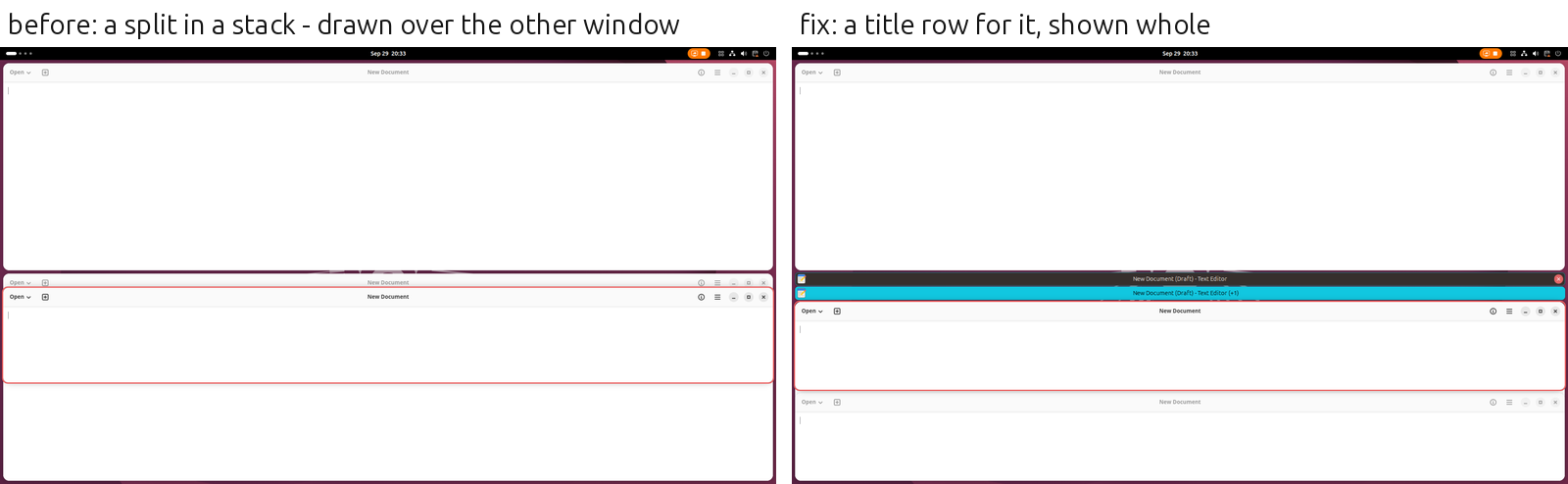
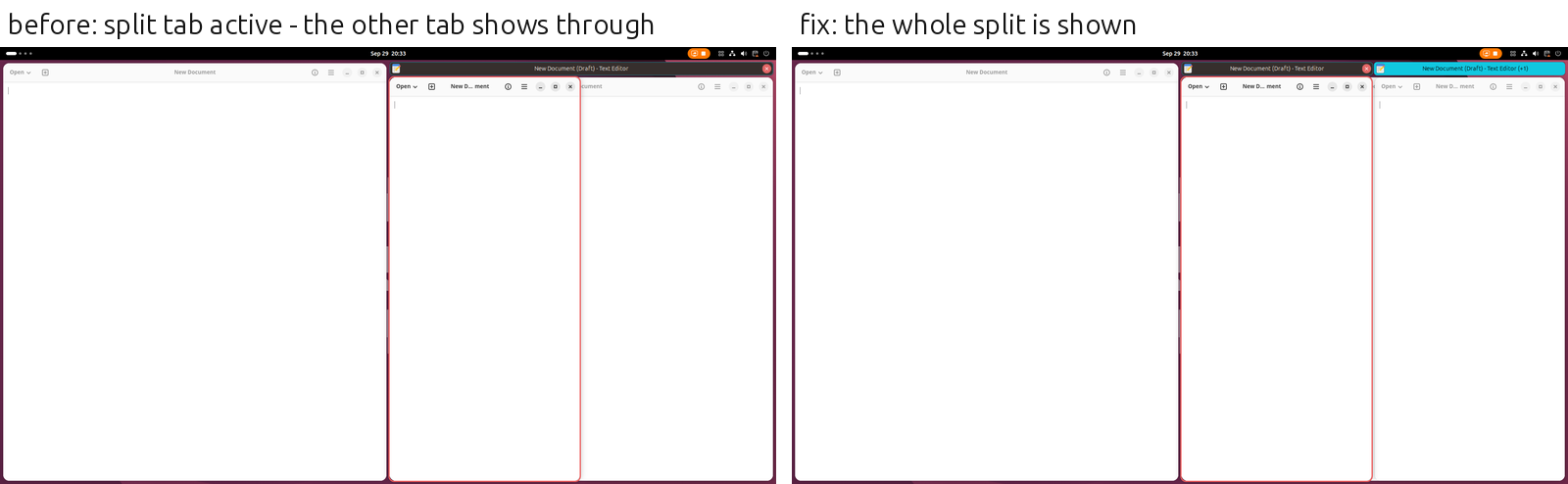
Desired outcome. A container in a tabbed or stacked group is a member like a window. It has a tab (or a row in the stack's title list) showing the title of the window last used in it, and how many more windows it holds. Clicking the tab goes to that window. While it is the member shown, all of its windows are in front of the group's other members. The member shown is always shown whole, and the others are fully hidden.
Acceptance criteria.
TABBED[W1, HSPLIT[W2, W3]]: two tabs. Clicking the split's tab focuses W2 or W3, and both show, with W1 fully hidden behind them. Clicking W1's tab hides the split behind W1.STACKED[W1, HSPLIT[W2, W3]]: a title list with two rows (no cascade), the same behaviour.- Focus moving into the split by keyboard (
Super+H/J/K/L) or by clicking one of its windows shows the whole split at once, with no other tab showing through in between. - The active tab is highlighted for the split too.
- With title bars turned off (
showtab-decoration-enabled), stacks keep the cascade as before.
Reproduction: scenarios/17_stack_tab_switching.py (17.11, 17.12) and scenarios/16_tabbed_edge_resize.py under the watcher (sandbox/run-suite.sh 16 17).
- 主要言語
- JavaScript
- スター
- 1.3k
- フォーク
- 112
- PR マージ指標
- 30日以内にマージされた PR はありません
環境構築
このプロジェクトには開発コンテナ、Dockerfile、コントリビューションガイドがありません。まず README を読み、一般的な手順ははじめてのコントリビューションガイドを参照してください。
はじめの一歩
- issue を最後まで読み、次にプロジェクトのコントリビューションガイドを読みます。
- 着手することを issue にコメントします — 二人が同じ作業をするのを防げます。
- リポジトリをフォークし、ブランチを切って変更します。
- issue 番号を参照したプルリクエストを送ります。
forge-ext/forge のほかの issue
-
難易度 2/5 1〜3時間 初心者へのやさしさ 76/100
-
Bug: Changing a setting while Forge is disabled (e.g. screen locked) throws errors; old handlers keep running対応中かも @mattchristenson が 39 日前に担当しました。 オープン
難易度 3/5 1〜2日 初心者へのやさしさ 35/100
-
Bug: Windows overlap while resizing, until slower apps catch up対応中かも @mattchristenson が 39 日前に担当しました。 オープン
難易度 4/5 3〜5日 初心者へのやさしさ 30/100
-
Bug: Windows in a stacked group are hidden without a trace対応中かも @mattchristenson が 39 日前に担当しました。 オープン
難易度 4/5 3〜5日 初心者へのやさしさ 35/100
-
Bug: Toggling stacked or tabbed layout off changes the container's split direction対応中かも @mattchristenson が 39 日前に担当しました。 オープン
難易度 3/5 1〜2日 初心者へのやさしさ 30/100
forge-ext/forge の issue をすべて見る
似ている issue
-
[docs] RELEASE.md: wrong branch name, no check that the prepare PR merged with the right subject, manual publish step対応中かも @albertteoh が今日担当しました。 オープンdocumentation
難易度 2/5 1〜3時間 初心者へのやさしさ 85/100
jaegertracing/jaeger-ui#4739 ·
メンテナーはふだん 1 日以内に返信
-
documentation
難易度 2/5 1〜3時間 初心者へのやさしさ 74/100
keepassxreboot/keepassxc-browser#3159 · コメント 1 件 ·
-
Add: ESP 2 RSオープンapproved check:passed feeds:add
難易度 1/5 1時間未満 初心者へのやさしさ 67/100
-
v6: OTP input keeps the rest of a selection when you type over it対応中かも @thejesh23 が今日担当しました。 オープンbug confirmed has-pr js v6
難易度 2/5 1〜3時間 初心者へのやさしさ 82/100
twbs/bootstrap#43323 · コメント 1 件 ·
メンテナーはふだん 1 日以内に返信
-
難易度 2/5 1〜3時間 初心者へのやさしさ 82/100
メンテナーはふだん 1 日以内に返信