Bug: Tabbed and stacked groups that contain a split show windows on top of each other
Valutazione
- Difficoltà
- 4/5
- Tempo stimato
- 3-5 giorni
- Idoneità per principianti
- 20/100
- Tipo di issue
- Bug
- Chiarezza
- Abbastanza chiara
- Stato di attività
- Ferma
- Stack tecnologico
- javascript
- Ambito
- desktop
Direzione di ricerca
Run sandbox/run-suite.sh 16 17 to reproduce the failures in scenarios/17_stack_tab_switching.py and scenarios/16_tabbed_edge_resize.py. Read those scenarios to learn the expected tabbed/stacked behaviour. Note linked PR #571 already implements a fix, so the work is under way.
Scritto dal modello di indicizzazione a partire dal testo della issue.
Descrizione
Problem. A tabbed or stacked group can hold a container, e.g. after Super+Z/Super+V (split) inside a tab, or when a split is toggled to tabbed/stacked. Such a member is handled as if it weren't there:
- It has no tab or row. A tab group shows tabs only for its windows, and there is no tab to click to reach the split.
- Stacks fall back to the cascade. A stack holding a split has no title list (P15 adds one only when every member is a window), so it cascades: the split is drawn over the other windows, with only their title bars peeking out above it.
- Only one window of the split is raised. When a window in the split gets focus, only that window is raised. The group's other member stays on top of the split's other windows and shows through where they should be.
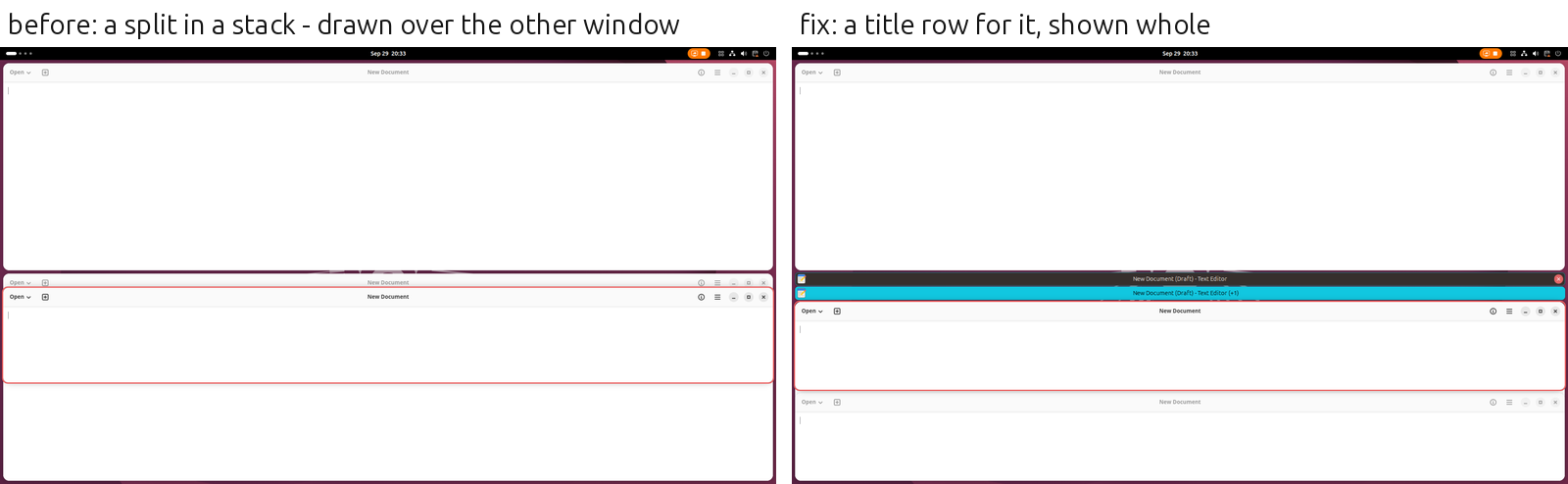
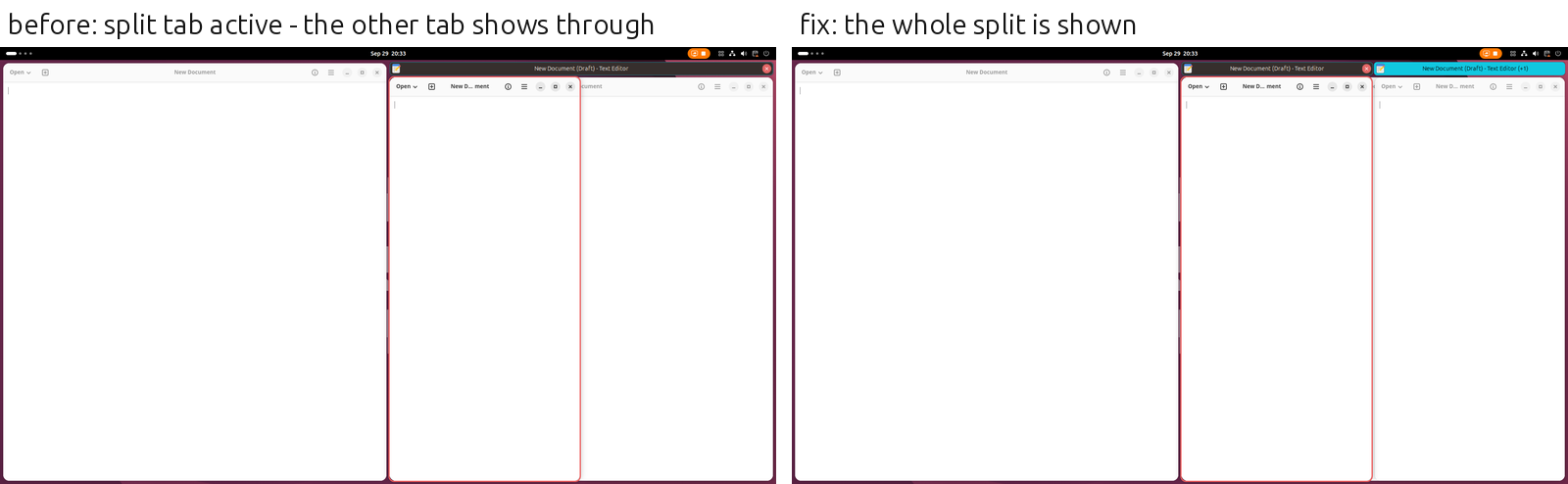
Desired outcome. A container in a tabbed or stacked group is a member like a window. It has a tab (or a row in the stack's title list) showing the title of the window last used in it, and how many more windows it holds. Clicking the tab goes to that window. While it is the member shown, all of its windows are in front of the group's other members. The member shown is always shown whole, and the others are fully hidden.
Acceptance criteria.
TABBED[W1, HSPLIT[W2, W3]]: two tabs. Clicking the split's tab focuses W2 or W3, and both show, with W1 fully hidden behind them. Clicking W1's tab hides the split behind W1.STACKED[W1, HSPLIT[W2, W3]]: a title list with two rows (no cascade), the same behaviour.- Focus moving into the split by keyboard (
Super+H/J/K/L) or by clicking one of its windows shows the whole split at once, with no other tab showing through in between. - The active tab is highlighted for the split too.
- With title bars turned off (
showtab-decoration-enabled), stacks keep the cascade as before.
Reproduction: scenarios/17_stack_tab_switching.py (17.11, 17.12) and scenarios/16_tabbed_edge_resize.py under the watcher (sandbox/run-suite.sh 16 17).
- Lingua principale
- JavaScript
- Stelle
- 1.3k
- Fork
- 112
- Metriche di merge delle PR
- Nessuna PR unita negli ultimi 30g
Preparare l'ambiente
Questo progetto non fornisce container di sviluppo, Dockerfile né guida per i contributori, quindi l'ambiente è a tuo carico: parti dal suo README e consulta la nostra guida al primo contributo per i passaggi generali.
Come iniziare
- Leggi tutta la issue e poi la guida ai contributi del progetto.
- Commenta sulla issue per dire che te ne occupi tu — evita che due persone facciano lo stesso lavoro.
- Fai un fork del repository e lavora su un branch.
- Apri una pull request che faccia riferimento al numero della issue.
Altre issue di forge-ext/forge
-
Bug: GNOME 51 crash - metaWindow.set_unmaximize_flags() causes Mutter SIGSEGV on window closeAperta
Difficoltà 2/5 1-3 ore Idoneità per principianti 76/100
-
Bug: Changing a setting while Forge is disabled (e.g. screen locked) throws errors; old handlers keep runningForse già presa @mattchristenson l’ha presa 38 giorni fa. Aperta
Difficoltà 3/5 1-2 giorni Idoneità per principianti 35/100
-
Bug: Windows overlap while resizing, until slower apps catch upForse già presa @mattchristenson l’ha presa 39 giorni fa. Aperta
Difficoltà 4/5 3-5 giorni Idoneità per principianti 30/100
-
Bug: Windows in a stacked group are hidden without a traceForse già presa @mattchristenson l’ha presa 39 giorni fa. Aperta
Difficoltà 4/5 3-5 giorni Idoneità per principianti 35/100
-
Bug: Toggling stacked or tabbed layout off changes the container's split directionForse già presa @mattchristenson l’ha presa 39 giorni fa. Aperta
Difficoltà 3/5 1-2 giorni Idoneità per principianti 30/100
Tutte le issue di forge-ext/forge
Issue simili
-
Difficoltà 2/5 1-3 ore Idoneità per principianti 78/100
Fei2411/DeepSeek-Bot#1113 ·
-
bug
Difficoltà 2/5 1-3 ore Idoneità per principianti 75/100
arfct/timezone.fyi#19 ·
-
Difficoltà 2/5 1-3 ore Idoneità per principianti 82/100
fastify/fastify-http-proxy#493 ·
-
Difficoltà 2/5 1-3 ore Idoneità per principianti 76/100
eliasstravik/herdr-projects#785 ·
-
Difficoltà 2/5 1-3 ore Idoneità per principianti 82/100
tensorflow/tfjs#8754 ·