Welcome
Nadie ha tomado este issue todavía.
Evaluación
- Dificultad
- 5/5
- Tiempo estimado
- Más de una semana
- Aptitud para principiantes
- 15/100
- Tipo de issue
- Documentación
- Claridad
- Necesita aclaración
- Estado de actividad
- Estancado
- Stack tecnológico
- github
- Área
- documentation, release
Línea de trabajo
Empieza leyendo el flujo de trabajo de release y las instrucciones de GitHub Pages en este issue. No se identifica ningún cambio en archivos, pruebas o repositorio, y el issue no define cómo sería la finalización.
Escrito por el modelo de indexación a partir del texto del issue.
Descripción
Welcome
This repository will teach you about release workflows. By the end of this course, you'll have two versions of the classic arcade game, "Alien Invasion". Let's get started! If you'd like, you can use GitHub Pages to host your Invasion game and see live updates. Go to the Settings tab of this repository. Scroll down to GitHub Pages. Select master as a Source, and click Save.
The GitHub flow
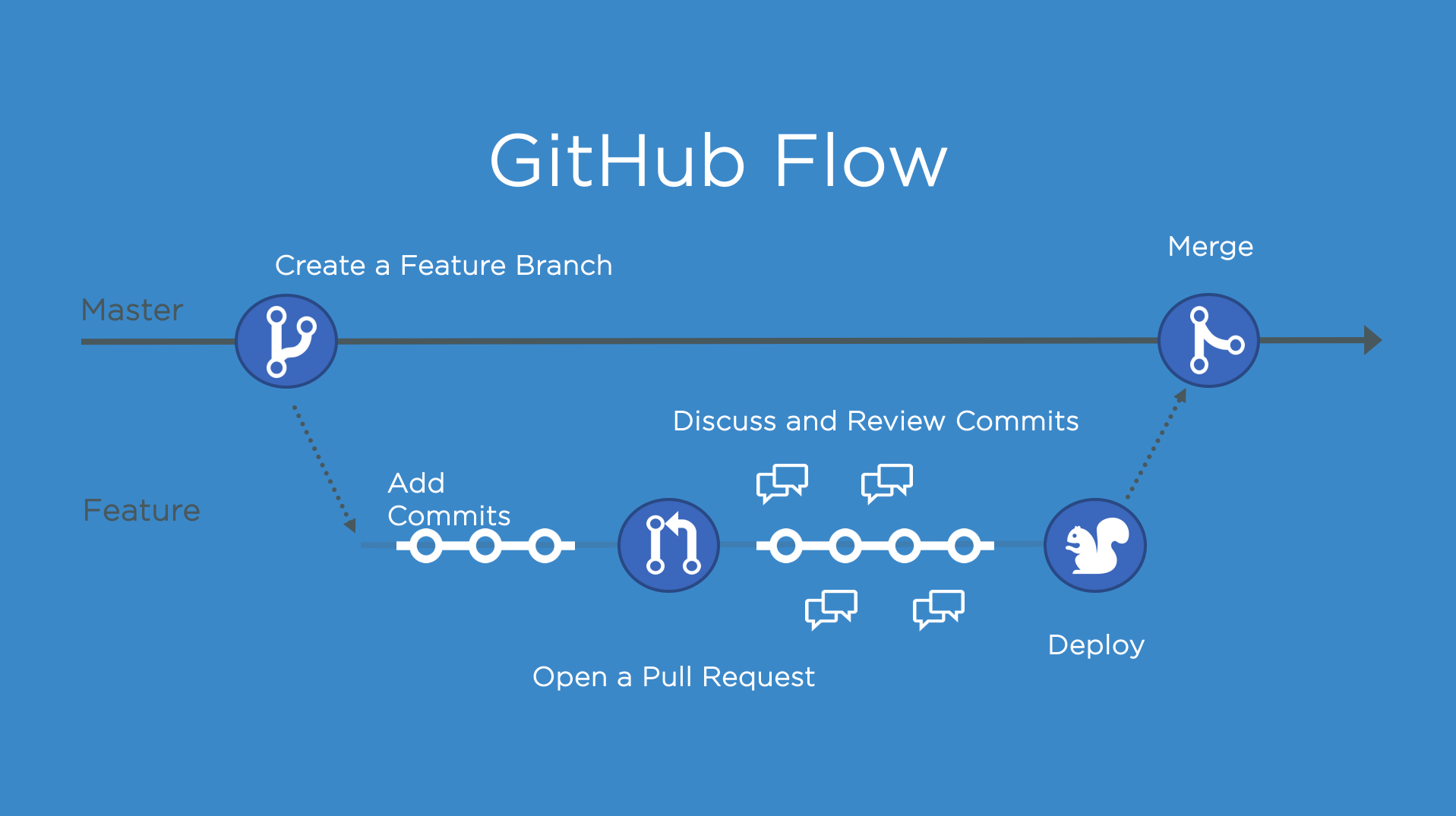
The GitHub Flow is a lightweight, branch-based workflow for projects with regular deployments.
Some projects may deploy more often, with continuous deployment. There might be a "release" every time there's a new commit on master.
But, some projects rely on a different structure for versions and releases.
Versions
Versions are different iterations of updated software like operating systems, apps, or dependencies. Common examples are "Windows 8.1" to "Windows 10", or "macOS High Sierra" to "macOS Mojave".
Developers update code, and then run tests on the project for bugs. During that time, the developers might set up certain securities to protect from new code or bugs. Then, the tested code is ready for production. Teams version the code and release it for installation by end users.
Step 1: Create a beta release
Create a release for this repository on GitHub.
GitHub Releases point to a specific commit. Releases can include release notes in Markdown, and attached binaries.
Before using a release based workflow for a larger release, let's create a tag and release.
⌨️ Activity: Create a release for the current codebase
- Go to the Releases page for this repository.
- You can click the link above, or click the Code tab at the top of your repository. Then, find the navigation bar below the repository description, and click 0 releases.
- Click Create a new release.
- In the field for Tag version, specify a number. In this case, use v0.9. Keep the Target as master.
- Give the release a title, like "First beta release". If you'd like, you could also give the release a short description.
- Select the checkbox next to This is a pre-release, since it is representing a beta version.
- Click Publish release.
Note: There are a lot of options here, like pre-releases, and attaching binaries. We'll talk more about these later. You might also see some yellow bars along the top in this repository for existing branches. We'll come to those later, too.
I'll respond below for your next step
Sometimes I respond too fast for the page to update! If you perform an expected action and don't see a response, wait a few seconds and refresh the page for your next steps.
- Lenguaje dominante
- JavaScript
- Estrellas
- 4
- Forks
- 0
- Métricas de merge de PR
- Sin PR fusionados en 30 d
Guía de contribución
No hay ninguna guía de contribución indexada para este repositorio
Primeros pasos
- Lee el issue completo y luego la guía de contribución del proyecto.
- Comenta en el issue que vas a ocuparte — evita que dos personas hagan lo mismo.
- Haz un fork del repositorio y trabaja en una rama.
- Abre un pull request que haga referencia al número del issue.
Issues similares
-
Dificultad 2/5 1-3 horas Aptitud para principiantes 82/100
-
area-deployment area-integrations triage:bot-seen
Dificultad 2/5 Medio día Aptitud para principiantes 86/100
-
Issue-Bug
Dificultad 2/5 1-3 horas Aptitud para principiantes 68/100
sugarlabs/musicblocks#8924 ·
-
Dificultad 1/5 Menos de una hora Aptitud para principiantes 90/100
ArduPilot/ardupilot_wiki#8088 ·
-
[BUG] createTool tools cannot be registered with Mastra when exactOptionalPropertyTypes is enabled Abiertocustomer-eng status: needs triage
Dificultad 2/5 1-3 horas Aptitud para principiantes 84/100