“Retry” button remains on the position is was triggered on and not on the image it was triggered on
Dieses Issue hat noch niemand übernommen.
Bewertung
- Schwierigkeit
- 3/5
- Geschätzter Aufwand
- 1-2 Tage
- Anfängerfreundlichkeit
- 42/100
- Issue-Typ
- Bug
- Klarheit
- Klar beschrieben
- Aktivitätsstatus
- Veraltet
- Tech-Stack
- javascript
- Bereich
- frontend
Rechercherichtung
Beginnen Sie damit, das Problem unter https://color.stage.mozaws.net/ über den Tab Custom background zu reproduzieren, einschließlich des fehlgeschlagenen Ersetzens und Löschens nach einer Neuanordnung. Überprüfen Sie, dass die Schaltfläche Retry der neuen Position des betroffenen Bildes und nicht der ursprünglichen Position folgt, und bestätigen Sie das Verhalten für jeden gemeldeten Fall.
Vom Indexierungsmodell aus dem Issue-Text verfasst.
Beschreibung
Preconditions:
- Go to about:config and change the “xpinstall.signatures.required” pref to “false”
- Access https://color.stage.mozaws.net/
- Click on the “Advanced colors” tab
- Click on “Firefox Color Extension” link from the right side panel
- On the newly opened page, click on “Unsigned add-on for color.stage.mozaws.net “
- Follow the instructions on the doorhangers and install the Firefox Color add-on
Steps to reproduce:
- Access https://color.stage.mozaws.net/
- Click on the “Custom background” tab
- Add 3 custom backgrounds
- Attempt to replace the 3rd image with an image larger than 1MB or an invalid file type.
- Notice that the replacing attempt fails and the “Replace” button turns into “Retry” button
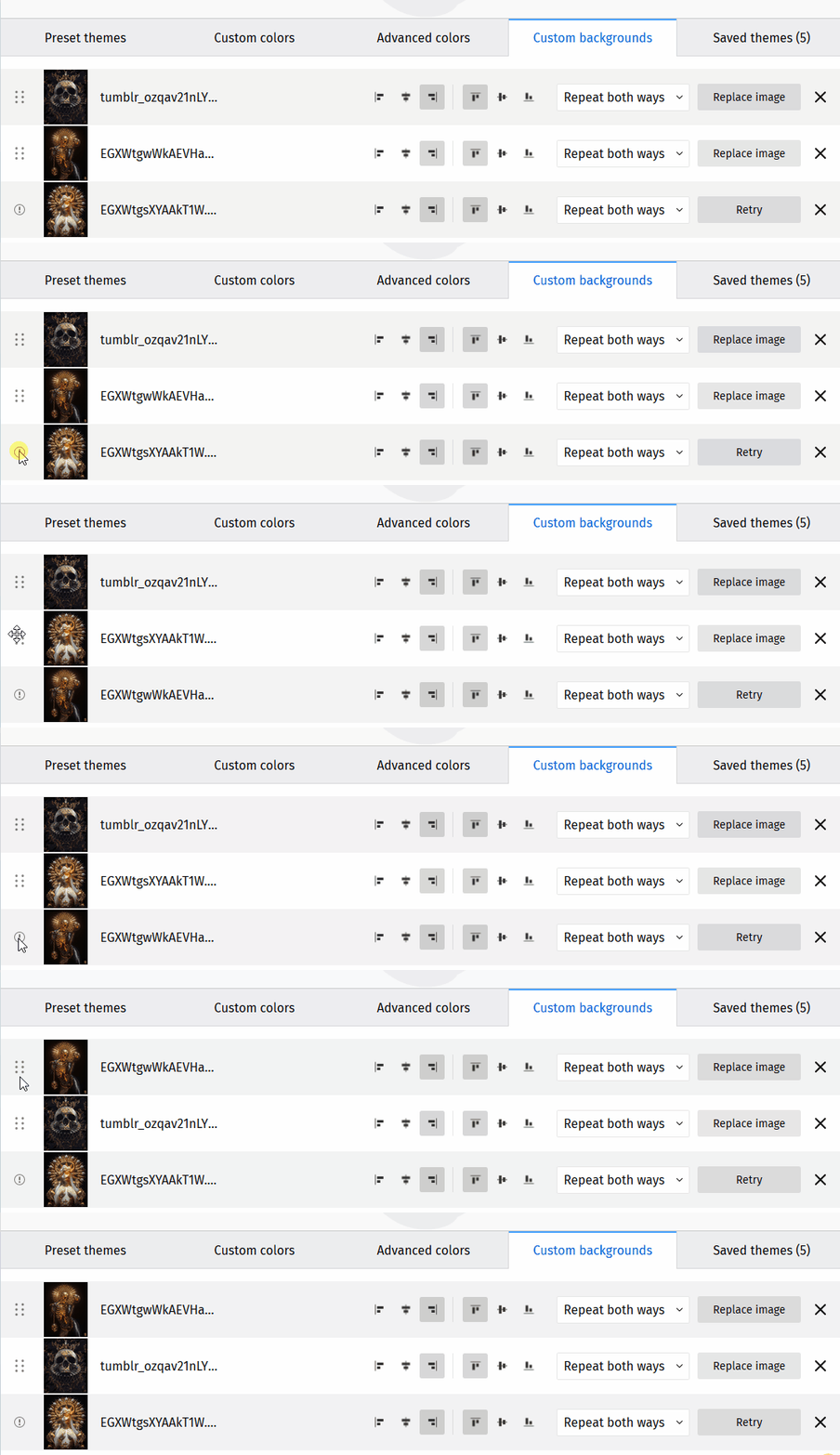
- Using the position marker on the left, change the position of the image with the “Retry” button to either the first or second position.
- Observe that the “Retry” button will keep the 3rd position and not move with the position of the image it was triggered on
Note: The same steps are true regardless of the position the “Retry” button was triggered on. Ex: Triggered on 2nd position and image moved to first position, etc.
Expected results:
The “Retry” button should move to the new position of the image it was triggered on and not keep the position it was originally triggered.
Actual results:
The “Retry” button will remain in the position it was triggered on and not move to the position of the image it was triggered on.
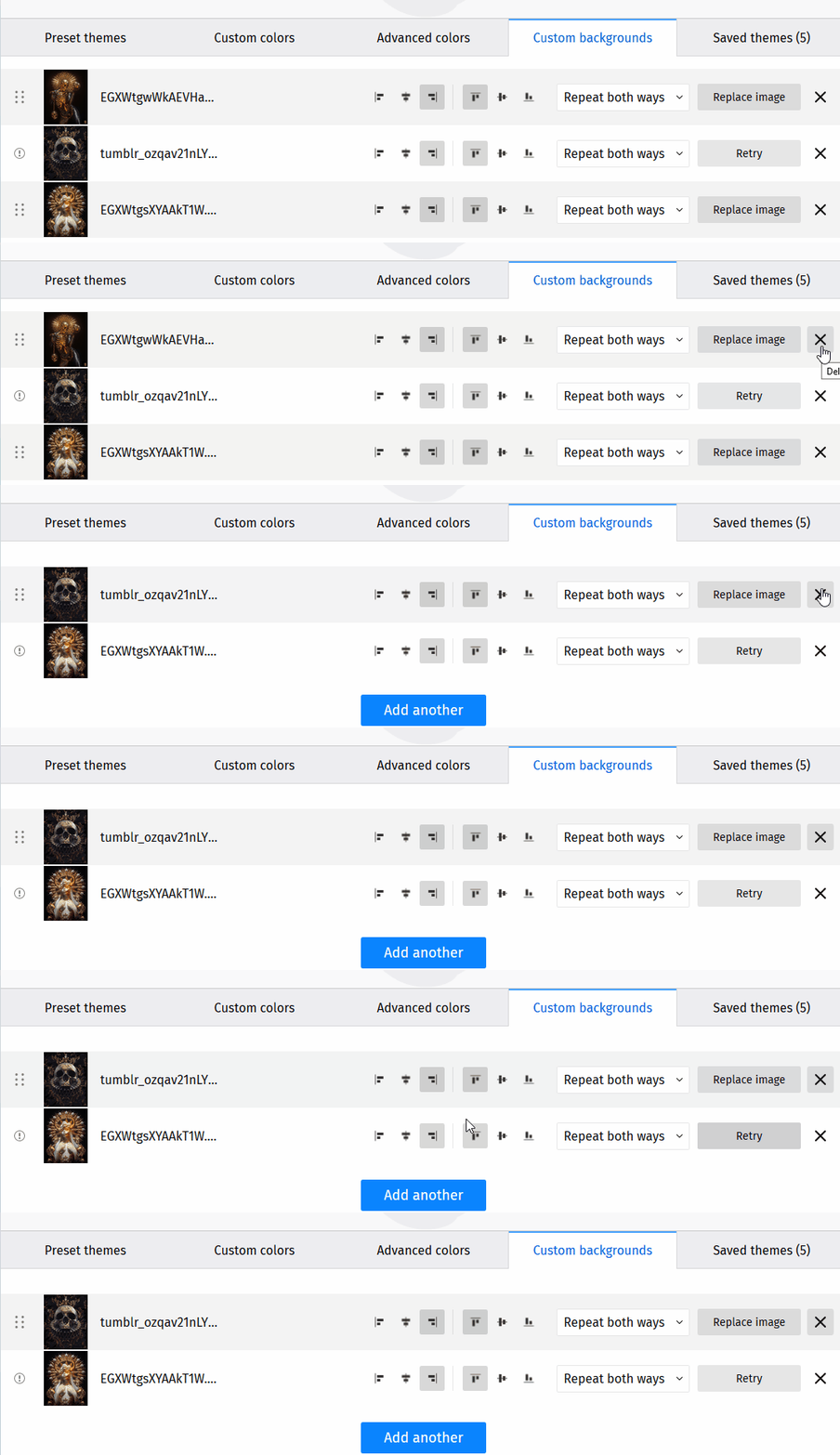
NOTE: The same issue occurs when deleting custom backgrounds. The “Retry” button remains relative to the position it was triggered on and not the image it was triggered on.
Affected versions:
- Nightly 80.0a1/20200702214948
- Beta Developer Edition 79.0b3/20200703001609
- Release Unbranded 78.0/20200625152958
Affected OSes:
- Windows 10 64-bit
- Ubuntu 16.04 LTS
- macOS Catalina 10.15
- Vorherrschende Sprache
- JavaScript
- Sterne
- 512
- Forks
- 102
- PR-Merge-Kennzahlen
- Keine gemergten PRs in 30 T.
Entwicklungsumgebung
- Kein Dockerfile und keine Docker-Compose-Datei
- Keine Pull-Request-Vorlage
- Beitragsleitfaden lesen
Erste Schritte
- Lesen Sie das ganze Issue und danach den Beitragsleitfaden des Projekts.
- Schreiben Sie ins Issue, dass Sie es übernehmen — das erspart doppelte Arbeit.
- Forken Sie das Repository und arbeiten Sie in einem Branch.
- Öffnen Sie einen Pull Request, der die Issue-Nummer nennt.
Mehr aus mozilla/FirefoxColor
-
Schwierigkeit 2/5 1-3 Stunden Anfängerfreundlichkeit 68/100
mozilla/FirefoxColor#1081 · 1 Kommentar ·
-
Schwierigkeit 4/5 3-5 Tage Anfängerfreundlichkeit 35/100
mozilla/FirefoxColor#1088 ·
-
does not see browserOffen
Schwierigkeit 3/5 1-2 Tage Anfängerfreundlichkeit 35/100
mozilla/FirefoxColor#1087 · 1 Kommentar ·
-
Schwierigkeit 5/5 Über eine Woche Anfängerfreundlichkeit 35/100
mozilla/FirefoxColor#1085 · 1 Kommentar ·
-
Schwierigkeit 3/5 1-2 Tage Anfängerfreundlichkeit 68/100
mozilla/FirefoxColor#1084 · 1 Kommentar ·
Alle Issues in mozilla/FirefoxColor
Ähnliche Issues
-
Schwierigkeit 2/5 1-3 Stunden Anfängerfreundlichkeit 72/100
Maintainer antworten meist innerhalb von 1 Tag
-
bug
Schwierigkeit 2/5 1-3 Stunden Anfängerfreundlichkeit 72/100
jellyfin/jellyfin-desktop#1290 ·
Maintainer antworten meist innerhalb von 1 Tag
-
Schwierigkeit 2/5 1-3 Stunden Anfängerfreundlichkeit 72/100
zilliztech/memsearch#832 ·
Maintainer antworten meist innerhalb von 1 Tag
-
Schwierigkeit 2/5 1-3 Stunden Anfängerfreundlichkeit 65/100
sindresorhus/serialize-error#120 ·
-
Schwierigkeit 2/5 1-3 Stunden Anfängerfreundlichkeit 65/100
sindresorhus/slugify#83 ·