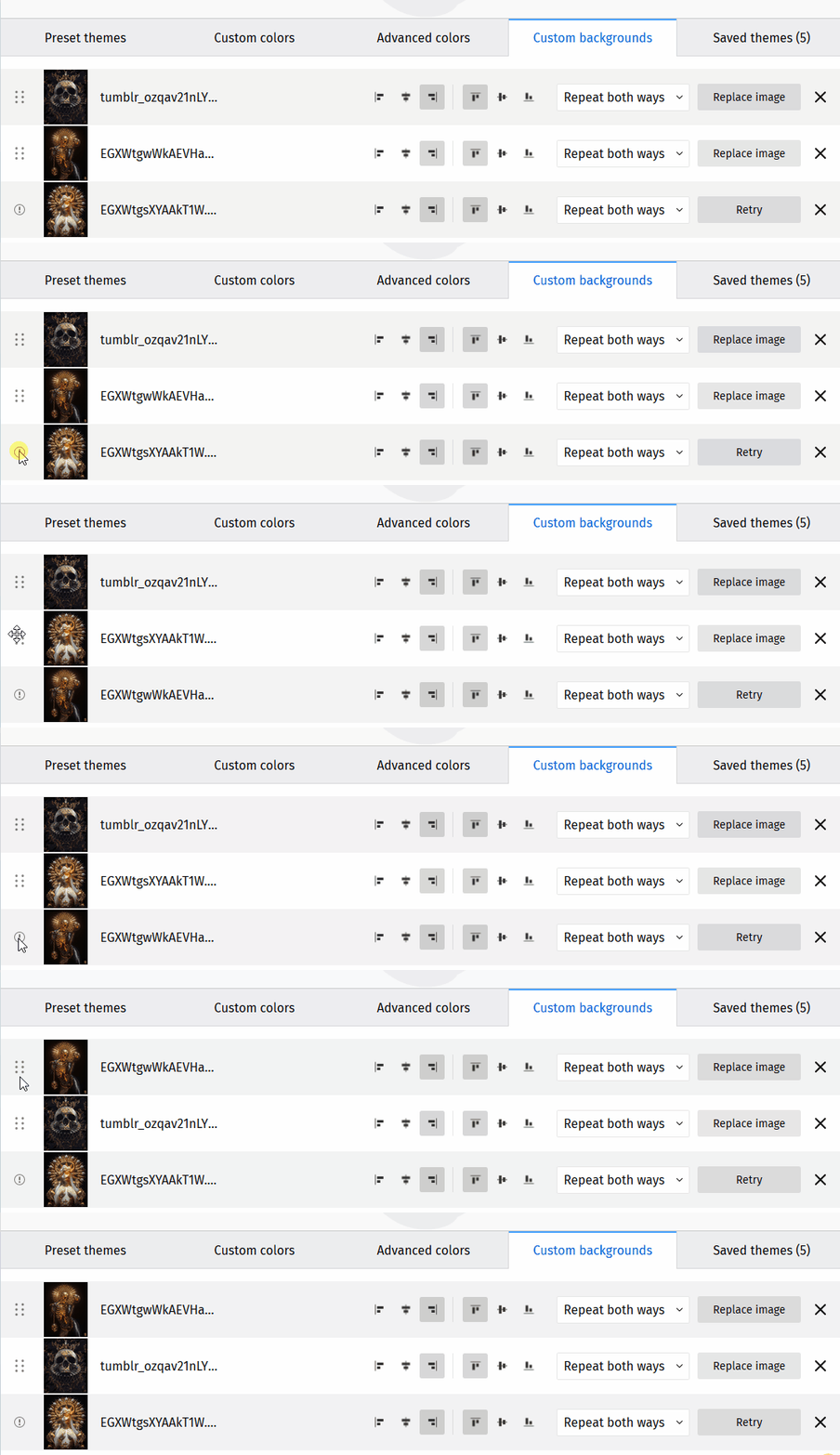
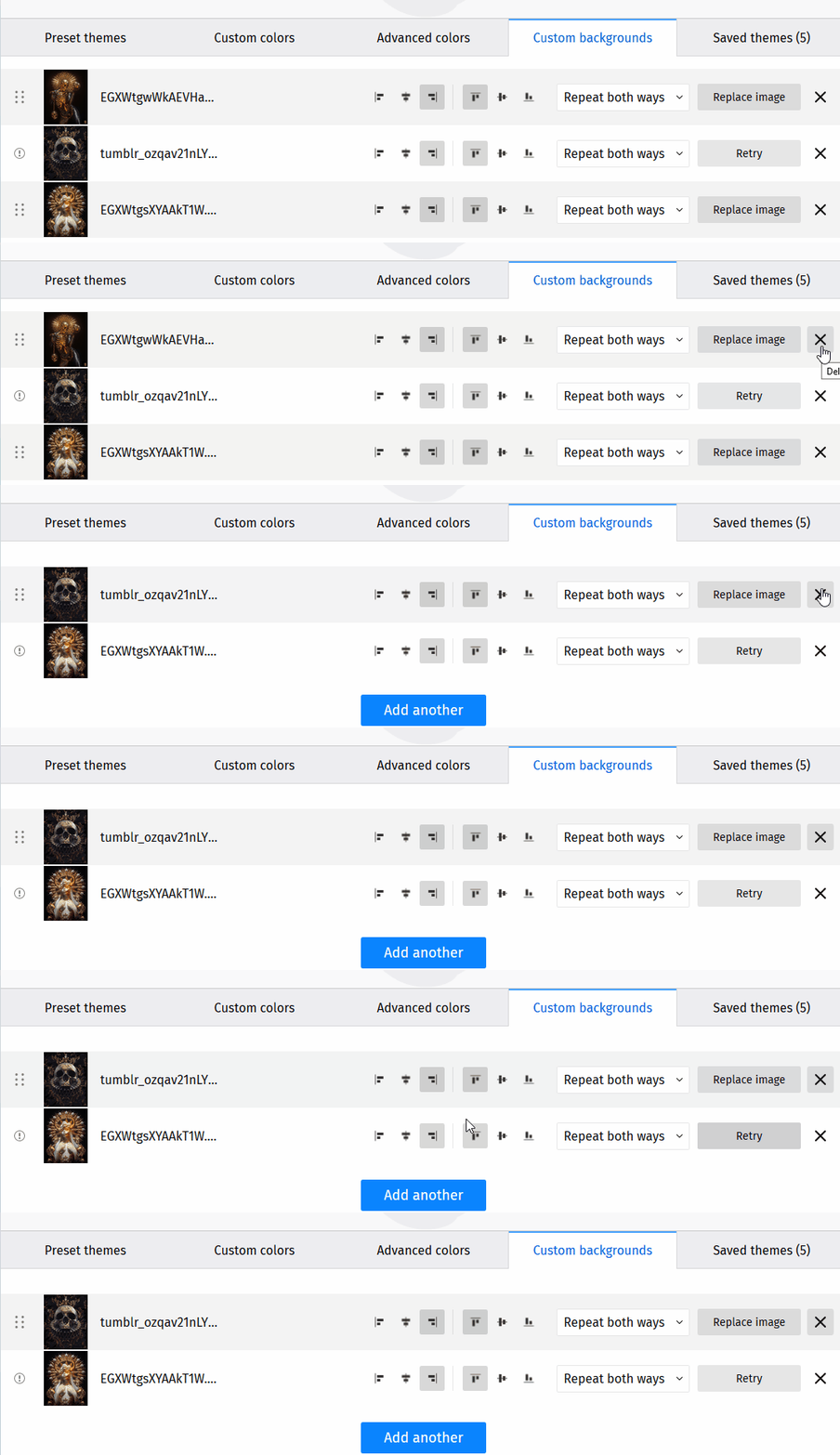
“Retry” button remains on the position is was triggered on and not on the image it was triggered on
Nadie ha tomado este issue todavía.
Evaluación
- Dificultad
- 3/5
- Tiempo estimado
- 1-2 días
- Aptitud para principiantes
- 42/100
- Tipo de issue
- Error
- Claridad
- Bien especificado
- Estado de actividad
- Estancado
- Stack tecnológico
- javascript
- Área
- frontend
Línea de trabajo
Empieza reproduciendo el problema en https://color.stage.mozaws.net/ desde la pestaña Custom background, incluidos los fallos al reemplazar y eliminar después de reordenar. Verifica que el botón Retry siga la nueva posición de la imagen afectada en lugar de la posición original, y confirma el comportamiento para cada caso informado.
Escrito por el modelo de indexación a partir del texto del issue.
Descripción
Preconditions:
- Go to about:config and change the “xpinstall.signatures.required” pref to “false”
- Access https://color.stage.mozaws.net/
- Click on the “Advanced colors” tab
- Click on “Firefox Color Extension” link from the right side panel
- On the newly opened page, click on “Unsigned add-on for color.stage.mozaws.net “
- Follow the instructions on the doorhangers and install the Firefox Color add-on
Steps to reproduce:
- Access https://color.stage.mozaws.net/
- Click on the “Custom background” tab
- Add 3 custom backgrounds
- Attempt to replace the 3rd image with an image larger than 1MB or an invalid file type.
- Notice that the replacing attempt fails and the “Replace” button turns into “Retry” button
- Using the position marker on the left, change the position of the image with the “Retry” button to either the first or second position.
- Observe that the “Retry” button will keep the 3rd position and not move with the position of the image it was triggered on
Note: The same steps are true regardless of the position the “Retry” button was triggered on. Ex: Triggered on 2nd position and image moved to first position, etc.
Expected results:
The “Retry” button should move to the new position of the image it was triggered on and not keep the position it was originally triggered.
Actual results:
The “Retry” button will remain in the position it was triggered on and not move to the position of the image it was triggered on.
NOTE: The same issue occurs when deleting custom backgrounds. The “Retry” button remains relative to the position it was triggered on and not the image it was triggered on.
Affected versions:
- Nightly 80.0a1/20200702214948
- Beta Developer Edition 79.0b3/20200703001609
- Release Unbranded 78.0/20200625152958
Affected OSes:
- Windows 10 64-bit
- Ubuntu 16.04 LTS
- macOS Catalina 10.15
- Lenguaje dominante
- JavaScript
- Estrellas
- 506
- Forks
- 100
- Métricas de merge de PR
- Sin PR fusionados en 30 d
Preparar el entorno
Primeros pasos
- Lee el issue completo y luego la guía de contribución del proyecto.
- Comenta en el issue que vas a ocuparte — evita que dos personas hagan lo mismo.
- Haz un fork del repositorio y trabaja en una rama.
- Abre un pull request que haga referencia al número del issue.
Más de mozilla/FirefoxColor
-
Dificultad 2/5 1-3 horas Aptitud para principiantes 68/100
mozilla/FirefoxColor#1081 · 1 comentario ·
-
does not see browserAbierto
Dificultad 3/5 1-2 días Aptitud para principiantes 35/100
mozilla/FirefoxColor#1087 · 1 comentario ·
-
Dificultad 5/5 Más de una semana Aptitud para principiantes 35/100
mozilla/FirefoxColor#1085 · 1 comentario ·
-
Dificultad 3/5 1-2 días Aptitud para principiantes 68/100
mozilla/FirefoxColor#1084 · 1 comentario ·
-
Dificultad 5/5 Más de una semana Aptitud para principiantes 35/100
mozilla/FirefoxColor#1083 · 1 reacción ·
Todos los issues de mozilla/FirefoxColor
Issues similares
-
Complexity: Small P-Feature: Projects page ready for merge team role: back end/devOps role: front end size: 0.25pt
Dificultad 1/5 1-3 horas Aptitud para principiantes 88/100
Los mantenedores suelen responder en 1 día
-
Dificultad 1/5 Menos de una hora Aptitud para principiantes 67/100
bellingcat/toolkit#905 ·
-
self-care self-care:docs-build-time-investigator
Dificultad 2/5 Medio día Aptitud para principiantes 76/100
githubnext/gh-aw-cao#14191 ·
Los mantenedores suelen responder en 1 día
-
effort:low impact:medium RAG status: auto-triaged
Dificultad 2/5 1-3 horas Aptitud para principiantes 84/100
mastra-ai/mastra#25229 · 2 comentarios ·
Los mantenedores suelen responder en 1 día
-
Dificultad 2/5 1-3 horas Aptitud para principiantes 88/100
sugarlabs/musicblocks#8984 ·
Los mantenedores suelen responder en 1 día