[Windows]: League of Legends (Tencent China, launched via WeGame)
Dieses Issue hat noch niemand übernommen.
Bewertung
- Schwierigkeit
- 4/5
- Geschätzter Aufwand
- 3-5 Tage
- Anfängerfreundlichkeit
- 22/100
- Issue-Typ
- Bug
- Klarheit
- Größtenteils klar
- Aktivitätsstatus
- Aktiv
- Bereich
- networking
Rechercherichtung
No source files are named; this is a compatibility report against AdGuard for Windows. Start by reading linked issue #6308 and reproducing the launch with SockFilter versus WFP, checking whether LeagueClient.exe hangs before LeagueClientUx.exe starts. Done looks like a maintainer confirming whether the referenced fix covers the Tencent WeGame client and which release includes it.
Vom Indexierungsmodell aus dem Issue-Text verfasst.
Beschreibung
Application Name
League of Legends (Tencent China, launched via WeGame)
Application Executable Name
LeagueClient.exe
Troubleshooting Result
- Selecting a different network driver (Suggests low-level network conflict)
Suggested Configuration List
I am not sure, please investigate
Description of the Problem
- App won’t start or keeps crashing
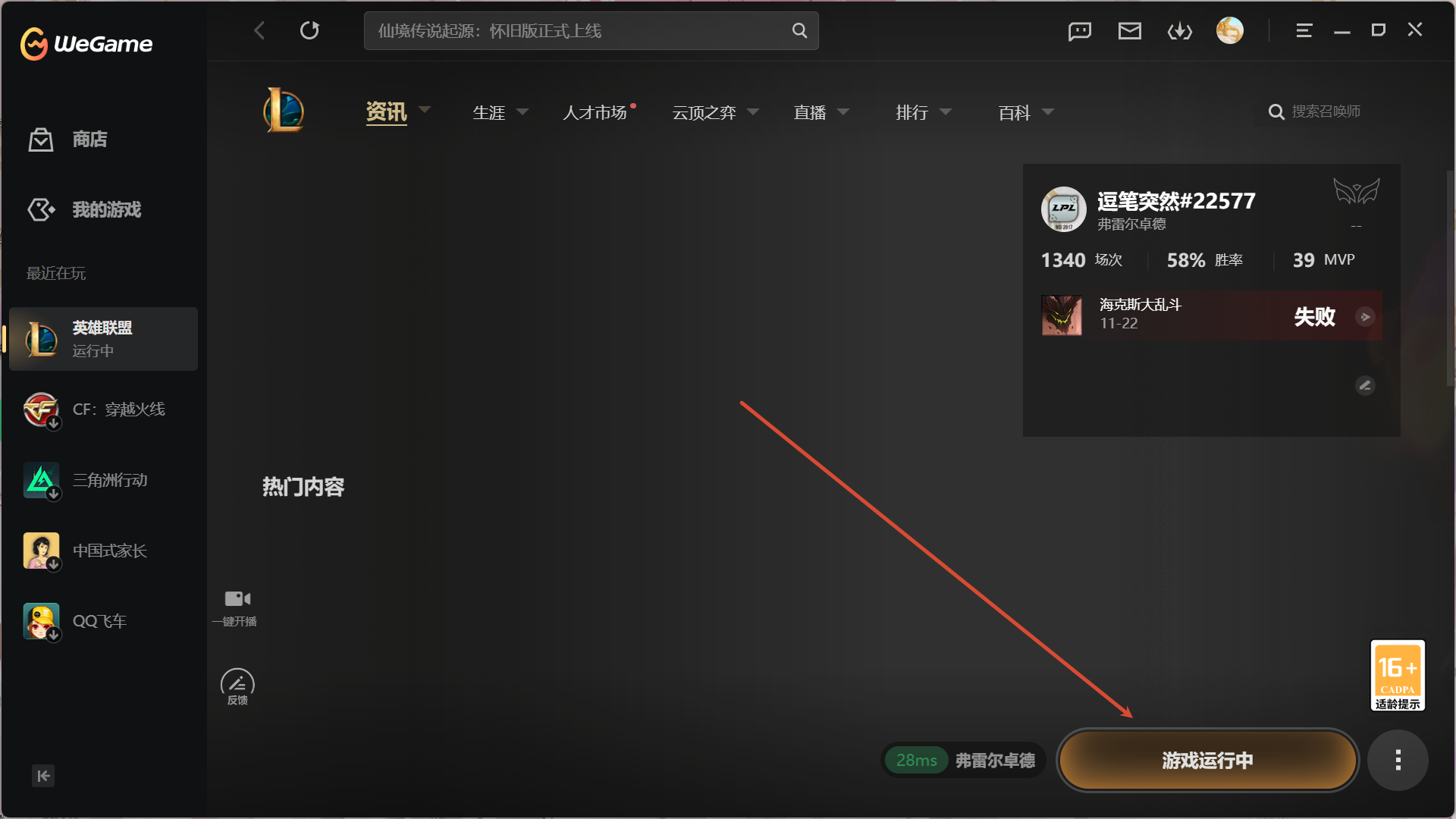
What changed: 2026 年 11 月 22 日,国服《英雄联盟》客户端更新到 16.23.840.6595 后,我在 WeGame 点击「开始游戏」。WeGame 显示「正在运行中」,但游戏大厅始终没有出现。当时 AdGuard for Windows 8.0.4 已开启防护,使用 SockFilter 驱动 8.0.91.0。
League of Legends (Tencent China) hangs on startup with SockFilter
- Windows 11 26H2, build 26300.10075
- AdGuard for Windows 8.0.4 (build 8.0.5595)
- SockFilter driver 8.0.91.0
- League of Legends client 16.23.840.6595, launched via WeGame
Steps to reproduce
- Enable AdGuard protection and select the SockFilter network driver.
- Open WeGame and click “Start Game” for League of Legends.
- WeGame shows the game as running, but no client window appears.
LeagueClient.exestays running without startingLeagueClientUx.exeor writing a new League client log.Troubleshooting results
- Turning off “Route traffic through AdGuard” for
LeagueClient.exedid not resolve the hang.- Adding the exact path of
LeagueClient.exeto the advanced filtering exclusions also did not resolve it. The AdGuard service log confirmed that the configuration reloaded before the next launch.- Pausing AdGuard protection allowed the client to launch.
- Switching from SockFilter to WFP with AdGuard protection enabled allowed the client to reach the lobby. The new client log reached
UX_PROCESS_BROWSER_READY.This may be related to https://github.com/AdguardTeam/AdguardForWindows/issues/6308, which mentions the same SockFilter version. Could you confirm whether the fix covers the Tencent WeGame client and which release includes it?
Final Checks
- I have confirmed that disabling the Tracking Protection or specific filters did NOT fix the issue.
Screenshots
Screenshot 1
System configuration
| Information | Value |
|---|---|
| AdGuard product: | AdGuard for Windows v8.0.4 |
| System version: | Microsoft Windows NT 10.0.26300.0 |
| Download link: | https://lol.qq.com/download.shtml |
| Which driver was enabled: | SockFilter (Experimental) |
| Which driver helped: | WFP |
| Username: | @ToddModica |
| License type: | paid |
| AdGuard driver: | SOCKFILTER |
| Filters: | Ad blocking: AdGuard Base Privacy: AdGuard Tracking Protection, AdGuard URL Tracking Social widgets: AdGuard Social Media Annoyances: AdGuard Cookie Notices, AdGuard Popups, AdGuard Mobile App Banners, AdGuard Other Annoyances, AdGuard Widgets Language-specific: AdGuard Russian, AdGuard Japanese, AdGuard Chinese, Dandelion Sprout's Nordic Filters |
| Custom filters: | User rules (url: none), GOODBYEADS (url: https://raw.githubusercontent.com/8680/GOODBYEADS/master/data/rules/adblock.txt), CJX's Annoyances List (url: https://filters.adtidy.org/extension/ublock/filters/220.txt), 乘风 广告过滤规则 (url: https://cdn.jsdelivr.net/gh/xinggsf/Adblock-Plus-Rule@master/rule.txt) |
| Tracking protection: | General settings: Block trackers, Strip URLs from tracking parameters, Hide your search queries, Send Do-Not-Track header Windows tracking: Disable Windows Telemetry, Turn off Advertising ID, Disable Windows Recall Miscellaneous: Remove X-Client-Data header from HTTP requests |
| DNS filtering: | disabled |
| Browsing Security: | enabled |
| Browsing Security statistics: | disabled |
| Userscripts: | AdGuard Extra (url: https://userscripts.adtidy.org/release/adguard-extra/1.0/adguard-extra.user.js)<br>AdGuard Popup Blocker (url: https://userscripts.adtidy.org/release/popup-blocker/2.5/popupblocker.user.js) |
| Userstyles: | disabled |
Issue configuration
- Vorherrschende Sprache
- Keine Sprachdaten
- Sterne
- 10
- Forks
- 4
- Ø Merge
- 1 Std. 13 Min.
- Gemergte PRs (30 T.)
- 7
Entwicklungsumgebung
Dieses Projekt bietet weder Dev-Container noch Dockerfile noch Beitragsleitfaden – die Einrichtung liegt bei Ihnen. Beginnen Sie mit der README; die allgemeinen Schritte stehen in unserem Leitfaden für den ersten Beitrag.
Erste Schritte
- Lesen Sie das ganze Issue und danach den Beitragsleitfaden des Projekts.
- Schreiben Sie ins Issue, dass Sie es übernehmen — das erspart doppelte Arbeit.
- Forken Sie das Repository und arbeiten Sie in einem Branch.
- Öffnen Sie einen Pull Request, der die Issue-Nummer nennt.
Mehr aus AdguardTeam/CompatibilityIssues
-
[Windows]: MAXOffenCompatibility Priority: P4 Windows
Schwierigkeit 3/5 Ein halber Tag Anfängerfreundlichkeit 15/100
-
Compatibility Priority: P4 Windows
Schwierigkeit 2/5 1-3 Stunden Anfängerfreundlichkeit 45/100
-
[Windows]: AdguardOffenCompatibility Priority: P4 Windows
Schwierigkeit 4/5 3-5 Tage Anfängerfreundlichkeit 28/100
-
[Windows]: DiscordOffenCompatibility Priority: P4 Windows
Schwierigkeit 4/5 3-5 Tage Anfängerfreundlichkeit 45/100
-
Compatibility Priority: P4 Windows
Schwierigkeit 4/5 3-5 Tage Anfängerfreundlichkeit 30/100
Alle Issues in AdguardTeam/CompatibilityIssues
Ähnliche Issues
-
Schwierigkeit 2/5 1-3 Stunden Anfängerfreundlichkeit 78/100
smartcontractkit/external-adapters-js#5651 ·
Maintainer antworten meist innerhalb von 1 Tag
-
needs-info
Schwierigkeit 2/5 1-3 Stunden Anfängerfreundlichkeit 78/100
-
Schwierigkeit 2/5 1-3 Stunden Anfängerfreundlichkeit 82/100
Maintainer antworten meist innerhalb von 1 Tag
-
good first issue help wanted
Schwierigkeit 2/5 1-3 Stunden Anfängerfreundlichkeit 85/100
vishwagw/Sky-Sim-drone-simulator-3.0#46 ·
Maintainer antworten meist innerhalb von 1 Tag
-
Schwierigkeit 2/5 1-3 Stunden Anfängerfreundlichkeit 76/100
NuSkooler/enigma-bbs#1213 ·
Maintainer antworten meist innerhalb von 1 Tag