[Windows]: League of Legends (Tencent China, launched via WeGame)
还没有人认领这个 Issue。
评估
- 难度
- 4/5
- 预计耗时
- 3-5 天
- 新手友好度
- 22/100
- Issue 类型
- 缺陷
- 描述清晰度
- 基本清楚
- 活跃度
- 活跃
- 领域
- networking
调研方向
No source files are named; this is a compatibility report against AdGuard for Windows. Start by reading linked issue #6308 and reproducing the launch with SockFilter versus WFP, checking whether LeagueClient.exe hangs before LeagueClientUx.exe starts. Done looks like a maintainer confirming whether the referenced fix covers the Tencent WeGame client and which release includes it.
由索引模型根据 Issue 内容生成。
描述
Application Name
League of Legends (Tencent China, launched via WeGame)
Application Executable Name
LeagueClient.exe
Troubleshooting Result
- Selecting a different network driver (Suggests low-level network conflict)
Suggested Configuration List
I am not sure, please investigate
Description of the Problem
- App won’t start or keeps crashing
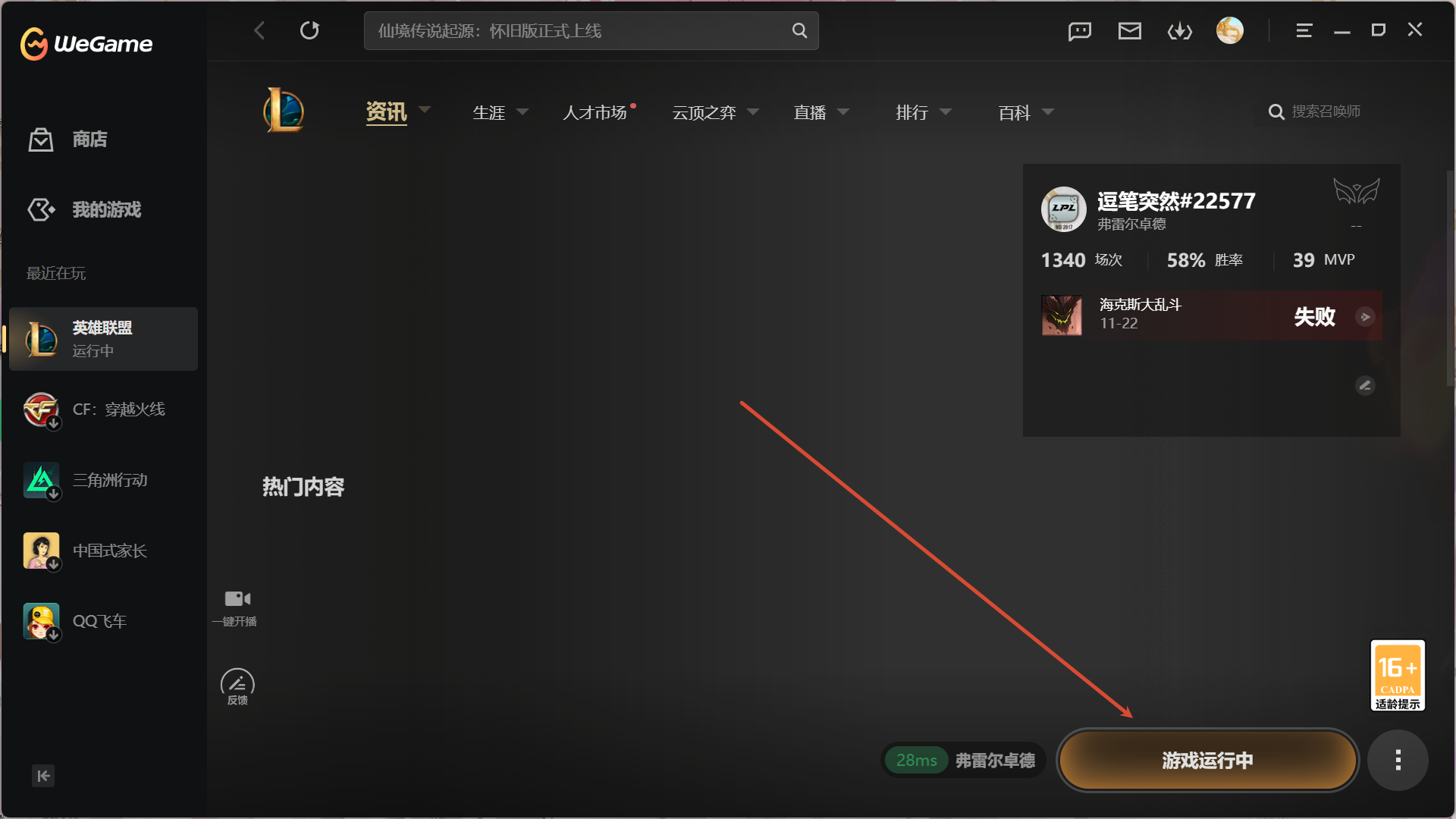
What changed: 2026 年 11 月 22 日,国服《英雄联盟》客户端更新到 16.23.840.6595 后,我在 WeGame 点击「开始游戏」。WeGame 显示「正在运行中」,但游戏大厅始终没有出现。当时 AdGuard for Windows 8.0.4 已开启防护,使用 SockFilter 驱动 8.0.91.0。
League of Legends (Tencent China) hangs on startup with SockFilter
- Windows 11 26H2, build 26300.10075
- AdGuard for Windows 8.0.4 (build 8.0.5595)
- SockFilter driver 8.0.91.0
- League of Legends client 16.23.840.6595, launched via WeGame
Steps to reproduce
- Enable AdGuard protection and select the SockFilter network driver.
- Open WeGame and click “Start Game” for League of Legends.
- WeGame shows the game as running, but no client window appears.
LeagueClient.exestays running without startingLeagueClientUx.exeor writing a new League client log.Troubleshooting results
- Turning off “Route traffic through AdGuard” for
LeagueClient.exedid not resolve the hang.- Adding the exact path of
LeagueClient.exeto the advanced filtering exclusions also did not resolve it. The AdGuard service log confirmed that the configuration reloaded before the next launch.- Pausing AdGuard protection allowed the client to launch.
- Switching from SockFilter to WFP with AdGuard protection enabled allowed the client to reach the lobby. The new client log reached
UX_PROCESS_BROWSER_READY.This may be related to https://github.com/AdguardTeam/AdguardForWindows/issues/6308, which mentions the same SockFilter version. Could you confirm whether the fix covers the Tencent WeGame client and which release includes it?
Final Checks
- I have confirmed that disabling the Tracking Protection or specific filters did NOT fix the issue.
Screenshots
Screenshot 1
System configuration
| Information | Value |
|---|---|
| AdGuard product: | AdGuard for Windows v8.0.4 |
| System version: | Microsoft Windows NT 10.0.26300.0 |
| Download link: | https://lol.qq.com/download.shtml |
| Which driver was enabled: | SockFilter (Experimental) |
| Which driver helped: | WFP |
| Username: | @ToddModica |
| License type: | paid |
| AdGuard driver: | SOCKFILTER |
| Filters: | Ad blocking: AdGuard Base Privacy: AdGuard Tracking Protection, AdGuard URL Tracking Social widgets: AdGuard Social Media Annoyances: AdGuard Cookie Notices, AdGuard Popups, AdGuard Mobile App Banners, AdGuard Other Annoyances, AdGuard Widgets Language-specific: AdGuard Russian, AdGuard Japanese, AdGuard Chinese, Dandelion Sprout's Nordic Filters |
| Custom filters: | User rules (url: none), GOODBYEADS (url: https://raw.githubusercontent.com/8680/GOODBYEADS/master/data/rules/adblock.txt), CJX's Annoyances List (url: https://filters.adtidy.org/extension/ublock/filters/220.txt), 乘风 广告过滤规则 (url: https://cdn.jsdelivr.net/gh/xinggsf/Adblock-Plus-Rule@master/rule.txt) |
| Tracking protection: | General settings: Block trackers, Strip URLs from tracking parameters, Hide your search queries, Send Do-Not-Track header Windows tracking: Disable Windows Telemetry, Turn off Advertising ID, Disable Windows Recall Miscellaneous: Remove X-Client-Data header from HTTP requests |
| DNS filtering: | disabled |
| Browsing Security: | enabled |
| Browsing Security statistics: | disabled |
| Userscripts: | AdGuard Extra (url: https://userscripts.adtidy.org/release/adguard-extra/1.0/adguard-extra.user.js)<br>AdGuard Popup Blocker (url: https://userscripts.adtidy.org/release/popup-blocker/2.5/popupblocker.user.js) |
| Userstyles: | disabled |
Issue configuration
- 主要语言
- 没有语言数据
- 星标
- 10
- 派生
- 4
- 平均合并
- 1 小时 20 分钟
- 30 天内合并 PR
- 6
环境准备
这个项目没有提供开发容器、Dockerfile 或贡献指南,环境需要你自己搭建:先看它的 README,通用步骤见我们的新手贡献指南。
从这里开始
- 先读完整个 Issue,再读项目的贡献指南。
- 在 Issue 下留言说明你要接手 —— 这能避免两个人做同样的事。
- Fork 仓库,在一个分支上完成修改。
- 提交 Pull Request,并在描述里引用这个 Issue 编号。
AdguardTeam/CompatibilityIssues 的其他 Issue
-
Compatibility Priority: P4 Windows
难度 2/5 1-3 小时 新手友好度 45/100
-
Compatibility Priority: P4 Windows
难度 4/5 3-5 天 新手友好度 28/100
-
Compatibility Priority: P4 Windows
难度 4/5 3-5 天 新手友好度 45/100
-
Compatibility Priority: P4 Windows
难度 4/5 3-5 天 新手友好度 30/100
-
Compatibility Priority: P4 Windows
难度 4/5 3-5 天 新手友好度 20/100
查看 AdguardTeam/CompatibilityIssues 的全部 Issue
相似的 Issue
-
难度 2/5 1-3 小时 新手友好度 78/100
smartcontractkit/external-adapters-js#5651 ·
维护者通常 1 天内回复
-
needs-info
难度 2/5 1-3 小时 新手友好度 78/100
-
难度 2/5 1-3 小时 新手友好度 82/100
维护者通常 1 天内回复
-
good first issue help wanted
难度 2/5 1-3 小时 新手友好度 85/100
vishwagw/Sky-Sim-drone-simulator-3.0#46 ·
维护者通常 1 天内回复
-
难度 2/5 1-3 小时 新手友好度 76/100
NuSkooler/enigma-bbs#1213 ·
维护者通常 1 天内回复